Freedom251 › 3D Avatar Software

Genies Avatar SDK
What Genies Avatar SDK is
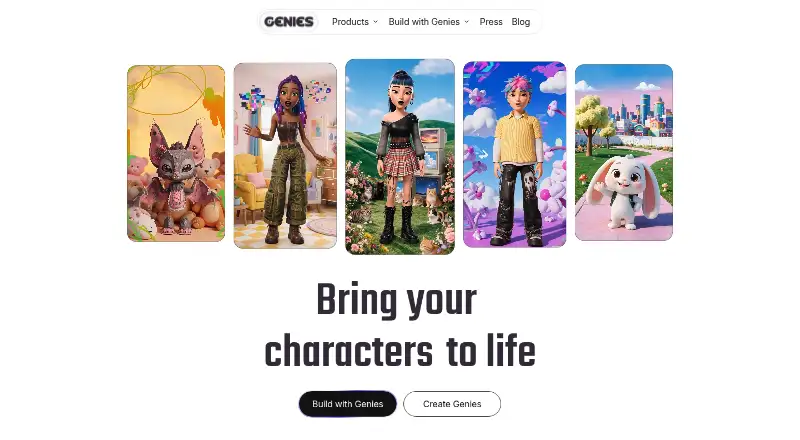
Genies Avatar SDK lets developers use Genies avatar technology in standalone Unity projects. Avatars can be loaded from a Genies account, a local definition, or a default definition. The Avatar Editor framework and customization APIs let developers change and save avatar definitions, including wearables, body size, hair color, colors, and facial or body features. Users can browse inventory and save avatars to a profile. Progressive loading shows a silhouette first, then lower-resolution assets, and finally a full-fidelity avatar. Developers can submit custom wearables through the Developer Portal UGC pipeline, and those items can be gifted to users. The SDK supports Unity 2022.3.62f2 or later, including Unity 6, and Genies documents Cinemachine 3 support. It is free for developers and end users, including commercial projects. Developers and users currently need Genies accounts. Genies may review games for security and performance, and games require approval before they can be made available. The EULA also prohibits using the SDK to train or fine-tune AI or machine-learning models.
Who it suits
Genies Avatar SDK suits Unity developers who want avatar loading, editing, and wearable customization in standalone projects. It can be used in commercial projects at no charge, but account requirements and game approval apply.
What it does well
- Free for developers and end users, including commercial projects
- Load avatars from accounts or local definitions
- Customization APIs cover wearables and avatar features
- Supports Unity 2022.3.62f2 or later, including Unity 6
- Custom wearables can be gifted to users
What to know first
- Developers and users currently need Genies accounts
- Games require approval before becoming available
- SDK cannot be used to train or fine-tune AI models
Limits
Developers and users currently need Genies accounts, and games can only be made available after approval. The EULA prohibits training or fine-tuning AI or machine-learning models with the SDK and does not obligate Genies to provide SDK or game maintenance or support.
Plans
| Plan | Billed and limits | Price |
|---|---|---|
| Genies Avatar SDK | Free for developers and end users; commercial projects may use it for free. · Unity SDK | Unity 2022.3.62f2 or later, including Unity 6 | iOS, Android, Windows Standalone | Free |
As genies.com lists them, read 2 Oct 2026. The maker's own page has the final word.
Getting started
- Visit https://genies.com/ and access the Genies Avatar SDK.
- Use Unity 2022.3.62f2 or later, including Unity 6.
- Develop a standalone project for iOS, Android, or Windows.
- Use Genies accounts, local definitions, or default definitions to load avatars.
- Submit any custom wearables through the Developer Portal UGC pipeline.
- Obtain approval before making a game available.
Genies Avatar SDK brings account-linked avatars and customization into standalone Unity projects. It suits developers building games around player identities and wearable items; its strongest fit is a project that can accept Genies accounts and game approval as conditions of release.
Overview
The SDK supports loading an avatar from a user's Genies account, a local definition, or a default definition. That range gives developers a route for both account-based characters and defined starting avatars, while the account requirement means it is not a fit for projects that need account-free use.
Developers can edit and save avatar definitions, including wearables, body size, and hair color. The SDK is free for developers and end users, and commercial projects may use it for free. The trade-off is operational: games may be reviewed for security and performance, and cannot be made available until approved.
Key features
Avatar editing and customization
The Avatar Editor framework and customization APIs cover equipping wearables, changing colors, adjusting facial and body features, browsing inventory, and saving avatars to a user profile. This makes the SDK more useful than a simple avatar display layer when a game needs players to customize and retain a character. Custom wearables can be submitted through the Developer Portal UGC pipeline and gifted to users, which is relevant for games built around wearable items.
Progressive loading
Progressive loading shows a silhouette first, then lower-resolution assets, and finally a full-fidelity avatar. That staged presentation can give a game something to show while the complete character loads, although the final result depends on the full-fidelity assets arriving.
Unity compatibility and conditions
The SDK supports Unity 2022.3.62f2 or later, including Unity 6, and Genies documents Cinemachine 3 support. Developers and users currently need Genies accounts. The Developer EULA also prohibits using the SDK to train or fine-tune AI or machine-learning models. Genies may review games for security and performance, and approval is required before they can be made available. While Genies directs developers to its Support team, the EULA disclaims any obligation to provide SDK or game maintenance or support.
Pricing
Genies Avatar SDK — free. The free plan is for developers and end users, and commercial projects may use it for free. It includes the Unity SDK for Unity 2022.3.62f2 or later, including Unity 6, for iOS, Android, and Windows Standalone. There is no free trial because the plan is free. Its meaningful costs are not subscription fees but the account, approval, and usage conditions: projects must clear review before release, and the SDK cannot be used to train or fine-tune AI or machine-learning models.
Platforms
The SDK targets Unity projects for iOS, Android, and Windows Standalone. Developers need Unity 2022.3.62f2 or later, including Unity 6. It is a game-development SDK rather than a general-purpose avatar editor for desktop or web use.
Who it's for
Choose Genies Avatar SDK if you are building a Unity game that benefits from account-linked avatars, editable character attributes, saved profiles, and custom wearables, and you can accommodate account requirements and approval. Look elsewhere if your project cannot depend on Genies accounts, needs to avoid an approval gate, or requires SDK use for AI or machine-learning model training.
Pros and cons
- Pro: Avatar loading supports account, local, and default definitions, giving developers more than one way to supply a character.
- Pro: Editing, inventory, profile saving, and custom wearables cover a broad avatar workflow within a Unity project.
- Pro: Commercial use is free, including the listed mobile and Windows Standalone targets.
- Con: Developers and users currently need Genies accounts, which rules out account-free use.
- Con: A game cannot be made available until it passes Genies' review and approval process.
- Con: The EULA bars AI or machine-learning training and does not promise SDK or game maintenance or support.
Alternatives
For other tools and software in related categories, see Game Character Creation Software, 3D Avatar Software, and AI Avatar Generators.
- Blender is a better fit for open-source 3D creation that can be downloaded without registration and used offline, rather than Genies' account-linked Unity avatar workflow.
- Blockbench is a free option for projects that need a tool described as usable for any type of project, without strings attached.
- MetaPerson Creator may suit users who want a first avatar and export free, with additional avatars available through in-app credits.
- Meshy is an alternative for users who want a monthly-credit model: its free plan includes 100 credits and 10 free downloads per month for Meshy 6 Lite models.
- in3D may fit API testing, with its free plan rate-limited to two scans per day.
- MakeHuman is a free alternative with no license fees, paywall, or email requirement to download.
- Daz Studio is a free option for macOS and Windows that requires a Daz 3D account and includes free starter content.
- Tripo AI may suit web or API workflows; its free plan includes 200 monthly credits, one concurrent task, 15 exports, and 10 stored models.
Verdict
Genies Avatar SDK is a strong choice for Unity developers who want a free, commercial-use avatar system with profile saving, customization, and custom wearables across iOS, Android, and Windows Standalone. Choose it when those features justify requiring Genies accounts and getting a game approved before release; look elsewhere if either condition is unacceptable.
Verdict
The SDK provides avatar loading and customization for standalone Unity projects, including custom wearable support. Account requirements, game review and approval, and the AI-training restriction are key conditions for use.
Questions
How much does Genies Avatar SDK cost?
It is free for developers and end users. Commercial projects may also use it for free.
Which platforms and Unity versions does it support?
The SDK supports iOS, Android, and Windows Standalone. It supports Unity 2022.3.62f2 or later, including Unity 6, and Genies documents Cinemachine 3 support.
Do developers and users need Genies accounts?
Yes. Developers and users currently need Genies accounts to use the Avatar SDK.
Can a project use custom wearables?
Developers can submit custom wearables through the Developer Portal UGC pipeline, and those wearables can be gifted to users.
Can games be published without review?
Genies may review games for security and performance. Games can only be made available after approval.
Can the SDK be used to train AI models?
No. The Developer EULA prohibits using the SDK to train or fine-tune AI or machine-learning models.
Facts from Genies Avatar SDK's own pages
- Account requirement
- The FAQ says developers and users currently need Genies accounts to use the Avatar SDK. · docs.genies.com, 2 Oct 2026
- Avatar editing
- The SDK's Avatar Editor framework lets developers change and save avatar definitions, including wearables, body size, and hair color. · docs.genies.com, 2 Oct 2026
- Avatar loading
- Developers can load avatars from a user's Genies account, a local definition, or a default definition. · docs.genies.com, 2 Oct 2026
- Company location
- Genies identifies itself as Genies, Inc., Los Angeles, California. · genies.com, 2 Oct 2026
- Custom assets
- Developers can submit custom wearables through the Developer Portal UGC pipeline, and those wearables can be gifted to users. · docs.genies.com, 2 Oct 2026
- Customization APIs
- Avatar customization APIs support equipping wearables, changing colors, adjusting facial and body features, browsing inventory, and saving avatars to a user profile. · docs.genies.com, 2 Oct 2026
- Headquarters
- Los Angeles, CA · genies.com, 28 Sept 2026
- Progressive loading
- Progressive loading displays a silhouette first, followed by lower-resolution assets and then the full-fidelity avatar. · docs.genies.com, 2 Oct 2026
- Purpose
- The SDK lets developers use Genies avatar technology in standalone Unity projects. · docs.genies.com, 2 Oct 2026
- Review requirement
- The Developer EULA says Genies may review games for security and performance, and games can only be made available after approval. · legal.genies.com, 2 Oct 2026
- Support
- Genies links developers to its Support team, while the EULA says Genies has no obligation to provide SDK or game maintenance or support. · docs.genies.com, 2 Oct 2026
- Unity support
- The SDK supports Unity 2022.3.62f2 or later, including Unity 6, and Genies documents Cinemachine 3 support. · genies.com, 2 Oct 2026
- Usage restriction
- The Developer EULA prohibits using the SDK to train or fine-tune AI or machine-learning models. · legal.genies.com, 2 Oct 2026
Where Genies Avatar SDK stands on Freedom251
- 3D Avatar Software#3 of 26
- AI Avatar Generators#8 of 28
- Game Character Creation Software#9 of 22