Freedom251 › Avatar Generators

Avaturn
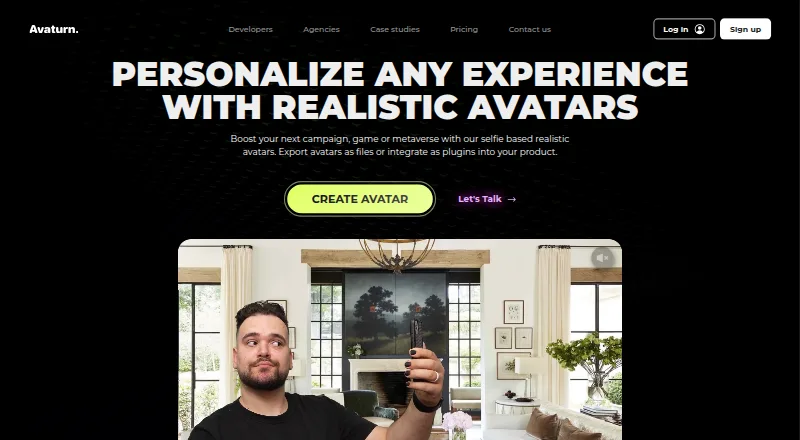
What Avaturn is
Avaturn creates customizable 3D human avatars for games, apps and metaverses from users’ 2D photos. Its generative AI turns a photo into a recognizable avatar, which users can adjust by changing body shape, clothes, accessories, hairstyles, shoes and glasses. Avaturn says these options can be combined into more than 10,000 looks. Avatars can be exported as 3D models for Blender, Unity, Unreal Engine, Maya, Cinema4D and other 3D environments, in GLB/glTF 2.0, FBX and VRM formats. They include a humanoid rig, ARKit blendshapes and visemes, and work with Mixamo animations and VTubing software. Developer tutorials cover Unity, Unreal Engine, HTML and JavaScript, Three.js, Android and iOS. The free app integration has no stated limit on avatar creation or exports. The API is excluded from the free plan; PRO costs $800 a month. Windows and Mac standalone apps are available by contacting Avaturn.
Who it suits
Avaturn suits teams making games, apps or metaverse experiences that need customizable human avatars and 3D exports. Developers can use its listed integrations, while the paid API is an option for those needing API access.
What it does well
- Free app integration has no avatar or export limits.
- Supports GLB/glTF 2.0, FBX and VRM exports.
- Includes a humanoid rig, blendshapes and visemes.
- Lists tutorials for game engines and mobile platforms.
What to know first
- API access is not included in the free plan.
- PRO costs $800 a month.
- Standalone Windows and Mac apps require contacting Avaturn.
Limits
The free app integration has no stated limit on avatar creation or exports, but the developer API is not available on the free plan. PRO costs $800 a month and includes up to 1.000 avatars per month; each extra avatar costs $0.15.
Plans
| Plan | Billed and limits | Price |
|---|---|---|
| Free | No limits on number of avatars created or exports | Free |
| PRO | $800/month · Up to 1.000 avatars / month · $0.15 per extra avatar · Your logos and colors · API and SDK for customizing UX and UI · Your own user managment (no login to Avaturn) · Upload custom garments · Priority support over email | $800 a month |
| Enterprise | Need more? · Additional requirements · Full body scans · Dedicated cloud server · Custom T&C · Dedicated slack support channel | On request |
As avaturn.me lists them, read 28 Sept 2026. The maker's own page has the final word.
Getting started
- Open https://avaturn.me/ and create avatars through the free app integration.
- Choose a photo to generate a customizable 3D avatar.
- Customize its body shape, clothes, accessories, hairstyle, shoes, or glasses.
- Export the avatar for a supported 3D environment or use an integration tutorial.
- Contact Avaturn about standalone Windows or Mac apps.
- Choose PRO for API and SDK access, or contact Avaturn about Enterprise requirements.
Avaturn suits people who want a customizable 3D likeness and developers adding human avatars to games or apps. Its free integrations make it accessible for basic use, but API-driven projects need the $800/month PRO plan.
Overview
Avaturn converts a 2D photo into a realistic human avatar, then provides controls to reshape and dress it. It is a focused avatar system, not a general-purpose 3D modeling tool: the main value is turning a personal likeness into a character that can be used across development and animation workflows.
Export options include GLB/glTF 2.0, FBX and VRM, with rigged models for game-engine and other 3D workflows. Unity, Unreal Engine, HTML and JavaScript, Three.js, Android and iOS have integration tutorials. That breadth suits teams already working in those environments, though Windows and Mac standalone Unity apps require contacting Avaturn.
Key features
- Photo-based avatar creation: Generative AI turns a photo into a recognizable, realistic 3D avatar. This gives users a likeness-based starting point instead of building a character from scratch.
- Appearance customization: Body shape, clothes, accessories, hairstyles, shoes and glasses can be adjusted. Avaturn says these combinations support more than 10,000 looks, offering variety within a human-avatar format rather than open-ended character modeling.
- Animation-ready output: Avatars include a standard humanoid rig, ARKit blendshapes and visemes, and are compatible with Mixamo animations and VTubing software. These features make the exports relevant to animation and face-driven workflows as well as static display.
- Developer integrations: The developer docs cover Unity, Unreal Engine, web technologies, Android and iOS. The listed app integrations are free, and the free integration has no cap on avatars created or exports. API access and the web SDK for advanced customization, however, require a paid package.
- Photo and video handling: Avaturn says photos and videos are processed using Google Cloud Platform and Amazon Web Services. Videos are used for body scanning or anonymized internal technology improvement; users can request data deletion. Its privacy policy also says it cannot guarantee the security of transmitted or stored information.
Pricing
Free — free. The free plan has no limits on the number of avatars created or exports on the free app integration. It is a strong fit for trying the avatar workflow or using a listed integration without a stated volume cap. It does not include the paid developer API.
PRO — $800 a month, billed $800/month. PRO includes up to 1,000 avatars per month, with each extra avatar costing $0.15. It adds API and SDK access for customizing the user experience and interface, branded logos and colors, custom garments, and user management without Avaturn login. Priority email support is also included. This is the relevant option for teams that need API access or a branded, controlled integration, but the monthly allowance and overage charge matter for higher-volume projects.
Enterprise — custom pricing. Enterprise adds full-body scans, a dedicated cloud server, custom terms and conditions, and a dedicated Slack support channel. It is aimed at projects with additional requirements; teams should compare its custom terms and price with their deployment needs.
Platforms
Avaturn lists Android, iOS, macOS, web and Windows platforms. Its integration tutorials include Unity, Unreal Engine, HTML and JavaScript, Three.js, Android and iOS. Unity support covers WebGL and Android/iOS; standalone Windows and Mac apps require contacting Avaturn.
Who it's for
Avaturn is best suited to individuals seeking a customizable human likeness and developers who need rigged avatars for games, apps, web projects or VTubing. The free integration is particularly useful for projects that can work within the listed integration paths and do not need API access. Teams requiring API customization, branded presentation or their own user-management flow should expect the PRO price. It is less suitable for anyone seeking a general-purpose modeling suite or an avatar format beyond human characters.
Pros and cons
- Pro: Photo-to-avatar creation and extensive appearance controls provide a direct route from a likeness to a customized character.
- Pro: Rigging, ARKit blendshapes, visemes and compatibility with Mixamo and VTubing software support varied animation workflows.
- Pro: The free app integration has no stated avatar-creation or export cap, making the basic workflow usable without a paid plan.
- Con: API access is reserved for PRO, which costs $800 a month, creating a substantial price step for teams that need developer-level customization.
- Con: PRO limits included volume to 1,000 avatars per month and charges $0.15 for each additional avatar.
- Con: The security policy does not guarantee the security of transmitted or stored information, a consideration for projects handling photos and videos.
Alternatives
Browse 3D Avatar Software for more options in the category.
- Blender is a free, open-source 3D creation suite for people who want a broader modeling tool and do not need Avaturn’s photo-based avatar workflow.
- MetaPerson Creator offers a free first avatar and export, with additional avatars using in-app credits; consider it if that entry model better fits a small initial project.
- Meshy has a free tier with 100 credits and 10 monthly downloads for Meshy 6 Lite models, so it may suit users whose work fits that credit-and-download allowance.
- Genies Avatar SDK is free for developers and end users, including commercial projects, making it worth considering when that free SDK model is the priority.
- MakeHuman is a free option with no license fees or paywall for users who prefer its community offering.
- Roblox Creator Hub provides free dashboard access and Roblox Studio tools for projects centered on the Roblox platform.
- three.ws Avatar SDK has a forever-free plan for one agent and one custom avatar, with unlimited embeds and 200 animation clips; it may fit projects that can work within those limits.
- Daz Studio is free and includes starter content, making it an alternative for users seeking that software’s free 3D creation workflow.
Verdict
Choose Avaturn if you want to turn a photo into a customizable, rigged human avatar and use it across supported app, game or animation workflows. Its no-cap free integration is a practical starting point; look elsewhere if you need broad 3D modeling or if API access at $800/month is beyond the project’s budget.
Verdict
Avaturn combines photo-based avatar creation, customization and 3D exports with integrations for several development platforms. The free integration has no stated avatar or export limits, but API access requires a paid package.
Questions
Does Avaturn have a free plan?
Yes. Free costs nothing. Avaturn says the listed app integrations can be used without limits on avatar creation or exports.
How much does PRO cost?
PRO costs $800 a month, billed at $800/month. It includes up to 1.000 avatars per month, with each extra avatar priced at $0.15.
Which platforms does Avaturn support?
Platforms listed are Android, iOS, macOS, web, and Windows. Unity support includes WebGL and Android/iOS; standalone Windows and Mac apps are available by contacting Avaturn.
Can I use Avaturn avatars in game engines?
Avatars can be exported for Unity and Unreal Engine, among other environments. Developer tutorials also cover both engines.
Is the developer API included in the free plan?
No. The developer API is available only in a paid package; PRO includes API and SDK for customizing the user experience and interface.
What happens to photos and videos used by Avaturn?
Avaturn's privacy policy says recorded photos and videos are processed using Google Cloud Platform and Amazon Web Services. It says videos are used for body scanning or internal technology improvement using anonymized data.
Facts from Avaturn's own pages
- Animation
- Avaturn avatars include a standard humanoid rig, ARKit blendshapes and visemes, and are compatible with Mixamo animations and VTubing software. · avaturn.me, 28 Sept 2026
- Customization
- Users can customize body shape, clothes, accessories, hairstyles, shoes and glasses. · docs.avaturn.me, 28 Sept 2026
- Data handling
- The privacy policy says recorded photos and videos are processed using Google Cloud Platform and Amazon Web Services and that videos are used for body scanning or internal technology improvement using anonymized data. · docs.google.com, 28 Sept 2026
- Deletion
- The agency FAQ says user data can be deleted upon an API request or user request. · avaturn.me, 28 Sept 2026
- Exports
- Avatars can be exported as 3D models for Blender, Unity, Unreal Engine, Maya, Cinema4D or other 3D environments. · avaturn.me, 28 Sept 2026
- Free integration
- Avaturn says the listed integrations can be used for free, while API and web SDK access for advanced customization is available through its developer portal. · docs.avaturn.me, 28 Sept 2026
- Free usage limits
- The docs state there are no limits on the number of avatars created or exports on the free app integration. · docs.avaturn.me, 28 Sept 2026
- Integrations
- The developer docs list integration tutorials for Unity, Unreal Engine, HTML and JavaScript, Three.js, Android and iOS. · docs.avaturn.me, 28 Sept 2026
- Looks
- Avaturn says users can create more than 10,000 looks using body types, hairstyles, clothes and accessories. · avaturn.me, 28 Sept 2026
- Paid API limit
- The developer API is available only in a paid package and is not available on the free plan. · docs.avaturn.me, 28 Sept 2026
- Photo to avatar
- Avaturn uses generative AI to turn a 2D photo into a recognizable, realistic 3D avatar. · avaturn.me, 28 Sept 2026
- Platform caveat
- Unity support includes WebGL and Android/iOS, while Windows and Mac standalone apps are available by contacting Avaturn. · docs.avaturn.me, 28 Sept 2026
- Security
- The privacy policy says Avaturn uses commercially reasonable security practices and cannot guarantee the security of transmitted or stored information. · docs.google.com, 28 Sept 2026
- Support
- The PRO plan includes priority support over email, while Enterprise lists a dedicated Slack support channel. · avaturn.me, 28 Sept 2026
- What it does
- Avaturn is a realistic avatar creator and avatar system for games, apps and metaverses that turns users into customizable 3D avatars. · docs.avaturn.me, 28 Sept 2026
Where Avaturn stands on Freedom251
- Avatar Generators#1 of 14
- 3D Avatar Software#2 of 26