Freedom251 › Game Animation Software
Gamelabs Studio
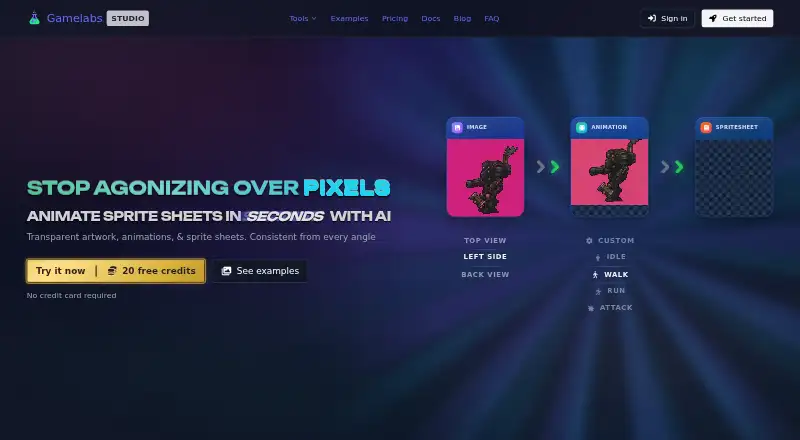
What Gamelabs Studio is
Gamelabs Studio is a web-based platform for creating 2D game artwork, animations, and spritesheets from text prompts or reference images. It supports styles such as pixel art, hand-drawn, anime, retro, and modern. A reference-based workflow can generate front, back, side, and top views intended to remain visually coherent. Sprite sheet exports allow configurable FPS, grid layout, padding, and transparent backgrounds; PNGs can include semi-transparent pixels. The tool also generates tileable textures and maps for top-down, isometric, and side-scrolling games. Its browser editor includes layers, blend modes, brushes, selections, text, and generative fill. Assets can be exported for Unity, Godot, Unreal, GameMaker, and Construct. MCP support is listed for Cursor, VS Code, and compatible tools, and API access is included on all plans. The free plan has 20 credits; paid plans start at $10 a month for Indie. Artwork costs 0.5 credit, while spritesheets and low-quality animation cost one credit.
Who it suits
Gamelabs Studio suits solo developers and studios making 2D games who need artwork, animation, or spritesheets. It may also fit teams that want to connect asset generation with supported game engines or custom tools through the API.
What it does well
- Generates artwork from prompts or reference images.
- Exports spritesheets with configurable layout and transparency.
- Includes a browser-based image editor.
- API access is included in every plan.
- Free plan provides 20 credits.
What to know first
- Higher animation quality tiers use additional credits.
- Indie plan provides 120 credits per month.
- Raw generated assets cannot be resold as standalone packs.
Limits
The free plan provides 20 credits. Indie provides 120 credits per month for $10 a month; artwork costs 0.5 credit, spritesheets or low-quality animations cost 1 credit, and higher animation tiers use more credits.
Plans
| Plan | Billed and limits | Price |
|---|---|---|
| Free Trial | $0/forever · 20 free credits · all features · no credit card required | Free |
| Indie | $10/month · 120 credits / month · Studio + MCP + API access · full commercial rights · credits never expire · tech support | $10 a month |
| Pro | $20/month · 250 credits / month · Studio + MCP + API access · full commercial rights · credits never expire · tech support | $20 a month |
| Studio | $50/month · 650 credits / month · Studio + MCP + API access · full commercial rights · credits never expire · tech support | $50 a month |
As gamelabstudio.co lists them, read 4 Oct 2026. The maker's own page has the final word.
Getting started
- Open the Gamelabs Studio website
- Use the free plan or start a free trial without a credit card
- Create artwork from a text prompt or reference image
- Edit results in the browser-based Studio
- Export assets as PNG, MP4, WebM, or JSON
- Connect exports to Unity, Godot, Unreal, GameMaker, or Construct
Verdict
Gamelabs Studio combines asset generation, editing, animation exports, and integrations for 2D game workflows. The free credits offer a starting point, while ongoing generation depends on plan credits and per-asset usage.
Questions
Is there a free plan?
Yes. Free Trial is billed at 0.00 USD forever, includes 20 credits and all features, and requires no credit card.
How much do paid plans cost?
Indie costs $10 a month, Pro costs $20 a month, and Studio costs $50 a month.
Which platforms are supported?
Gamelabs Studio is available through the web and API.
Can outputs be used commercially?
Users retain rights to generated outputs and may use them commercially without extra fees or attribution. Raw generated assets may not be resold as standalone packs.
What integrations are listed?
Exports are listed for Unity, Godot, Unreal, GameMaker, and Construct. MCP support covers Cursor, VS Code, and other compatible tools.
Facts from Gamelabs Studio's own pages
- API
- The pricing page says API access is included in all plans, and describes it as a way to integrate Gamelabs into custom tools and pipelines programmatically. · gamelabstudio.co, 4 Oct 2026
- Art styles
- The maker says the generator supports pixel art, hand-drawn, anime, retro, modern, and other styles. · gamelabstudio.co, 4 Oct 2026
- Audience
- The product is designed for people building 2D games, from solo developers to full studios. · gamelabstudio.co, 4 Oct 2026
- Built-in editor
- The browser-based image editor includes layers, blend modes, brushes, selections, text, and AI-powered generative fill. · gamelabstudio.co, 4 Oct 2026
- Commercial rights
- The maker says users retain rights to generated outputs and may use them commercially without additional fees or attribution, while raw generated assets may not be resold as standalone packs. · gamelabstudio.co, 4 Oct 2026
- Credit usage
- Artwork costs 0.5 credit and a spritesheet or low-quality animation costs 1 credit; higher animation quality tiers use additional credits. · gamelabstudio.co, 4 Oct 2026
- Integrations
- The maker lists Unity, Godot, Unreal, GameMaker, and Construct for asset export, and describes MCP support for Cursor, VS Code, and other compatible tools. · gamelabstudio.co, 4 Oct 2026
- Maps and textures
- The product can generate tileable textures and AI game maps, including top-down, isometric, and side-scrolling workflows. · gamelabstudio.co, 4 Oct 2026
- Multi-angle assets
- Users can generate front, back, side, and top views using a reference-based workflow intended to keep assets visually coherent. · gamelabstudio.co, 4 Oct 2026
- Privacy and security
- The privacy policy says data is stored in the US West region, payment card details are handled by the payment provider rather than stored by Gamelabs, and the service uses access controls and encryption in transit. · gamelabstudio.co, 4 Oct 2026
- Product
- Gamelabs Studio is an AI-powered platform for generating game artwork, animations, and spritesheets from text prompts or reference images. · gamelabstudio.co, 4 Oct 2026
- Sprite sheets
- Animations can be exported as sprite sheets with configurable FPS, grid layout, padding, and transparent backgrounds. · gamelabstudio.co, 4 Oct 2026
- Support
- Monthly plans include tech support, and the FAQ lists [email protected] for contacting the team. · gamelabstudio.co, 4 Oct 2026
- Transparency
- The maker says sprite sheet export removes the chroma key and produces PNGs with alpha transparency, including semi-transparent pixels. · gamelabstudio.co, 4 Oct 2026
Where Gamelabs Studio stands on Freedom251
- Game Animation Software#8 of 32