Freedom251 › Flooring Contractor Software
FloorWizard
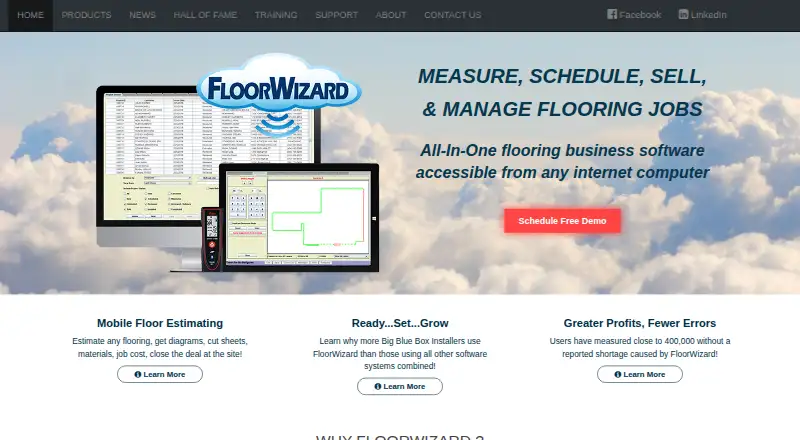
What FloorWizard is
FloorWizard is flooring business software for estimating, selling, scheduling, and managing jobs through an internet-accessible system. It can measure projects, estimate materials and labor, and rework estimates around alternate materials. On-site closing functions support the sales workflow. Project-management tools include tracking, appointment scheduling, search, reporting, and team assignments. Projects can be reached from internet-enabled computers and shared between remote locations through a managed central database, which FloorSoft says has no additional hosting cost. User access levels can be customized, and administrators can control access to projects. FloorWizard can create installation documents and email documents directly to customers. For measurements, it supports a Tablet PC and Bluetooth laser, including the Leica e7100i. The product supports takeoff measurements, material orders, installation scheduling, job costing, invoicing, and payments. FloorSoft describes it for flooring retailers, installers, restoration businesses, and renovation companies. Pricing is on request, and a free demo is offered. The setup guide specifies Windows XP or higher and Internet Explorer 7 or higher for desktop access; Mac access requires third-party software that replicates Windows.
Who it suits
FloorWizard suits flooring retailers, installers, restoration businesses, and renovation companies that need to estimate and coordinate jobs. Its shared projects and access controls may help teams working across remote locations.
What it does well
- Measures projects and estimates materials and labor
- Projects can be shared between remote locations
- Includes installation documents and customer email
- Supports job costing, invoicing, and payments
What to know first
- Pricing is available on request
- Desktop access guide specifies Windows XP or higher
- Mac access requires third-party software that replicates Windows
Limits
Pricing is on request. Desktop access requires Windows XP or higher and Internet Explorer 7 or higher; Mac access requires third-party software that replicates Windows.
Plans
| Plan | Billed and limits | Price |
|---|---|---|
| FloorWizard | Pricing not listed; contact sales for details | On request |
As floorsoft.com lists them, read 4 Oct 2026. The maker's own page has the final word.
Getting started
- Visit the FloorSoft website and request a free demo.
- Contact FloorSoft for pricing.
- For desktop access, use Windows XP or higher with Internet Explorer 7 or higher.
- For Mac access, use third-party software that replicates Windows.
- Use a Tablet PC and Bluetooth laser for mobile measurements, including the Leica e7100i.
FloorWizard is an internet-accessible flooring business system that combines takeoffs, estimating, sales, scheduling, and administration. It is best suited to flooring retailers, installers, restoration firms, and renovation companies coordinating work between offices and job sites. Its broad workflow is compelling for established teams, but buyers should be comfortable with custom pricing and a Windows-centred desktop setup.
Overview
FloorWizard covers the operational chain from measuring a project to collecting payment. Takeoff measurements feed flooring estimates that account for materials and labor, while alternate-material refiguring lets staff revise a proposal without rebuilding it from scratch. Material orders, job costing, invoicing, and payments extend the system beyond a simple calculator. On-site closing functions and tablet-based estimating with a Bluetooth laser are aimed at salespeople who need to produce or adjust quotes away from the office.
Its management side includes project tracking, appointment scheduling, search, reporting, and team assignments. Projects can be shared between remote locations from internet-enabled computers through a managed central database, which FloorSoft says is provided at no additional cost. Customizable access levels by user type and administrator-controlled project access are useful when sales, installation, and office staff should not all see or edit the same records.
Key features
Estimating and field measurement
The combination of takeoffs, material and labor estimates, alternate-material calculations, and job costing supports a flooring-specific sales process rather than a generic invoice workflow. FloorSoft describes mobile estimating with a Tablet PC and Bluetooth laser, specifically naming the Leica e7100i interface. That hardware focus will appeal to businesses already measuring rooms electronically; it is less attractive to teams seeking a modern phone-first workflow.
Scheduling and administration
Installation scheduling, appointments, assignments, project search, and reporting give managers a way to follow jobs after the sale. Installation documents can be created in the system, and documents can be emailed directly to customers. These functions connect office administration with installers, although the product’s value depends on fitting its permission model and shared-project process to the organization’s roles.
Connectivity, updates, and support
FloorSoft says its managed central database carries no additional hosting charge and that software updates are free. The homepage claims integration with any software, and a company news item describes an interface to FieldAware; prospective buyers should confirm that a needed integration is covered. Support is advertised as available 24/7, with training guides and videos for FloorWizard. A promotional PDF also describes secure payment processing for credit cards, but no certification or compliance standard is stated.
Pricing
The FloorWizard plan uses custom pricing; FloorSoft does not publish a subscription amount. A free demo is offered, so a purchasing conversation is required to establish cost, seats, terms, and any limits. That sales-led process may suit a flooring company wanting a tailored deployment, but it makes budgeting and direct comparison harder than with products that publish per-user rates.
The plan includes takeoff measurements, flooring estimates, material orders, installation scheduling, job costing, invoicing, and payments. It also includes the broader project, document, access-control, and shared-database functions described above. No separate cheaper tier or free plan is presented, so small operators should verify the minimum commitment before choosing it.
Platforms
FloorWizard is offered for macOS, web, and Windows, with web listed as its mobile platform. The setup guide requires desktop access through Windows XP or higher and 32-bit Internet Explorer 7 or higher. Mac users need third-party software such as Parallels to replicate Windows, making the Mac option dependent on an additional compatibility layer rather than a native desktop experience. The Tablet PC and Bluetooth-laser workflow is the clearest mobile-oriented option.
Who it's for
FloorWizard fits flooring retailers and installation businesses that want estimating, selling, scheduling, and project administration in one system. It is particularly relevant to multi-location operations or teams dividing work between sales offices and installation crews, because projects can be shared remotely and access can be assigned by user type. Restoration and renovation companies with flooring-heavy workflows are also within its stated audience.
It is a weaker fit for a solo contractor who wants transparent self-service pricing, a native Mac desktop application, or a smartphone-first measuring process. Businesses with strict payment-compliance requirements should also obtain assurances beyond the product’s secure-payment description.
Pros and cons
Pros
- End-to-end flooring workflow: measurement, estimates, orders, scheduling, costing, invoicing, and payments are covered in one plan.
- Useful for distributed teams: a managed shared database and remote project access connect multiple locations without an added hosting charge.
- Field sales support: tablet estimating, Bluetooth-laser compatibility, alternate-material refiguring, and on-site closing support quote work away from the office.
- Operational controls: role-based access, project permissions, reporting, assignments, and customer document emailing address day-to-day coordination.
- Ongoing assistance: FloorSoft advertises 24/7 support, training materials, and free updates.
Cons
- Custom pricing only: buyers cannot calculate cost or compare tiers without contacting sales.
- Windows-heavy desktop requirements: the stated Internet Explorer and Windows requirements are dated, and Mac access needs third-party virtualization software.
- Hardware-dependent field workflow: the named tablet-and-laser approach may not suit teams expecting phone-based measurement.
- Payment assurance is limited: secure card processing is described, but no compliance certifications are provided.
Alternatives
Flooring Contractor Software is the broader category guide for comparing flooring-focused systems.
DoAllFloors is a better starting point for teams wanting Android, iOS, and web access with a free plan; its Starter tier allows up to five users, while the listed beta terms say it will become $59 per month.
FlooringFlow suits smaller operators seeking a published freemium model: its free tier permits two jobs per month for one user, while Pro is $39 per month with unlimited jobs.
CalcuFloor is the simpler web option when basic project and space organization matters more than a full management suite; its free Lite tier is limited to one project and one area, with Plus at €16 per month.
Clockit is worth considering when a retailer-linked account or multi-store professional plan is the priority; Professional is listed at $49.95 per month.
FloorIQ offers a no-time-limit free plan capped at five projects and a company Pro plan priced at $500 per month for up to 10 users.
MeasureSquare is the alternative to consider for broader mobile and API coverage, including Android, iOS, web, and Windows; its Mobile Retail plan is $54 per month for one user.
RFMS is another paid flooring-business platform with Android, iOS, web, Windows, and API support, with pricing handled through a demo request.
Carman is a paid alternative spanning Android, iOS, web, and API platforms.
Verdict
Choose FloorWizard if your flooring business needs one system for measurement, estimating, installation coordination, documents, billing, and shared projects across locations. Its strongest reason to buy is the flooring-specific, end-to-end workflow with controlled access and field estimating. Look elsewhere if transparent pricing, native Mac support, or phone-first mobility is more important than a long-established, sales-led platform.
Verdict
FloorWizard combines estimating, sales, scheduling, and project administration for flooring work. Buyers should review the stated desktop requirements and request pricing details.
Questions
How much does FloorWizard cost?
Pricing is on request. FloorSoft offers a free demo.
What does FloorWizard do?
It supports flooring estimates, sales, scheduling, and job management, including takeoffs, material orders, job costing, invoicing, and payments.
Which platforms does it support?
FloorWizard is listed for web, Windows, and macOS. Its setup guide requires Windows XP or higher and Internet Explorer 7 or higher for desktop access; Mac access requires third-party software that replicates Windows.
Can teams share projects across locations?
Yes. Projects can be accessed from internet-enabled computers and shared between remote locations through a managed central database.
Does FloorWizard include a free plan?
A free plan is not described. FloorSoft offers a free demo, and pricing is on request.
Who makes FloorWizard?
FloorSoft, Inc. makes FloorWizard and says it is located in Dalton, Georgia. The company says it has designed flooring software since 1992.
Facts from FloorWizard's own pages
- Access controls
- The product supports customizable access levels by user type and lets administrators control access to projects. · floorsoft.com, 4 Oct 2026
- Audience
- FloorSoft describes FloorWizard as software for flooring businesses and professionals, including retailers, installers, restoration, and renovation companies. · floorsoft.com, 3 Oct 2026
- Company
- FloorSoft, Inc. says it is located in Dalton, Georgia and has designed flooring software since 1992. · floorsoft.com, 4 Oct 2026
- Database and updates
- FloorSoft says the system uses a managed central database at no additional cost and provides software updates for free. · floorsoft.com, 3 Oct 2026
- Devices
- FloorSoft describes mobile estimating with a Tablet PC and Bluetooth laser, and says its laser interface supports the Leica e7100i Bluetooth laser. · floorsoft.com, 3 Oct 2026
- Documents
- The product can create installation documents and email documents directly to customers. · floorsoft.com, 4 Oct 2026
- Email and documents
- The homepage lists direct emailing of documents to customers and creation of installation documents. · floorsoft.com, 3 Oct 2026
- Estimation
- The product supports flooring measurement, job refiguring with alternate materials and labor, and on site job closing. · floorsoft.com, 4 Oct 2026
- Founded
- 1992 · floorsoft.com, 28 Sept 2026
- Hardware
- FloorWizard supports measurement using a tablet PC and Bluetooth laser, and the maker specifically names compatibility with the Leica e7100i Bluetooth laser. · floorsoft.com, 4 Oct 2026
- Headquarters
- Dalton, Georgia, United States · floorsoft.com, 28 Sept 2026
- Integrations
- The maker advertises integration with any software and provides interface and API support, but does not name specific integrations on those pages. · floorsoft.com, 4 Oct 2026
- Intended users
- The maker describes FloorWizard as software for flooring businesses and flooring professionals, including retail and installation workflows. · floorsoft.com, 4 Oct 2026
- Lowe’s relationship
- FloorSoft states FloorWizard is not Lowe’s official floor estimating software and that Lowe’s has made no commitment to the product. · floorsoft.com, 3 Oct 2026
- Mac access
- The setup guide says Mac access requires third party software such as Parallels that replicates Windows. · floorsoft.com, 4 Oct 2026
- Platform requirement
- The maker’s setup guide specifies a full Windows XP or higher operating system and 32 bit Windows Internet Explorer 7.0 or higher. · floorsoft.com, 4 Oct 2026
- Platform requirements
- A FloorSoft setup guide says desktop access requires Windows XP or higher and Internet Explorer 7 or higher; Mac access requires a third-party system that replicates Windows. · floorsoft.com, 3 Oct 2026
- Pricing availability
- The product page offers a free demo, while the pages opened here do not state a FloorWizard subscription price. · floorsoft.com, 3 Oct 2026
- Project management
- It includes project search, reporting, job progress tracking, performance benchmarks, and appointment scheduling. · floorsoft.com, 4 Oct 2026
- Purpose
- FloorWizard is a cloud based system for scheduling, estimating, selling, and managing flooring jobs over the internet. · floorsoft.com, 4 Oct 2026
- Remote access
- Projects can be accessed from internet-enabled computers and shared between remote locations. · floorsoft.com, 3 Oct 2026
- Security
- The maker’s promotional PDF describes a secure payment function for processing credit card transactions; the pages reviewed do not specify certifications or compliance standards. · floorsoft.com, 4 Oct 2026
- Shared database
- The maker says projects can be accessed from internet enabled computers and shared between remote locations, with managed database hosting at no additional cost. · floorsoft.com, 4 Oct 2026
- Support
- FloorSoft says its support team is available 24/7 and offers FloorWizard application, hardware, interface, and technical support. · floorsoft.com, 4 Oct 2026
Where FloorWizard stands on Freedom251
- Flooring Contractor Software#13 of 24