Freedom251 › Flooring Contractor Software
Clockit
What Clockit is
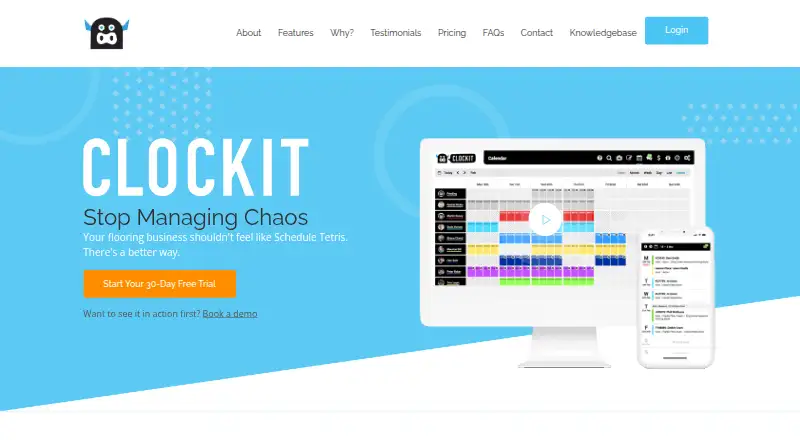
Clockit is a live, cloud-based booking and job management system for the flooring industry. Flooring retailers and installers can use its shared schedule to see installer availability, book work, and reschedule installation jobs. A separate Measure Calendar helps schedule measures and manage each measurer’s schedule. Customers can receive automatic email and SMS updates when plans change, plus scheduled SMS reminders for measures.
Job records can include photos and notes about damage, moisture readings, preparation work, and completed installations. After finishing a job, installers can generate invoices. Retailers receive completion notifications that can include additional charges. Clockit is available on the web and supports installation scheduling, invoicing, and payments. The listed plans include a free Store Account linked to one store and activated by the retailer, as well as paid options for independent installers and retail sites with different monthly installation allowances. The site offers a 30-day trial with full access and no credit card required. Dedicated support is listed with paid plans, and the site provides a sales and support phone number.
Who it suits
Clockit suits flooring retailers and installers who coordinate installation work, measures, customer updates, and job records. Its plans cover a single retailer-linked store, independent installers working across multiple stores, and retail sites with monthly install allowances.
What it does well
- Shared schedule shows installer availability and supports booking and rescheduling.
- Measure Calendar manages measure appointments and individual measurer schedules.
- Customers can receive automatic email and SMS change updates.
- Job records can include photos and notes about work conditions.
- Installers can generate invoices after completing jobs.
What to know first
- The free Store Account is linked to one store.
- Silver, Gold, and Platinum plans have monthly installation caps.
- The Professional plan costs $49.95 a month.
Limits
The free Store Account is linked to one store and activated by the retailer. Silver allows up to 100 installs per month, Gold up to 150, and Platinum up to 500; each price is per retail site.
Plans
| Plan | Billed and limits | Price |
|---|---|---|
| Store Account | activated by retailer · linked to one store · live install schedule · job history and documentation · web and email notifications · invoice now | Free |
| Silver | per retail site · up to 100 installs per month · install scheduling · customer notifications · measure calendar · job documentation · invoice now · short-notice coverage · custom branding · dedicated support | $114 a month |
| Gold | per retail site · up to 150 installs per month · all Silver features | $149 a month |
| Platinum | per retail site · up to 500 installs per month · all Silver features | $229 a month |
| Professional | multiple stores · live schedule · job documentation · SMS and email notifications · invoice now · short-notice access · availability controls · dedicated support | $49.95 a month |
As clockitsoftware.com.au lists them, read 15 Oct 2026. The maker's own page has the final word.
Getting started
- Open the Clockit website.
- Choose the Store Account, Professional, Silver, Gold, or Platinum plan that fits the work.
- For a Store Account, have the retailer activate it and link it to one store.
- Alternatively, start the 30-day trial with full access; no credit card is required.
- Use Clockit on the web to schedule installation jobs and measures.
Clockit is a web-based booking and job-management system for flooring retailers and installers. It is best for teams that need to coordinate measures and installation work in one workflow; its main trade-off is that broader or higher-volume use requires a paid plan.
Overview
Clockit brings job bookings, measure planning, job records and invoicing together in a live cloud service. Its focus on flooring installation makes it a more natural fit for retailers and installers managing that workflow than for businesses seeking a general-purpose project system.
The shared schedule shows installer availability and supports booking and rescheduling. A separate Measure Calendar manages measure appointments and individual measurer schedules. This separation is useful for teams coordinating both stages of work, though users looking only for a simple appointment calendar may not need the full job-management workflow.
Key features
- Installation and measure calendars: Shared installer availability helps teams book and adjust jobs, while individual measurer schedules help organize site measures.
- Customer updates: Automatic email and SMS messages can notify customers when plans change, and scheduled SMS reminders can prompt them about measures. These tools reduce the need to relay every schedule change manually.
- Job documentation: Photos and notes can record damage, moisture readings, preparation work and completed installs. Keeping those records with a job gives retailers and installers a place to retain practical context about the work.
- Completion and invoicing: Installers can generate invoices after a job, while retailers receive notice of completion and additional charges. This links job completion to retailer visibility, but does not establish a broader accounting or payment-processing feature.
Clockit’s terms refer to third-party applications that users may enable to interoperate with the service, but do not name particular integrations. Clockit says it will not sell users’ personal information to third parties. It also says it performs daily system backups, while not guaranteeing that data will not be lost.
Pricing
Clockit has a free Store Account and paid monthly plans. The 30-day trial provides full access without requiring a credit card, making it a useful way to assess the workflow before choosing a plan.
| Plan | Price | Best fit and limits |
|---|---|---|
| Store Account | free | Linked to one store and activated by the retailer. A narrow option for work tied to a single retailer account, not independent multi-store work. |
| Professional | $49.95 a month | Works across multiple stores and is intended for independent installers. The plan description gives no monthly install quota. |
| Silver | $114 a month | Up to 100 installs per month; price is per retail site. Suits a site with a moderate, defined installation volume. |
| Gold | $149 a month | Up to 150 installs per month; price is per retail site. The higher quota suits sites that outgrow Silver. |
| Platinum | $229 a month | Up to 500 installs per month; price is per retail site. It is the highest-volume option among the published tiers. |
The free account’s one-store link is its main constraint. Independent installers needing multiple-store coverage have a paid option, while retail sites should match their expected monthly installs to a tier. The volume-based plans are priced per retail site, so their listed price is not a single multi-site total. Paid plans include dedicated support; the site also provides a sales and support phone number.
Platforms
Clockit is available on the web. It is therefore suited to teams using a browser-based service, but it is not presented as a native mobile app.
Who it's for
Clockit is a strong fit for flooring retailers and installers who coordinate measures, installer availability, customer notifications and job records. The Store Account may suit a retailer-linked operation limited to one store. Independent installers working across stores should consider Professional, while retail sites can select Silver, Gold or Platinum according to monthly install volume. Businesses outside flooring installation, or those needing a broader platform, should look elsewhere.
Pros and cons
- Pro: Separate installation and measure scheduling supports two important parts of flooring work in the same service.
- Pro: Customer change notices and measure reminders can reduce manual follow-up when schedules move.
- Pro: Photos and notes keep job-specific conditions and completion records attached to the work.
- Con: The free account is limited to one retailer-linked store, so it does not serve independent multi-store work.
- Con: The retail-site plans impose monthly install caps, requiring higher-volume sites to choose a larger tier.
- Con: The service is web-only, which may not suit teams seeking a native mobile app.
Alternatives
For a wider shortlist of tools in this category, see Flooring Contractor Software.
- DoAllFloors is an alternative with Android, iOS and web platforms, a free plan and no free trial; its listed Starter plan allows up to five users and 1 GB of storage.
- FlooringFlow offers Android, iOS and web access. Choose it if a free tier limited to two jobs monthly and one user is enough, or if its $39 a month Pro plan for unlimited jobs and one included user better matches your needs.
- CalcuFloor is a web alternative with a free Lite plan limited to one project and one area. It may suit users focused on organizing spaces within a project rather than coordinating the full installation workflow.
- FloorIQ has a web free plan with five projects and no time limit or credit card requirement. Consider it if that project-based entry point fits better than Clockit’s single-store account.
- MeasureSquare supports Android, iOS, web and Windows, with a listed Mobile Retail plan at $54 a month for one user. It is an option for readers seeking those additional platforms.
- FloorWizard is another paid flooring-software option, with custom pricing.
- RFMS is a paid alternative with custom pricing.
- Carman is another paid option, available on Android, iOS, web and through an API.
Verdict
Choose Clockit if a flooring business needs shared installation and measure schedules, customer updates, job records and completion invoicing in a trade-focused web service. Its free one-store account offers a limited entry point, while paid plans give independent installers multi-store coverage and retail sites install-volume tiers. Look elsewhere if native mobile access or a broader workflow matters more than flooring-specific coordination.
Verdict
Choose Clockit if flooring installation work needs a shared schedule, measure planning, customer notifications, and job records. The free Store Account is limited to one retailer-linked store; multi-store work or higher install volumes use paid monthly plans.
Questions
Is Clockit free?
Yes. The Store Account is listed as free and is linked to one store, with activation by the retailer.
Does Clockit offer a trial?
Yes. The site offers a 30-day trial with full access and no credit card required.
What does Clockit cost?
Professional is $49.95 a month. Silver is $114 a month, Gold is $149 a month, and Platinum is $229 a month; the last three are priced per retail site.
Which platforms support Clockit?
Clockit is available on the web.
What can Clockit do for installation jobs?
It supports scheduling and rescheduling, measure planning, customer email and SMS updates, job photos and notes, installer invoices, and retailer completion notifications.
Does Clockit name specific integrations?
Its terms refer to third-party applications that users may enable to interoperate with the service, but do not name specific integrations.
Facts from Clockit's own pages
- API and SDKs
- The published retailer help collection contains no API or SDK documentation, and the terms describe access through the hosted service. · help.clockit.co.nz, 15 Oct 2026
- Audience
- The product is designed for flooring retailers and installers coordinating installation jobs. · clockitsoftware.com.au, 8 Oct 2026
- Availability controls
- Installers choose how much availability they expose and can use released slots for other work or short-notice jobs. · clockitsoftware.com.au, 15 Oct 2026
- Availability limitation
- The terms provide the service as-is and do not warrant uninterrupted or error-free operation. · clockit.co.nz, 15 Oct 2026
- Backups
- The terms say Clockit performs daily backups but gives no guarantee against data loss and requires customers to keep their own copies. · clockit.co.nz, 15 Oct 2026
- Company founding
- LinkedIn lists the company as founded in 2014. · nz.linkedin.com, 15 Oct 2026
- Company headquarters
- LinkedIn lists Wellington, New Zealand as headquarters and Brisbane, Australia as another location. · nz.linkedin.com, 15 Oct 2026
- Company legal name
- The registered entity is Clockit Software Limited, a New Zealand limited company registered on October 14, 2014. · companyhub.nz, 15 Oct 2026
- Company ownership
- Company records list Scott Harvey and Shane Alan Chandler as directors and shareholders, with Jonathan Simon Wall holding 10%. · companyhub.nz, 15 Oct 2026
- Company size
- LinkedIn lists Clockit Software Limited as having 2–10 employees. · nz.linkedin.com, 15 Oct 2026
- Customer base claim
- The Australian homepage claims more than 100 flooring retailers across Australia and New Zealand use Clockit. · clockitsoftware.com.au, 15 Oct 2026
- Customer notifications
- The service sends configurable email and SMS updates when measures or installation plans change. · clockitsoftware.com.au, 15 Oct 2026
- Data backups
- The terms say Clockit performs daily system data backups but does not guarantee that data will not be lost. · clockitsoftware.com.au, 8 Oct 2026
- Documentation
- The retailer help collection lists 31 articles covering jobs, permissions, measures, notifications, invoices, calendars and short-notice work. · help.clockit.co.nz, 15 Oct 2026
- Health and safety
- The New Zealand site says Clockit includes a flooring-specific hazard analysis developed with FloorNZ. · clockit.co.nz, 15 Oct 2026
- Industry focus
- The product is purpose-built for flooring businesses rather than being a generic scheduling system. · clockitsoftware.com.au, 15 Oct 2026
- Integrations
- The terms refer to third-party applications that users may enable to interoperate with the service, but do not name specific integrations. · clockitsoftware.com.au, 8 Oct 2026
- Invoicing
- Installers can generate invoices immediately after finishing a job and retailers receive completion and extra-charge notifications. · clockitsoftware.com.au, 15 Oct 2026
- Job documentation
- Users can attach photos and notes such as damage records, moisture readings and preparation details to jobs in cloud storage. · clockitsoftware.com.au, 15 Oct 2026
- Licence
- Clockit retains intellectual-property rights in the service, website and documentation; the terms prohibit modifying, copying, decompiling or reverse engineering the software. · clockit.co.nz, 15 Oct 2026
- Limit: notification failure
- A Trustpilot reviewer reported paid notifications failing across accounts and said support ignored refund requests. · trustpilot.com, 15 Oct 2026
- Limit: user experience
- A G2 reviewer said the user experience needed design and development work. · g2.com, 15 Oct 2026
- Live scheduling
- Retailers and installers share a live schedule showing bookings and installer availability in real time. · clockitsoftware.com.au, 15 Oct 2026
- Measure calendar
- A dedicated measure calendar manages measurer schedules and carries measure information into job sheets. · clockitsoftware.com.au, 15 Oct 2026
Where Clockit stands on Freedom251
- Flooring Contractor Software#1 of 24