Freedom251 › AI Floor Plan Generators
FloorLens
What FloorLens is
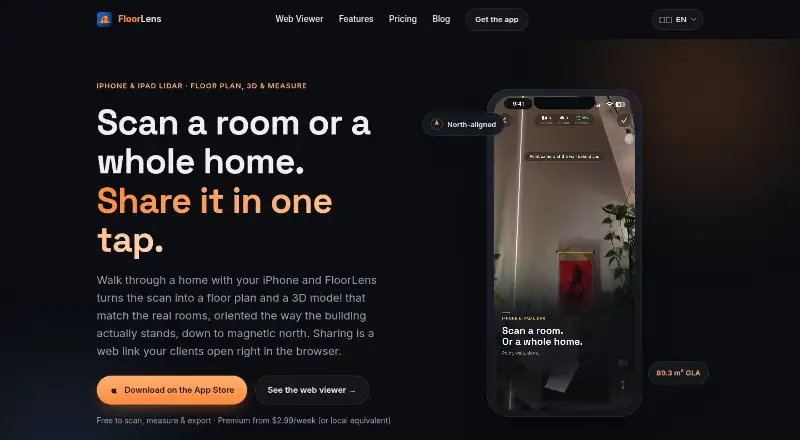
FloorLens turns LiDAR scans of rooms and homes into measured floor plans, 3D models, and tours that open in a browser. It automatically measures wall lengths, room areas, ceiling heights, and object dimensions, and lets users edit walls and objects. Shared scans offer dollhouse, floor-plan, and first-person photo views without requiring viewers to install an app or create an account. The app can orient plans to magnetic north and show the sun position and shadows for the scan location. Exports include measured PDFs, JPG, PNG, and SVG views, GLB, USDZ, and OBJ models, and MP4 fly-through videos. Country profiles include area standards such as ANSI Z765, Gross Internal Area, RMS, WoFlV, and SIA 416; FloorLens describes measurements as scan estimates, not surveys. Scanning and measurements run on the device, and scans upload only when users choose to share them. An account is optional, and shared scans can be deleted from the cloud through the app. FloorLens requires iOS 26 and a LiDAR-capable iPhone 12 Pro or later, or iPad Pro; there is no Android version.
Who it suits
FloorLens is aimed at real-estate agents, landlords, architects, renovators, and interior designers, as well as people planning moves or renovations. It suits users with a supported LiDAR device who need measured plans, 3D views, or shareable tours.
What it does well
- Measures walls, room areas, ceilings, and object dimensions automatically.
- Shared tours open in a browser without an account.
- Exports plans, images, 3D models, and MP4 videos.
- Scanning and measurements run on the device.
What to know first
- Requires iOS 26 and a LiDAR-capable Apple device.
- There is no Android version.
- Measurements are scan estimates rather than surveys.
Limits
The Free plan includes one web scan; its link and QR access auto-delete after 14 days, and the scan has no texture. Premium is $6.99 a month billed, or $2.99/week or $39.99/year, and allows up to three active web scans with 90-day links; Professional is $19.99 a month billed or $149.99/year, with up to 30 scans and 180-day links.
Plans
| Plan | Billed and limits | Price |
|---|---|---|
| Free | 1 web scan · link + QR auto-deletes after 14 days · basic scan without texture · PDF, image, 3D model and MP4 exports | Free |
| Professional | or $149.99/year · Up to 30 web scans · 180-day links · includes Premium features | $19.99 a month |
| Premium | or $2.99/week · $39.99/year · Up to 3 web scans at a time · 90-day links · textured walls and 3D · iCloud sync · branded PDFs | $6.99 a month |
| Enterprise | Usage-based pricing · More cloud scan exports per month · priority support · includes Professional features | On request |
As floorlens.app lists them, read 5 Oct 2026. The maker's own page has the final word.
Getting started
- Install FloorLens on a LiDAR-capable iPhone 12 Pro or later or iPad Pro running iOS 26.
- Scan a room or home to create a measured floor plan and 3D model.
- Edit walls or objects and review automatic measurements.
- Choose a free or paid plan for the web scan capacity and features you need.
- Share a scan through a web link or QR code, or export it in a supported format.
FloorLens is a LiDAR room-scanning app for turning spaces into measured plans, 3D models and browser tours. It suits property professionals and people planning renovations who have a compatible Apple device. Its broad sharing and export options make it a flexible planning tool, but it is not a survey instrument and it cannot serve Android users.
Overview
FloorLens brings scanning, editing and presentation into one workflow. It automatically measures walls, room areas, ceiling heights and objects, and lets users refine walls and objects before sharing or exporting. Recipients can open a shared scan in a browser and switch between dollhouse, floor-plan and first-person photo views without installing an app or creating a viewer account. That makes it useful for communicating a space to clients, tenants or collaborators who do not use the app.
Plans can be aligned to magnetic north, and models show sun position and shadows for the scan location. Country profiles include area standards such as ANSI Z765, Gross Internal Area, RMS, WoFlV and SIA 416. These options add context to planning, but the measurements remain scan estimates rather than surveys; anyone needing survey-grade records should look elsewhere.
Key features
Exports cover measured PDFs, JPG, PNG and SVG views, GLB, USDZ and OBJ models, and MP4 fly-through videos. The range suits both simple document sharing and workflows that need a 3D model or visual walkthrough. Web links and QR codes make sharing direct, while Premium adds iCloud sync between devices.
Scanning, plans and measurements run on the device. Scans go to the cloud only when users choose to share them; an account is optional, and shared scans can be deleted from the cloud through the app. That is a meaningful privacy advantage for people handling property scans they do not want uploaded by default.
Pricing
The Free plan costs nothing and includes one web scan, link and QR sharing that auto-deletes after 14 days, basic scans without texture, and PDF, image, 3D model and MP4 exports. It is a useful way to try the core capture and export workflow, but the single scan and short-lived link limit ongoing sharing.
Premium costs $6.99 a month, billed or $2.99/week, or $39.99/year. It raises the allowance to three web scans at a time, extends links to 90 days and adds textured walls and 3D, iCloud sync and branded PDFs. It is the practical step up for individual users who need better-presented models or longer-lived shared scans.
Professional costs $19.99 a month, billed or $149.99/year, and allows up to 30 web scans with 180-day links, including Premium features. That higher capacity suits property teams or frequent client-facing work. Enterprise has custom pricing with usage-based billing; it includes Professional features, more cloud scan exports per month and priority support, making it the team-oriented option when those needs justify a custom plan.
A free trial is available. The entry's maximum projects figure is 3, so users planning a larger project library should confirm that this cap fits their workflow before relying on the app.
Platforms
FloorLens runs on iOS, macOS and the web, but capture requires iOS 26 and a LiDAR-capable iPhone 12 Pro or later or iPad Pro. There is no Android version. The device requirement is a substantial barrier for otherwise interested users, and the web platform does not remove the need for supported Apple hardware to scan.
Who it's for
Real-estate agents and landlords can use browser tours to share spaces without asking viewers to install software. Architects, interior designers and renovators may value editable plans, object and room measurements, area profiles and multiple model exports for early planning. People preparing a move or renovation also get a way to document and communicate room layouts. In all these cases, the app is best for estimates and presentation, not work requiring formal surveyed measurements.
Pros and cons
- Pros: Browser tours offer three viewing modes without requiring a viewer app or account, which lowers friction when sharing with clients or tenants.
- Pros: Exports span documents, image views, 3D formats and fly-through video, giving users several ways to hand off a scan.
- Pros: On-device scanning and optional cloud sharing keep scans local unless the user chooses to share them.
- Cons: LiDAR capture requires a recent supported iPhone or iPad Pro and iOS 26, excluding Android users and older Apple devices.
- Cons: Results are scan estimates, not surveys, so the app is unsuitable where formal surveyed accuracy is required.
- Cons: The Free plan's one web scan and 14-day links are restrictive for repeat or durable sharing; more capacity requires a paid plan.
Alternatives
AI Floor Plan Generators is a category directory for readers comparing a broader set of floor-plan tools.
Planner 5D is a better fit for readers who need broader platform coverage, including Android and Windows, or want to convert an uploaded floor plan into a 3D project with its $59.99 a year Premium plan.
RoomSketcher is an option for readers seeking a floor-planning tool available on Android and Windows as well as Apple platforms and the web.
Luw.ai Studio is worth considering for an iOS, macOS or web user focused on AI image creation, with a free tier that provides daily credits but limits resolution and includes a watermark.
Ritn3D suits readers who want an editor across Android, iOS, web and Windows, with a free plan that includes an unlimited floor plan editor and sharing with up to five people.
Treform is another option for readers seeking a floor-planning tool across macOS, web and Windows.
CubiCasa is a fit for Android and web users who need a free 2D floor plan with room dimensions and PNG or JPG output.
Finch is aimed at architectural design across macOS, web and Windows, with a free single-user plan that includes editing tools and real-time building performance metrics.
BuildFloorPlan is a browser-based alternative for users who want to generate plans from a sketch or image; its free plan allows two generations and includes a seven-day history window.
Verdict
FloorLens is a strong choice for property and renovation work when a supported LiDAR Apple device is already part of the workflow. Its combination of editable measurements, browser tours, broad exports and privacy-conscious local capture makes it especially useful for planning and sharing. Choose another tool if you need Android capture, or if estimates cannot replace formal survey measurements.
Verdict
FloorLens combines on-device LiDAR measurement with editable plans, 3D models, browser tours, and multiple export formats. Its device requirements and estimate-not-survey qualification matter if you are choosing it for measurement work.
Questions
Is FloorLens free?
Yes. The Free plan costs nothing and includes one web scan, a link and QR code that auto-delete after 14 days, a basic scan without texture, and exports.
What does Premium cost?
Premium is $6.99 a month billed, or $2.99/week or $39.99/year. It includes up to three active web scans, 90-day links, textured walls and 3D, iCloud sync, and branded PDFs.
Which devices does FloorLens support?
FloorLens lists iOS, macOS, and web platforms. The iOS app requires iOS 26 and a LiDAR-capable iPhone 12 Pro or later or iPad Pro; the maker says there is no Android version.
Does sharing a scan require an account or app?
An account is optional for users, and shared scans open in a browser without an app or viewer account. The site describes sharing through web links and QR codes.
What can FloorLens export?
Exports include measured PDFs, JPG, PNG, and SVG views, GLB, USDZ, and OBJ 3D models, and MP4 fly-through videos.
Are FloorLens measurements survey results?
No. FloorLens describes measurements as scan estimates rather than surveys.
Facts from FloorLens's own pages
- Account and deletion
- An account is optional, and users can delete shared scans from the cloud through the app. · floorlens.app, 5 Oct 2026
- Area standards
- Country profiles include standards such as ANSI Z765, Gross Internal Area, RMS, WoFlV, and SIA 416; FloorLens describes the results as scan estimates rather than surveys. · floorlens.app, 5 Oct 2026
- Editing and measurements
- Users can edit walls and objects, while the app automatically measures wall lengths, room areas, ceiling heights, and object dimensions. · floorlens.app, 5 Oct 2026
- Exports
- Exports include measured PDFs, JPG, PNG and SVG views, GLB/USDZ/OBJ 3D models, and MP4 fly-through videos. · floorlens.app, 5 Oct 2026
- Integrations and sharing
- The site describes iCloud sync between devices and sharing through web links and QR codes. · floorlens.app, 5 Oct 2026
- Intended users
- The maker describes FloorLens for real-estate agents, landlords, architects, renovators, interior designers, and people planning moves or renovations. · floorlens.app, 5 Oct 2026
- Orientation and light
- FloorLens aligns plans to magnetic north and models the sun position and shadows for the scan location. · floorlens.app, 5 Oct 2026
- Privacy
- Scanning, floor plans, and measurements run on the device, and scans are uploaded only when the user chooses to share them. · floorlens.app, 5 Oct 2026
- Product
- FloorLens turns LiDAR scans of rooms or homes into measured floor plans, textured 3D models, and browser-viewable tours. · floorlens.app, 5 Oct 2026
- Requirements
- FloorLens requires iOS 26 and a LiDAR-capable iPhone 12 Pro or later or iPad Pro; the site says there is no Android version. · floorlens.app, 5 Oct 2026
- Support
- The Enterprise plan lists priority support. · floorlens.app, 5 Oct 2026
- Web tours
- Shared scans open in a browser with dollhouse, floor-plan, and first-person photo views, without an app or viewer account. · floorlens.app, 5 Oct 2026
Where FloorLens stands on Freedom251
- AI Floor Plan Generators#8 of 40