Freedom251 › AI Video Editing Software

Fabel
What Fabel is
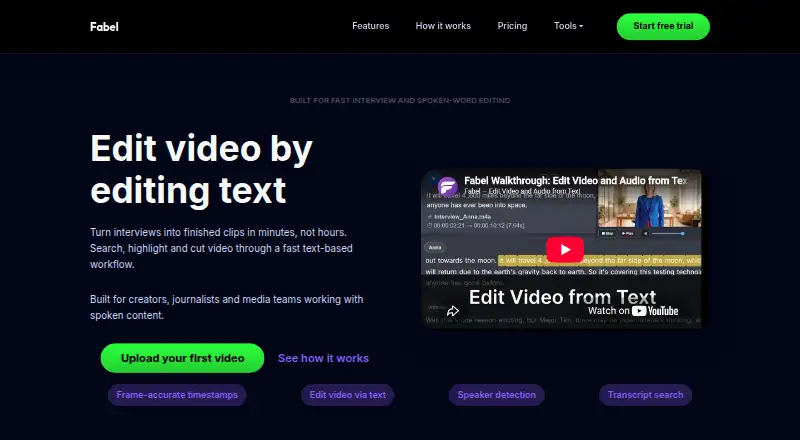
Fabel is a web video editor that lets creators work with spoken footage through its transcript. Users can search interviews, podcasts, documentaries, or other media for words, phrases, and quotes, then highlight transcript text to make clips and sequences. Clicking a word takes the user to that point in the video. Fabel says its word-level timing supports frame-accurate review and cutting, and automatic speaker detection adds labels without manual labeling.
The workspace can be used to share media and export time-coded scripts, clips, and transcripts. Users upload files and start editing in a browser, without installing software. Fabel says uploaded files are stored securely, are accessible only to the user, are not used for training, and are not shared with third parties. The site describes the product as currently completely free, and lists a free plan at no cost with no limits stated. Fabel provides a contact email for questions and help.
Who it suits
Fabel suits creators, journalists, and media teams who work with spoken content such as interviews, podcasts, and documentaries. Its transcript search and text-based clip creation are useful for people who want to find and shape moments from recorded speech.
What it does well
- Find words, phrases, and quotes across a transcript or media library.
- Turn highlighted transcript text into clips and sequences.
- Jump to a video moment by clicking its transcript word.
- Automatic speaker detection adds labels without manual labeling.
- Share media and export time-coded scripts, clips, and transcripts.
- Upload and edit in a browser without installing software.
What to know first
- Editing is available on the web platform.
- The product is focused on spoken content and transcripts.
Plans
| Plan | Billed and limits | Price |
|---|---|---|
| Free | No limits stated | Free |
As fabel.tv lists them, read 4 Oct 2026. The maker's own page has the final word.
Getting started
- Open https://fabel.tv/ in a web browser.
- Upload media to the workspace.
- Search the transcript or library for words, phrases, or quotes.
- Highlight transcript text to create clips and sequences.
- Share media or export time-coded scripts, clips, and transcripts as needed.
Verdict
Choose Fabel if your work involves finding and editing moments from interviews, podcasts, or other spoken footage. Its transcript search, word-level navigation, and text-based clip creation bring those tasks into a browser workspace. It may be a less suitable fit for work that does not center on spoken content.
Questions
Is Fabel free?
Yes. The site says Fabel is currently completely free and lists its Free plan at no cost.
Which platforms does Fabel support?
Fabel is available on the web. Users can upload files and start editing without installing software.
What kinds of media work is Fabel designed for?
Fabel is intended for spoken content, including interviews, podcasts, and documentaries.
Can Fabel find words across multiple recordings?
Users can search within a transcript or across their whole library for words, phrases, and quotes.
How does Fabel handle uploaded files?
Fabel says files are stored securely, accessible only to the user, not used for training, and not shared with third parties.
How can I get help with Fabel?
Fabel provides a contact email for questions and help.
Facts from Fabel's own pages
- Availability
- The site says users can upload and start editing without installing software. · fabel.tv, 4 Oct 2026
- Exports and sharing
- The workspace supports sharing media and exporting time-coded scripts, clips and transcripts. · fabel.tv, 4 Oct 2026
- Intended users
- Fabel is built for creators, journalists and media teams working with spoken content, including interviews, podcasts and documentaries. · fabel.tv, 4 Oct 2026
- Pricing status
- The homepage states that Fabel is currently completely free. · fabel.tv, 4 Oct 2026
- Privacy
- Fabel says uploaded files are stored securely, accessible only to the user, not used for training and not shared with third parties. · fabel.tv, 4 Oct 2026
- Product
- Fabel is a transcript-based video editing platform for searching interviews, selecting clips and shaping stories from text. · app.fabel.tv, 4 Oct 2026
- Search
- Users can search a transcript or their whole library for words, phrases and quotes. · fabel.tv, 4 Oct 2026
- Speakers
- Automatic speaker detection provides speaker labels without manual labeling. · fabel.tv, 4 Oct 2026
- Support
- Fabel provides a contact email for questions and help. · fabel.tv, 4 Oct 2026
- Text editing
- Users can highlight transcript text and turn selected words into clips and sequences. · fabel.tv, 4 Oct 2026
- Timing
- Fabel says each word is timed for frame-accurate review and cutting. · fabel.tv, 4 Oct 2026
- Transcript navigation
- Users can click a word to jump to its corresponding moment in the video. · fabel.tv, 4 Oct 2026
Where Fabel stands on Freedom251
- AI Video Editing Software#13 of 32
- Podcast Clip Makers#13 of 30