Freedom251 › AI Video Editing Software
Dawn Cut
What Dawn Cut is
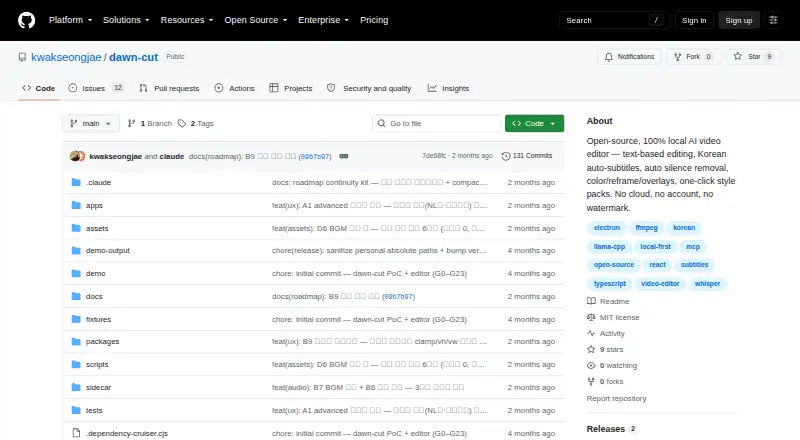
Dawn Cut is an open-source video editor for macOS that turns transcript changes into video edits. Its local whisper.cpp transcription produces word-level text and supports Korean auto-subtitles. Delete a range of words to cut the matching footage and close the gap; the editor also offers automatic silence removal, filler-word detection, and subtitle review and correction. For finishing, it includes color grading, reframing, overlays, and style packs. Exports listed for the project include SRT subtitles, chapters, deterministic EDL files, and video rendered through an FFmpeg sidecar.
The project describes Dawn Cut as fully local, with no cloud service or account requirement. Its Free plan costs nothing, has no subscription, and adds no watermark. The project is released under the MIT license and labels the product v0.1, with its deterministic editing core ready to use. Natural-language editing is experimental: a local llama.cpp planner requires a one-time model download, and its planning quality is bounded by the 1.5B model. An experimental headless MCP server can let external agents such as Claude Desktop and Cursor operate on .dawn projects, though its render does not yet burn in subtitles or overlays.
Who it suits
Dawn Cut suits macOS editors who want transcript-based cuts, local word-level transcription, and automatic silence removal. Its local operation and MIT license may also suit people seeking an open-source workflow without an account or cloud service.
What it does well
- Word-range deletion cuts matching footage and closes the gap.
- Local whisper.cpp transcription provides word-level text.
- Supports Korean auto-subtitles and subtitle correction.
- Includes color grading, reframing, overlays, and style packs.
- Exports SRT, chapters, deterministic EDL, and rendered video.
What to know first
- Available for macOS only.
- Natural-language editing is experimental and bounded by a 1.5B planner.
- Experimental MCP rendering omits subtitles and overlays.
- MCP's npx-installable package is not published.
Limits
The Free plan costs nothing and has no subscription, account requirement, or watermark. Experimental natural-language editing is bounded by its 1.5B planner; experimental MCP rendering does not burn in subtitles or overlays.
Plans
| Plan | Billed and limits | Price |
|---|---|---|
| Free | No subscription · no account · no watermark | Free |
As github.com lists them, read 8 Oct 2026. The maker's own page has the final word.
Getting started
- Open https://github.com/kwakseongjae/dawn-cut.
- Use a Mac, then install Node 20 or later and pnpm 10.
- Install cmake and FFmpeg for transcription setup.
- Follow the project's quickstart to set up the app.
- For experimental natural-language editing, download its model once.
Verdict
Choose Dawn Cut if you want a free macOS editor that ties transcript edits to footage and runs locally. Look elsewhere if you need a published npx-installable MCP package or MCP renders with subtitles and overlays burned in.
Questions
How much does Dawn Cut cost?
Its Free plan costs nothing, with no subscription.
Is Dawn Cut open source?
Yes. It is released under the MIT license.
Which platform does it support?
Dawn Cut is available for macOS.
Does it create captions automatically?
Yes. Local whisper.cpp transcription provides word-level text and supports Korean auto-subtitles.
Can external agents work with Dawn Cut projects?
An experimental headless MCP server can let agents such as Claude Desktop and Cursor operate on .dawn projects. Its render does not yet burn in subtitles or overlays.
Does it require an account or cloud service?
The project describes Dawn Cut as local, with no cloud service and no account requirement.
Facts from Dawn Cut's own pages
- Automatic captions
- Yes · github.com, 21 Sept 2026
- Editing features
- Features include silence removal, filler-word detection, subtitle review and correction, color grading, reframing, overlays, and style packs. · github.com, 8 Oct 2026
- Experimental AI
- Natural-language editing uses a local llama.cpp planner and requires a one-time model download; planning quality is bounded by its 1.5B model. · github.com, 8 Oct 2026
- Exports
- The README lists SRT and chapter export, deterministic EDL export, and video rendering through an FFmpeg sidecar. · github.com, 8 Oct 2026
- Free plan
- Yes · github.com, 21 Sept 2026
- Integrations
- The experimental headless MCP server can let external agents such as Claude Desktop and Cursor operate on .dawn projects. · github.com, 8 Oct 2026
- License
- The project is released under the MIT license. · github.com, 8 Oct 2026
- MCP limitation
- The experimental MCP render does not yet burn in subtitles or overlays, and its npx-installable package is not published. · github.com, 8 Oct 2026
- Privacy
- The project describes Dawn Cut as 100% local, with no cloud and no account. · github.com, 8 Oct 2026
- Product
- Dawn Cut is an open-source, local AI video editor for editing video through text, subtitles, and automatic silence removal. · github.com, 8 Oct 2026
- Requirements
- The quickstart lists Node 20 or later and pnpm 10, plus cmake and FFmpeg for transcription setup. · github.com, 8 Oct 2026
- Silence removal
- Yes · github.com, 21 Sept 2026
- Status
- The README labels the product v0.1 and says the deterministic editing core is ready to use. · github.com, 8 Oct 2026
- Supported platforms
- macOS · github.com, 21 Sept 2026
- Text-based editing
- Yes · github.com, 21 Sept 2026
- Text editing
- Deleting a word range cuts the corresponding footage and closes the gap. · github.com, 8 Oct 2026
- Transcription
- The app uses local whisper.cpp for word-level transcription and supports Korean auto-subtitles. · github.com, 8 Oct 2026
Where Dawn Cut stands on Freedom251
- AI Video Editing Software#11 of 32
- AI Video Editors#32 of 81
- Video editors#48 of 71