Freedom251 › AI transcription tools
Express Scribe
What Express Scribe is
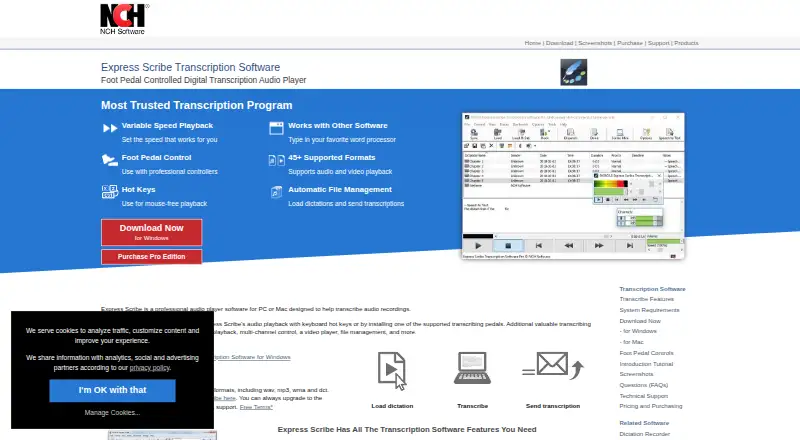
Express Scribe is a desktop audio player for transcribing recordings, with versions for Linux, macOS and Windows. It supports timestamps and variable-speed playback that keeps pitch constant, along with multi-channel controls and video playback. Users can control playback with keyboard hotkeys or supported professional USB foot pedals, and hotkeys can help with mouse-free work in Microsoft Word and other major word processors.
The free edition supports common audio formats, including WAV, MP3, WMA and DCT, and is described as unlimited. Express Scribe can receive dictations from FTP, email or a local computer network, then send completed transcriptions to clients. It works with speech-recognition software, including SAPI-compliant software, and accepts encrypted dictation files from Express Dictate or Pocket Dictate. The professional edition adds proprietary recorder-format support, including DSS and formats from Sony, Philips, Grundig and Olympus; video playback is also listed as a Pro feature. A native Linux build is available, though some proprietary formats may not work there. The maker offers tutorials and setup guidance, FAQs, format help and technical support. The site lists free and paid plans, with professional annual pricing at $99 a year.
Who it suits
Express Scribe suits people transcribing medical, legal or video recordings who want playback controls tailored to transcription. It can also fit workflows that use word processors, speech-recognition software or incoming dictations from FTP, email or a local network.
What it does well
- Runs on Linux, macOS and Windows.
- Variable-speed playback retains constant pitch.
- Supports keyboard hotkeys and professional USB foot pedals.
- Receives dictations through FTP, email or a local network.
- Works with SAPI-compliant speech-recognition software.
What to know first
- The free edition is limited to common audio formats.
- Proprietary recorder formats require a professional edition.
- The native Linux build may not support some proprietary formats.
Limits
The free edition supports common audio formats; support for proprietary recorder formats requires the professional version. DSS, Sony, Philips, Grundig and Olympus recorder formats, as well as video playback, are listed as Pro features.
Plans
| Plan | Billed and limits | Price |
|---|---|---|
| Free | Unlimited free version · Common audio formats | Free |
| Professional Quarterly | Professional features · All upgrades · Unlimited ongoing use | On request |
| Basic Annual | Standard Edition | On request |
| Professional Annual | Unrestricted Professional License | On request |
| Express Scribe Free | Common audio formats including WAV, MP3, WMA and DCT | Free |
| Express Scribe Professional Quarterly Plan | $26.49 quarterly · Unlimited ongoing use of all professional features and all upgrades | $26.49 a month |
| Express Scribe Basic Annual Plan | $79.99+VAT/year · Standard Edition | $79.99 a year |
| Express Scribe Professional Annual Plan | $99.00+VAT/year · Unrestricted Professional License | $99 a year |
As nch.com.au lists them, read 22 Sept 2026. The maker's own page has the final word.
Getting started
- Visit https://www.nch.com.au/scribe/.
- Choose the version for Linux, macOS or Windows.
- Start with the free edition for common audio formats, or select a professional plan for additional format support.
- Use supported audio or video files, or receive dictations through FTP, email or a local network.
- Control playback with hotkeys or a supported professional USB foot pedal.
Express Scribe is a transcription workstation for turning recorded speech into documents. It is best for medical, legal and video transcription teams that need precise playback, timestamps and hands-free controls across desktop operating systems. The free edition is a capable starting point for common audio, while specialist recorder files and some video work push you toward a paid license.
Overview
Variable-speed playback preserves the speaker’s pitch, making slow, careful listening practical without distorting voices. Timestamp support and multi-channel control help you return to exact moments or isolate channels during difficult passages. Keyboard hotkeys and compatible professional USB foot pedals keep start, stop and navigation away from the mouse, a meaningful advantage for long transcription sessions.
Express Scribe also handles the handoff around a transcript. It can receive dictations through FTP, email or a local computer network and send completed transcriptions to clients. Microsoft Word and other major word processors fit the write-while-listening workflow, with hotkeys for mouse-free operation. SAPI-compliant speech-recognition software can convert speech to text, but the application remains a controlled playback and document-production tool rather than a standalone automated transcription service. Encrypted dictation from Express Dictate or Pocket Dictate is supported for compatible workflows.
Key features
- Playback and navigation: Variable speed with constant pitch, timestamps and multi-channel controls support close review while preserving intelligibility.
- Hands-free operation: Keyboard shortcuts and supported professional USB foot pedals let transcriptionists control playback without interrupting typing.
- Format coverage: Common audio includes MP3, M4A, DSS and WAV; video support includes AVI, MOV, MP4 and WMV. The free edition is limited to common audio formats, so proprietary recorder files require the professional edition.
- Dictation routing: FTP, email and local-network intake, plus delivery of finished transcripts to clients, suits offices that pass recordings between speakers and typists.
- Speech recognition: SAPI-compatible recognition software can be used for speech-to-text, extending the workflow without replacing a dedicated recognition system.
- Automation and support: The SDK exposes command-line actions to open or close files, dispatch or delete them, and bring the application forward or back. Video tutorials, format and file guidance, controller setup help, FAQs and technical support assist with configuration.
Pricing
Express Scribe uses a freemium model with a free edition and paid standard or professional licenses. The free plan costs nothing and offers unlimited use with common audio formats. A similarly named Express Scribe Free plan is also free and specifies common formats including WAV, MP3, WMA and DCT. These options fit individuals who transcribe ordinary files and do not need proprietary recorder support.
The Express Scribe Professional Quarterly Plan costs $26.49 a month, billed quarterly, with unlimited ongoing use of all professional features and all upgrades. The Express Scribe Professional Annual Plan costs $99 a year, billed yearly, and provides an unrestricted professional license plus all professional features and upgrades. The comparison also names Professional Quarterly as custom pricing with professional features, all upgrades and unlimited ongoing use, and Professional Annual as custom pricing for an unrestricted professional license; prospective buyers should distinguish these labels from the priced plans shown above.
The Basic Annual Plan costs $79.99 a year, billed yearly, for the Standard Edition. It is the lower-cost paid route, but it does not promise the unrestricted professional license or the full professional feature set. A free trial is available, useful for checking format and workflow compatibility before committing.
Platforms
Native builds are available for Linux, macOS and Windows. Linux users should expect that some unusual proprietary formats may not work in the native build; running the Windows version with Wine supports more formats. That makes Windows the safer choice when recorder-specific compatibility is essential.
Who it's for
Choose Express Scribe for medical, legal or video transcription where humans need controlled playback, timestamps, foot-pedal support and a defined dictation pipeline. It is particularly suitable for offices receiving files from multiple sources and returning finished documents to clients. It is less suitable when the priority is fully automated, cloud-based transcription rather than listening and typing.
Pros and cons
- Pros: Constant-pitch speed changes make difficult audio easier to work through; timestamps, channels and hotkeys support precise navigation; FTP, email and network intake reduce manual file handling; encrypted Express Dictate and Pocket Dictate files fit compatible business workflows; Linux, macOS and Windows coverage supports mixed desktop environments.
- Cons: The free edition excludes proprietary recorder formats; professional features and video playback require an upgrade; Linux may miss esoteric formats unless the Windows build is used through Wine; it depends on SAPI-compatible recognition software rather than providing a complete automated transcription service.
Alternatives
For a wider shortlist, see Transcription Software. Pick Notta instead if you want web, mobile and desktop access with a free allowance of one seat and 120 transcription minutes per month. Happy Scribe suits users seeking meeting recording and a 10-minute AI trial in its free plan. Choose Simon Says when pay-as-you-go billing at $15 a month plus usage is preferable. Superwhisper is an option for voice-to-text in any app across mobile and desktop. Vosk is free, open source and offline for users who want speech recognition rather than a playback workstation. easytranscript, Gladia and noScribe provide alternative transcription workflows with their own platform and pricing approaches.
Verdict
Express Scribe is a strong fit for professional transcribers who value timestamped, variable-speed playback, foot-pedal control and dependable dictation exchange on desktop. Its free edition covers common audio at no cost, while the professional annual license is the practical choice for proprietary recorder formats, video playback and unrestricted features. Look elsewhere if your priority is end-to-end automated transcription or if your required recorder format is not covered by the edition you choose.
Verdict
Choose Express Scribe if you need a transcription player with timestamps, configurable playback controls and dictation handling across desktop platforms. Look elsewhere or consider a professional edition if your workflow depends on proprietary recorder formats, which are not included in the free edition.
Questions
Is Express Scribe free?
Yes. The Free plan costs nothing and supports common audio formats; the free version is described as unlimited.
What does the professional edition add?
It adds proprietary recorder formats, including DSS and Sony, Philips, Grundig and Olympus formats. Video playback is also listed as a Pro feature.
Which platforms does Express Scribe support?
It is available for Linux, macOS and Windows. The native Linux build may not support some proprietary formats.
How much does Express Scribe Professional cost?
The Professional Quarterly plan is $26.49 a month, billed quarterly. The Professional Annual plan is $99 a year.
Can it work with speech recognition?
Yes. It works with speech-recognition software, and its speech-to-text feature works with SAPI-compliant recognition software.
Can Express Scribe receive dictations?
It can receive dictations via FTP, email or a local computer network, and can receive encrypted files from Express Dictate or Pocket Dictate.
Facts from Express Scribe's own pages
- Apple App Store availability
- The separate Express Scribe Transcription listing says it has insufficient ratings to display an overview. · apps.apple.com, 15 Oct 2026
- Audio and video playback
- The product plays both audio and video recordings. · nch.com.au, 15 Oct 2026
- Automatic file management
- Incoming dictations can be loaded automatically from FTP, email, local network folders or Express Delegate. · nch.com.au, 15 Oct 2026
- Company founding
- LinkedIn states that NCH Software was founded in 1993. · linkedin.com, 15 Oct 2026
- Company ownership and founder
- Crunchbase identifies NCH Software as a private company founded by Peter Lupton and based in Greenwood Village, Colorado. · crunchbase.com, 15 Oct 2026
- Company size and headquarters
- LinkedIn lists NCH Software as privately held, headquartered in Greenwood Village, Colorado, with 51–200 employees. · linkedin.com, 15 Oct 2026
- Controls
- Playback can be controlled with keyboard hotkeys or supported professional USB foot pedals. · nch.com.au, 11 Oct 2026
- Documentation
- NCH provides a 52-page Windows help manual, FAQs, tutorials, technical support links and a version history. · help.nchsoftware.com, 15 Oct 2026
- Encrypted dictation
- Express Scribe can receive encrypted dictation files from Express Dictate or Pocket Dictate. · nch.com.au, 11 Oct 2026
- File formats
- The site lists more than 30 audio formats and numerous video formats, including MP3, WAV, DSS, M4A, MP4 and WMV. · nch.com.au, 15 Oct 2026
- File handling
- It can automatically receive dictations from FTP, email or a local computer network and send finished transcriptions to clients. · nch.com.au, 11 Oct 2026
- Foot-pedal control
- Professional USB foot pedals can control playback, with plug-and-play setup support. · nch.com.au, 15 Oct 2026
- Free edition limits
- The free version supports common audio formats, while proprietary format support is available by upgrading to the professional version. · nch.com.au, 11 Oct 2026
- Free plan
- Yes · secure.nch.com.au, 22 Sept 2026
- Hotkeys
- System-wide hotkeys allow playback control while typing in another application. · nch.com.au, 15 Oct 2026
- Integrations
- GetApp user data mentions Google Drive and Microsoft Word as integrations. · getapp.com, 15 Oct 2026
- Intended users
- The product page identifies medical, legal and video transcription as use cases. · nch.com.au, 11 Oct 2026
- Latest Windows release
- Version 15.13 was uploaded on 2026-10-15 with a low-disk-space warning and an exposed Extra Volume Boost setting. · nch.com.au, 15 Oct 2026
- License
- The EULA reserves copyright to NCH Software, distributes the software as-is and grants a proprietary license rather than an open-source license. · nchsoftware.com, 15 Oct 2026
- Limit: audio quality
- GetApp and Capterra reviewers report tinny, static or otherwise weaker audio quality than competing transcription players. · getapp.com, 15 Oct 2026
- Limit: editing tools
- G2 and Capterra reviewers say the editor lacks autocorrect and basic audio enhancement, requiring another application for cleanup or proofreading. · capterra.com, 15 Oct 2026
- Limit: license complaints
- Apple reviewers report updates that failed to recognize previously paid licenses and demanded another payment. · apps.apple.com, 15 Oct 2026
- Limit: support
- G2 and GetApp data indicate customer support is weaker than ease of use, with GetApp rating support 3.5 out of 5. · getapp.com, 15 Oct 2026
- Linux
- A native Linux build is available, but the maker says it cannot support some esoteric proprietary formats; running the Windows version with Wine supports more formats. · nch.com.au, 11 Oct 2026
Where Express Scribe stands on Freedom251
- AI transcription tools#3 of 46
- Transcription Software#5 of 46