Freedom251 › Salon Accounting Software
Express Accounts
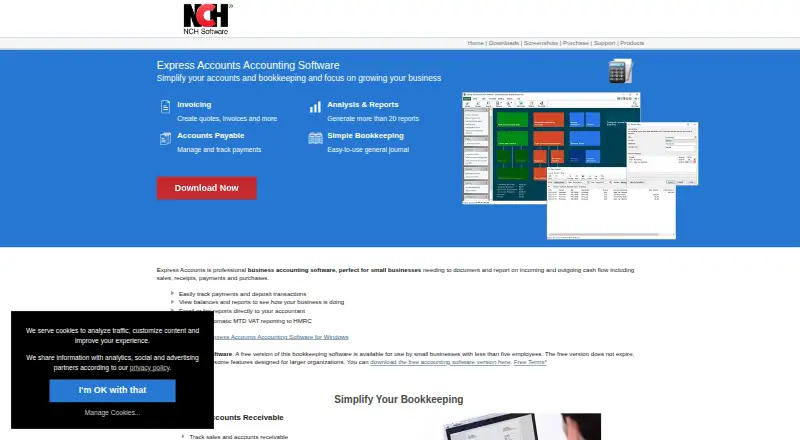
What Express Accounts is
Express Accounts is accounting software for tracking business cash flow, including sales, receipts, payments, and purchases. It creates quotes, sales orders, and invoices, and can record recurring orders and invoices. For outgoing costs, it manages accounts payable, tracks payments and purchases, generates purchase orders, and creates and prints checks. The software generates more than 20 financial reports, including income statements, balance sheets, and cash flow statements, and includes sales tax tools. A single installation can handle multiple businesses, including businesses that use different currencies. Express Accounts can import bank transactions, customers, invoices, quotes, sales orders, suppliers, and items from CSV files, and use OFX bank statements for reconciliation. It integrates with Inventoria for inventory data; both programs must be installed on the same machine for synchronization. Express Invoice can also connect with Express Accounts when recording customer payments. The software is available for Windows, macOS, and the web. It can be downloaded and installed for offline accounting. NCH lists a free version for non-commercial use and a separate free version for small businesses with fewer than five employees; the small-business version does not expire. NCH describes the product as suitable for small businesses, freelancers, self-employed professionals, and businesses with contractors or employees.
Who it suits
Express Accounts suits small businesses, freelancers, and self-employed professionals who need to track cash flow, issue invoices, and review financial reports. Its multiple-business and multi-currency support can also suit businesses managing more than one operation or currency.
What it does well
- Creates quotes, sales orders, invoices, and recurring invoices.
- Includes more than 20 financial reports.
- Supports multiple businesses and currencies in one installation.
- Imports accounting records from CSV files and OFX bank statements.
- Can be installed for offline accounting.
What to know first
- The small-business free version is limited to businesses with fewer than five employees.
- The free non-commercial version is restricted to non-commercial use.
- Desktop use does not require a password.
Limits
The free small-business version is for businesses with fewer than five employees; some features for larger organizations are not supported. The separate free version is for non-commercial use only.
Plans
| Plan | Billed and limits | Price |
|---|---|---|
| Free (non-commercial use) | non-commercial use only | Free |
| Free version for small businesses | fewer than five employees · does not expire · some features for larger organizations are not supported | Free |
| Free version | non-commercial use · businesses with fewer than 5 employees · some larger-organization features excluded | Free |
| Express Accounts Basic | discount price; normal price $249.00 + VAT · standard edition · single installation license | $159, paid once |
| Express Accounts Plus | discount price; normal price $295.00 + VAT · fully featured · single installation license | $249, paid once |
| Express Accounts Plus Quarterly Plan | $49.14 every quarter ($16.38/mo) · unlimited ongoing use of professional features · all upgrades included | $49.14 a month |
As nchsoftware.com lists them, read 8 Oct 2026. The maker's own page has the final word.
Getting started
- Visit the Express Accounts website.
- Choose the free non-commercial version or the free version for businesses with fewer than five employees.
- Download and install the software for offline accounting, or use the web platform.
- Import records from CSV files or use OFX bank statements for reconciliation.
- Install Inventoria on the same machine if you need inventory synchronization.
Overview
Express Accounts is accounting software for following business cash flow, from sales and receipts through purchases and payments. It fits small businesses, freelancers, self-employed professionals, contractors and employers who want invoicing, payables and reporting together, with the option to work offline. The free choices make it approachable, but the small-business edition's employee ceiling, unsupported larger-organization features and desktop security trade-off matter when choosing it.
Key features
Sales tools cover quotes, sales orders, invoices and recurring orders or invoices. That supports a complete quote-to-bill process and reduces the need to keep recurring billing records elsewhere. Accounts-payable functions track purchases and outgoing payments, create purchase orders, and produce printable checks, so the system handles money going out as well as revenue coming in.
More than 20 financial reports include income statements, balance sheets and cash-flow statements. Sales-tax tools and multi-currency support are useful for businesses with tax obligations or international transactions. A single installation can run multiple businesses, including businesses using different currencies, which suits an owner managing separate operations without separate installations.
CSV import accepts bank transactions, customers, invoices, quotes, sales orders, suppliers and items. OFX bank statements support reconciliation, giving businesses a way to bring existing records into the system rather than re-entering every transaction. Express Invoice can integrate with Express Accounts when recording customer payments.
Inventory is handled through Inventoria integration rather than entirely inside Express Accounts. Synchronization requires both programs installed on the same machine, an important extra deployment step for businesses that need stock data connected to accounting. The product can be downloaded for offline accounting, while Web Access requires a username and password. The desktop version does not require a password, so anyone with access to that computer may be able to open the accounting installation. Automatic integrated backup is included as an accounting feature. NCH provides technical-support contacts, manuals, video tutorials and a user forum.
Pricing
Free (non-commercial use)
This plan costs nothing and is restricted to non-commercial use. It is appropriate for personal, educational or other non-commercial accounting, but not for operating a revenue-generating business.
Free version for small businesses
The small-business version costs nothing, does not expire and is limited to fewer than five employees. Some features intended for larger organizations are not supported. It is a sensible fit for a very small team that can stay within that headcount and does not need those larger-business capabilities; growing companies should treat the employee limit as a reason to review alternatives before adopting it as a long-term system.
No paid plan or paid upgrade price is provided, so businesses that outgrow the free edition should confirm their next licensing step with NCH.
Platforms
Express Accounts is available for macOS, Windows and the web. Desktop installation enables offline work, while web access adds browser-based access with username-and-password login. Businesses wanting synchronized inventory must run Inventoria on the same machine, which can reduce the flexibility of a mixed-device setup.
Who it's for
Choose it when a small business needs cash-flow tracking, sales-tax handling, invoicing, purchasing and financial statements in one system. Freelancers, self-employed professionals and contractor-based businesses can use the recurring billing, payables and import tools without committing to a subscription price. It is also relevant to owners running multiple businesses or currencies from one installation.
Look elsewhere if you need a larger employee base on a free plan, require password protection on the desktop application, or want inventory synchronization without installing a second NCH product locally.
Pros and cons
Pros
- Broad small-business coverage: quotes, orders, invoices, payables, purchase orders, checks and cash-flow reporting sit in one accounting application.
- Useful reporting: more than 20 reports, including income statements, balance sheets and cash-flow statements, support regular financial review.
- Flexible record handling: CSV imports and OFX reconciliation can shorten migration and bank-reconciliation work.
- Multiple businesses and currencies: one installation can manage separate businesses, including different-currency operations.
- Offline option: downloadable desktop software allows accounting without an internet connection.
Cons
- Strict free-plan size limit: the small-business edition is for fewer than five employees and omits some larger-organization features.
- Non-commercial free edition: the separate free plan cannot be used for a commercial business.
- Desktop access lacks a password requirement: local computer access is not protected by an application login.
- Inventory needs another installation: Inventoria must be installed on the same machine for synchronization.
Alternatives
Clear Books is a better fit for a sole trader wanting browser and mobile access, with a forever-free plan and no transaction limits.
FreeAgent suits users who prefer Android or iOS access and are willing to pay monthly plans for sole-trader or partnership accounting.
Giddh is worth considering for students, teachers, institutes and coaching centers eligible for its free plan, with broader platform coverage including mobile and API access.
GnuCash is the straightforward alternative for free personal and small-business desktop accounting on Linux, macOS or Windows.
Wave is preferable when unlimited estimates, invoices, bills and bookkeeping records are more important than offline desktop accounting.
ZipBooks offers a starter option with unlimited invoices, vendors and customers, plus Square or PayPal payments.
Zoho Books fits solopreneurs and micro businesses that meet its annual-revenue condition and want a free mobile-oriented plan.
BUSY is an alternative for businesses seeking a web-based free billing and accounting plan with multiple companies and financial years.
For salon-focused comparisons, see the Salon Accounting Software list.
Verdict
Express Accounts is a strong choice for a very small business that wants free, offline-capable bookkeeping with invoicing, payables, multi-currency records and substantial reporting. Its main reason to choose it is the breadth of accounting work covered without an expiry on the under-five-employee plan. Look elsewhere if your team is approaching five employees, needs stronger desktop access control, or expects inventory synchronization without installing Inventoria alongside it.
Verdict
Choose Express Accounts if your small business needs cash-flow tracking, invoicing, payables, and financial reporting, including offline use. The free small-business version is limited to fewer than five employees, while the non-commercial free version is for non-commercial use. Businesses needing inventory synchronization must also install Inventoria on the same machine.
Questions
Is Express Accounts free?
Yes. NCH lists a free version for non-commercial use and a free small-business version for businesses with fewer than five employees. The small-business version does not expire.
Which platforms does it support?
Express Accounts lists macOS, web, and Windows.
Can I use it offline?
Yes. It can be downloaded and installed to manage accounting offline.
Does it support multiple currencies?
Yes. One installation can run multiple businesses, including businesses using different currencies.
Does Express Accounts connect with inventory software?
It integrates with Inventoria to maintain inventory data. Synchronization requires both programs to be installed on the same machine.
Who makes Express Accounts?
The listed support and product information identifies NCH as the provider.
Facts from Express Accounts's own pages
- Accounts payable
- Tracks bills and outgoing purchases, creates purchase orders and prints checks. · nchsoftware.com, 15 Oct 2026
- Backup
- The product page lists automatic integrated backup as an additional accounting feature. · nchsoftware.com, 8 Oct 2026
- Bank reconciliation
- Reconciles account transactions against bank statements. · help.nchsoftware.com, 15 Oct 2026
- Changelog
- Version 14.04 for macOS was uploaded August 14, 2026; version 14.02 for Windows was uploaded July 28, 2026. · nchsoftware.com, 15 Oct 2026
- Company facts
- LinkedIn lists NCH Software as privately held, founded in 1993, headquartered in Greenwood Village, Colorado, with 51–200 employees. · linkedin.com, 15 Oct 2026
- Data import
- It can import bank transactions, customers, invoices, quotes, sales orders, suppliers and items from CSV files, and can use OFX bank statements for reconciliation. · nchsoftware.com, 8 Oct 2026
- Documentation
- The online manual covers chart of accounts, taxes, invoicing, purchasing, payroll, reports, CSV import, backups, multiple currencies, mail merge and Inventoria integration. · help.nchsoftware.com, 15 Oct 2026
- Founder and ownership
- Crunchbase identifies Peter Lupton as founder and CEO and describes NCH Software as a private, active for-profit company founded in 1993. · crunchbase.com, 15 Oct 2026
- Imports
- CSV import supports bank transactions, customers, invoices, quotes, sales orders, suppliers and items; the FAQ also lists OFX and Microsoft Money import. · nchsoftware.com, 15 Oct 2026
- Integration
- Integrates with NCH Inventoria to keep inventory quantities and business data synchronized. · nchsoftware.com, 15 Oct 2026
- Intended users
- NCH describes Express Accounts as suitable for small businesses and highlights freelancers, self-employed professionals, businesses with contractors and businesses with employees. · nchsoftware.com, 8 Oct 2026
- Inventory integration
- Express Accounts integrates with Inventoria to maintain inventory data across business operations. · nchsoftware.com, 8 Oct 2026
- Invoicing
- Creates quotes, sales orders, invoices, recurring invoices and customer statements. · nchsoftware.com, 15 Oct 2026
- License
- The EULA reserves copyright to NCH and other listed owners, making the software proprietary rather than open source. · nchsoftware.com, 15 Oct 2026
- Limit: ledger reliability
- A Capterra reviewer says a random general-ledger account sequence problem persisted for more than a year and made entries difficult to investigate. · capterra.com, 15 Oct 2026
- Limit: missing capabilities
- The G2 reviewer wanted French-law compliance, while Capterra reviewers requested more financial-analysis modules and autofill suggestions. · g2.com, 15 Oct 2026
- Limit: reconciliation
- A reviewer reports that correcting a posting after reconciliation caused it to reappear in the next month’s reconciliation. · capterra.com, 15 Oct 2026
- Limit: support
- Several Capterra reviewers report delayed or absent responses, including a backup submitted months earlier with no substantive follow-up. · capterra.com, 15 Oct 2026
- Multiple businesses
- One installation can run multiple businesses, including businesses using different currencies. · nchsoftware.com, 15 Oct 2026
- Notable news
- NCH’s release archive records the Inventoria integration with Express Accounts, Express Invoice and Copper on July 30, 2013. · nch.com.au, 15 Oct 2026
- Offline use
- The downloadable program can be installed and used offline. · nchsoftware.com, 15 Oct 2026
- Other integrations
- Express Invoice can integrate with Express Accounts when recording customer payments, and Inventoria synchronization requires both programs to be installed on the same machine. · nchsoftware.com, 8 Oct 2026
- Platforms
- The download page offers Windows and Mac OS X versions and lists Windows 7 to 11 and macOS 10.5 or above as system requirements. · nchsoftware.com, 8 Oct 2026
- Praise: accounting functions
- Reviewers praise quotes, invoices, orders, journal entries, bank reconciliation, balance sheets and statutory reports. · capterra.com, 15 Oct 2026
Where Express Accounts stands on Freedom251
- Salon Accounting Software#4 of 29