Freedom251 › Legal Trial Presentation Software

ExhibitView Trial Presenter
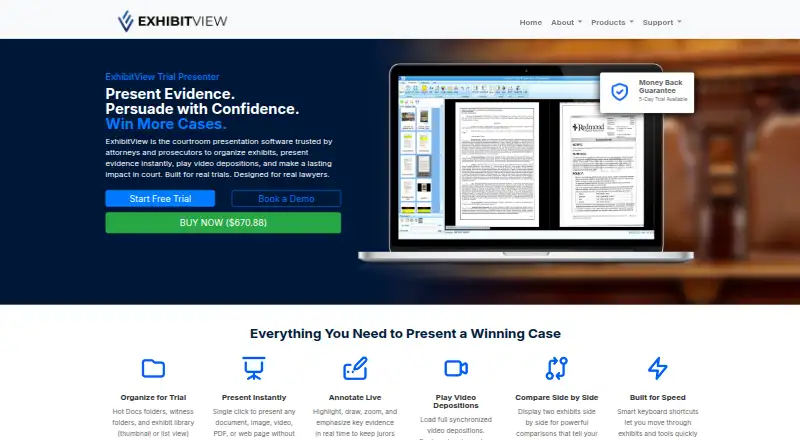
What ExhibitView Trial Presenter is
ExhibitView Trial Presenter is courtroom presentation software for managing exhibits, presenting evidence and playing video depositions. Its materials can be arranged in Hot Docs folders, witness folders and an exhibit library, with thumbnail or list views. During a presentation, users can open documents, images, videos, PDFs and web pages with a single click, then highlight, draw on or zoom into evidence. They can show two exhibits side by side or switch to a full-screen view.
For deposition video, the software supports synchronized playback and lets presenters bookmark or impeach testimony during a presentation. Its e-Search feature can search and review documents and create reports, whether working with a few documents or thousands. The maker names trial attorneys, prosecutors and DAs, paralegals, litigation support professionals, trial consultants and legal videographers among its intended users.
Desktop products are designed for Windows and can be used on a compatible Windows laptop. The maker also offers iTrial, an iPad app for presenting documents, photographs, video and other evidence; desktop cases can be synchronized to it. The listed plan is $670.88, paid once and includes a 5-day trial and money-back guarantee.
Who it suits
ExhibitView Trial Presenter suits trial attorneys, prosecutors and DAs, paralegals, litigation support teams, trial consultants and legal videographers who present evidence in court. Its Windows desktop products and iPad option may suit teams that need to present exhibits or synchronized deposition video.
What it does well
- Organizes evidence in Hot Docs, witness folders and an exhibit library.
- Presents documents, images, videos, PDFs and web pages with one click.
- Supports live highlighting, drawing and zooming on evidence.
- Shows two exhibits side by side or full screen.
- Offers synchronized deposition video and testimony bookmarking.
- Searches and reviews documents and creates reports with e-Search.
What to know first
- The desktop products are designed for Windows.
- The listed plan costs $670.88, paid once.
- The trial lasts 5 days.
Limits
The listed plan includes a 5-day trial. Desktop products are designed for Windows; Mac-focused firms are advised to contact the maker about setup.
Plans
| Plan | Billed and limits | Price |
|---|---|---|
| ExhibitView Trial Presenter | 5-day trial · money-back guarantee | $670.88, paid once |
As exhibitview.net lists them, read 5 Oct 2026. The maker's own page has the final word.
Getting started
- Visit https://exhibitview.net/exhibitview-trial-presenter/.
- Choose the ExhibitView Trial Presenter plan, listed at $670.88, paid once with a 5-day trial.
- Use a compatible Windows laptop for the desktop product.
- For iPad presentations, use the maker's iTrial app and synchronize desktop cases to it.
- Review the maker's tutorials, documentation and training resources before a live trial.
Verdict
Choose ExhibitView Trial Presenter if your legal team needs to organize courtroom materials, present varied evidence and work with deposition video. Its Windows-oriented desktop design may be less suitable for Mac-focused firms; the maker advises those firms to contact it about setup.
Questions
How much does ExhibitView Trial Presenter cost?
The listed plan costs $670.88, paid once and includes a 5-day trial and money-back guarantee.
Is there a free plan or trial?
There is no free plan. A 5-day trial is listed.
Which platforms does it support?
The listed supported platforms are Windows and iOS. Desktop products are designed for Windows, and the maker offers the iTrial iPad app.
What evidence can it present?
It can present documents, images, videos, PDFs and web pages. It also supports synchronized video depositions.
Who is ExhibitView Trial Presenter for?
The maker lists trial attorneys, prosecutors and DAs, paralegals, litigation support, trial consultants and legal videographers.
What support and training are available?
The support page lists office and 24-hour emergency text or phone support at 404-247-3596 and [email protected]. Tutorials, documentation and training resources are also available.
Facts from ExhibitView Trial Presenter's own pages
- Comparison
- It can display two exhibits side by side or present exhibits full screen. · exhibitview.net, 5 Oct 2026
- Deposition video
- It supports synchronized video depositions and bookmarking or impeaching testimony during presentation. · exhibitview.net, 5 Oct 2026
- Document search
- Its e-Search feature can search, review and create reports for a few or thousands of documents. · exhibitview.net, 5 Oct 2026
- Evidence organization
- It organizes materials in Hot Docs folders, witness folders and an exhibit library with thumbnail or list views. · exhibitview.net, 5 Oct 2026
- Intended users
- The maker lists trial attorneys, prosecutors and DAs, paralegals, litigation support, trial consultants and legal videographers as users. · exhibitview.net, 5 Oct 2026
- iPad option
- iTrial is the maker’s iPad app for presenting documents, photographs, video and other evidence, and desktop cases can be synchronized to it. · exhibitview.net, 5 Oct 2026
- Live annotation
- Presentation tools support highlighting, drawing and zooming while presenting evidence. · exhibitview.net, 5 Oct 2026
- Mac limitation
- The maker says its desktop products are designed for Windows and advises Mac focused firms to contact it about setup. · exhibitview.net, 5 Oct 2026
- Presentation formats
- It can present documents, images, videos, PDFs and web pages with a single click. · exhibitview.net, 5 Oct 2026
- Purpose
- ExhibitView is courtroom presentation software for organizing exhibits, presenting evidence and playing video depositions. · exhibitview.net, 5 Oct 2026
- Support
- The support page lists office and 24 hour emergency text or phone support at 404-247-3596 and [email protected]. · exhibitview.net, 5 Oct 2026
- Training
- The maker provides tutorials, documentation and training resources and recommends training before a live trial. · exhibitview.net, 5 Oct 2026
- Trial reliability advice
- The FAQ recommends a backup computer and independent case file backups for important trials. · exhibitview.net, 5 Oct 2026
- Windows support
- The desktop products are designed for Windows and can be used on a compatible Windows laptop. · exhibitview.net, 5 Oct 2026
Where ExhibitView Trial Presenter stands on Freedom251
- Legal Trial Presentation Software#10 of 24