Freedom251 › Recruiting Events Software

event67
What event67 is
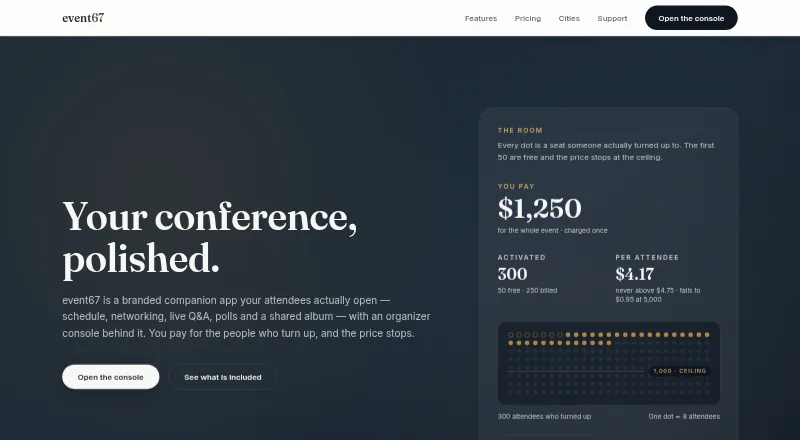
event67 is a branded conference companion app with an organizer console, billed by activated attendees. Its live schedule can be filtered by track and includes session details, personal agendas and workshop RSVPs with waitlists. Attendees can search a directory, manage profiles and connect in person by QR code or remotely by request. Moderated Q&A, polls, crowd reactions and session feedback support attendee engagement. Organizers can apply their branding and publish the app under their own name in the App Store and Google Play; a web version is also available. The Partner API, signed webhooks and scheduled data sources support access to event records, updates and partner-data imports, but integrations require a paid organization plan. The free plan covers one live event and up to 50 activated attendees. Event Pass charges $5.00 USD once per activated attendee beyond the first 50, capped at $4,750 per event. Annual seasonal plans start at $8,750 a year. The product is positioned as an attendee-experience app, not a full event-management suite.
Who it suits
It suits event organizers seeking a branded attendee companion for in-person events. It is not intended as a full event-management suite.
What it does well
- Free plan includes one live event.
- Schedules include tracks and personal agendas.
- Attendees can connect in person by QR code.
- Organizers can publish under their own app name.
What to know first
- No ticket sales or badge printing.
- No video streaming or exhibitor lead retrieval.
- Integrations require a paid organization plan.
- No in-app attendee deletion button.
Limits
The Free plan covers one live event and up to 50 activated attendees. Event Pass charges $5 per activated attendee beyond the first 50, with a $4,750 cap per event; integrations require a paid organization plan.
Plans
| Plan | Billed and limits | Price |
|---|---|---|
| Free | forever · one live event · up to 50 activated attendees · full app and branding · no card | Free |
| Season Pass Growth | annual · 10,000 attendee credits · $3 per credit · credits pool across unlimited events | $30,000 a year |
| Event Pass | per activated attendee beyond 50; charged 48 hours after event · one event cap $4,750 · unlimited invites · no per-event minimum | $5, paid once |
| Season Pass Scale | annual · 25,000 attendee credits · $2.50 per credit · credits pool across unlimited events | $62,500 a year |
| Season Pass Starter | annual · 2,500 attendee credits · one event at a time · $3.50 per credit | $8,750 a year |
As event67.com lists them, read 15 Oct 2026. The maker's own page has the final word.
Getting started
- Visit the event67 website.
- Start with the Free plan for one live event and up to 50 activated attendees, or choose a paid plan.
- Set up the event schedule, tracks, sessions, and workshop RSVPs.
- Apply your branding and publish under your own name in the App Store and Google Play, or use the web version.
- For data integrations, use a paid organization plan with the Partner API, signed webhooks, or scheduled data sources.
Overview
event67 is a branded companion app for in-person conference organizers who want attendees to navigate sessions, connect, and participate. It works best as a focused attendee-experience layer, not as the system running event operations.
Its live schedule, networking tools, and engagement features cover useful parts of the conference day, and organizers can publish the app under their own name. But ticketing and several other core event services sit outside its scope.
Key features
Schedules and workshop RSVPs
A live, filterable schedule with tracks and session details helps attendees find relevant sessions and organize a personal agenda. Workshop RSVPs and waitlists are useful for managing interest in limited-capacity sessions, though they do not replace ticket sales or registration.
Networking and participation
Attendees can search a directory, manage profiles, and connect in person by QR code or remotely by sending a request. Moderated Q&A, polls, crowd reactions, and session feedback give people several ways to contribute during a conference. These are practical engagement tools, but they do not extend to algorithmic matchmaking or video streaming.
Branding and integrations
Organizers can brand the app and publish it under their own name in the App Store and Google Play, with a web version alongside Android and iOS apps. The Partner API, signed webhooks, and scheduled data sources support reading event records, receiving updates, and importing partner data. Integrations require a paid organization plan, which limits their usefulness to organizers relying on the free tier.
Security and data handling
The maker says traffic uses HTTPS, authentication is handled by Firebase Authentication, and the API runs on Google Cloud Run; data is processed primarily in the United States. It has no SOC 2 report, ISO 27001 certification, HIPAA compliance, or FedRAMP authorization, so organizations with those requirements should look elsewhere. Profile and event participation data remain until deletion is requested, with no scheduled purge, and attendees have no in-app deletion button. Support says it responds within one business day, usually sooner.
Pricing
The free plan costs $0 forever and covers one live event with up to 50 activated attendees and the whole feature set. That is a useful way to run a small event, but the attendee cap makes it a narrow fit for larger conferences.
Event Pass charges $5 per activated attendee beyond the first 50, with no event limit and a $4,750 cap per event. Charges arrive 48 hours after the event ends, so organizers pay in relation to activated attendees rather than buying a fixed annual allowance.
Season Pass plans suit organizers running events throughout the year. Starter costs $8,750 a year for 2,500 attendee credits; Growth costs $30,000 a year for 10,000 credits; Scale costs $62,500 a year for 25,000 credits. Unused credits roll over for 12 months on each plan, and additional attendees cost $5 each. These annual commitments make more sense for recurring programs with predictable volume than for occasional events. There is no free trial.
Platforms
Attendees can use event67 on Android, iOS, or the web. Organizers also have an API, while the ability to publish under their own app name supports a branded presence in the mobile app stores.
Who it's for
event67 fits organizers of in-person conferences who want to improve schedule navigation, attendee connections, and session participation without adopting a full event-management suite. It is a poor fit for teams that need ticket sales, badge printing, exhibitor lead retrieval, video streaming, or algorithmic matchmaking in the same product.
Pros and cons
- Pros: A free plan includes the whole feature set for one event and up to 50 activated attendees, making it practical for a small conference.
- Pros: Schedules, personal agendas, workshop waitlists, networking, and live engagement tools cover several attendee needs in one companion app.
- Pros: Branding, mobile apps, and a web version give organizers several ways to present the conference experience.
- Cons: It does not handle ticket sales, badge printing, exhibitor lead retrieval, video streaming, or algorithmic matchmaking, leaving important event workflows elsewhere.
- Cons: The free plan stops at 50 activated attendees, and annual plans require substantial upfront commitments.
- Cons: There are no named security certifications among SOC 2, ISO 27001, HIPAA, or FedRAMP; attendee data also lacks an in-app deletion control and scheduled purge.
Alternatives
For a broader set of recruiting-event options, see Recruiting Events Software. Consider Eventus if per-user pricing is preferable: its first 10 users are free, then the Value plan is $5.00 /user. Handshake may suit teams that want a free Basic plan with 10 messages per month, a simple company presence, and limited talent matching. Symplicity Recruit offers job-post pricing per school for targeting 1–4 schools, with Smart Invites for 5 or more schools. Withe is worth considering for fairs: its Recruiter plan includes the first three fairs free, with unlimited candidates and hiring managers per fair. FairUp is another freemium option. ScanFactor is another freemium option. EasyVirtualFair has a single-event license starting at $1,500 per virtual fair, with the final quote depending on event scope. GradLeaders is another paid option.
Verdict
Choose event67 if your priority is a branded companion app for an in-person conference, especially when schedules, networking, and session participation matter more than event operations. Its useful free tier lowers the barrier for small events, but larger programs must weigh per-attendee charges or an annual credit commitment. Look elsewhere if your workflow depends on ticketing, badge printing, lead retrieval, streaming, matchmaking, or specific security certifications.
Verdict
event67 focuses on schedules, networking and attendee engagement, with a free tier for one event and up to 50 activated attendees. Organizers needing ticketing, badge printing or video streaming should note those omissions.
Questions
Is event67 free?
Yes. The Free plan is billed at $0 forever and includes one live event, up to 50 activated attendees, and the whole feature set.
How does Event Pass pricing work?
The first 50 activated attendees are free. Each additional activated attendee costs $5, charged 48 hours after the event ends, with a $4,750 cap per event.
What annual plans are available?
Season Pass Starter costs $8,750 a year for 2,500 attendee credits; Growth costs $30,000 a year for 10,000; Scale costs $62,500 a year for 25,000. Unused credits roll over for 12 months, and overages cost $5 per attendee.
Which platforms does event67 support?
The listed platforms are Android, iOS, web, and API. Organizers can also publish the branded app under their own name in the App Store and Google Play.
Does event67 include integrations?
The Partner API, signed webhooks, and scheduled data sources support reading event records, receiving updates, and importing partner data. Integrations require a paid organization plan.
What event-management features are outside its scope?
event67 does not provide ticket sales, badge printing, exhibitor lead retrieval, video streaming, or algorithmic matchmaking.
Facts from event67's own pages
- API
- The Partner API is a read-mostly REST API covering events, sessions, tracks, rooms, speakers, sponsors, attendees and engagement records. · event67.com, 15 Oct 2026
- API access
- Integrations require an organization administrator and a paid organization; the free event allowance does not unlock them. · event67.com, 15 Oct 2026
- API and integrations
- The Partner API, signed webhooks, and scheduled data sources support reading event records, receiving updates, and importing partner data; integrations require a paid organization plan. · event67.com, 28 Sept 2026
- API documentation
- Public endpoint documentation and an OpenAPI 3.1 document are generated from the running server schemas. · event67.com, 15 Oct 2026
- API limits
- Partner API keys allow 600 requests per minute, page sizes up to 200, 100 active keys and 20 webhook endpoints per organization. · event67.com, 15 Oct 2026
- Apple accessibility disclosure
- The App Store listing says the developer has not indicated supported accessibility features for SHG. · apps.apple.com, 15 Oct 2026
- Apple app features
- The independently listed SHG app describes attendee profiles, directory search, QR connections, schedules, push updates and Apple, Google or email sign-in. · apps.apple.com, 15 Oct 2026
- Apple app requirements
- The SHG app listing requires iOS 17.0 or later and lists a 70.1 MB download. · apps.apple.com, 15 Oct 2026
- Apple privacy disclosure
- Apple's listing says the developer reports collecting identity-linked contact information, identifiers and usage data, plus unlinked user contact information and photos or videos. · apps.apple.com, 15 Oct 2026
- Branding
- Organizers can apply their logo, colors and typography throughout the attendee app, with WCAG AA contrast feedback during editing. · event67.com, 15 Oct 2026
- Branding and platforms
- Organizers can brand the app and publish it under their own name in the App Store and Google Play, with a web version also available. · event67.com, 28 Sept 2026
- Certifications
- The maker states it has no SOC 2 report, ISO 27001 certification, HIPAA compliance, or FedRAMP authorization. · event67.com, 28 Sept 2026
- Company incorporation
- The same corporate record gives SPARThoughts Inc.'s incorporation date as April 4, 2021. · federalcorporation.ca, 15 Oct 2026
- Data location
- Data is processed primarily in the United States and customers cannot select another residency region. · event67.com, 15 Oct 2026
- Data retention
- Profile and event participation data are kept until deletion is requested, with no scheduled purge; attendees do not have an in-app deletion button. · event67.com, 28 Sept 2026
- Data-source integration
- No-code JSON data sources can connect, preview, map and schedule imports into attendees, sessions or raw records. · event67.com, 15 Oct 2026
- Engagement
- Features include moderated live Q&A, polls, crowd reactions, and session feedback. · event67.com, 28 Sept 2026
- Headquarters record
- The corporate record lists the director office address in Brampton, Ontario, Canada. · federalcorporation.ca, 15 Oct 2026
- Legal company
- A Corporations Canada-derived record lists Samar Sunil Swami as director of SPARThoughts Inc. · federalcorporation.ca, 15 Oct 2026
- License and hosting
- The branded-app page says customers receive a published app and console with no source-code handover, indicating proprietary hosted software rather than open-source or self-hosted software. · event67.com, 15 Oct 2026
- Limit: app discoverability
- The attendee guidance says event apps are published under the organizer's name, so searching app stores for event67 will not find an event's app. · event67.com, 15 Oct 2026
- Limit: attendee communications
- Attendees cannot message one another inside the app; connections are exchanged and continued elsewhere. · event67.com, 15 Oct 2026
- Limit: attendee deletion
- Attendee deletion is requested by email or web form, and current deletion does not remove questions, photos or feedback attached to an event. · event67.com, 15 Oct 2026
- Limit: calendar and video
- The attendee page says there is no calendar synchronization and no live or on-demand video. · event67.com, 15 Oct 2026
Where event67 stands on Freedom251
- Recruiting Events Software#1 of 29
- Virtual Town Hall Software#2 of 35