Freedom251 › Gaming Community Platforms
Enjin Wallet
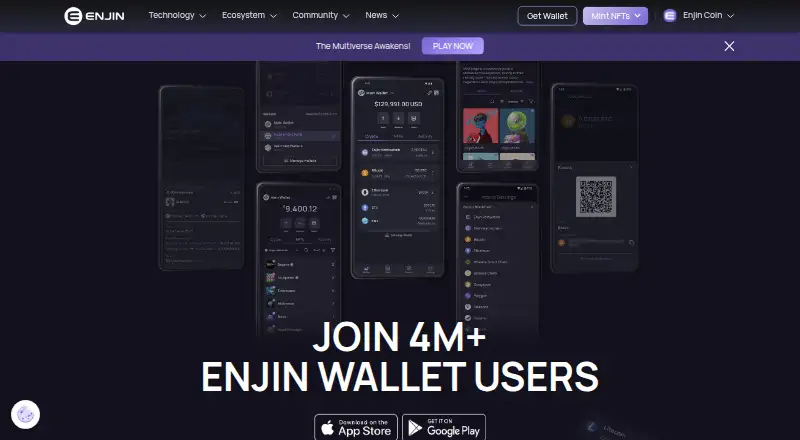
What Enjin Wallet is
Enjin Wallet is a free mobile wallet for managing cryptocurrencies, NFTs, and other blockchain assets on Android and iOS. Users can create as many wallets as they need, manage NFTs, and trade them on NFT.io. Quick Actions support sending, receiving, and staking ENJ. Enjin says the wallet supports 14 chains, including Enjin Relaychain and Matrixchain, Bitcoin, Ethereum, Polygon, Polkadot, Kusama, Litecoin, and testnets. Enjin Connect links the wallet to ecosystem apps such as NFT.io and the Enjin Platform through a QR code flow. The wallet is non-custodial, and Enjin says encryption protects coin and NFT holdings. Enjin charges no extra fees for transactions or storage, though network gas and third-party service fees may apply. NFT buying, selling, and trading are unavailable on iOS, and the DApp browser is unavailable on both mobile platforms. Setup requires backing up a private 12-word recovery phrase. Minimum requirements are Android 7.0 on a 64-bit build or iOS 16.
Who it suits
It may suit traders, collectors, gamers, and developers who want a mobile wallet for blockchain assets and NFTs. Users should check the iOS trading restriction and the supported operating-system minimums before choosing it.
What it does well
- Free on Android and iOS.
- Create as many wallets as needed.
- Supports 14 chains.
- Quick Actions send, receive, and stake ENJ.
- No extra transaction or storage fees.
What to know first
- NFT trading is unavailable on iOS.
- DApp browser is unavailable on both platforms.
- Network gas and third-party fees may apply.
- Requires Android 7.0 64-bit or iOS 16.
Limits
The minimum supported systems are Android 7.0 with a 64-bit build and iOS 16. NFT buying, selling, and trading are unavailable on iOS, and the DApp browser is unavailable on both platforms.
Plans
| Plan | Billed and limits | Price |
|---|---|---|
| Enjin Wallet | Available on Android and iOS · Network fees apply · Third-party service fees may apply | Free |
As enjin.io lists them, read 11 Oct 2026. The maker's own page has the final word.
Getting started
- Install Enjin Wallet on a supported Android or iOS device.
- Create a wallet; you can create as many as needed.
- Back up the 12-word recovery phrase and do not share it, including with Enjin.
- Use Enjin Connect's QR code flow to link the wallet with an ecosystem app.
Enjin Wallet is a free, non-custodial mobile wallet for cryptocurrencies, NFTs, and other blockchain assets. It suits traders, collectors, gamers, and developers who want Enjin ecosystem connections alongside multi-chain storage. Its strongest case is broad chain and NFT coverage on Android and iOS; platform restrictions and recovery-phrase responsibility make it a poor fit for users expecting a fully featured desktop or iPhone NFT marketplace.
Overview
Enjin Wallet has been developed by Singapore-based Enjin, founded in 2009. You can create as many wallets as needed and manage peer transfers from the app. Non-custodial control means responsibility for access stays with you: setup requires backing up a 12-word recovery phrase, which must never be shared, including with Enjin. Encryption is used to protect coin and NFT holdings.
The wallet connects directly to Enjin’s wider ecosystem. Enjin Connect uses a QR-code flow to link the wallet with apps such as NFT.io and the Enjin Platform, while documented compatibility extends to the Enjin Blockchain, Enjin Platform API and SDKs, and NFT.io. That makes it more useful for people already using Enjin services than for someone seeking a wallet with no ecosystem preference.
Key features
Multi-chain asset management
Support covers 14 chains, including Enjin Relaychain and Matrixchain, Bitcoin, Ethereum, Polygon, Polkadot, Kusama, Litecoin, and testnets. This range is practical for users who move assets across several networks, although each network can bring its own gas costs and operational differences.
NFTs and ENJ actions
You can manage NFTs and trade them on NFT.io. Quick Actions handle sending, receiving, and staking ENJ without leaving the wallet, giving ENJ holders a focused way to perform common actions. NFT buying, selling, and trading are unavailable on iOS, so iPhone users will need another route for those activities.
Enjin connections
The QR-based Enjin Connect flow links the wallet to NFT.io and the Enjin Platform. It is a meaningful advantage for Enjin-focused projects and developers, but less relevant if your assets and applications sit outside that ecosystem.
Costs and support
Enjin says it adds no transaction or storage fees. Network gas fees still apply, and third-party services may charge their own fees. Technical questions are directed to the Enjin Help Center; support requests should include your device type, app version, and relevant screenshots.
Pricing
| Plan | Price | Includes and terms |
|---|---|---|
| Enjin Wallet | free | Available on Android and iOS; network fees apply; third-party service fees may apply |
The single free plan is suitable for anyone who wants the full wallet without a subscription or trial decision. There are no published seat or wallet-count caps, and users can create as many wallets as needed. “Free” does not remove blockchain gas charges or fees from connected services, so frequent traders should budget for those variable costs.
Platforms
Enjin Wallet runs on Android and iOS. Android requires version 7.0 with a 64-bit build; iOS requires version 16. The DApp browser is unavailable on both platforms. iOS also lacks NFT buying, selling, and trading, making Android the more capable choice for NFT activity within the supported mobile options.
Who it's for
This is a strong fit for ENJ holders, NFT collectors, multi-chain traders, gamers using Enjin-connected projects, and developers working with Enjin’s platform tools. It also works for users who value self-custody and are comfortable safeguarding a recovery phrase. Choose another wallet if you need desktop access, a built-in DApp browser, or full NFT trading on iOS.
Pros and cons
- Pro: Support for 14 chains, including major networks and Enjin-specific chains, reduces the need to split assets across multiple wallets.
- Pro: Unlimited wallet creation is useful for separating portfolios, projects, or identities.
- Pro: NFT management, NFT.io trading, and dedicated ENJ send, receive, and stake actions suit Enjin-focused users.
- Pro: No additional transaction or storage fee from Enjin keeps the app’s direct cost at zero.
- Con: iOS users cannot buy, sell, or trade NFTs in the wallet.
- Con: No DApp browser on either mobile platform limits in-app access to decentralized applications.
- Con: Network gas and third-party fees remain payable, despite the free plan.
- Con: Losing the 12-word recovery phrase can jeopardize access because custody rests with the user.
Alternatives
Steam Community is the better choice for broad gaming communities across Android, iOS, Linux, macOS, web, and Windows; its community features require a Steam account and it does not serve as a crypto wallet.
Ascended fits organizers who need community creation and streaming instead of blockchain custody, with a free tier for up to three communities and 720p streaming.
The100.io offers basic functionality and core features for gaming groups rather than NFT or cryptocurrency management.
Z League is a free-to-download gaming platform with in-app purchases, not a multi-chain asset wallet.
GameTree is aimed at finding players through free core LFG features, with an account required for personality matching and Steam sync.
NexGild suits web-based community administrators needing one game, up to 30 members, scheduling, and Discord integration on its free plan.
Spawn Point Gaming is a web community service with a free plan and paid monthly tiers managed through Stripe.
Speedrun.com is the relevant alternative for organized speedrunning communities and their core competition features, rather than blockchain asset storage.
For broader discovery, browse Digital Wallet Apps or Gaming Community Platforms.
Verdict
Choose Enjin Wallet if you want free, self-custodial access to multiple chains, NFTs, and ENJ actions in a mobile app, especially within the Enjin ecosystem. Look elsewhere if you need a DApp browser, desktop support, or complete NFT trading on iOS; the recovery phrase and variable network or service fees also demand careful ownership.
Verdict
Enjin Wallet brings multi-chain asset management, NFT features, and ENJ actions into a free mobile app. Its platform restrictions, recovery-phrase responsibility, and possible network or third-party fees are worth weighing first.
Questions
Is Enjin Wallet free?
Yes. The listed Enjin Wallet plan is free. Network fees and possible third-party service fees may apply.
Which platforms does Enjin Wallet support?
It is available on Android and iOS. The minimum supported systems are Android 7.0 with a 64-bit build and iOS 16.
Does Enjin Wallet support NFTs?
Yes. Users can manage NFTs and trade them on NFT.io. Buying, selling, and trading NFTs are unavailable on iOS.
Which blockchain networks does it support?
Enjin Support says the wallet supports 14 chains, including Enjin Relaychain and Matrixchain, Bitcoin, Ethereum, Polygon, Polkadot, Kusama, Litecoin, and testnets.
Does Enjin Wallet charge transaction fees?
Enjin says it adds no fees for transactions or storage. Network gas fees and possible third-party service fees may apply.
How do I recover a wallet?
Setup instructions tell users to back up a 12-word recovery phrase and not share it, including with Enjin.
Facts from Enjin Wallet's own pages
- Chains
- Enjin Support says the wallet supports 14 chains, including Enjin Relaychain and Matrixchain, Bitcoin, Ethereum, Polygon, Polkadot, Kusama, Litecoin, and testnets. · support.enjin.io, 11 Oct 2026
- Device limits
- Enjin Support lists Android 7.0 with a 64-bit build and iOS 16 as minimum supported operating systems. · support.enjin.io, 11 Oct 2026
- ENJ actions
- Quick Actions let users send, receive, and stake ENJ from the wallet. · enjin.io, 11 Oct 2026
- Enjin Connect
- Enjin Connect links the wallet to ecosystem apps, notably NFT.io and the Enjin Platform, using a QR code flow. · support.enjin.io, 11 Oct 2026
- Fees
- Enjin says the wallet charges no additional fees for transactions or storage, while network gas fees and possible third-party service fees may apply. · enjin.io, 11 Oct 2026
- Founded
- 2009 · enjin.io, 28 Sept 2026
- Headquarters
- Singapore · enjin.io, 28 Sept 2026
- Integrations
- Enjin documentation says the wallet is compatible with the Enjin Blockchain, Enjin Platform API and SDKs, and NFT.io. · docs.enjin.io, 11 Oct 2026
- Intended users
- Enjin's press kit describes the wallet as built for traders, collectors, gamers, and developers. · enjin.io, 11 Oct 2026
- NFTs
- The wallet lets users manage NFTs and trade them on NFT.io. · enjin.io, 11 Oct 2026
- Platform limits
- Enjin Support says buying, selling, and trading NFTs are unavailable on iOS, and the DApp browser is unavailable on both Android and iOS. · support.enjin.io, 11 Oct 2026
- Purpose
- Enjin describes its mobile wallet as a place to manage cryptocurrencies, NFTs, and blockchain assets. · enjin.io, 11 Oct 2026
- Recovery
- The setup instructions tell users to back up a 12-word recovery phrase and not share it, including with Enjin. · enjin.io, 11 Oct 2026
- Security
- Enjin describes the wallet as non-custodial and says it uses encryption to protect coin and NFT holdings. · enjin.io, 11 Oct 2026
- Support
- The wallet page directs users with questions or technical problems to the Enjin Help Center and says to include device type, app version, and relevant screenshots. · enjin.io, 11 Oct 2026
- Wallets
- Users can create as many wallets as they need. · enjin.io, 11 Oct 2026
Where Enjin Wallet stands on Freedom251
- Gaming Community Platforms#4 of 33
- Digital Wallet Apps#14 of 44