Freedom251 › Gaming Community Platforms
Ascended
What Ascended is
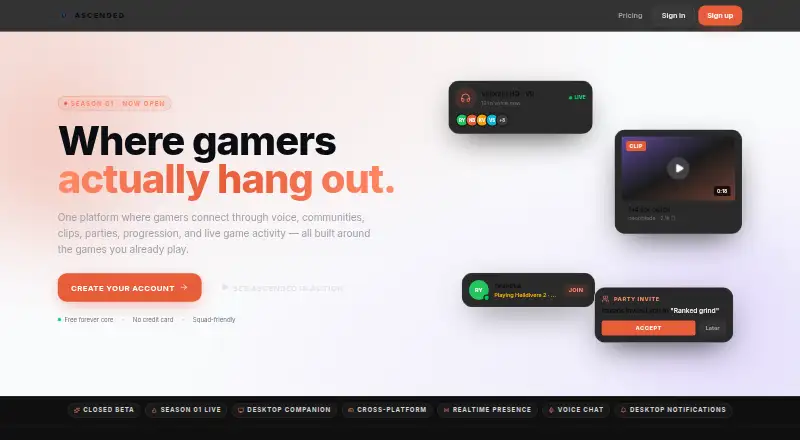
Ascended is a gaming social platform for players who want voice, communities, clips, parties, progression, and live game activity in one place. Its feed combines clips, photos, posts, and LFG listings, ranked by who users care about. Players can join persistent communities with channels, events, supporters, and shared culture, then drop into voice rooms and parties that carry across games. Users can also livestream to friends with chat, reactions, and party watch. The Windows desktop companion advertises automatic game detection, an in-game overlay, screenshots, and a 30-second instant replay buffer; captured clips stay on the PC unless shared to the cloud. Ascended lists iOS and Android access through browser home-screen installation instructions. The free plan supports up to 3 communities or groups and 720p streaming and uploads. Ascended Plus is $4.99 a month, with up to 10 communities or groups and bigger upload limits. The privacy policy is marked as a private-beta placeholder, and some moderation tools are placeholders too.
Who it suits
Ascended suits gamers, squads, creators, and communities looking to combine social feeds, voice, parties, and shared activity. Desktop capture tools may suit players who want to save clips locally before choosing whether to share them.
What it does well
- Feed includes clips, photos, posts, and LFG listings.
- Voice rooms and parties carry across games.
- Desktop app includes a 30-second replay buffer.
- Free plan supports up to 3 communities or groups.
- Users can edit profiles, export data, or delete accounts.
What to know first
- macOS and Linux are listed as coming soon.
- Account deletion during beta requires a manual support request.
- Privacy policy is a private-beta placeholder.
- Some moderation tools remain placeholders during beta.
Limits
The Free plan is limited to three communities or groups and 720p streaming and uploads. Ascended Plus raises the community limit to 10, while the Squad Plan allows up to 25 and includes five squad members.
Plans
| Plan | Billed and limits | Price |
|---|---|---|
| Free | $0 forever · Create up to 3 communities/groups · 720p streaming and uploads | Free |
| Squad Plan | $14.99/mo · Includes 5 squad members · Up to 25 communities/groups | $14.99 a month |
| Founder | $300 one-time · Lifetime Ascended Plus · Lifetime Founder badge and profile effects | $300, paid once |
| Ascended Plus | $4.99/mo · Up to 10 communities/groups · Bigger upload limits | $4.99 a month |
As ascgaming.org lists them, read 2 Oct 2026. The maker's own page has the final word.
Getting started
- Visit the Ascended website.
- Choose a platform: Windows desktop, iPhone or iPad Safari, or Android Chrome.
- For mobile, follow the browser home-screen installation instructions.
- Create an account and set up a profile.
- Choose the Free plan or a paid plan based on community limits and included features.
Ascended is a gaming social platform for players who want to combine group coordination, community activity and sharing clips. It will suit squads and creators seeking a shared home, though players who need a polished desktop app beyond Windows should look elsewhere.
Overview
Ascended brings together social feeds, cross-game voice parties, persistent communities and a desktop capture companion. That range can make it useful for groups that want to organize play and share moments in one place; its beta-stage privacy policy and account-deletion process call for care.
Key features
The feed combines clips, photos, looking-for-group posts and updates, ranked by who users care about. It gives squads a way to follow activity and find teammates alongside their regular posts, rather than relying on a standalone LFG tool.
Voice rooms and parties carry across games, while persistent communities offer channels, events, supporters and group culture. These features make Ascended a stronger fit for groups building an ongoing hub than for players who only need occasional matchmaking.
The Windows companion advertises automatic game detection, an in-game overlay, screenshots and a 30-second instant replay buffer. Clips stay on the PC unless users choose to share them to the cloud, giving users control over uploads. Livestreaming to friends includes chat, reactions and party watch.
Moderation includes reporting, slow mode, timeouts, kick and ban controls, DM controls and channel permissions, but some tools remain placeholders during beta. The privacy page describes collection of account details, profile preferences, posted content and basic device and usage analytics; it says Ascended does not sell data or run third-party ad networks. The page also labels its policy a private-beta placeholder, not a final policy or legal advice. Users can export data and delete accounts in Settings, but deletion requires a manual support request during beta.
Pricing
The Free plan costs nothing, billed $0 forever. It allows up to 3 communities or groups and 720p streaming and uploads, making it a practical starting point for smaller groups willing to keep within those caps.
Ascended Plus costs $4.99 a month, billed $4.99/mo, and raises the cap to 10 communities or groups with bigger upload limits. It suits active users who need more room than Free provides. Squad Plan costs $14.99 a month, billed $14.99/mo, includes 5 squad members and allows up to 25 communities or groups; it is the clearest option for a defined group sharing the expanded community allowance.
Founder costs $300, paid once, billed $300 one-time, for lifetime Ascended Plus plus a lifetime Founder badge and profile effects. It trades an upfront payment for lifetime Plus access; the badge and effects are the other stated additions. No trial is described.
Platforms
Ascended lists Android, iOS, web and Windows. Its desktop app is Windows-only: the download page lists version 2.0.7 at 95 MB, and the homepage names Windows 10 / 11 support. macOS and Linux are coming soon. Mobile installation is described through iPhone and iPad Safari and Android Chrome home-screen instructions, rather than native app downloads.
Who it's for
Ascended is aimed at gamers, squads, creators and communities who want shared feeds, cross-game voice, events and capture tools together. Its community caps and squad pricing serve groups of different sizes, while Windows capture makes it a better match for PC players than for users expecting equivalent desktop tools on macOS or Linux.
Pros and cons
- Pro: Feed, LFG, voice, communities and friend livestreaming bring several group activities into one service.
- Pro: Local-first clip storage means captures do not go to the cloud unless users choose to share them.
- Con: The Windows desktop app is the only listed desktop app, with macOS and Linux still forthcoming.
- Con: The privacy policy is explicitly a beta placeholder, some moderation controls are placeholders, and account deletion requires support intervention.
- Con: Free groups are capped at 3 communities and 720p streaming and uploads; larger limits require a paid plan.
Alternatives
For a broader gaming community comparison, browse Gaming Community Platforms.
- Steam Community is a free option for players already using Steam; community features require a Steam account, and it supports more listed platforms, including Linux and macOS.
- The100.io has a free Basic plan with core functionality and is an alternative for players considering a service created by Mike LaPeter with volunteer help.
- GameTree offers free core LFG; choose it if you want personality matching and Steam sync tied to an account.
- WildStack has a free web plan for matchmaking, groups, chat and voice, a narrower stated focus than Ascended's capture and livestreaming mix.
- Backloggd is the alternative for tracking games: its free plan includes unlimited game logging, lists, reviews and journal tracking, plus 14 days of recent activity.
- Game Jolt is a free alternative across Android, iOS, Linux, web and Windows.
- Challengermode is a free alternative with a Developers package at custom pricing.
- GamerLink is a free Android and iOS alternative; its maker is identified as GamerLink LLC within the Sony Interactive Entertainment group.
Verdict
Choose Ascended if your squad or gaming community wants feeds, cross-game voice, persistent hubs and PC capture in one place, and its Windows focus and beta caveats are acceptable. Look elsewhere if you need a finalized privacy policy, fully established moderation controls or macOS and Linux desktop support.
Verdict
Ascended brings gaming feeds, voice, communities, and desktop capture together, with a free tier for smaller groups. Readers should note the beta-stage privacy policy and account-deletion process, as well as the platform availability limits.
Questions
Is Ascended free?
Yes. The Free plan is $0 forever and includes up to three communities or groups, with 720p streaming and uploads.
What do the paid plans cost?
Ascended Plus is $4.99/mo, and the Squad Plan is $14.99/mo. Founder is a $300 one-time payment.
Which platforms does Ascended support?
The listed platforms are Android, iOS, web, and Windows. The homepage lists Windows 10 and 11 support and says macOS and Linux are coming soon.
What does the desktop app do?
It advertises automatic game detection, a 30-second instant replay buffer, screenshots, and an in-game overlay. Clips stay on the PC unless users choose to share them to the cloud.
Can users delete or export account data?
Settings provide account deletion and data export. During beta, account deletion requires a manual support request.
Facts from Ascended's own pages
- Account controls
- Users can edit their profile, delete their account, and export their data in Settings; during beta, account deletion requires a manual support request. · ascgaming.org, 2 Oct 2026
- Audience
- The maker presents Ascended as built for gamers, squads, creators, and communities. · ascgaming.org, 2 Oct 2026
- Capture and storage
- The desktop companion captures clips and screenshots, and clips remain on the PC unless users choose to share them to the cloud. · ascgaming.org, 2 Oct 2026
- Communities
- Communities are persistent gaming hubs with channels, events, supporters, and culture. · ascgaming.org, 2 Oct 2026
- Desktop availability
- The download page lists a Windows desktop app, version 2.0.7 at 95 MB; it also gives iPhone and iPad Safari and Android Chrome home-screen installation instructions. · ascgaming.org, 2 Oct 2026
- Desktop features
- The desktop app advertises automatic game detection, a 30-second instant replay buffer, screenshots, and an in-game overlay. · ascgaming.org, 2 Oct 2026
- Desktop operating systems
- The homepage lists Windows 10 / 11 support and says macOS and Linux are coming soon. · ascgaming.org, 2 Oct 2026
- Livestreaming
- Users can livestream to friends with built-in chat, reactions, and party watch. · ascgaming.org, 2 Oct 2026
- Moderation
- The safety page lists reporting, slow mode, timeout, kick and ban tools, DM controls, and channel permissions, and says some tools are still placeholders during beta. · ascgaming.org, 2 Oct 2026
- Privacy
- The privacy page says Ascended collects account details, profile preferences, posted content, and basic device and usage analytics; it says it does not sell data or run third-party ad networks. · ascgaming.org, 2 Oct 2026
- Privacy policy status
- The privacy page labels its policy a placeholder for the private beta, not legal advice or a final policy. · ascgaming.org, 2 Oct 2026
- Product
- Ascended describes itself as a gaming social platform for connecting through voice, communities, clips, parties, progression, and live game activity. · ascgaming.org, 2 Oct 2026
- Social feed
- The social feed includes clips, photos, LFG, and posts, ranked by who users care about. · ascgaming.org, 2 Oct 2026
- Voice and parties
- Users can drop into voice rooms and parties that carry across games. · ascgaming.org, 2 Oct 2026
Where Ascended stands on Freedom251
- Gaming Community Platforms#1 of 33