Freedom251 › Gaming Community Platforms
GamerLink
What GamerLink is
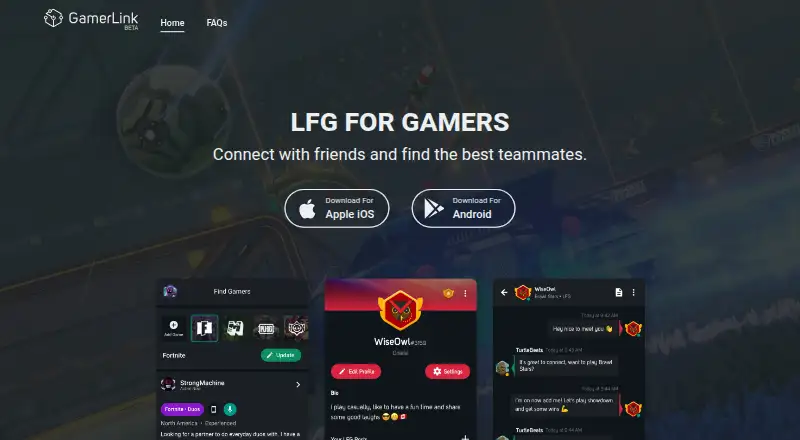
GamerLink is a free mobile platform for finding gaming teammates and connecting with friends through Looking For Group (LFG) posts. It supports more than 300 LFG games across major platforms. To create a post, choose a game and platform, then set preferences related to that game. Profiles can display a selected color, avatar, wallpaper, bio, and LFG games. Each LFG has a chatroom for coordinating when to play, and voice parties let users talk with friends and teammates, invite friends, and send group messages. The app is available on iOS and Android; desktop and web access are currently unavailable, and accounts cannot be accessed there. GamerLink has discontinued its content feed while focusing on LFG. Users can remove friends, report users, or block users from their profiles. Its privacy policy says it may collect account and profile information, device identifiers, activity, content, and messages, and may monitor communications for safety and rule enforcement. GamerLink is for users aged 13 and older, subject to the applicable parental-consent age in their country.
Who it suits
GamerLink suits players looking for teammates for supported games or a way to coordinate with friends. It is for mobile users on iOS or Android who are at least 13, subject to local parental-consent requirements.
What it does well
- Free to use on iOS and Android.
- Supports more than 300 LFG games across major platforms.
- LFG posts include game, platform, and preference choices.
- LFG chatrooms help players coordinate when to play.
- Voice parties let users chat with friends and teammates, invite friends, and send group messages.
- Profiles offer customizable colors, avatars, wallpapers, bios, and LFG games.
What to know first
- Desktop and web access are currently unavailable.
- The content feed is no longer supported.
Limits
GamerLink is free, and the facts do not identify a free-plan quota or feature restriction. Access is limited to iOS and Android; desktop and web access are unavailable, and the content feed has been discontinued.
Getting started
- Visit the GamerLink website for information about the service.
- Download GamerLink for iOS or Android.
- Create a profile with a color, avatar, wallpaper, bio, and LFG games.
- Choose a game and platform, then set preferences to create an LFG post.
- Use the LFG chatroom to coordinate, or start a voice party with friends and teammates.
Verdict
Choose GamerLink if you want a free mobile way to find gaming teammates and coordinate through LFG chatrooms or voice parties. Look elsewhere if you need desktop or web access, or a supported content feed.
Questions
How much does GamerLink cost?
GamerLink is free, with a free plan.
Which devices support GamerLink?
GamerLink is available on iOS and Android. Desktop and web access are currently unavailable.
How many games does GamerLink support?
The official site says it supports more than 300 LFG games across major platforms.
What can users do with LFG posts?
Users select a game, platform, and game-related preferences. People who create or join an LFG can use its chatroom to coordinate when to play.
Does GamerLink offer ways to communicate with teammates?
LFG chatrooms support coordination, while voice parties let users chat with friends and teammates, invite friends, and send group messages.
Who makes GamerLink, and who can use it?
GamerLink LLC is identified as the company behind the service and is wholly owned within the Sony Interactive Entertainment group. The service is for users aged 13 and older, subject to the applicable parental-consent age in their country.
Facts from GamerLink's own pages
- Age requirement
- The privacy policy states GamerLink is only for users aged 13 and older. · gamerlinkapp.com, 4 Oct 2026
- Chat
- Users who create or join an LFG can participate in its chatroom to coordinate play. · gamerlinkapp.com, 4 Oct 2026
- Content feed
- GamerLink says it has stopped supporting its content feed while it focuses on its LFG platform. · gamerlinkapp.com, 3 Oct 2026
- Data collection
- The privacy policy says the service may collect account and profile information, activity and device identifiers, content, and messages. · gamerlinkapp.com, 4 Oct 2026
- Desktop and web availability
- The FAQ says desktop and web support was scaled back and accounts cannot currently be accessed on those platforms. · gamerlinkapp.com, 4 Oct 2026
- Game coverage
- The official site says GamerLink supports over 300 LFG games across major platforms. · gamerlinkapp.com, 3 Oct 2026
- Game support
- The website says GamerLink supports over 300 LFG games across major platforms. · gamerlinkapp.com, 4 Oct 2026
- LFG preferences
- Users create LFG posts by selecting a game, platform, and game related preferences. · gamerlinkapp.com, 3 Oct 2026
- LFG setup
- Users create an LFG by selecting a game and setting game-related preferences. · gamerlinkapp.com, 4 Oct 2026
- Maker
- The privacy policy identifies GamerLink LLC as the company behind the service and says it is wholly owned within the Sony Interactive Entertainment group. · gamerlinkapp.com, 3 Oct 2026
- Mobile apps
- The maker says GamerLink is available on iOS and Android and can be downloaded for free. · gamerlinkapp.com, 4 Oct 2026
- Ownership
- The privacy policy identifies GamerLink LLC as a wholly owned company in the Sony Interactive Entertainment group. · gamerlinkapp.com, 4 Oct 2026
- Privacy and security
- The privacy policy says the company maintains industry-standard technical and organisational measures to help protect personal information, while noting it cannot warrant security. · gamerlinkapp.com, 4 Oct 2026
- Privacy practices
- The privacy policy says GamerLink may collect account details, profile information, messages, and usage activity, and may monitor communications for safety and rule enforcement. · gamerlinkapp.com, 3 Oct 2026
- Profile
- Profiles can be customized with a color, avatar, wallpaper, bio, and LFG games. · gamerlinkapp.com, 4 Oct 2026
- Profiles
- Profiles can be customized with a color, avatar, wallpaper, bio, and LFG games. · gamerlinkapp.com, 3 Oct 2026
- Purpose
- GamerLink is a free platform for gamers to find teammates and connect with friends through Looking For Group posts. · gamerlinkapp.com, 3 Oct 2026
- Safety controls
- Users can remove friends, report users, and block users from their profiles. · gamerlinkapp.com, 3 Oct 2026
- Support
- Users can submit a Help & Feedback ticket in the mobile app or email [email protected]. · gamerlinkapp.com, 4 Oct 2026
- Supported devices
- The FAQ says GamerLink is available on iOS and Android, while desktop and web access are currently unavailable. · gamerlinkapp.com, 3 Oct 2026
- Voice parties
- Users can create parties to voice chat with friends and teammates, invite friends, and join friends' open parties. · gamerlinkapp.com, 4 Oct 2026
- What it does
- GamerLink is a free platform for gamers to connect with friends and find like-minded players through Looking For Group posts. · gamerlinkapp.com, 4 Oct 2026
Where GamerLink stands on Freedom251
- Gaming Community Platforms#8 of 33