Freedom251 › Embroidery Design Software
Embrowser
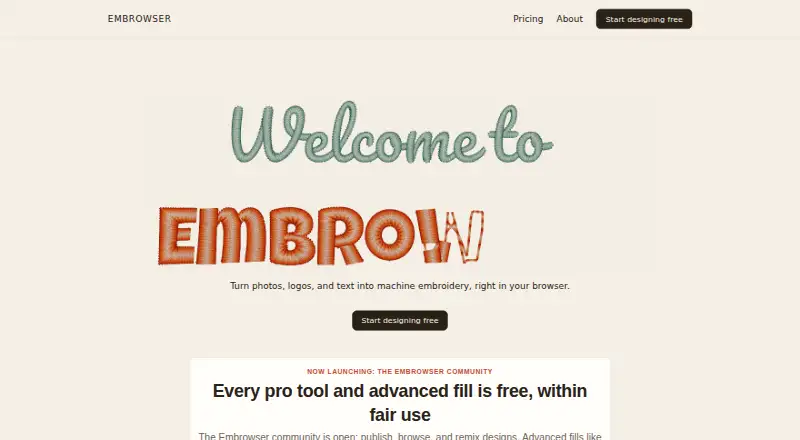
What Embrowser is
Embrowser is a browser-based editor for turning photos, logos, and text into machine embroidery designs. It includes tools for drawing and editing paths, editing nodes, cutting with a knife tool, freehand drawing, and working with shapes. Text can follow curved paths. Before stitching, you can view a design in 3D. Image tracing converts photos into editable paths and stitches, with two image auto-traces per week on the Free plan. Embrowser imports SVG and images, and supports PES, DST, JEF, VP3, EXP, and U01 embroidery files. It exports to those six embroidery formats, which the maker says work with most home and commercial machines that read them. The editor runs in a browser without installation and requires an internet connection; the maker says it works on Windows, Mac, Linux, and tablets. Desktop and laptop browsers are best for editing, tablets suit viewing and simple edits, and phones are too small for the editor. Users can publish, browse, like, comment on, and remix community designs. Free provides public view links; Hobby adds private folder sharing with specific users. Plans start with Free and include monthly and yearly Hobby options.
Who it suits
Embrowser suits people who want to create or edit embroidery designs in a browser, including those converting photos or logos into stitches. Its desktop and laptop editor is suited to design work, while tablet users can view designs and make simple edits.
What it does well
- Converts photos into editable paths and stitches.
- Offers a 3D preview before stitching.
- Imports SVG, images, and six embroidery formats.
- Exports PES, DST, JEF, VP3, EXP, and U01.
- Runs in a browser without installation.
- Supports sharing and remixing community designs.
What to know first
- Requires an internet connection.
- Phones are too small for the editor.
- Free saves up to 10 designs and allows two image auto-traces weekly.
- Hobby costs $9.99 per month or $99.90 per year.
Limits
Free includes 10 saved designs, 200 MB storage, three custom fonts, two image auto-traces per week, and a 25 MB per-design file limit. Hobby raises the limits to 500 saved designs, 3 GB storage, 100 custom fonts, higher auto-tracing and advanced-fill limits, and 100 MB per file.
Plans
| Plan | Billed and limits | Price |
|---|---|---|
| Free | 10 saved designs · 3 custom fonts · 200 MB storage · 2 image auto-traces/week · 25 MB per file · fair-use limits | Free |
| Hobby (monthly) | $9.99/mo · 500 saved designs · 3 GB storage · 100 custom fonts · higher auto-tracing and advanced-fill limits · private folder sharing · 100 MB per file | $9.99 a month |
| Hobby (yearly) | $99.90/yr; 2 months free compared to monthly · 500 saved designs · 3 GB storage · 100 custom fonts · higher auto-tracing and advanced-fill limits · private folder sharing · 100 MB per file | $99.90 a year |
As embrowser.com lists them, read 8 Oct 2026. The maker's own page has the final word.
Getting started
- Open https://embrowser.com/ in a browser.
- Use a desktop or laptop browser for the editor; tablets suit viewing and simple edits.
- Choose Free, Hobby monthly at $9.99 a month, or Hobby yearly at $99.90 a year.
- Import an image, SVG, or supported embroidery file, or create a design with the drawing and text tools.
- Preview the design in 3D and export it in a supported embroidery format.
Embrowser is a browser-based workspace for converting photos, logos, and lettering into machine-embroidery files. It is best for hobbyists and small makers who want drawing, tracing, and stitch simulation together rather than a desktop installation. Its strongest case is broad format support and an approachable free tier; its biggest constraints are the internet requirement, desktop-oriented editor, and capped free tracing.
Overview
Embrowser puts embroidery design and stitch preparation in a web browser, so there is no software installation to maintain. You can turn an image into editable paths and stitches, refine artwork manually, and inspect a 3D stitch preview before committing fabric and thread. That combination is more capable than a basic converter, but it depends on a live connection and a reasonably large screen.
The service runs on Windows, Mac, Linux, and tablets through a browser. Desktop and laptop browsers are the intended workspace; tablets are practical for viewing and simple edits, while phones are too small for the editor. Designs are stored in Cloudflare R2 with provider-managed encryption at rest, TLS in transit, and HTTPS browser traffic. Embrowser says it does not sell personal information or automatically scan customer content for advertising or profiling.
Key features
Construction tools include path and node editing, freehand drawing, a knife tool, shape operations, and text that follows curved paths. These controls give users a way to clean up traced artwork or build lettering and shapes from scratch instead of accepting an automatic result unchanged.
Image auto-digitizing converts photos into editable paths and stitches. Free allows two image auto-traces per week, enough for occasional experiments but restrictive for regular production. Hobby raises the tracing allowance and advanced-fill limits, although no fixed quota is stated. A 3D preview provides a visual check of stitch layout before stitching.
Embrowser imports SVG and image files and exports PES, DST, JEF, VP3, EXP, and U01. The maker says machines reading those formats cover most home and commercial machines, making the export range a practical strength. Community tools let users publish, browse, like, comment on, and remix designs. Free offers public view links; Hobby adds private folder sharing with selected users. Original designs may be used in personal or commercial projects subject to the Terms of Service.
Pricing
Free — $0.00 per free. You get 10 saved designs, three custom fonts, 200 MB of storage, two image auto-traces per week, a 25 MB per-design file limit, and fair-use limits. Public links support sharing, but there is no private-folder option. This plan suits learners and occasional projects; the saved-design, storage, and tracing caps become obstacles for an active library.
Hobby (monthly) — $9.99 per month. It expands capacity to 500 saved designs, 3 GB of storage, 100 custom fonts, higher auto-tracing and advanced-fill limits, private folder sharing, and 100 MB per file. Priority support is included. It is the sensible upgrade for frequent tracing, larger files, or collaboration with specific people.
Hobby (yearly) — $99.90 per year. It has the same allowance as monthly Hobby and is billed annually, with two months free compared with paying $9.99 each month. Choose it when you expect to use the service throughout the year; monthly is less committing for shorter projects.
Platforms
Embrowser is web-only and requires an internet connection. It works in browsers on Windows, Mac, Linux, and tablets, with desktop or laptop use preferred. Phones are not a realistic editing platform.
Who it's for
Choose Embrowser for browser-based design, image tracing, and 3D stitch checking across common machine formats. The Free plan fits occasional makers testing the workflow. Hobby fits users building a larger design library, tracing regularly, or sharing folders privately. It is a poor match for offline work or phone-first editing.
Pros and cons
- Pros: broad PES, DST, JEF, VP3, EXP, and U01 import/export support; editable image tracing rather than a fixed conversion; curved-path lettering and detailed drawing tools; 3D stitch preview; commercial use of original designs under the terms; private folder sharing and priority support on Hobby.
Alternatives
Browse Embroidery Design Software for a wider category comparison. Pick Boldbobbin instead if you want a freemium option spanning iOS, macOS, web, and Windows. mySewnet Embroidery is the better route for Android and iOS support alongside desktop apps and a free Basic tier with 100 MB of Vault storage. Choose StitchConsole if Linux, macOS, Windows, and web access plus unlimited designs on its Free plan matter more; its free tier syncs ten designs at a time and includes ten image conversions.
TurtleStitch is a free, open-source web platform. Ink/Stitch is free, open-source software delivered as an Inkscape extension for Linux, macOS, and Windows. PEmbroider is a free open-source library for macOS and Windows. Choose ApS-Ethos for a Windows commercial package with organiser and creative-writer modules. Tajima Embroidery i2 is a paid macOS and Windows option sold through local distributors.
Verdict
Hobby is the practical choice for regular work because it lifts the free plan's small library, storage, file-size, and tracing limits and adds private sharing. Look elsewhere if offline access, a phone-sized editor, or a precisely published tracing quota is essential.
Verdict
Choose Embrowser if you want browser-based embroidery design tools, photo tracing, and a 3D stitch preview. The Free plan includes two image auto-traces per week; Hobby raises file and storage limits and adds private folder sharing. Look elsewhere if you need a phone-sized editor or offline access.
Questions
Is there a free plan?
Yes. Free costs nothing and includes 10 saved designs, 200 MB storage, three custom fonts, and two image auto-traces per week.
How much does Hobby cost?
Hobby costs $9.99 a month or $99.90 a year.
What platforms does Embrowser support?
It runs in a browser and the maker says it works on Windows, Mac, Linux, and tablets. It requires an internet connection; phones are too small for the editor.
Which embroidery formats does it support?
It imports and exports PES, DST, JEF, VP3, EXP, and U01 embroidery files. It also imports SVG and images.
Can I share designs privately?
Free provides public view links. Hobby adds private folder sharing with specific users.
Can Embrowser designs be used commercially?
The maker says original designs created in Embrowser may be used for personal or commercial projects, subject to its Terms of Service.
Facts from Embrowser's own pages
- Auto digitizing
- Image tracing can convert photos into editable paths and stitches; the Free plan includes 2 image auto-traces per week. · embrowser.com, 8 Oct 2026
- Commercial use
- The maker says original designs created in Embrowser may be used for personal or commercial projects, subject to its Terms of Service. · embrowser.com, 8 Oct 2026
- Design tools
- It includes path drawing and editing, node editing, a knife tool, freehand drawing, shape operations, and text that can follow curved paths. · embrowser.com, 8 Oct 2026
- Device limitation
- The maker says the editor works best on desktop and laptop browsers, tablets are suitable for viewing and simple edits, and phones are too small for the editor. · embrowser.com, 8 Oct 2026
- File formats
- It supports embroidery files PES, DST, JEF, VP3, EXP, and U01, plus SVG and image imports, and exports to the six listed embroidery formats. · embrowser.com, 8 Oct 2026
- Machine compatibility
- The maker says it works with machines that read PES, DST, JEF, VP3, EXP, or U01 files, covering most home and commercial machines. · embrowser.com, 8 Oct 2026
- Platform and connection
- Embrowser runs in a browser without installation and requires an internet connection; the maker says it works on Windows, Mac, Linux, and tablets. · embrowser.com, 8 Oct 2026
- Privacy
- The privacy policy says Embrowser does not sell personal information and does not automatically scan customer content for advertising or profiling. · embrowser.com, 8 Oct 2026
- Purpose
- Embrowser turns photos, logos, and text into machine embroidery in a web browser. · embrowser.com, 8 Oct 2026
- Security
- The privacy policy says design files are stored in Cloudflare R2 with provider-managed encryption at rest and TLS in transit, and browser-to-service traffic uses HTTPS. · embrowser.com, 8 Oct 2026
- Sharing and community
- Users can publish, browse, like, comment on, and remix community designs; Free has public view links and Hobby adds private folder sharing with specific users. · embrowser.com, 8 Oct 2026
- Stitch preview
- The product provides a 3D preview of a design before stitching. · embrowser.com, 8 Oct 2026
- Support
- Users can contact support by email or in-app help resources, and Hobby users receive priority support. · embrowser.com, 8 Oct 2026
- Usage limits
- The FAQ lists per-design file size limits of 25 MB for Free and 100 MB for Hobby. · embrowser.com, 8 Oct 2026
Where Embrowser stands on Freedom251
- Embroidery Design Software#6 of 31