Freedom251 › Embroidery Design Software
TurtleStitch
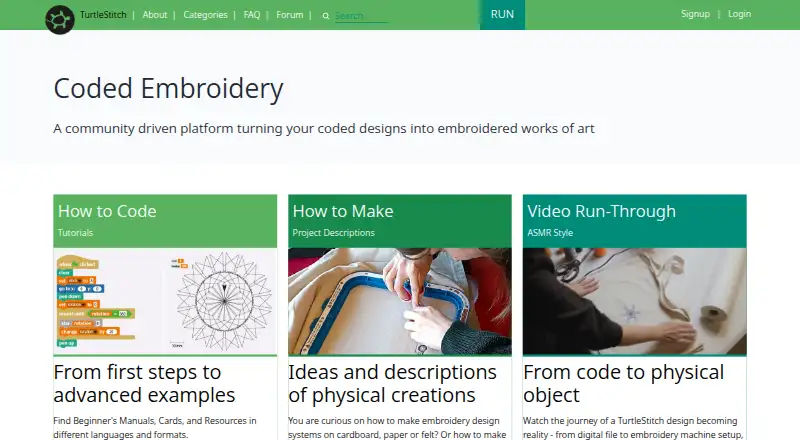
What TurtleStitch is
TurtleStitch is a free platform for creating, sharing, and remixing embroidery patterns through code. Built on Snap!, it combines block-based programming with textile craft in a browser and is described for learners with or without programming experience. Users can export designs for embroidery machines that read .exp or .dst files. Density Warning flags potential stitch-density problems, and X-Ray View helps locate overlapping areas. Online use requires internet access and a modern browser; the FAQ names Firefox, Chrome, and Safari. For offline work, users can download a release, open index.html in a browser, and use the blocks and libraries, but cloud access is unavailable. Offline projects are exported as XML files and can be reopened from the user's computer. Cloud project saving requires an account and email address, and cloud projects are public by default, with an Unshare option in project settings. Users can program without providing personally identifiable information. The site describes use in schools, workshops, maker spaces, artistic projects, and community settings, and directs questions to its forum and technical issues to GitHub.
Who it suits
It suits learners, educators, and makers creating embroidery designs through block-based code. The site describes use in schools, workshops, maker spaces, artistic projects, and community settings.
What it does well
- Free to use
- Exports designs for .exp and .dst machines
- Offline work includes blocks and libraries
- Density and overlap checks are available
- Teachers can create student logins without student personal information
What to know first
- Online use requires internet access
- Offline mode does not provide cloud access
- Cloud projects are public by default
- Cloud saving requires an account and email
Plans
| Plan | Billed and limits | Price |
|---|---|---|
| Free | Free and open-source web platform | Free |
As turtlestitch.org lists them, read 7 Oct 2026. The maker's own page has the final word.
Getting started
- Open the TurtleStitch website in a modern browser with internet access.
- Choose a browser named in the FAQ: Firefox, Chrome, or Safari.
- Create a design using the block-based programming environment.
- Export a design for a machine that reads DST or EXP files.
- For offline work, download a release and open index.html in a browser.
- Save offline projects as XML files on your computer.
Overview
TurtleStitch is a free, code-based tool for creating embroidery patterns, built for learners, educators and makers who want to combine programming with textile craft. Its strongest appeal is a browser-based creative workspace that can also be used offline; it is a less natural fit for people seeking a conventional embroidery digitizing editor.
Design checks and exports for common machine formats make it useful beyond coding exercises, but users should confirm their machine accepts DST or EXP before settling on it.
Key features
Built on Snap!, TurtleStitch uses block-based programming to create, remix and share patterns. That approach suits classrooms, workshops and exploratory projects, including for people with no programming background. It makes experimentation central, rather than offering the more direct, conventional editing workflow some embroidery designers may prefer.
Density Warning flags possible stitch-density problems, and X-Ray View helps reveal overlapping areas. Together with stitch simulation, these features give users ways to inspect a design before exporting. They are useful checks, not a guarantee of compatibility with a particular machine. Vector import adds another route for building a design, while machine exports support DST and EXP.
The FAQ names Ink/Stitch as software that may convert designs for machines requiring other formats. That can extend the workflow, but it means another tool may be needed. TurtleStitch also directs users to its community forum for questions and feedback, and GitHub for technical issues.
Pricing
The Free plan costs nothing and is a free, open-source web platform. It includes TurtleStitch's code-based design workflow, stitch simulation, vector import and DST/EXP exports. With no paid tier to weigh against it, the main trade-offs are practical: users may need Ink/Stitch for other machine formats, and cloud saving brings account and sharing considerations.
There is no paid plan to add as a team grows or needs more capacity; the offer is simply a free platform. That makes it a straightforward choice for personal learning and education, but buyers seeking a paid commercial workflow should compare alternatives.
Platforms
TurtleStitch is available on the web and is supported on Linux, macOS and Windows; its platform classification also includes self-hosted use. In the browser, the FAQ calls for internet access and a modern browser, naming Firefox, Chrome and Safari. For offline work, users can download a release and open index.html in a browser; the blocks and libraries remain available, but cloud access does not.
Offline projects are exported as XML files to the user's computer and can be reopened from there. This provides a local workflow without cloud saving, though it is distinct from the machine-file export workflow.
Who it's for
TurtleStitch is a strong fit for teachers, students, workshop leaders and makers using embroidery to explore coding or to build artistic and community projects. Registered users granted teacher status can create student logins without collecting personal information from students, a useful option for education settings.
It also suits individual designers who are comfortable working with code blocks and whose machines use DST or EXP. Designers who want conventional digitizing tools or need a different machine format should consider other software.
Pros and cons
- Pros: Free and open-source, with block-based design, simulation, vector import and embroidery exports in one platform, making it a practical starting point for learning and experimentation.
- Pros: An offline workflow retains all blocks and libraries, with projects saved locally as XML, which helps when cloud access is not wanted or available.
- Pros: Teacher accounts can create student logins without collecting student personal information, supporting classroom use.
- Cons: Machine exports are DST and EXP; users with other format requirements may need a separate converter such as Ink/Stitch.
- Cons: Cloud project saving requires an account and email address, and saved projects are public by default unless unshared in settings.
- Cons: Offline work cannot access cloud services, so it does not replace the online sharing workflow.
Alternatives
Embroidery Design Software is a useful category starting point for comparing tools across embroidery design.
Choose Ink/Stitch instead if you want free, open-source embroidery software that runs as an Inkscape extension. Boldbobbin is another free-plan option, with web, iOS, macOS and Windows support. For a broader suite with mobile support, mySewnet Embroidery offers a free Basic plan with 100MB Vault Storage and standard embroidery, quilting and craft-cutting tools, alongside a paid Essential tier at $99.99 a year.
StitchConsole may suit users who want a free plan with unlimited designs, ten synced designs at a time, ten image conversions and ten export formats. Embrowser is a web-based alternative with a free tier capped at ten saved designs, three custom fonts, 200 MB of storage, two image auto-traces per week and 25 MB per file. PEmbroider is a free open-source library for macOS and Windows, released under GPLv3 and ACSL 1.4. Consider Tajima DG or ApS-Ethos if you are comparing paid alternatives.
Verdict
Choose TurtleStitch if you want a no-cost way to make embroidery patterns through block-based coding, especially for learning, teaching or creative exploration. Its combination of offline use, design checks and DST/EXP exports is compelling for that audience. Look elsewhere if you need a conventional digitizing workflow, other machine formats without a separate converter, or cloud projects that are private by default.
Verdict
TurtleStitch combines code-based design with embroidery exports and includes an offline workflow. Users should note that cloud saving requires an account and saved projects are public by default.
Questions
Is TurtleStitch free?
Yes. Its Free plan is listed as free, and the platform is described as free and open-source.
Which embroidery machine formats can it export?
The listed machine formats are DST and EXP.
Can I use TurtleStitch offline?
Yes. Download a release and open index.html in a browser. Cloud access is unavailable offline, and offline projects are exported as XML files.
Do I need an account to program?
The privacy policy says users can program without providing personally identifiable information. Saving projects to the cloud requires an account and email address.
Are cloud-saved projects private?
Cloud-saved projects are public by default. An Unshare option is available in project settings.
Which platforms and browsers are supported?
Platforms are listed as Linux, macOS, self-hosted, web, and Windows. For browser use, the FAQ names Firefox, Chrome, and Safari.
Facts from TurtleStitch's own pages
- Analytics and hosting
- The privacy policy says TurtleStitch uses cookie-free Umami analytics for anonymized usage statistics and locates its servers in the European Union. · turtlestitch.org, 7 Oct 2026
- Browser requirements
- The FAQ says users need internet access and a modern browser, and names Firefox, Chrome, and Safari as supported options. · turtlestitch.org, 7 Oct 2026
- Cloud sharing
- The privacy policy says cloud-saved projects are shared publicly by default, with an Unshare option in project settings. · turtlestitch.org, 7 Oct 2026
- Coding environment
- Built on Snap!, TurtleStitch combines block-based programming with textile craft in the browser. · turtlestitch.org, 7 Oct 2026
- Design checks
- Density Warning flags potential stitch-density problems, while X-Ray View helps find overlapping areas. · turtlestitch.org, 7 Oct 2026
- Education
- The site describes use in schools, workshops, maker spaces, artistic projects, and community settings, and says it is designed for learners with or without programming experience. · turtlestitch.org, 7 Oct 2026
- Exports
- Users can export designs for embroidery machines, and the FAQ specifies machines that read .exp or .dst files. · turtlestitch.org, 7 Oct 2026
- Integrations
- TurtleStitch is based on Snap!, and its FAQ identifies Ink/Stitch as software that may convert designs for machines using other formats. · turtlestitch.org, 7 Oct 2026
- Local saving
- Offline projects are exported as XML files to the user's computer and can be reopened from there. · turtlestitch.org, 7 Oct 2026
- Offline use
- Users can download a release, open index.html in a browser, and work offline with all blocks and libraries; cloud access is unavailable offline. · turtlestitch.org, 7 Oct 2026
- Privacy
- The privacy policy says users can program without providing personally identifiable information, while cloud project saving requires an account and email address. · turtlestitch.org, 7 Oct 2026
- Purpose
- TurtleStitch lets users create, share, and remix embroidery patterns through code. · turtlestitch.org, 7 Oct 2026
- Security statement
- The privacy policy says the site follows industry standards for server security but cannot absolutely guarantee protection from malicious database access. · turtlestitch.org, 7 Oct 2026
- Support
- The site directs users to its community forum for questions and feedback and to GitHub for technical issues. · turtlestitch.org, 7 Oct 2026
- Teacher accounts
- Registered users granted teacher status can create student logins without collecting personal information from students. · turtlestitch.org, 7 Oct 2026
Where TurtleStitch stands on Freedom251
- Embroidery Design Software#7 of 31