Freedom251 › Software Packaging Tools

Electron Forge
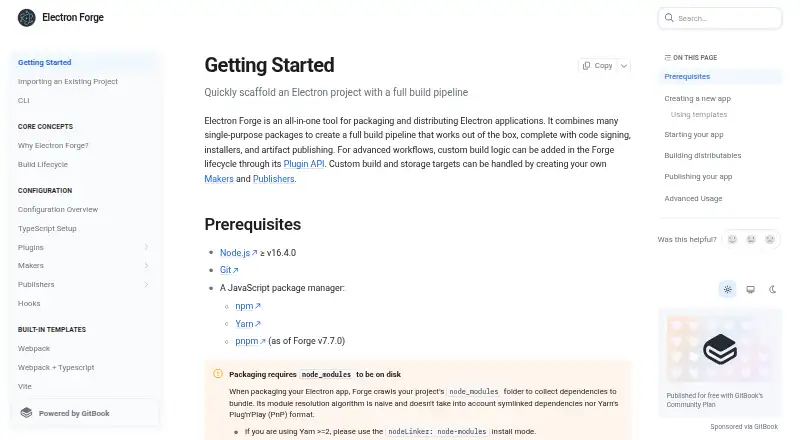
What Electron Forge is
Electron Forge is an open-source tool for taking Electron applications from development toward packaging and distribution on Windows, macOS and Linux. It combines build steps for code signing, installer creation and publishing artifacts. Developers can start a project with the create-electron-app script and choose first-party Webpack, Webpack with TypeScript, Vite, or Vite with TypeScript templates. The templates use plugins to bundle JavaScript for production and include a development server.
Forge Makers create platform-specific distributables, with documented formats including Squirrel.Windows, ZIP, DEB, RPM, DMG, AppX, Flatpak, Snap, MSIX and MSI. Publishers can send artifacts from the make command to distribution services, update servers or storage such as an S3 bucket. GitHub Publisher uploads app artifacts to GitHub Releases and can publish to GitHub Enterprise with host configuration. Forge also documents auto-update options using a free Electron team service for open-source GitHub apps, static storage publishers or a hosted update server. macOS auto updates require a signed application. Developers can extend build logic through the Plugin API and create custom Makers and Publishers for build or storage targets. The getting-started requirements are Node.js 16.4.0 or later, Git and a JavaScript package manager.
Who it suits
Electron Forge suits developers who want to package and distribute Electron apps with a documented build pipeline and first-party project templates. Its plugins, Makers and Publishers also support developers who need to adapt build, signing, publishing or storage workflows.
What it does well
- Open-source and listed as free.
- Provides templates for Webpack, Vite and TypeScript combinations.
- Generates distributables for Windows, macOS and Linux.
- Plugins, Makers and Publishers provide extension points for custom workflows.
- Documents publishing to GitHub Releases and GitHub Enterprise.
- Includes documented auto-update approaches and code-signing guides.
What to know first
- Getting started requires Node.js 16.4.0 or later, Git and a JavaScript package manager.
- Packaging requires node_modules on disk.
- Module resolution does not account for symlinked dependencies or Yarn Plug'n'Play.
- macOS auto updates require a signed application.
Limits
Packaging requires node_modules on disk, and Forge’s module resolver does not account for symlinked dependencies or Yarn Plug'n'Play. Auto updates on macOS require a signed application.
Plans
| Plan | Billed and limits | Price |
|---|---|---|
| Electron Forge | No paid plans or usage limits stated on the official pages opened | Free |
As electronforge.io lists them, read 7 Oct 2026. The maker's own page has the final word.
Getting started
- Visit the Electron Forge website.
- Install Node.js version 16.4.0 or later, Git and a JavaScript package manager.
- Initialize a project with the create-electron-app script.
- Choose a first-party Webpack or Vite template, with or without TypeScript.
- Use Makers to create distributables and Publishers to send artifacts to a distribution or storage target.
Overview
Electron Forge is a free, open-source toolkit for developers building Electron applications. It is best suited to teams that want project scaffolding, packaging and publishing in one extensible workflow. Its breadth is a clear advantage for conventional Node.js setups; dependency layouts based on symlinks or Yarn Plug'n'Play are a notable mismatch.
Key features
The create-electron-app script starts a project from first-party Webpack, Webpack with TypeScript, Vite or Vite with TypeScript templates. Those templates include a development server and plugins for production bundling, so developers get a working front-end build foundation rather than having to assemble one separately. Documentation also covers Parcel, React, React with TypeScript and Vue 3.
Forge combines build tools for code signing, packaging and artifact publishing. Its make command works with Makers to produce platform-specific outputs, including DMG, AppX, Flatpak, DEB, RPM, Snap, MSIX, MSI, ZIP and Squirrel.Windows. That range makes it practical to target multiple desktop systems from an Electron project. The trade-off is that packaging requires dependencies in an on-disk node_modules directory: Forge's resolver does not account for symlinked dependencies or Yarn Plug'n'Play. For Yarn 2 or later, the guide recommends node-modules mode; for pnpm, it recommends node-linker=hoisted.
Publishers send artifacts to distribution services, update servers or storage such as an S3 bucket. The GitHub Publisher can upload releases to GitHub Releases and supports GitHub Enterprise through host configuration. Forge also documents auto-update approaches using a free Electron team service for open-source GitHub apps, static storage publishers or a hosted update server. macOS auto updates require a signed application, so signing is a prerequisite rather than an optional finishing touch for that workflow.
Customization is a strong point for teams with requirements beyond the defaults: plugins can add build logic, while custom Makers and Publishers can target other build and storage destinations. Documentation also includes an Electronegativity plugin for checking misconfigurations and security anti-patterns. Getting started requires Node.js 16.4.0 or later, Git and a JavaScript package manager.
Pricing
Electron Forge is free and open source. Its free plan costs nothing; no paid plans or usage limits are stated. That makes it suitable for developers who need the documented packaging and publishing workflow without a subscription. The trade-off is not a cheaper tier with fewer features: there is no paid plan described, so teams should assess Forge by its technical fit, especially its dependency-layout requirements.
Platforms
Forge targets Windows, macOS and Linux, with command-line packaging and auto-update support. Its Makers produce formats such as DMG, AppX, Flatpak, DEB, RPM, Snap, MSIX, MSI and ZIP. Teams can build a broad desktop distribution pipeline, but macOS auto updates depend on signing the application.
Who it's for
Choose Forge if you are an Electron developer who wants a path from project setup to signed packages and published artifacts, with extension points for specialized build or storage workflows. It is a weaker fit if your dependencies rely on symlinks or Yarn Plug'n'Play and you cannot adopt a supported on-disk layout.
Pros and cons
- Pro: First-party Webpack and Vite templates, including TypeScript variants, provide a bundled starting point with a development server.
- Pro: Makers and Publishers cover packaging and distribution across major desktop platforms, while plugins and custom targets leave room for tailored workflows.
- Pro: GitHub Releases publishing and several documented update approaches can connect builds to release and update workflows.
- Con: Packaging requires on-disk node_modules; symlinked dependencies and Yarn Plug'n'Play are not handled by the resolver.
- Con: macOS auto updates require a signed application, adding a necessary signing step to that route.
- Con: Setup requires Node.js 16.4.0 or later, Git and a JavaScript package manager.
Alternatives
For other options, browse Software Packaging Tools. Tauri Bundler is a free open-source Rust library that wraps Rust executables in OS-specific bundles; consider it when you want a Rust-focused bundling approach, bearing in mind its public API stability is not strictly SemVer. makeself creates self-extracting archives for Unix-compatible systems, making it a more focused choice when that output is the goal. nFPM is another free option to compare for packaging, with no paid plans or usage limits stated on its pages. electron-builder is a free alternative for Electron application packaging. electron-packager is a free open-source Node.js library and CLI; choose it only if its Node.js 22.12.0-or-higher requirement suits your environment. InstallAware offers a free Visual Studio freeware edition for commercial use and a free trial, so it may suit developers already working in Visual Studio. IzPack is a free Apache License 2.0 alternative to consider. NSIS is free for any use and generates Windows installers up to 2GB, making it the more targeted choice when Windows installers are all you need.
Verdict
Electron Forge is a strong choice for Electron developers who want free scaffolding, multi-platform packaging and artifact publishing in a customizable toolchain. Its main reason to choose is the breadth of that integrated workflow; its main reason to look elsewhere is a project dependency layout that cannot meet the on-disk node_modules requirement.
Verdict
Choose Electron Forge if you are building an Electron app and want templates and a pipeline for packaging and publishing across desktop platforms. Check the packaging requirements if your dependencies use symlinks or Yarn Plug'n'Play, and plan to sign a macOS app to use auto updates.
Questions
Is Electron Forge free?
Electron Forge is open source and listed as free. No paid plans or usage limits are stated on the official pages described here.
Which platforms can Electron Forge package apps for?
It supports Windows, macOS and Linux, with platform-specific distributable formats including Squirrel.Windows, ZIP, DEB, RPM, DMG, AppX and Flatpak.
What do I need to get started?
The getting-started guide requires Node.js version 16.4.0 or later, Git and a JavaScript package manager.
Can Electron Forge publish app builds?
Yes. Publishers send artifacts created by the make command to distribution services, update servers or storage such as an S3 bucket. GitHub Publisher can upload to GitHub Releases and, with host configuration, GitHub Enterprise.
Does Electron Forge support auto updates?
It documents options using a free Electron team service for open-source GitHub apps, static storage publishers or a hosted update server. A signed application is required for macOS auto updates.
Can I customize the build process?
Yes. The Plugin API supports custom build logic, and developers can implement custom Makers and Publishers for build and storage targets.
Facts from Electron Forge's own pages
- Auto updates
- Forge documents auto-update options using a free Electron team service for open-source GitHub apps, static storage publishers, or a hosted update server. · electronforge.io, 7 Oct 2026
- Build output
- Forge makers generate platform-specific distributables, with documented formats including DMG, AppX, Flatpak, deb, RPM, Snap, MSIX, MSI, and ZIP. · electronforge.io, 7 Oct 2026
- Build pipeline
- Forge combines tools for a build pipeline that supports code signing, installers, and artifact publishing. · electronforge.io, 7 Oct 2026
- Code signing
- The documentation includes guides for configuring code signing and signing Windows and macOS apps. · electronforge.io, 7 Oct 2026
- Customization
- Custom build logic can be added through Forge’s Plugin API, and custom build and storage targets can be implemented with Makers and Publishers. · electronforge.io, 7 Oct 2026
- Distributables
- Makers generate platform-specific distributable formats, including DMG, AppX, and Flatpak files. · electronforge.io, 7 Oct 2026
- Extensibility
- Forge supports custom build logic through plugins and lets developers create custom makers and publishers for build and storage targets. · electronforge.io, 7 Oct 2026
- Frontend tools
- The first-party templates use plugins to bundle JavaScript for production and include a development server. · electronforge.io, 7 Oct 2026
- GitHub Releases
- The GitHub Publisher uploads app artifacts to GitHub Releases, and can publish to GitHub Enterprise using host configuration options. · electronforge.io, 7 Oct 2026
- Integrations
- The documentation index includes integrations and guides for Webpack, Vite, Parcel, React, React with TypeScript, and Vue 3. · electronforge.io, 7 Oct 2026
- macOS update prerequisite
- A signed application is required to use auto updates on macOS. · electronforge.io, 7 Oct 2026
- Package manager setup
- The guide recommends node-modules mode for Yarn 2 or later and node-linker=hoisted for pnpm. · electronforge.io, 7 Oct 2026
- Packaging limit
- Packaging requires node_modules on disk; the module resolver does not account for symlinked dependencies or Yarn Plug'n'Play. · electronforge.io, 7 Oct 2026
- Packaging limitation
- Packaging requires node_modules on disk; Forge’s module resolution does not account for symlinked dependencies or Yarn Plug'n'Play. · electronforge.io, 7 Oct 2026
- Prerequisites
- Getting started requires Node.js version 16.4.0 or later, Git, and a JavaScript package manager. · electronforge.io, 7 Oct 2026
- Pricing
- The official site pages opened describe Electron Forge as a tool and provide setup and usage documentation, but do not state a product price or paid plans. · electronforge.io, 7 Oct 2026
- Publishing
- Publishers send artifacts created by the make command to distribution services, update servers, or storage such as an S3 bucket. · electronforge.io, 7 Oct 2026
- Purpose
- Electron Forge is an all-in-one tool for packaging and distributing Electron applications. · electronforge.io, 7 Oct 2026
- Requirements
- The getting-started guide lists Node.js version 16.4.0 or later, Git, and a JavaScript package manager as prerequisites. · electronforge.io, 7 Oct 2026
- Scaffolding
- The create-electron-app script initializes a new project, and the documented first-party templates include webpack, webpack with TypeScript, Vite, and Vite with TypeScript. · electronforge.io, 7 Oct 2026
- Security tooling
- The documentation index lists an Electronegativity plugin to check for misconfigurations and security anti-patterns. · electronforge.io, 7 Oct 2026
- Templates
- Forge lists first-party Webpack, Webpack with TypeScript, Vite, and Vite with TypeScript templates. · electronforge.io, 7 Oct 2026
- Who it is for
- Forge is presented as a tool for Electron app developers who want to take an app from development to distribution with minimal configuration, with extension points for advanced workflows. · electronforge.io, 7 Oct 2026
Where Electron Forge stands on Freedom251
- Software Packaging Tools#3 of 29