Freedom251 › Software Packaging Tools
appimagetool
What appimagetool is
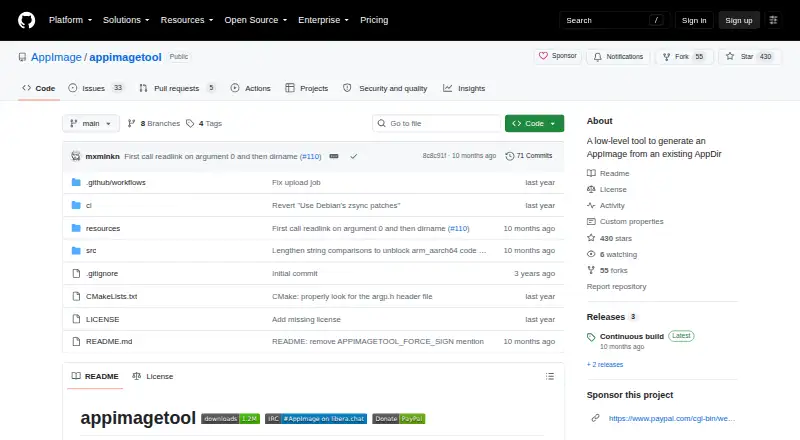
appimagetool is a free Linux command-line utility that packages an existing AppDir as an AppImage. It is a low-level option for application authors distributing desktop Linux applications across common distributions; the project recommends higher-level community tools for most users. Its options include listing AppImage files, setting or guessing update information, choosing Squashfs compression, and excluding files. GPG signing is supported through options for a signing key and extra signing arguments. When update information is embedded and zsyncmake is installed, the tool can generate a zsync file. Build instructions cover x86_64, i686, aarch64, and armhf. The current version downloads the latest AppImage runtime, though a locally supplied runtime can be used instead. The README also documents guessing update information from environment variables used by GitHub Actions and GitLab CI. An AppDir is required as input. If the tool cannot identify the binaries’ architecture, such as in a multi-architecture AppDir or one containing only shell scripts, ARCH must be set. The original source code is under the MIT License, subject to stated exceptions and dependency terms.
Who it suits
It suits Linux application authors who already have an AppDir and want a low-level command-line packaging tool. Most users may prefer one of the higher-level community tools that use it internally.
What it does well
- Creates AppImages from existing AppDirs.
- Supports GPG signing options.
- Can generate zsync files with update information and zsyncmake.
- Build instructions cover four architectures.
- Update information can be guessed from CI environment variables.
What to know first
- An AppDir is required as input.
- ARCH must be set when the tool cannot identify the binaries’ architecture.
- The project recommends higher-level tools for most users.
Limits
An AppDir is expected as input. When the tool cannot determine binary architecture, ARCH must be set; this can apply to multi-architecture AppDirs or those containing only shell scripts.
Plans
| Plan | Billed and limits | Price |
|---|---|---|
| appimagetool | Generates AppImages from existing AppDirs · low-level tool | Free |
As github.com lists them, read 4 Oct 2026. The maker's own page has the final word.
Getting started
- Open the project repository on GitHub.
- Prepare an AppDir as the input.
- Set ARCH if the tool cannot determine the binaries' architecture.
- Choose build options such as compression, exclusions, or update information.
- Use a higher-level community tool instead if that better fits your deployment workflow.
Verdict
appimagetool provides command-line control over AppImage packaging, signing, and update information. It is best considered when a low-level tool fits the workflow and an AppDir is ready.
Questions
Is appimagetool free?
Yes. The appimagetool plan is free.
What does appimagetool create?
It generates an AppImage from an existing AppDir. It can also generate a zsync file when update information is embedded and zsyncmake is installed.
Which platforms and architectures are supported?
It targets Linux. Build instructions list x86_64, i686, aarch64, and armhf.
Does it support signing?
Yes. It supports GPG signing, with options for a signing key and extra signing arguments.
Is appimagetool open source?
The repository's original source code is licensed under the MIT License, subject to exceptions for files or directories with different terms and for dependencies.
Where can users get support?
The AppImage project site points users to its Discourse forum and mailing list, and to the #AppImage channel on irc.libera.chat for live chat.
Facts from appimagetool's own pages
- Architectures
- The build instructions list x86_64, i686, aarch64, and armhf targets. · github.com, 4 Oct 2026
- Build options
- The command-line options include listing AppImage files, setting or guessing update information, choosing Squashfs compression, and excluding files. · github.com, 4 Oct 2026
- Higher-level tools
- The README says many community-provided higher-level tools for deploying applications in AppImage format use appimagetool internally, and recommends using them instead of calling appimagetool directly in most cases. · github.com, 4 Oct 2026
- Integrations
- The README documents guessing update information from environment variables used by GitHub Actions and GitLab CI. · github.com, 4 Oct 2026
- Intended users
- The project describes AppImage packaging as a way for application authors to distribute desktop Linux applications across common Linux distributions. · appimage.org, 4 Oct 2026
- License
- The repository’s original source code is licensed under the MIT License, subject to exceptions for files or directories with different terms and for dependencies. · github.com, 4 Oct 2026
- Notable limitation
- An AppDir is expected as input, and ARCH must be set when the tool cannot determine the architecture of the binaries, such as when the AppDir contains multiple architectures or only shell scripts. · github.com, 4 Oct 2026
- Purpose
- appimagetool generates an AppImage from an existing AppDir. · github.com, 4 Oct 2026
- Runtime requirement
- The current version downloads the latest AppImage runtime, or can use a locally supplied runtime file when the build system lacks internet access or the user prefers a local runtime. · github.com, 4 Oct 2026
- Signing
- The tool supports GPG signing with options for a signing key and extra signing arguments. · github.com, 4 Oct 2026
- Support
- The AppImage project site points users to its Discourse forum and mailing list for questions, and to the #AppImage channel on irc.libera.chat for live chat. · appimage.org, 4 Oct 2026
- Update metadata
- When update information is embedded and zsyncmake is installed, the tool can generate a zsync file. · github.com, 4 Oct 2026
Where appimagetool stands on Freedom251
- Software Packaging Tools#7 of 29