Freedom251 › eBook Creation Software
eBook Creator
What eBook Creator is
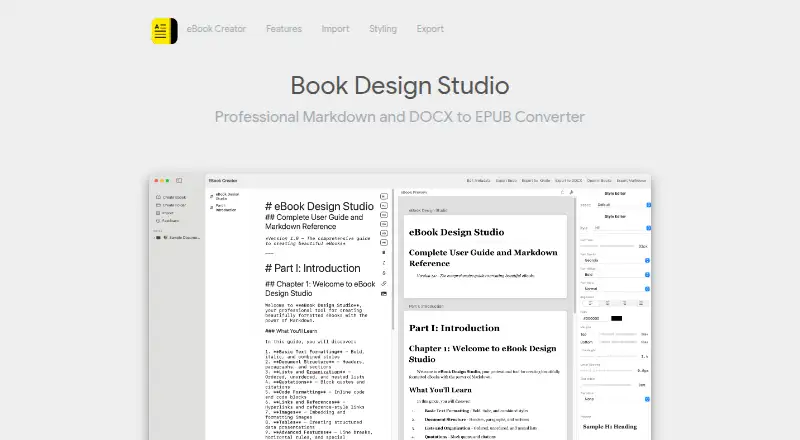
eBook Creator is a macOS app for making EPUB ebooks from DOCX documents or Markdown. Users can drag and drop a Microsoft Word file, retaining its formatting, headings, and structure, or write in the app's native Markdown editor with syntax highlighting. A split view previews the ebook as the user works. The style editor provides typography controls and custom styles for body text, paragraphs, and headings from H1 through H6. Five presets are available: Classic, Modern, Elegant, Bold, and Minimal. Images in imported documents are extracted and optimized for ebook use. On export, the app produces EPUB files and says it preserves formatting, images, and chapter navigation for major ebook platforms. The maker describes those exports as ready for Apple Books, Amazon Kindle, Google Play Books, and Kobo. The app is available from the Mac App Store and requires macOS 14.0 (Sonoma) or later; it is optimized for Apple Silicon and Intel Macs. The maker says the app does not collect personal data and documents stay on the user's Mac. The listed plan is free and is for Mac only. The site copyright identifies Indigogo LTD.
Who it suits
eBook Creator suits authors, bloggers, and digital publishers who want to turn Word documents or Markdown writing into EPUB files. It is for people using a Mac with macOS 14.0 or later who want styling controls and a live preview while preparing ebooks.
What it does well
- Imports DOCX while preserving formatting, headings, and structure.
- Includes a Markdown editor with syntax highlighting and live preview.
- Offers five styling presets and custom typography controls.
- Exports EPUB with formatting, images, and chapter navigation.
- The maker says documents stay on the Mac and personal data is not collected.
What to know first
- Available only for Mac.
- Requires macOS 14.0 (Sonoma) or later.
Plans
| Plan | Billed and limits | Price |
|---|---|---|
| eBook Creator | Only for Mac | Free |
As ebookcreatorapp.com lists them, read 9 Oct 2026. The maker's own page has the final word.
Getting started
- Get eBook Creator through the Mac App Store.
- Confirm the Mac runs macOS 14.0 (Sonoma) or later.
- Import a DOCX file by dragging and dropping it, or start writing in the Markdown editor.
- Review the ebook in split-view preview and adjust styles or choose a preset.
- Export the finished ebook as an EPUB.
Verdict
Choose eBook Creator if you use a compatible Mac and want to produce EPUBs from DOCX files or Markdown with styling and preview tools. Look elsewhere if you need an app for a non-Mac platform or use an earlier macOS version.
Questions
How much does eBook Creator cost?
The listed plan is free, and is for Mac only.
Which platforms does it support?
It is a macOS app and requires macOS 14.0 (Sonoma) or later. It is optimized for Apple Silicon and Intel Macs.
What file types can I import and export?
It imports DOCX and Markdown and exports EPUB files.
Which ebook platforms are its EPUB exports ready for?
The maker says exports are ready for Apple Books, Amazon Kindle, Google Play Books, and Kobo.
Who makes eBook Creator?
The site's copyright identifies Indigogo LTD.
Does the app collect personal data?
The maker says the app does not collect personal data and documents stay on the user's Mac.
Facts from eBook Creator's own pages
- DOCX import
- Users can drag and drop Microsoft Word documents, with formatting, headings, and structure preserved. · ebookcreatorapp.com, 9 Oct 2026
- Download
- The maker links to the Mac App Store for the app. · ebookcreatorapp.com, 9 Oct 2026
- EPUB export
- The app exports EPUB files and says it preserves formatting, images, and chapter navigation for major ebook platforms. · ebookcreatorapp.com, 9 Oct 2026
- Image handling
- Images in imported documents are automatically extracted and optimized for ebook format. · ebookcreatorapp.com, 9 Oct 2026
- Integrations
- The maker says exported EPUBs are ready for Apple Books, Amazon Kindle, Google Play Books, and Kobo. · ebookcreatorapp.com, 9 Oct 2026
- Intended users
- The maker describes the product for authors, bloggers, and digital publishers. · ebookcreatorapp.com, 9 Oct 2026
- Live preview
- A split view previews the ebook in real time as users write. · ebookcreatorapp.com, 9 Oct 2026
- Maker
- The site copyright identifies Indigogo LTD. · ebookcreatorapp.com, 9 Oct 2026
- Markdown editor
- The app includes a native Markdown editor with syntax highlighting. · ebookcreatorapp.com, 9 Oct 2026
- Operating system
- The app requires macOS 14.0 (Sonoma) or later and is optimized for Apple Silicon and Intel Macs. · ebookcreatorapp.com, 9 Oct 2026
- Presets
- The app offers five presets: Classic, Modern, Elegant, Bold, and Minimal. · ebookcreatorapp.com, 9 Oct 2026
- Privacy
- The maker says the app does not collect personal data and documents stay on the user's Mac. · ebookcreatorapp.com, 9 Oct 2026
- Purpose
- eBook Creator imports DOCX files or lets users write in Markdown, then exports EPUB ebooks. · ebookcreatorapp.com, 9 Oct 2026
- Styling
- The style editor supports typography controls and custom styles for body text, paragraphs, and H1–H6 headings. · ebookcreatorapp.com, 9 Oct 2026
Where eBook Creator stands on Freedom251
- eBook Creation Software#12 of 28