Freedom251 › Digital Signage Software

EasySignage
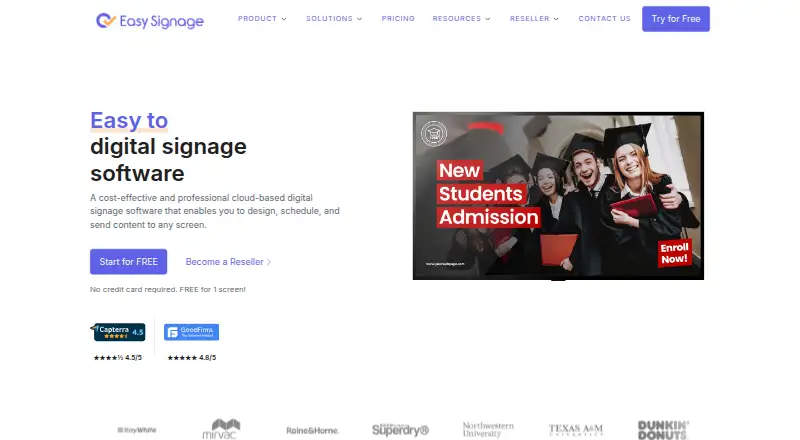
What EasySignage is
EasySignage is a digital signage platform for publishing content to screens through Android, FireTV, WebOS, Windows, Linux, Raspberry Pi, and web players. It supports images, videos, documents, GIFs, YouTube videos, and web content. Features include scheduling, offline playback, split screens, video walls, and touchscreen kiosks. The service lists more than 100 apps and integrations, including Canva, Google Slides, Sheets, Power BI, and Google Drive. It says it runs on Google Cloud Platform and provides a 99.9% uptime guarantee; it also holds ISO/IEC 27001:2022 certification and a SOC 2 attestation. EasySignage says it works with existing devices without proprietary hardware. Its free plan does not expire, but is limited to one screen with 200 MB of storage; estimated content capacity is 100 images and 10 minutes of video. Paid plans start at $7 per screen per month, with annual pricing starting at $5.83 per screen per month. Basic and higher plans include unlimited users; Premium includes team management and access control.
Who it suits
It suits organizations that want to publish varied content across supported screen players, including offline playback and scheduled displays. Its free plan may suit a single-screen setup; teams needing more users or management controls can consider the listed paid tiers.
What it does well
- Supports seven listed types of screen players.
- Includes offline playback, scheduling, and split screens.
- The free plan never expires.
- Lists more than 100 apps and integrations.
- Works with existing devices without proprietary hardware.
What to know first
- Free plan is limited to one screen.
- Free screen includes 200 MB of storage.
- Free content capacity is estimated at 100 images and 10 video minutes.
Limits
The Free plan is limited to one screen and includes 200 MB of storage. Its estimated capacity is 100 images and 10 minutes of video. Paid plans start at $7 per screen per month; annual pricing starts at $5.83 per screen per month.
Plans
| Plan | Billed and limits | Price |
|---|---|---|
| Free | Always free plan; no card required · 1 screen · 200 MB storage · Unlimited monthly bandwidth · Unlimited playlists | Free |
| Basic | Monthly pricing is stated in the pricing FAQ; pricing page displays per-screen billing · Unlimited users · 10 GB cloud storage · 2 GB per screen · 1 free screen | $7 a month |
| Premium | Billed yearly · Unlimited users · Unlimited monthly bandwidth | On request |
| Enterprise | Billed yearly · Unlimited monthly bandwidth | On request |
As easysignage.com lists them, read 28 Sept 2026. The maker's own page has the final word.
Getting started
- Visit https://easysignage.com/.
- Choose the Free plan or a paid plan; the Free plan requires no card.
- Select a supported player platform: Android, FireTV, WebOS, Windows, Linux, Raspberry Pi or web.
- Connect content such as images, videos, documents, GIFs, YouTube videos or web content.
- Use scheduling or other available signage features to organize playback.
Overview
EasySignage is a digital signage service for publishing content to screens, from a single web player to dedicated devices such as Android, FireTV, WebOS, Windows, Linux and Raspberry Pi players. It suits operators who want broad content and display options without buying proprietary hardware. Its permanent one-screen free plan is useful for a small trial or simple display, but the storage cap makes it a limited long-term fit for media-heavy use.
Key features
Content and screen control
EasySignage supports images, videos, documents, GIFs, YouTube videos and web content. Scheduling helps teams coordinate what appears and when, while offline playback is valuable when a display cannot count on continuous connectivity. Split-screen layouts, video walls and touchscreen kiosks extend its use beyond straightforward playlist rotation, though those features matter most to operators with more involved display setups.
The free screen includes 200 MB of storage, with an estimated content capacity of 100 images and 10 minutes of video. That is enough to assess a basic setup, but not much room for a substantial video library. Unlimited monthly bandwidth and playlists soften the free plan’s limits; the single-screen cap remains the more significant restriction for anyone managing multiple displays.
Integrations and administration
More than 100 apps and integrations are available, including Canva, Google Slides, Sheets, Power BI and Google Drive. API access offers another way to connect the platform to a workflow. Advanced user roles support more structured administration; Premium adds team management and access control. Resellers get a portal for accounts, licenses, billing and support.
EasySignage runs on Google Cloud Platform, provides a 99.9% uptime guarantee, and holds ISO/IEC 27001:2022 certification and a SOC 2 attestation. Those are meaningful assurances for organizations screening vendors on infrastructure and security, though they do not change the practical storage and screen limits of the lower tiers.
Pricing
Free
The Free plan costs nothing and is always free, with no card required. It covers one screen, 200 MB of storage, unlimited monthly bandwidth and unlimited playlists. It is a sensible way to run a single modest display indefinitely, but the one-screen limit and estimated allowance of 100 images or 10 minutes of video constrain larger or video-heavy use.
Basic
Basic starts at $7 per screen per month, with annual pricing starting at $5.83 per screen per month. It includes everything in Free, unlimited users, 10 GB of cloud storage and 2 GB per screen, plus one free screen. The added storage makes it the more practical choice for a growing content library, and unlimited users avoid seat-count tradeoffs as a team expands. Pricing is per screen, so multi-display deployments scale with screen count.
Premium and Enterprise
Premium and Enterprise have custom pricing and are billed yearly. Premium includes the Basic plan and adds unlimited monthly bandwidth, team management and access control. It is the more relevant step for organizations that need stronger team administration; the published plan terms do not give a price to compare against Basic. Enterprise includes Premium and unlimited monthly bandwidth, making it an option for larger requirements, but its price is also custom.
Platforms
EasySignage supports Android, FireTV, WebOS, Windows, Linux, Raspberry Pi and web players. That range, together with support for existing devices and no requirement for expensive proprietary hardware, gives operators flexibility to reuse compatible equipment. Its listed platform range covers common signage players and desktop environments, although buyers should match their intended player to the supported options before choosing.
Who it's for
EasySignage is a strong fit for businesses, venues and teams that need varied content formats, scheduled playback and the option to keep screens running offline. The free plan works for a single low-volume display; Basic is the more credible fit when a larger library or multiple users are involved. Premium is aimed at teams that need explicit management and access controls, while resellers have dedicated account and billing administration.
It is less compelling for anyone who needs several screens on a no-cost plan, substantial free storage, or a clear upfront price for advanced tiers. The free allowance is a practical foothold, not a broad multi-screen deployment plan.
Pros and cons
- Pros: Permanent free access to one screen means a small installation can keep running without a subscription.
- Pros: Support for many media types, scheduling, offline playback, split screens, video walls and kiosks covers more than basic signage loops.
- Pros: More than 100 apps and integrations, API access, and compatibility with existing devices offer flexibility in workflows and hardware.
- Pros: Basic and higher plans include unlimited users, while Premium adds team management and access control.
- Cons: Free is limited to one screen and 200 MB of storage, restricting deployments and larger media collections.
- Cons: Premium and Enterprise use custom pricing and yearly billing, so buyers cannot assess their cost from the stated starting rates.
- Cons: Basic is priced per screen, so the stated monthly starting price does not represent the full cost of a multi-screen installation.
Alternatives
OptiSigns is worth considering if a free setup needs up to three supported screen types, 25 basic apps and 1 GB of storage; its free plan also has a free trial option and supports iOS and macOS among its platforms.
Yodeck may suit a single-screen user looking for an essentials-focused free plan with unlimited file capacity.
Play Digital Signage is another freemium option with a free one-screen plan.
DigitalSignage.com offers a free plan with three screens and 1 GB of cloud storage, so it is a relevant alternative when the screen count matters more than EasySignage's single-screen free tier.
MediaSignage is an alternative with a free plan for three screens and 1 GB of cloud storage.
NEXON Vision offers a free plan with three screens and 1 GB of storage, and a Business plan at €3 a month plus VAT with 100 GB storage, unlimited screens and unlimited users.
Addreality is an alternative freemium signage platform with a free plan and support for web, desktop and mobile platforms.
info-beamer is another freemium option, with a free account for one device and 1 GB of storage.
For a broader comparison, browse Digital Signage Software.
Verdict
Choose EasySignage for a flexible signage platform with broad player support, offline playback, varied content handling and a free plan that does not expire. It is particularly appealing for a single-screen start or for teams that value integrations and display options. Look elsewhere if a free deployment needs multiple screens or if you need a published price before considering advanced administration tiers.
Verdict
EasySignage covers multiple content types, player platforms, and display features, with a non-expiring free plan for one screen. Paid pricing starts at $7 per screen per month, or $5.83 per screen per month with annual pricing.
Questions
Is there a free plan?
Yes. The Free plan costs nothing, never expires and requires no card.
What does the Free plan include?
It includes one screen, 200 MB of storage, unlimited monthly bandwidth and unlimited playlists. The estimated content capacity is 100 images and 10 minutes of video.
How much do paid plans cost?
Paid plans start at $7 per screen per month. Annual pricing starts at $5.83 per screen per month.
Which platforms does EasySignage support?
Supported players include Android, FireTV, WebOS, Windows, Linux, Raspberry Pi and web. The platform list also includes API.
Does EasySignage offer integrations?
Yes. It offers more than 100 apps and integrations, including Canva, Google Slides, Sheets, Power BI and Google Drive.
What is included in Premium?
Premium includes team management and access control. Its price is not given in the listed plan details.
Facts from EasySignage's own pages
- Annual starting price
- Annual pricing starts at $5.83 per screen per month · easysignage.com, 28 Sept 2026
- API access
- Yes · easysignage.com, 21 Sept 2026
- App ecosystem
- Offers more than 100 apps and integrations · easysignage.com, 28 Sept 2026
- Cloud infrastructure
- Built on Google Cloud Platform · easysignage.com, 28 Sept 2026
- Content types
- images,videos,documents,GIF,YouTube videos,web content · easysignage.com, 21 Sept 2026
- Free content limit
- Estimated limit is 100 images and 10 minutes of videos · easysignage.com, 28 Sept 2026
- Free plan
- Yes · easysignage.com, 21 Sept 2026
- Free plan duration
- The free plan never expires · easysignage.com, 28 Sept 2026
- Free screen limit
- Free plan is limited to 1 screen · easysignage.com, 28 Sept 2026
- Free storage
- Free screen includes 200 MB of storage · easysignage.com, 28 Sept 2026
- Hardware requirement
- Works with existing devices and requires no expensive proprietary hardware · easysignage.com, 28 Sept 2026
- Key integrations
- Integrates with Canva, Google Slides, Sheets, Power BI, and Google Drive · easysignage.com, 28 Sept 2026
- Notable features
- Includes scheduling, offline operation, split screen, video walls, and touchscreen kiosks · easysignage.com, 28 Sept 2026
- Offline playback
- Yes · easysignage.com, 21 Sept 2026
- Paid starting price
- Paid plans start at $7 per screen per month · easysignage.com, 28 Sept 2026
- Pricing model
- Per-screen pricing with no hidden fees or long-term contracts · easysignage.com, 28 Sept 2026
- Reseller administration
- Resellers receive an admin portal for accounts, licenses, billing, and support · easysignage.com, 28 Sept 2026
- Security certifications
- ISO/IEC 27001:2022 certified and holds a SOC 2 attestation · easysignage.com, 28 Sept 2026
- Paid from
- 7 · easysignage.com, 21 Sept 2026
- Support channels
- Support ranges from email to email, chat, and video call support · easysignage.com, 28 Sept 2026
- Supported platforms
- Supports Android, FireTV, WebOS, Windows, Linux, Raspberry Pi, and web players · easysignage.com, 28 Sept 2026
- Team management
- Premium includes team management and access control · easysignage.com, 28 Sept 2026
- Uptime guarantee
- Provides 99.9% uptime · easysignage.com, 28 Sept 2026
- User capacity
- Basic and higher plans include unlimited users · easysignage.com, 28 Sept 2026
Where EasySignage stands on Freedom251
- Digital Signage Software#3 of 207