Freedom251 › Digital Signage Software
NEXON Vision
by NEXON Vision
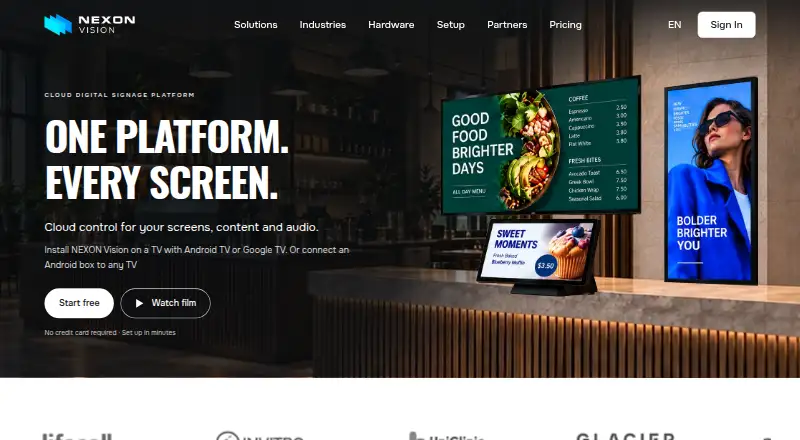
What NEXON Vision is
NEXON Vision is an API-platform service for managing digital content across screens. Its supported content includes video, audio, photos, images, web pages, YouTube, and streaming content, and it supports offline playback. The service offers advanced user roles and API access. The Free plan costs nothing, billed plus VAT, and includes 1 GB of storage and three screens. Business costs €3 a month, billed plus VAT, with 100 GB of storage, unlimited screens, and unlimited users. Premium costs €5 a month and includes 500 GB of storage. NEXON Vision lists a 14-day trial and a freemium pricing model. The maker, NEXON Vision, is headquartered in Warsaw, Poland. API is its listed platform, a detail to consider when assessing how it will fit a screen-content setup. The plans differ in storage and, for Business, screen and user allowances, so readers can compare those stated limits with their needs.
Who it suits
NEXON Vision may suit organizations managing varied media and web content across screens through an API. Its plans may fit different storage and screen needs, from three screens on Free to unlimited screens and users on Business.
What it does well
- Supports video, audio, images, web pages, and streaming content.
- Includes offline playback.
- Offers advanced user roles and API access.
- Business includes unlimited screens and users.
What to know first
- Free includes 1 GB storage and three screens.
- Business and Premium prices are billed plus VAT.
- The listed platform is API.
Limits
The free plan includes 1 GB of storage and three screens. Business costs €3 a month and includes 100 GB, unlimited screens and users; Premium costs €5 a month and includes 500 GB. Paid plans are billed plus VAT.
Plans
| Plan | Billed and limits | Price |
|---|---|---|
| Business | per screen / mo + VAT · 100 GB storage · unlimited screens and users · all file types · YouTube, websites and streaming · Canva editor | €3 a month |
| Premium | per screen / mo + VAT · 500 GB storage · screen zones · advanced access management · Proof of Play reports · API integrations · guaranteed SLA · 24/7 support | €5 a month |
| Free | per screen / mo + VAT · 1 GB storage · up to 3 screens · video, audio and photo playback · screen synchronization | On request |
As nexon.vision lists them, read 9 Oct 2026. The maker's own page has the final word.
Getting started
- Visit the NEXON Vision website.
- Choose the free plan or review the Business and Premium plans.
- Use the 14-day trial if you want to start with the listed trial.
- Plan around the API platform and the storage and screen allowance in your chosen plan.
NEXON Vision is a cloud digital-signage platform for businesses coordinating screens, schedules, media and audio. It fits operators using Android-based displays, from small installations to large fleets. Its main appeal is broad content support, offline playback and low per-screen pricing; Samsung, LG and VIDAA users need extra hardware.
Overview
NEXON Vision combines scheduled playback, synchronized multi-screen content, offline playback and real-time screen-status monitoring. Offline playback keeps planned material running during connectivity interruptions, while status monitoring helps an operator identify unavailable screens without visiting each location. Those controls suit advertising and information displays, digital menus and ordering, background music, hotel TV, electronic queues and interactive screens.
The service is intended for business customers rather than consumers. It is a sensible fit when one platform must handle both visual signage and audio, but the appropriate tier depends on storage, fleet size and whether the operation needs governance, reporting or integrations.
Key features
Supported content spans video, audio, photos, images, web pages, YouTube and streaming content. Business explicitly includes all file types, YouTube, websites and streaming, making it the practical choice for teams mixing uploaded media with online sources. Canva editor access in that tier can reduce the need to prepare every asset in another application.
Scheduling and synchronized playback are useful for coordinated campaigns or menus across several displays. Screen monitoring adds operational visibility, and offline playback reduces the risk that a temporary network failure leaves a display blank. Advanced users also get API access, with API integrations included in Premium.
The player runs on compatible Android TV or Google TV devices, or on an Android player connected to another television or display. It cannot be installed directly on Samsung Tizen, LG webOS or VIDAA televisions, so owners of those systems must budget for an external Android player. Integrations named by the maker include DocDream clinic screens, Expert Music, Canva and air-raid alerts.
Customer content and service data are processed on EU servers, including a DigitalOcean data centre in Frankfurt. The maker describes its policy as GDPR-compliant and cites Standard Contractual Clauses and, where applicable, the EU-US Data Privacy Framework for subprocessors outside the EEA. These arrangements matter to organisations with European data-handling requirements.
Pricing
Free — €0.00 per free, billed plus VAT. This plan provides 1 GB of storage and three screens. It is enough for a small proof of concept or a compact installation, but the storage ceiling and three-screen cap make it unsuitable for a growing network.
Business — €3.00 per screen per month, plus VAT. The plan raises storage to 100 GB and allows unlimited screens and users. It adds all file types, YouTube, websites, streaming and the Canva editor. This is the strongest value for businesses operating more than a few screens or sharing management across a team; billing per screen means costs rise directly with fleet size.
Premium — €5.00 per screen per month, plus VAT. Premium includes 500 GB, screen zones, advanced access management, Proof of Play reports, API integrations, a guaranteed SLA and 24/7 support. It is the appropriate tier for controlled deployments that need evidence of playback, segmented layouts, stronger permissions or assured support. Smaller operators pay more than Business without necessarily using those controls.
A 14-day trial is available, and the pricing FAQ describes a free 14-day pilot for full-fleet rollouts with full features and real content at customer locations. Networks of 500 or more screens can receive custom terms, potentially including custom rates, dedicated support, SSO and infrastructure adjustments.
Platforms
Android TV and Google TV devices are supported, as are Android players attached to other displays. Android and API are the listed platform categories. Direct installation on Samsung Tizen, LG webOS and VIDAA is not supported, so those displays require an Android player.
Who it's for
NEXON Vision is best for businesses running Android-compatible signage in retail, hospitality, healthcare or public-facing environments. Business suits teams needing varied media and unlimited users; Premium suits larger or more regulated operations needing zones, permissions, playback reports, API connections, SLA coverage and round-the-clock support. The Free plan works for a three-screen pilot, not a serious multi-location rollout.
Pros and cons
- Pros: Offline and synchronized playback help maintain consistent schedules across screens.
- Pros: Video, audio, images, web pages, YouTube and streaming support covers mixed-content deployments.
- Pros: Business offers unlimited screens and users at €3 per screen per month, plus Canva editing.
- Pros: Premium adds zones, access management, Proof of Play, API integrations, SLA and 24/7 support.
- Cons: Samsung, LG and VIDAA displays need an external Android player.
- Cons: Free storage is limited to 1 GB and three screens, while paid pricing scales with every screen.
- Cons: Premium is required for several operational controls and reporting features.
Alternatives
OptiSigns is a better fit when iOS, Linux, macOS, web or Windows support matters, and its free plan covers up to three supported screen types with 1 GB storage.
Yodeck suits a single-screen starter deployment with essential features and Android, API and web platforms.
EasySignage is worth considering for an always-free one-screen plan with 200 MB storage and unlimited monthly bandwidth.
Play Digital Signage offers a free screen tier plus paid tiers with templates, scheduling, an editor and media-library features.
DigitalSignage.com provides a free three-screen, 1 GB plan with no time limit, while its Plus+ tier costs $3.00 per month.
MediaSignage offers a free three-screen, 1 GB option and an unlimited-screen Plus+ tier.
Tilecast is the alternative when open-source, self-hosted software with no subscription is the priority.
Layarva is an option for a one-screen free plan with 1 GB media storage and one offline screen.
Browse more options in Digital Signage Software.
Verdict
Choose NEXON Vision if you run business signage on Android-compatible hardware and want offline resilience, varied media and a clear path from a three-screen trial to managed fleets. Look elsewhere if direct Samsung, LG or VIDAA installation is essential, or if you need a platform whose free tier or pricing model better matches a very small deployment.
Verdict
NEXON Vision combines varied content types, offline playback, and API access with three plans that differ in storage and allowances. Check the listed API platform and plan limits against your screen setup.
Questions
Is NEXON Vision free?
Yes. Its Free plan costs nothing and includes 1 GB of storage and three screens.
How much do the paid plans cost?
Business costs €3 a month and Premium costs €5 a month. Both are billed plus VAT.
Is there a free trial?
NEXON Vision lists a 14-day trial.
What content does it support?
Listed content types are video, audio, photos, images, web pages, YouTube and streaming content. Offline playback is supported.
Which platform and access options are listed?
The listed platform is API, and the service includes API access. Advanced user roles are also listed.
Who makes NEXON Vision?
The maker is NEXON Vision, headquartered in Warsaw, Poland.
Facts from NEXON Vision's own pages
- API access
- Yes · nexon.vision, 21 Sept 2026
- Business uses
- Listed solutions include advertising and information screens, digital menus and ordering, background music, hotel TV, electronic queues and interactive screens. · nexon.vision, 9 Oct 2026
- Content types
- video,audio,photos,images,web pages,YouTube,streaming content · nexon.vision, 21 Sept 2026
- Customer type
- The terms state that the service is intended for business customers and is not intended for consumers. · nexon.vision, 9 Oct 2026
- Data transfer protection
- For subprocessors that may process data outside the EEA, the maker lists safeguards including Standard Contractual Clauses and, where applicable, the EU-US Data Privacy Framework. · nexon.vision, 9 Oct 2026
- Free plan
- Yes · nexon.vision, 21 Sept 2026
- Headquarters
- Warsaw, Poland · nexon.vision, 28 Sept 2026
- Integrations
- The maker lists DocDream clinic screens, Expert Music, Canva, air-raid alerts and API integrations. · nexon.vision, 9 Oct 2026
- Large networks
- For networks of 500 or more screens, the maker offers custom terms that may include custom rates, dedicated support, SSO and infrastructure adjustments. · nexon.vision, 9 Oct 2026
- Offline playback
- Yes · nexon.vision, 21 Sept 2026
- Playback
- The platform supports scheduled playback, synchronized multi-screen content, offline playback and real-time screen status monitoring. · nexon.vision, 9 Oct 2026
- Product
- NEXON Vision is a cloud digital signage platform for managing screens, content, schedules and audio. · nexon.vision, 9 Oct 2026
- Security
- The maker says customer content and service data are processed on EU servers, including a DigitalOcean data centre in Frankfurt, Germany, and describes its policy as GDPR-compliant. · nexon.vision, 9 Oct 2026
- Support
- The maker provides contact by message or phone, and the Premium plan lists 24/7 support. · nexon.vision, 9 Oct 2026
- Supported devices
- The player can run on compatible Android TV or Google TV devices, or on an Android player connected to another TV or display. · nexon.vision, 9 Oct 2026
- Trial
- The pricing FAQ offers a free 14-day pilot for full-fleet rollouts with full features and real content at the customer's locations. · nexon.vision, 9 Oct 2026
- Unsupported direct installation
- NEXON Vision cannot be installed directly on Samsung Tizen, LG webOS or VIDAA TVs; those displays need an external Android player. · nexon.vision, 9 Oct 2026
- User roles
- advanced · nexon.vision, 21 Sept 2026
Where NEXON Vision stands on Freedom251
- Digital Signage Software#17 of 207