Freedom251 › Digital Signage Software

Yodeck
by Yodeck
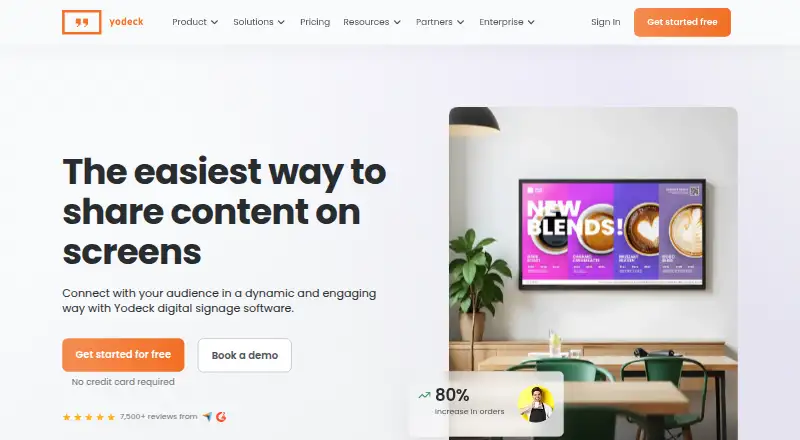
What Yodeck is
Yodeck is a digital signage platform for creating, scheduling and publishing content remotely from one dashboard. It can manage screens across locations and supports images, video, audio, documents, PDFs, Microsoft Office files, web pages, YouTube, Vimeo and live video streams, with offline playback. It runs on Raspberry Pi players, Android TVs, web browsers and compatible devices. The free plan covers one screen and includes unlimited users and file storage. Paid plans start at $8 per screen per month. A 30-day trial offers full feature access for up to five screens, and neither free access nor the trial requires a credit card. Yodeck connects with more than 160 apps and provides more than 800 free templates. Team tools include workspaces, hierarchies, custom roles and permissions. Enterprise includes SAML SSO, data encryption and 24/5 support; Enterprise+ offers 24/7 priority support. Every annual plan includes a free Yodeck Player. The platform lists API access, but no mobile app. Yodeck was founded in 2015.
Who it suits
Yodeck suits teams that need to publish and schedule signage content remotely across one or many screens. Its free plan covers one screen, while its trial supports up to five screens with full feature access.
What it does well
- Free plan includes unlimited users and file storage
- 30-day trial supports up to five screens
- Offline playback is available
- More than 160 connected apps
- More than 800 free templates
What to know first
- Free plan is limited to one screen
- No mobile app
- Paid plans start at $8 per screen per month
Limits
The Free plan is limited to one screen. The trial lasts 30 days and supports up to five screens. Enterprise+ pricing is tailored.
Plans
| Plan | Billed and limits | Price |
|---|---|---|
| Free | Shown as USD 0 per free on our read (localised); USD price not displayed to our checker · 1 screen · Unlimited file storage · Unlimited users | Free |
| Basic | billed monthly · 800+ templates · 90+ Essential Apps | $8 a month |
| Premium | billed monthly · Microsoft 365 and Google Apps · Data visualization apps · Yodeck AI Agent and API · Advanced media scheduling · Tag-based playlists and sub-playlists · Interactive library and playlist | $12 a month |
| Enterprise | billed monthly · 24/5 support | $16 a month |
| Enterprise+ | — | On request |
As yodeck.com lists them, read 28 Sept 2026. The maker's own page has the final word.
Getting started
- Visit yodeck.com
- Start with the free plan or begin the 30-day trial
- Select up to one screen on Free or up to five during the trial
- Use a Raspberry Pi player, Android TV, web browser, or compatible device
- Create, schedule, and publish content from the dashboard
Yodeck is a digital signage platform for teams that need to publish content to screens remotely. It is strongest for organizations managing displays across locations, while its free single-screen plan gives smaller users a low-commitment way to start.
Overview
Yodeck brings content creation, scheduling and publishing into one dashboard, with control that can scale from one screen to thousands across multiple locations. Offline playback is useful when a connection drops: scheduled content can continue rather than leaving a display dependent on uninterrupted internet access.
Its content range spans images, video, audio, documents, PDFs, Microsoft Office files, web pages, YouTube, Vimeo and live video streams. More than 160 connected apps and over 800 free templates add breadth for teams that want to build on existing tools or avoid starting every screen layout from scratch. The trade-off is that Yodeck has no mobile app; its listed platforms are Android, API and web, with support for Raspberry Pi players, Android TVs, browsers and compatible devices.
Key features
Content and control
Remote creation, scheduling and publishing make a single dashboard the operational hub for screens. Advanced roles, workspaces, hierarchies and permissions help larger teams divide responsibilities and manage access, rather than relying on a shared account. API access is included, though it arrives in the Premium plan rather than the entry paid tier.
Playback and security
Offline playback is a meaningful strength for displays that must keep showing content through network interruptions. Yodeck also offers ISO-certified security and enterprise-grade features; Enterprise adds SAML single sign-on and data encryption for organizations with more demanding access and security needs.
Pricing
Yodeck is freemium, with a 30-day trial that includes full feature access for up to five screens. No credit card is required to start the free plan or trial. Paid plans start at $8 per screen per month.
| Plan | Price | What it includes |
|---|---|---|
| Free | Free | One screen, unlimited file storage and unlimited users, with essential features. The single-screen ceiling makes it a sensible trial for an individual display, not a multi-location rollout. |
| Basic | $8 per screen per month | More than 800 templates and over 90 essential apps. Annual plans include a free 1GB RAM Yodeck Player. This is the entry point for paid use, but it leaves the advanced scheduling, API and office-app features to Premium. |
| Premium | $12 per screen per month | Microsoft 365 and Google Apps, data visualization apps, Yodeck AI Agent and API, advanced media scheduling, tag-based playlists and sub-playlists, and an interactive library and playlist. The upgrade is most relevant when integrations and finer scheduling control matter. |
| Enterprise | $16 per screen per month | 24/5 support, SAML SSO and data encryption. Annual plans include a free 4GB RAM Yodeck Player. It is aimed at teams that need stronger security and weekday support, rather than just more content options. |
| Enterprise+ | Custom pricing | Tailored onboarding, custom integrations and priority support; support is 24/7. This is for organizations whose rollout or support requirements go beyond the standard Enterprise offer. |
Annual plans include a player, but the included model differs by tier. The free plan's unlimited storage and users are generous for one screen; its hard screen cap is the key constraint. The stated monthly prices are per screen, so costs scale with each additional display.
Platforms
Yodeck runs on Raspberry Pi players, Android TVs, web browsers and compatible devices. Android, API and web are the listed platforms. The absence of a mobile app makes it a less natural choice for teams that expect to manage signage from a dedicated phone application.
Who it's for
Yodeck suits retailers, offices and other organizations that need centrally managed screens, varied media, and playback that can withstand connectivity interruptions. Its role and permission controls also make it a stronger fit for teams with multiple contributors than for a single user who only needs a basic playlist. Choose another product if mobile-app access is essential or if a one-screen free plan is too restrictive.
Pros and cons
- Pros: Offline playback helps preserve scheduled displays during connection failures.
- Pros: Broad media support, 160+ connected apps and 800+ templates give teams several ways to build and populate screens.
- Pros: Unlimited free-plan users and storage make the one-screen tier useful for a small pilot without a card.
- Pros: Workspaces, hierarchies and custom permissions support more structured team administration.
- Cons: The free tier supports only one screen, so expansion requires a paid plan.
- Cons: API access and advanced scheduling start at Premium, not Basic.
- Cons: There is no mobile app for phone-based management.
Alternatives
Compare digital signage software if you want to weigh Yodeck against other options in the category.
- OptiSigns is worth considering if a free plan supporting up to three screen types, 25 basic apps and 1GB of storage matters more than Yodeck's unlimited free storage and users for one screen.
- EasySignage offers an always-free one-screen plan with 200MB storage and unlimited monthly bandwidth, a fit for those prioritizing a free single-display option over Yodeck's larger storage allowance.
- Play Digital Signage is another freemium digital signage option.
- DigitalSignage.com has a free plan for three screens with 1GB cloud storage and one account per email, which may suit users who need more free screens than Yodeck provides.
- MediaSignage offers a free plan with three screens and 1GB cloud storage, making it an option for a small multi-screen setup.
- NEXON Vision has a free plan with three screens and 1GB storage, plus a Business plan at €3 a month with 100GB storage, unlimited screens and users.
- Addreality is another freemium digital signage option.
- info-beamer is another freemium option for digital signage.
Verdict
Choose Yodeck if you need centralized signage management, broad content support and offline playback, with team controls that can grow alongside a multi-screen deployment. Its free plan is a useful one-screen starting point, but Basic is the minimum for additional screens and API access waits until Premium. Look elsewhere if a mobile app is a requirement or your priority is a free plan covering several screens.
Verdict
Yodeck offers remote signage management, broad content support and offline playback, with a free one-screen plan and a 30-day trial. Paid plans start at $8 per screen per month, and the product facts list no mobile app.
Questions
Is there a free plan?
Yes. The Free plan supports one screen and includes unlimited file storage and unlimited users.
How much do paid plans cost?
The listed monthly prices are 8.00 USD for Basic, 12.00 USD for Premium, and 16.00 USD for Enterprise. Enterprise+ has tailored pricing.
Does Yodeck offer a trial?
Yes. Its 30-day trial provides full feature access for up to five screens, with no credit card required.
Which platforms and devices does it support?
Listed platforms are Android, API, and web. Yodeck also runs on Raspberry Pi players, Android TVs, web browsers, and compatible devices.
Can content play without an internet connection?
Yes. Yodeck supports offline playback.
Does it have a mobile app?
No. Yodeck's product facts say it has no mobile app.
Facts from Yodeck's own pages
- Annual player
- Every annual plan includes a free Yodeck Player. · yodeck.com, 28 Sept 2026
- API access
- The Premium plan includes the Yodeck AI Agent and API. · yodeck.com, 28 Sept 2026
- Connected apps
- Yodeck connects with more than 160 apps. · yodeck.com, 28 Sept 2026
- Company reach
- Yodeck is trusted by more than 65,000 companies across more than 135 countries. · yodeck.com, 28 Sept 2026
- Content management
- Users can create, schedule, and publish content remotely from one dashboard. · yodeck.com, 28 Sept 2026
- Content types
- images,videos,audio,documents,PDFs,Microsoft Word,PowerPoint,Excel,web pages,YouTube,Vimeo,live video streams · yodeck.com, 21 Sept 2026
- Card requirement
- No credit card is required to start for free or use the trial. · yodeck.com, 28 Sept 2026
- Enterprise security
- Enterprise includes SAML SSO and data encryption. · yodeck.com, 28 Sept 2026
- Founded
- 2015 · yodeck.com, 23 Sept 2026
- Free plan
- Yes · yodeck.com, 21 Sept 2026
- Free plan limit
- The free plan supports one screen. · yodeck.com, 28 Sept 2026
- Free storage
- The free plan includes unlimited file storage. · yodeck.com, 28 Sept 2026
- Free users
- The free plan includes unlimited users. · yodeck.com, 28 Sept 2026
- Mobile app
- No · yodeck.com, 21 Sept 2026
- Offline playback
- Yes · yodeck.com, 21 Sept 2026
- Partner network
- Yodeck works with more than 1,000 partners worldwide. · yodeck.com, 28 Sept 2026
- Screen scale
- The platform can control one or thousands of screens across multiple locations. · yodeck.com, 28 Sept 2026
- Security certification
- The platform offers ISO-certified security and enterprise-grade features. · yodeck.com, 28 Sept 2026
- Starting price
- Paid plans start at $8 per screen per month. · yodeck.com, 28 Sept 2026
- Supported platforms
- Yodeck runs on Raspberry Pi players, Android TVs, web browsers, and compatible devices. · yodeck.com, 28 Sept 2026
- Support coverage
- Enterprise includes 24/5 support; Enterprise+ offers 24/7 priority support. · yodeck.com, 28 Sept 2026
- Team management
- Features include workspaces, hierarchies, custom roles, and permissions. · yodeck.com, 28 Sept 2026
- Free templates
- Yodeck provides more than 800 free digital signage templates. · yodeck.com, 28 Sept 2026
- Trial period
- The trial provides full feature access for 30 days and supports up to five screens. · yodeck.com, 28 Sept 2026
Where Yodeck stands on Freedom251
- Digital Signage Software#7 of 207