Freedom251 › Event Diagramming Software

E3D Planner
What E3D Planner is
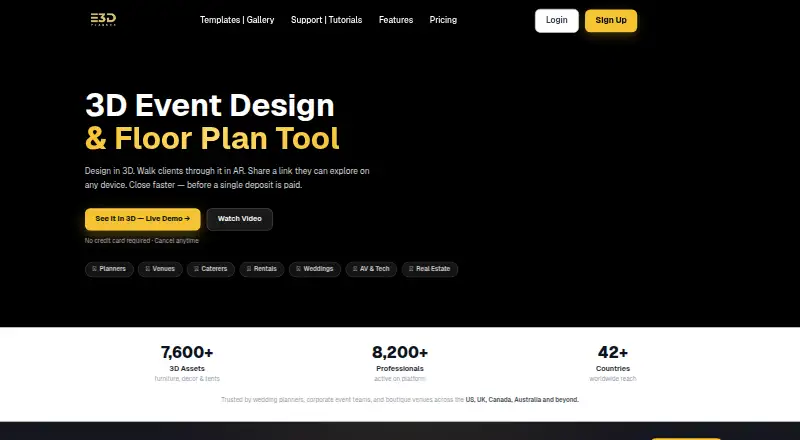
E3D Planner is software for creating 3D event designs and floor plans, aimed at planners, venues, and event teams. Its drag-and-drop workspace places furniture and décor in a three-dimensional layout, with augmented-reality previews for checking designs. Users can import floor plans, manage seating and guests, share client links, and export designs, including PDF export on Starter. Rendering capacity depends on the subscription: Starter provides HD output with five credits, Growth offers 4K with 15 credits, and Business provides 8K with 30 credits. Growth also includes up to 35 AI renders each month, while Business includes unlimited AI design generation. Concurrent event capacity rises from one on Starter to five on Growth and 30 on Business. Model-version allowances are one, two, and five respectively. Enterprise adds custom event and seat limits, multi-user access, SLA-backed support, custom 3D model integration, and a dedicated onboarding manager. The full 3D workspace runs on desktop and laptop; mobile supports viewing and sharing. Plans start at $16.99 a month, with Growth at 27.99 USD and Business at 49.99 USD; Enterprise uses custom pricing.
Who it suits
E3D Planner suits event planners, venues, and teams that need 3D layouts, seating management, floor-plan imports, and client sharing. It also fits organizations needing higher event capacity, richer rendering, or multi-user Enterprise access.
What it does well
- Drag-and-drop 3D furniture and décor design
- Augmented-reality design previews
- Floor-plan import and seating plans
- PDF export included on Starter
- Real-time team collaboration
- Desktop, laptop, Android, and iOS access
What to know first
- No free plan
- Starter supports one concurrent event
- Mobile supports viewing and sharing rather than the full workspace
- Enterprise pricing is custom
Limits
Starter allows one event at a time, one model version, and HD rendering with five credits. Growth allows up to five events, 15 rendering credits, and two model versions; Business allows up to 30 events, 30 credits, and five model versions.
Plans
| Plan | Billed and limits | Price |
|---|---|---|
| Starter | Monthly · 1 event at a time · Basic 3D catalog · HD rendering (5 credits) · 1 model version · PDF export · AR viewer | $16.99 a month |
| Growth | Monthly · Up to 5 events at once · Standard 3D catalog · 4K rendering (15 credits) · AI rendering up to 35/month · 2 model versions | $27.99 a month |
| Business | Monthly · Up to 30 events at once · Full and custom 3D catalog · 8K rendering (30 credits) · Unlimited AI design generation · 5 model versions · Priority support | $49.99 a month |
| Enterprise | Custom pricing · Custom event and seat limits · Multi-user team access · SLA-backed support · Custom 3D model integration | On request |
As e3dplanner.com lists them, read 7 Oct 2026. The maker's own page has the final word.
Getting started
- Open the E3D Planner website
- Choose Starter, Growth, Business, or Enterprise
- Use the desktop or laptop 3D workspace
- Import a floor plan or draw a room
- Arrange furniture and décor in the 3D designer
- Share a client link or export the design
Verdict
Pick E3D Planner for event layouts that combine 3D design, AR previews, seating, and client sharing. Look elsewhere if you need a free option or a complete 3D workspace directly on mobile.
Questions
How much does E3D Planner cost?
Starter is $16.99 a month, Growth is $27.99 a month, and Business is $49.99 a month. Enterprise uses custom pricing.
Is there a free plan?
No. E3D Planner is paid software.
Which platforms are supported?
It is available on Android, iOS, and the web. The full 3D workspace is on desktop and laptop, while mobile supports viewing and sharing.
Does it support seating and floor-plan imports?
Yes. Seating plans and floor-plan import are supported, with full seating management listed on Growth and Business.
Can teams collaborate?
Users can share client links, and Enterprise includes multi-user team access. Real-time team collaboration is listed.
Facts from E3D Planner's own pages
- AR previews
- The product lets users preview event designs in augmented reality. · e3dplanner.com, 7 Oct 2026
- Collaboration
- Users can share client links, and Enterprise includes multi-user team access. · e3dplanner.com, 7 Oct 2026
- Design tools
- The platform provides a drag-and-drop 3D designer with furniture and décor items. · e3dplanner.com, 7 Oct 2026
- Enterprise support
- The Enterprise plan includes SLA-backed support and a dedicated onboarding manager. · e3dplanner.com, 7 Oct 2026
- Exports
- The Starter plan includes design sharing and export, including PDF export. · e3dplanner.com, 7 Oct 2026
- Limits
- The listed concurrent event limits are 1 for Starter, up to 5 for Growth, and up to 30 for Business. · e3dplanner.com, 7 Oct 2026
- Platform access
- The template gallery says the full 3D workspace is available on desktop and laptop, while mobile supports viewing and sharing. · e3dplanner.com, 7 Oct 2026
- Purpose
- E3D Planner is 3D event design and floor-plan software for planners, venues, and event teams. · e3dplanner.com, 7 Oct 2026
- Rendering
- Rendering allowances and maximum quality vary by plan from HD with 5 credits to 8K with 30 credits. · e3dplanner.com, 7 Oct 2026
- Seating
- Its plans include seating and guest management, with full seating management listed on Growth and Business. · e3dplanner.com, 7 Oct 2026
- Support
- Support ranges from training resources on Starter to 24-hour email on Growth and dedicated support on Business. · e3dplanner.com, 7 Oct 2026
- Training
- The support page provides step-by-step video tutorials covering getting started, drawing rooms, importing floor plans, annotations, and sharing projects. · e3dplanner.com, 7 Oct 2026
Where E3D Planner stands on Freedom251
- Event Diagramming Software#16 of 24