Freedom251 › Game Compatibility Layers
DXVK
What DXVK is
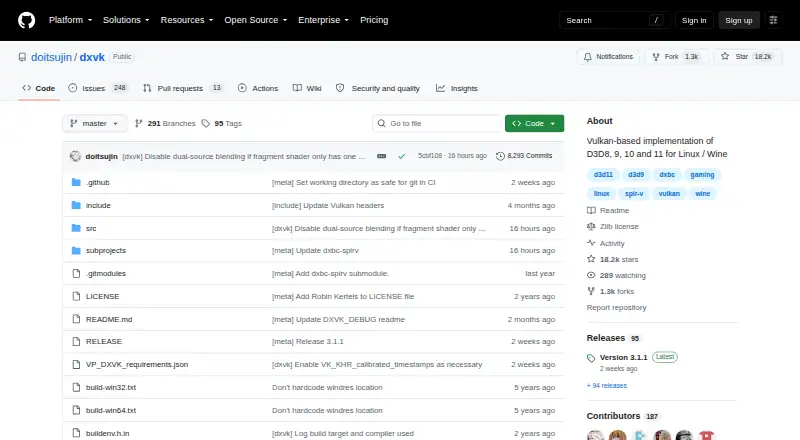
DXVK is a free Vulkan-based translation layer that lets Direct3D 8, 9, 10 and 11 applications run on Linux through Wine. DXVK Native can run without Wine and is intended for game and application ports or port bring-up. Release packages include both 32-bit and 64-bit versions, and the project links release builds and recent development builds through GitHub. Steam Play, Lutris, Bottles and Heroic Launcher can configure DXVK automatically when enabled. An optional HUD can display frame rate, frame times, GPU load, memory use, API feature level and shader compiler activity. On supported drivers, Graphics Pipeline Library can compile Vulkan shaders as a game loads its Direct3D shaders, reducing or eliminating shader compilation stutter in many games. Configuration options include shader caching, logging and GPU selection. DXVK is also available for Windows, and its zlib/libpng license permits use for any purpose, including commercial applications, subject to its conditions. It requires a sufficiently recent Vulkan driver for the user's hardware. The project warns that changing Direct3D libraries in multiplayer games may be treated as cheating and could result in an account ban.
Who it suits
It suits Linux users running Direct3D applications through Wine, as well as developers working on game or application ports. Users need hardware with a sufficiently recent Vulkan driver.
What it does well
- Translates Direct3D 8, 9, 10 and 11 through Vulkan.
- Provides both 32-bit and 64-bit release packages.
- Several launchers can configure DXVK automatically.
- Optional HUD shows performance and shader details.
What to know first
- Requires a sufficiently recent Vulkan driver.
- Multiplayer library changes may be treated as cheating.
- Launcher integrations configure DXVK only when enabled.
Limits
DXVK requires a sufficiently recent Vulkan driver; Linux use through Wine requires a compatible driver. The free software license permits commercial use subject to its stated conditions.
Plans
| Plan | Billed and limits | Price |
|---|---|---|
| DXVK | Free software under the zlib/libpng license · Vulkan required · Linux/Wine use requires a compatible Vulkan driver | Free |
As github.com lists them, read 29 Sept 2026. The maker's own page has the final word.
Getting started
- Open the DXVK GitHub repository at https://github.com/doitsujin/dxvk.
- Choose a release build or a linked recent development build.
- Check that the hardware has a sufficiently recent Vulkan driver using the project wiki.
- Use a compatible launcher such as Steam Play, Lutris, Bottles, or Heroic Launcher and enable DXVK, if applicable.
- Configure DXVK through environment variables or a configuration file if needed.
DXVK suits Linux players running Direct3D games through Wine, as well as developers bringing games or applications up without Wine. Its Vulkan translation and launcher integrations are useful, but compatible drivers are essential and multiplayer rules can make library changes risky.
Overview
DXVK translates Direct3D 8, 9, 10 and 11 workloads to Vulkan. It is a compatibility component rather than a launcher or a standalone game library: it provides a rendering route for applications running through Wine. DXVK Native extends that role to game and application ports and port bring-up without Wine.
Release packages include both 32-bit and 64-bit builds, and the project provides release downloads alongside links to recent development builds. Steam Play, Lutris, Bottles and Heroic Launcher can set up DXVK when enabled, a practical advantage for users already using those tools. It still depends on a sufficiently recent Vulkan driver for the hardware; driver compatibility is a prerequisite, not a minor setup detail.
Key features
Diagnostics and configuration
An optional HUD can show frame rate, frame times, GPU load, memory use, API feature level and shader compiler activity. Those metrics give technically minded users useful visibility when diagnosing performance or compatibility, though they are less relevant to someone who only wants a simple launch-and-play experience. Configuration through environment variables or a file offers control over shader caching, logging and GPU selection, at the cost of settings that may require manual attention.
Shader compilation
On supported drivers, Graphics Pipeline Library can compile Vulkan shaders as a game loads its Direct3D shaders. This can reduce or eliminate shader compilation stutter in many games, but the benefit depends on driver support and should not be treated as a guarantee for every title or system.
Multiplayer risk
The project warns that modifying Direct3D libraries in multiplayer games may be treated as cheating and could lead to an account ban. Players should check a game's rules before using DXVK in that context; users unwilling to accept that risk should avoid modifying protected multiplayer installations.
Pricing
DXVK is free software under the zlib/libpng license, priced at $0. The license permits use for any purpose, including commercial applications, subject to its stated conditions. There is no paid tier to unlock, but the free software still requires Vulkan, and Linux use through Wine requires a compatible Vulkan driver. The project offers release builds and links to recent development builds; no free trial is needed.
Platforms
DXVK is available for Linux and Windows, with Linux/Wine use as its main compatibility route. Its runtime model is translation, Vulkan support is required, and Steam integration is available. The project provides both 32-bit and 64-bit release builds. Windows is among its host platforms, while DXVK Native can be used without Wine for porting work.
Who it's for
DXVK is best for Linux users with suitable Vulkan drivers who need to run Direct3D applications through Wine, particularly those using Steam Play, Lutris, Bottles or Heroic Launcher. Port developers may also find DXVK Native relevant. It is a poor fit for hardware without a sufficiently recent Vulkan driver, and its multiplayer warning makes it unsuitable for users who cannot risk a game's anti-cheat or account enforcement. The project reports partial anti-cheat status, so users should treat compatibility and game policy as title-specific concerns.
Pros and cons
Pros
- Translates Direct3D 8–11 to Vulkan, covering a broad range of older and newer Direct3D applications.
- Steam Play, Lutris, Bottles and Heroic Launcher can enable setup automatically, reducing manual configuration for users of those launchers.
- HUD metrics and configurable logging, shader cache and GPU selection give advanced users tools to inspect and tune behavior.
- Free commercial-use licensing and 32-bit as well as 64-bit builds make it accessible across different use cases and application architectures.
Cons
- A sufficiently recent Vulkan driver is required, so unsupported hardware or drivers rule out the main use case.
- Shader-stutter reduction through Graphics Pipeline Library depends on supported drivers and does not promise the same result across games.
- Changing Direct3D libraries in multiplayer games may trigger cheating enforcement or an account ban.
- Manual environment-variable and file configuration can be more involved than users seeking a simple launcher experience need.
Alternatives
Game Compatibility Layers is a useful directory starting point for comparing software in this category.
Choose cnc-ddraw instead when a game uses a DirectDraw Software renderer; it is free on Linux, Windows, Android and macOS, but is aimed at that renderer rather than DXVK's Direct3D-to-Vulkan route.
FAudio is another free, cross-platform option for Linux, Windows, iOS and macOS, but it requires SDL 3.2.0 or newer and addresses a different software need.
Consider GameHub for its free access on Android, iOS and macOS; cloud gaming and streaming require a stable network.
Bannerlator is a free Android option, with compatibility varying by GPU, Android version and game and no support commitment.
Choose Box86 when the target is running 32-bit Linux software; it requires a 32-bit Linux subsystem and 32-bit libraries.
PlayOnLinux is another free option for Linux and macOS, though not all games are supported and performance can occasionally decrease.
Sober is a free unofficial project for the Linux desktop.
TDF is a free GNU/Linux-only option for x86_64 systems with a GPU supporting Vulkan 1.3 or newer.
Verdict
Choose DXVK if you need a free Direct3D-to-Vulkan route for Wine on Linux or for port bring-up, and your system has a compatible driver. Its launcher integrations and technical controls make it a capable fit for those workflows; look elsewhere if Vulkan support is missing or multiplayer enforcement risk is unacceptable.
Verdict
DXVK provides a Vulkan translation route for Direct3D applications, with launcher integrations and configuration options. Check driver compatibility and the multiplayer-game warning before using it.
Questions
Does DXVK cost anything?
No. DXVK is listed as free software under the zlib/libpng license.
Which platforms are listed?
The listed host platforms are Linux and Windows. Its stated Linux use case is running Direct3D applications through Wine.
Which Direct3D versions does it support?
DXVK translates Direct3D 8, 9, 10, and 11 to Vulkan.
Can it be used without Wine?
Yes. DXVK Native is intended for game and application ports or port bring-up.
How can I get DXVK?
The GitHub repository provides release builds and links to recent development builds. Release packages include 32-bit and 64-bit versions.
Is DXVK suitable for multiplayer games?
The project warns that modifying Direct3D libraries in multiplayer games may be treated as cheating and could result in an account ban.
Facts from DXVK's own pages
- Architecture
- Release packages include both 32 bit and 64 bit versions of DXVK. · github.com, 29 Sept 2026
- Configuration
- Users can configure DXVK with environment variables or a configuration file, including shader cache, logging and GPU selection options. · github.com, 29 Sept 2026
- Diagnostics
- An optional HUD can show frame rate, frame times, GPU load, memory use, API feature level and shader compiler activity. · github.com, 29 Sept 2026
- Downloads
- The project provides release builds and links to recent development builds through its GitHub repository. · github.com, 29 Sept 2026
- Launcher integrations
- Steam Play, Lutris, Bottles and Heroic Launcher can set up DXVK automatically when enabled. · github.com, 29 Sept 2026
- License
- The software uses the zlib/libpng license, which permits use for any purpose including commercial applications, subject to stated conditions. · github.com, 29 Sept 2026
- Multiplayer caution
- The project warns that modifying Direct3D libraries in multiplayer games may be treated as cheating and could result in an account ban. · github.com, 29 Sept 2026
- Native version
- DXVK Native can be used without Wine and is intended for game and application ports or port bring up. · github.com, 29 Sept 2026
- Purpose
- DXVK is a Vulkan based translation layer for Direct3D 8, 9, 10 and 11 that lets 3D applications run on Linux using Wine. · github.com, 29 Sept 2026
- Release signing
- The latest listed release is signed with the committer's verified signature. · github.com, 29 Sept 2026
- Requirements
- DXVK needs a sufficiently recent Vulkan driver for the user's hardware; the project directs users to its wiki for current driver status. · github.com, 29 Sept 2026
- Shader compilation
- On supported drivers, Graphics Pipeline Library can compile Vulkan shaders when a game loads its D3D shaders, reducing or eliminating shader compilation stutter in many games. · github.com, 29 Sept 2026
Where DXVK stands on Freedom251
- Game Compatibility Layers#7 of 27