Freedom251 › Game Compatibility Layers
Bannerlator
What Bannerlator is
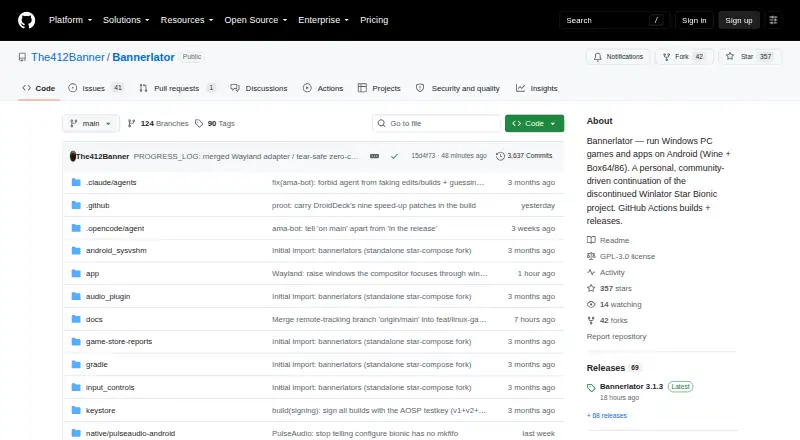
Bannerlator is an Android app for running Windows applications and games on Android. Wine runs Win32 and Win64 software, while Box64 and Box86 translate x86 and x86-64 programs to ARM. The app includes graphics translation through DXVK, VKD3D, and Vulkan, with X11 and an experimental Wayland display option. Wayland needs an Adreno GPU and a compatible Proton layer. Built-in integrations provide sign-in, library browsing, and game downloads or launches for Steam, Epic Games, Amazon Games, and GOG. Version 3.1.3 can optionally run Valve’s ARM64 Linux Steam client with Proton, but this requires an Adreno GPU and Android’s “Disable child process restrictions” developer setting. Other listed tools include frame generation, per-game graphics settings, touch and controller controls, and save backup or synchronization. Bannerlator requires Android 8.0 (SDK 26), but does not require a PC or root access. It is free under GPL-3.0. The maker describes it as a personal continuation of a discontinued project and says there is no support commitment; compatibility varies by device, Android version, GPU, and game.
Who it suits
Bannerlator may suit Android users seeking to run Windows applications or games and whose device meets the relevant GPU and Android requirements. Users considering the optional Linux Steam client should check its additional requirements first.
What it does well
- Runs Win32 and Win64 software through Wine
- Translates x86 and x86-64 software to ARM
- Integrates Steam, Epic Games, Amazon Games, and GOG
- Includes touch and controller controls
- No PC or root required
What to know first
- Requires Android 8.0 (SDK 26) or later
- Wayland requires Adreno and a compatible Proton layer
- Optional Linux Steam client requires Adreno
- No support commitment
Limits
Bannerlator has no support commitment, and compatibility varies by GPU, Android version and game. The optional ARM64 Linux Steam client requires an Adreno GPU and Android’s “Disable child process restrictions” developer setting; experimental Wayland also requires an Adreno GPU and compatible Proton layer.
Plans
| Plan | Billed and limits | Price |
|---|---|---|
| Bannerlator (GPL-3.0) | No guarantee on other devices · no support commitment · compatibility varies by GPU, Android version and game | Free |
As github.com lists them, read 30 Sept 2026. The maker's own page has the final word.
Getting started
- Open the Bannerlator project on GitHub: https://github.com/The412Banner/Bannerlator.
- Get a stable build from GitHub Releases.
- Install it on a device running Android 8.0 (SDK 26) or later.
- Use a supported store integration to sign in and browse its library.
- For the optional Linux Steam client, use an Adreno GPU and enable Android’s “Disable child process restrictions” developer setting.
Overview
Bannerlator is a free Android app for running Windows applications and games on ARM devices. It is best suited to Android users who want to experiment with PC games and are comfortable with compatibility limits. Its combination of translation layers, store integrations and game controls is broad, but it is a personal project without a support commitment.
The maker describes Bannerlator as a continuation of the discontinued Winlator Star Bionic project, shaped around the maker’s own hardware and workflow. That makes it a poor fit for users who need dependable compatibility or help troubleshooting unfamiliar setups.
Key features
Wine runs Win32 and Win64 applications, while Box64 and Box86 translate x86 and x86-64 software for ARM processors. Selectable performance presets let users adjust the translation setup. DXVK, VKD3D and other Vulkan-based graphics layers cover DirectX 9/10/11 and 12; the range is useful for trying Windows games on Android, but support for a graphics API does not guarantee that a specific title will run.
Touch controls, controller support, frame generation and per-game graphics settings give players several ways to tailor a game to their device. The practical benefit depends on the game and hardware, and compatibility varies by GPU and Android version as well as title.
Built-in Steam, Epic Games, Amazon Games and GOG integrations support sign-in, library browsing, and downloads or launches. Steam and GOG integrations also include cloud-save synchronization. These conveniences come with a clear security caveat: the maker says third-party store sign-ins are used at the user’s risk, although sensitive credentials and tokens are redacted from logs.
Version 3.1.3 offers an optional ARM64 Linux Steam client that runs games through Valve’s ARM64 Proton. It is a narrower, experimental route than the general Steam integration: it requires an Adreno GPU and Android’s “Disable child process restrictions” developer setting.
The app requires neither a PC nor root access, but it does require Android 8.0 (SDK 26) or later. X11 is supported, while the experimental Wayland backend requires both an Adreno GPU and a compatible Proton layer. Anti-cheat support is partial, an important constraint for players whose games depend on it.
Pricing
Bannerlator is free: the GPL-3.0 plan costs nothing. There is no paid tier to unlock or trial period to evaluate. The trade-off is not a feature-based free-plan cap but uncertainty: the maker makes no support commitment, compatibility varies, and there is no guarantee on other devices.
That makes the price appealing for users willing to troubleshoot on their own, but less compelling for anyone who needs a supported, predictable gaming setup. Stable builds are published through GitHub Releases, and the project says it is built through GitHub Actions only.
Platforms
Bannerlator runs on Android, with a listed minimum of Android 8.0 (SDK 26). It is designed to run Windows software on Android through Wine and CPU translation, rather than to provide a Windows or desktop edition. Vulkan support is included; the experimental Wayland backend and optional Linux Steam client both have additional Adreno-related requirements.
Who it's for
Bannerlator makes the most sense for Android owners who want to explore Windows games, use existing libraries from several PC storefronts, and are prepared to work around title- and device-specific issues. Touch and controller input, per-game settings, and cloud-save synchronization add practical flexibility for that audience.
It is not a strong choice for someone who needs broad game guarantees, reliable anti-cheat support, or a responsive support channel. Reports for setups the maker does not use may be closed, though the project links a public Mali GPU game-report board whose discussion threads can be replied to without an account or password.
Pros and cons
- Pros: Free, with Wine, Box64/Box86, DirectX translation layers and integrations for four major game stores in one Android app.
- Pros: Touch and controller support, per-game graphics settings, frame generation and Steam/GOG cloud-save synchronization give users meaningful ways to adapt gameplay.
- Cons: Compatibility varies by GPU, Android version and game, while anti-cheat support is only partial.
- Cons: The optional ARM64 Linux Steam client is experimental and restricted to Adreno GPUs with a developer setting enabled.
- Cons: Store sign-ins are at the user’s risk, and the maker offers no support commitment.
Alternatives
Game Compatibility Layers is a useful category page for comparing options beyond Bannerlator.
- cnc-ddraw is also free and supports Android, Linux, macOS and Windows; choose it when the game has a DirectDraw (Software) renderer.
- FAudio is a free option for iOS, Linux, macOS and Windows, with commercial use permitted under its zlib license. It requires SDL 3.2.0 or newer, making it relevant when that dependency fits the intended setup.
- GameHub offers free platform access on Android, iOS and macOS. Its cloud gaming and streaming require a stable network, so it is an alternative when those services suit the connection available.
- Box86 is a free, MIT-licensed Linux and self-hosted option for users who can provide a 32-bit Linux subsystem and 32-bit libraries.
- DXVK is free software for Linux and Windows that requires Vulkan; Linux/Wine use also needs a compatible Vulkan driver. Choose it when a standalone DirectX-to-Vulkan layer is a better fit than Bannerlator’s Android runtime.
- PlayOnLinux is a free Linux and macOS alternative, though not all games are supported and performance can occasionally decrease.
- Sober is a free unofficial project for Linux desktop.
- TDF is a free GNU/Linux-only option for x86_64 systems with Vulkan 1.3 or newer, rather than Android devices.
Verdict
Choose Bannerlator if you want a free, feature-rich way to experiment with Windows games on Android and can accept uneven compatibility and self-directed troubleshooting. Its store integrations and control options are the strongest reasons to try it; users who need consistent game support, full anti-cheat compatibility or committed help should look elsewhere.
Verdict
Bannerlator combines Windows compatibility layers with Android game-store integrations and several control options. Compatibility varies, and the maker offers no support commitment, so check the stated device requirements before relying on it.
Questions
Does Bannerlator cost anything?
Bannerlator is free under the GPL-3.0 license.
What devices does it run on?
Bannerlator runs on Android and lists Android 8.0 (SDK 26) as its minimum version. The maker says no PC or root access is required.
Which game stores are integrated?
The app describes sign-in, library browsing, and game downloads or launches for Steam, Epic Games, Amazon Games and GOG.
Can it run Steam’s Linux client?
Version 3.1.3 offers an optional ARM64 Linux Steam client with Proton. It requires an Adreno GPU and Android’s “Disable child process restrictions” developer setting.
Is Bannerlator open source?
The project states that it is licensed under GPL-3.0.
Does the maker provide support?
The maker says there is no support commitment. Reports for setups the maker does not use may be closed.
Facts from Bannerlator's own pages
- Account security
- The maker warns that built-in third-party store sign-ins are used at the user’s risk and says store credentials and sensitive tokens are redacted from logs. · github.com, 30 Sept 2026
- Android requirement
- The listed minimum Android version is Android 8.0 (SDK 26). · github.com, 30 Sept 2026
- Bug reports
- The project links a public Mali GPU game-report board where reports have discussion threads that can be replied to without an account or password. · github.com, 30 Sept 2026
- Build and distribution
- Builds are produced through GitHub Actions, with tagged stable builds published as GitHub Releases. · github.com, 30 Sept 2026
- Cloud saves
- Steam and GOG integrations provide cloud-save synchronization features. · github.com, 30 Sept 2026
- Compatibility limit
- The maker says the optional Linux Steam client works only with Adreno GPUs and requires Android’s “Disable child process restrictions” developer setting. · github.com, 30 Sept 2026
- CPU translation
- Box64 and Box86 translate x86 and x86-64 software to ARM, with selectable performance presets. · github.com, 30 Sept 2026
- Credential handling
- Store credentials and access tokens are redacted from logs, including Steam, Epic, GOG and Amazon sensitive values. · github.com, 30 Sept 2026
- Distribution
- Stable builds are published as GitHub Releases, and the project says it is built via GitHub Actions only. · github.com, 30 Sept 2026
- Game stores
- The app describes sign-in, library browsing, and game downloads or launches for Steam, Epic Games, Amazon Games, and GOG. · github.com, 30 Sept 2026
- Graphics
- The app supports X11 and an experimental Wayland display backend; Wayland requires an Adreno GPU and a compatible Proton layer. · github.com, 30 Sept 2026
- Graphics stack
- The project includes DXVK, VKD3D and Vulkan-based graphics translation layers. · github.com, 30 Sept 2026
- License
- The project states that Bannerlator is licensed under GPL-3.0. · github.com, 30 Sept 2026
- Linux Steam limitation
- The experimental Linux Steam client requires an Adreno GPU and Android's Disable child process restrictions setting. · github.com, 30 Sept 2026
- No PC or root
- The full-features section says Bannerlator requires no PC and no root. · github.com, 30 Sept 2026
- Other features
- The project lists frame generation, per-game graphics settings, touch controls, controller support, and save backup or synchronization features. · github.com, 30 Sept 2026
- Project status
- The maker describes Bannerlator as a personal continuation of the discontinued Winlator Star Bionic project, built for the maker’s own hardware and workflow. · github.com, 30 Sept 2026
- Purpose
- Bannerlator runs Windows applications and games on Android using Wine and Box64/86. · github.com, 30 Sept 2026
- Security disclaimer
- The maker says store sign-ins are a third-party login system and should be used at the user's own risk. · github.com, 30 Sept 2026
- Steam client
- Version 3.1.3 can optionally run Valve's native ARM64 Linux Steam client with Proton inside Bannerlator. · github.com, 30 Sept 2026
- Steam Linux client
- Version 3.1.3 offers an optional experimental ARM64 Linux Steam client download, with games running through Valve’s ARM64 Proton. · github.com, 30 Sept 2026
- Store integrations
- Built-in integrations support Steam, Epic Games, Amazon Games and GOG libraries. · github.com, 30 Sept 2026
- Support
- The maker says the project has no support commitment and that reports for setups the maker does not use may be closed. · github.com, 30 Sept 2026
- Support policy
- The project notice says there is no support commitment and reports for setups the maker does not run may be closed. · github.com, 30 Sept 2026
Where Bannerlator stands on Freedom251
- Game Compatibility Layers#4 of 27