Freedom251 › Game Compatibility Layers
Box86
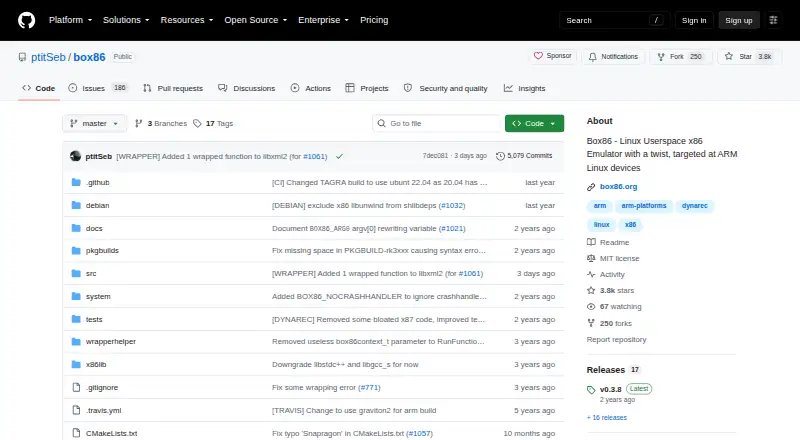
What Box86 is
Box86 runs 32-bit x86 Linux programs on Linux systems with other processor architectures, including ARM. It translates applications at runtime and uses native system libraries such as libc, libm, SDL, and OpenGL to integrate with them. On ARM, its dynamic recompiler is described as offering a 5 to 10 times speed boost over the interpreter. The project gives WorldOfGoo, Airline Tycoon Deluxe, FTL, and several GameMaker Linux games as examples that run, and links to a GitHub issue list for compatibility information. Wine is supported, though many games have graphics-driver requirements. Steam can run with Box86, but needs Box64 to be fully usable and uses substantial memory. Vulkan wrapping requires a 32-bit Vulkan driver; the Pi 4 Vulkan driver does not support DXVK. The host must provide a 32-bit little-endian system or 32-bit userspace subsystem: Box86 does not translate 32-bit programs for a 64-bit-only userspace. It is free under the MIT license, which provides the software as-is and disclaims warranties and liability.
Who it suits
Box86 suits Linux users who need to run 32-bit x86 applications on systems such as ARM devices. Users should first check the 32-bit host requirement and the project's compatibility information.
What it does well
- ARM dynamic recompiler is described as 5 to 10 times faster than interpretation.
- Uses native libraries including SDL and OpenGL.
- Project lists games as compatibility examples.
- Supports Wine and Vulkan wrapping with a 32-bit driver.
What to know first
- Requires a 32-bit little-endian host or userspace subsystem.
- Steam also needs Box64 to be fully usable.
- Steam uses substantial memory.
- Many games have graphics-driver requirements.
Limits
The host needs a 32-bit little-endian system or a 32-bit userspace subsystem; Box86 does not translate 32-bit applications for a 64-bit-only userspace. Steam also needs Box64 to be fully usable and uses substantial memory.
Plans
| Plan | Billed and limits | Price |
|---|---|---|
| Box86 | MIT-licensed software · requires a 32-bit Linux subsystem and 32-bit libraries | Free |
As github.com lists them, read 7 Oct 2026. The maker's own page has the final word.
Getting started
- Open the Box86 project website.
- Prepare a Linux host with a 32-bit little-endian system or 32-bit userspace subsystem.
- Install Box86 and the 32-bit libraries needed by the programs.
- Run the x86 Linux program through Box86.
- Optionally configure settings in /etc/box86.box86rc or ~/.box86rc; the user file takes priority.
Overview
Box86 is a free, open-source runtime for running 32-bit x86 Linux programs on non-x86 Linux hardware, including ARM systems. It suits Linux users who can provide a 32-bit userspace and want to run compatible software or games; it is a poor fit for a 64-bit-only host without that subsystem.
Key features
Box86 combines translation with runtime execution, and its ARM dynamic recompiler is described as delivering five to ten times the interpreter’s speed. That can make compatible applications more practical on ARM, though it does not remove the need for a suitable 32-bit environment.
Rather than supplying its own versions of core system libraries, Box86 uses native libraries such as libc, libm, SDL and OpenGL. This integration is useful when those libraries are present on the host, but it makes the host’s 32-bit libraries part of the setup.
Project examples include WorldOfGoo, Airline Tycoon Deluxe, FTL and several GameMaker Linux games. Compatibility varies by program; the project’s README points to a compatibility issue list. Box86 is the legacy 32-bit counterpart to Box64, not a general replacement for 64-bit translation.
The README says Wine is supported and that many Windows programs and games run, with graphics-driver requirements for many games. Steam can run too, but Box64 is also needed for it to be fully usable, and Steam uses substantial memory. Those conditions make both routes more involved than running a compatible Linux application directly.
Box86 can wrap Vulkan when the system has a 32-bit Vulkan driver. On Raspberry Pi 4, the Vulkan driver does not support DXVK, so Vulkan support alone does not make every graphics route viable. Configuration files are supported at /etc/box86.box86rc and ~/.box86rc; the user-level file takes priority.
Pricing
Box86 costs free and is MIT-licensed software. There is no paid tier or free-trial decision to weigh; the practical cost is providing the required 32-bit Linux subsystem and libraries. The MIT license supplies the software as-is and disclaims warranties and liability.
Platforms
Box86 is for Linux, including self-hosted setups. A host must be 32-bit little-endian or provide a 32-bit userspace subsystem: Box86 does not translate 32-bit programs into a 64-bit environment on its own. That is the decisive platform limit, even on otherwise capable ARM hardware.
Who it's for
Choose Box86 if you have a supported Linux host with 32-bit libraries and a specific 32-bit x86 application or game worth running. It is especially relevant to ARM users seeking compatibility with named Linux games, or exploring Wine where the required graphics drivers and memory are available. Look elsewhere if you need a standalone 32-to-64-bit bridge, or expect Steam to work fully without Box64.
Pros and cons
Pros
- Free and MIT-licensed: no software charge, and the license permits use subject to its terms.
- ARM dynamic recompilation: the stated five-to-tenfold speed boost over the interpreter may improve the prospect of running compatible software.
- Native library integration: using host libraries such as SDL and OpenGL can connect applications to the Linux system’s existing components.
- Documented examples: named games and Wine support give users concrete compatibility starting points.
Cons
- Requires 32-bit support on the host: a 64-bit-only system without a 32-bit userspace cannot use Box86 as a translation bridge.
- Compatibility is application-dependent: examples do not guarantee that a particular program will run.
- Steam has extra demands: Box64 is needed for full usability, and Steam consumes substantial memory.
- Graphics constraints remain: Vulkan wrapping requires a 32-bit Vulkan driver, and the Pi 4 driver does not support DXVK.
- No warranty: the MIT license disclaims warranties and liability.
Alternatives
For the broader category, browse Game Compatibility Layers.
- cnc-ddraw is a free option for Android, Linux, macOS and Windows when the game has a DirectDraw (Software) renderer; it is narrower than Box86’s Linux x86 program focus.
- FAudio is a free choice for iOS, Linux, macOS and Windows when SDL 3.2.0 or newer is available; commercial use is permitted under its zlib license.
- GameHub offers free platform access on Android, iOS and macOS; choose it for cloud gaming and streaming if you have a stable network.
- Bannerlator is a free Android alternative, but compatibility varies by GPU, Android version and game, with no support commitment or guarantee for other devices.
- DXVK is a free Linux and Windows option when Vulkan is available; Linux/Wine use requires a compatible Vulkan driver.
- PlayOnLinux is a free Linux and macOS alternative for users willing to accept that not all games are supported and performance may occasionally decrease.
- Sober is a free unofficial project for Linux desktop users.
- TDF is a free Linux and self-hosted option for GNU/Linux systems with an x86_64 CPU and a GPU supporting Vulkan 1.3 or newer.
Verdict
Box86 is a sensible choice for Linux users with a 32-bit userspace who want to run specific compatible x86 software on ARM, especially when its documented game examples match their needs. Its native-library approach and free MIT license are compelling, but the 32-bit host requirement is fundamental, and Wine or Steam adds driver, memory or Box64 dependencies. If your host lacks 32-bit support, or your target application is not known to work, choose another route.
Verdict
Box86 offers a route for running 32-bit x86 Linux software on supported Linux systems, with named compatibility examples and native library integration. Its 32-bit userspace requirement is central to deciding whether it fits a host.
Questions
Is Box86 free and open source?
Yes. Box86 is free software under the MIT license.
What does Box86 run?
It runs x86 Linux programs, including games, on non-x86 Linux systems such as ARM. Examples include WorldOfGoo, Airline Tycoon Deluxe, FTL, and several GameMaker Linux games.
What does the host system need?
It needs a 32-bit little-endian system or a 32-bit userspace subsystem. Box86 does not provide 32-bit-to-64-bit translation.
Can Box86 run Windows programs?
Wine is supported, and the README says many Windows programs and games run. Many games have graphics-driver requirements.
Can I use Steam with Box86?
Steam can run with Box86, but it also needs Box64 to be fully usable and uses substantial memory.
Does Box86 support Vulkan?
It wraps Vulkan when the system has a 32-bit Vulkan driver. The Pi 4 Vulkan driver does not support DXVK.
Facts from Box86's own pages
- 32-bit requirement
- The host needs a 32-bit little-endian system or a 32-bit userspace subsystem; Box86 does not provide 32-bit to 64-bit translation. · github.com, 7 Oct 2026
- Compatibility examples
- The project lists WorldOfGoo, Airline Tycoon Deluxe, FTL, and several GameMaker Linux games as examples that run. · github.com, 7 Oct 2026
- Compatibility list
- The project README links to a GitHub issue list for compatibility information. · github.com, 7 Oct 2026
- Configuration
- Box86 supports configuration files at /etc/box86.box86rc and ~/.box86rc, with the user file taking priority. · github.com, 7 Oct 2026
- Dynamic recompilation
- Its ARM dynamic recompiler is described as providing a 5 to 10 times speed boost over the interpreter. · github.com, 7 Oct 2026
- License
- The project repository identifies the software as MIT licensed. · github.com, 7 Oct 2026
- Native libraries
- Box86 uses native versions of system libraries such as libc, libm, SDL, and OpenGL to integrate with applications. · github.com, 7 Oct 2026
- Project relationship
- The official site describes Box86 as the legacy 32-bit version of Box64 for running 32-bit Linux applications. · box86.org, 7 Oct 2026
- Purpose
- Box86 runs x86 Linux programs, including games, on non-x86 Linux systems such as ARM. · github.com, 7 Oct 2026
- Security and warranty
- The MIT license provides the software as-is and disclaims warranties and liability. · github.com, 7 Oct 2026
- Steam
- The README says Steam can run with Box86 but also needs Box64 to be fully usable, and notes that it uses substantial memory. · github.com, 7 Oct 2026
- Vulkan
- Box86 wraps Vulkan when the system has a 32-bit Vulkan driver; the README notes that the Pi 4 Vulkan driver does not support DXVK. · github.com, 7 Oct 2026
- Wine
- The README says Wine is supported and that many Windows programs and games run, with graphics driver requirements for many games. · github.com, 7 Oct 2026
Where Box86 stands on Freedom251
- Game Compatibility Layers#5 of 27