Freedom251 › Web Annotation Tools
dotts
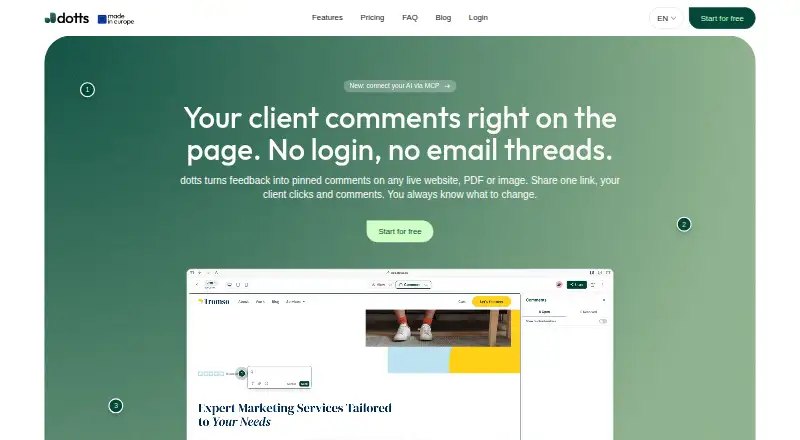
What dotts is
dotts is a web-based visual feedback tool for freelance web designers and small teams. It gathers pinned comments on live websites, PDFs, and images, letting clients leave feedback through a shared review link without an account, login, or installation. A sidebar helps users navigate comments, resolve them, edit them, or delete them. Uploads can be JPEG, PNG, SVG, WebP, PDF, or HEIC; users can also review live website URLs. Comments can include file attachments, emoji reactions, and mentions, and show device, browser, and screen-size context. dotts says it works with publicly accessible Squarespace, Webflow, Wix, and Framer sites without a plugin or integration. Its doby AI MCP server connects with Claude Code, Cursor, and Codex to read open comments and resolve them as changes are made. The free Testing plan allows up to three projects and unlimited reviewers. Pro costs $15 per month, or $150/year (2 months free), with unlimited projects and collaborators. Review links use a dotts domain; custom domains, logo swaps, and a fully white-labelled interface are not offered.
Who it suits
dotts suits freelance web designers and small teams collecting client feedback on websites and visual files. Its guest review links may fit clients who should not need to create accounts or install software.
What it does well
- Clients can comment without an account or installation
- Supports images, PDFs, and live website URLs
- Comment context includes device, browser, and screen size
- Free plan allows up to three projects and unlimited reviewers
What to know first
- Free plan is limited to three projects
- Review links use a dotts domain
- Custom domains and logo swaps are not offered
Limits
The free Testing plan is limited to three projects. Pro includes unlimited projects and collaborators; the listed price is $15 a month or $150 per year.
Plans
| Plan | Billed and limits | Price |
|---|---|---|
| Testing | Up to 3 projects · Unlimited reviewers · Basic support | Free |
| Pro | $15 /month; or $150/year (2 months free) · Unlimited projects · Unlimited collaborators · Priority support · 14-day money-back guarantee · Cancel anytime | $15 a month |
As dotts.se lists them, read 4 Oct 2026. The maker's own page has the final word.
Getting started
- Open the dotts website.
- Start with the free Testing plan or choose Pro.
- Create a project for a live website URL or upload a supported file.
- Share the review link with clients so they can leave comments.
- Use the sidebar to navigate, edit, resolve, or delete comments.
dotts is a web-based visual feedback workspace for freelance web designers and small teams. It lets clients review websites and uploaded documents through a guest link, while project teams organize and resolve the resulting comments. It is a strong fit when frictionless client access matters more than agency-grade branding control.
Overview
dotts brings visual review into one place for live website URLs, PDFs, and image files. Clients can open a shared review link and comment without an account, login, or installation, which removes the most common barrier in client sign-off. The product is aimed primarily at entrepreneurs, with its FAQ specifically positioning it for freelance web designers and small teams.
Comments appear in a sidebar for navigation and can be edited, deleted, or marked resolved. That makes it more useful than a simple annotation layer when a project has many iterations or several people answering feedback. The trade-off is presentation: review links remain on a dotts domain, with no custom review domains, logo replacement, or fully white-labelled interface.
Key features
Guest visual review
Reviewers can pin comments directly to websites, PDFs, JPEG, PNG, SVG, WebP, and HEIC files. They can also attach files to comments, react with emoji, mention colleagues, and include device, browser, and screen-size context. This combination gives a designer both the visual location of an issue and useful reproduction context.
Website coverage and collaboration
dotts says it works with publicly accessible sites on Squarespace, Webflow, Wix, and Framer without a plugin or integration. That is practical for freelancers moving between client platforms, although private or access-restricted sites are outside that stated compatibility. Collaborative review is supported, and clients remain guests rather than consuming a required account.
AI workflow
The doby AI MCP server connects dotts with Claude Code, Cursor, and Codex. It can read open comments and resolve them while changes are made, giving teams that use these coding tools a direct route from feedback to implementation. “Copy for AI” and MCP server support are the listed export options.
Privacy and support
Dotts describes itself as an EU company with EU hosting and a GDPR-first approach. Its English privacy policy names Alfahosting as the website host. Checkout uses Stripe with 256-bit encryption. Support is usually said to respond within one business day; the free plan includes basic support and Pro includes priority support.
Pricing
| Plan | Price | What you get |
|---|---|---|
| Testing | free | Up to 3 projects, unlimited reviewers, basic support |
| Pro | $15 a month, or $150/year (2 months free) | Unlimited projects, unlimited collaborators, priority support, 14-day money-back guarantee, cancel anytime |
Testing is well suited to a freelancer with a small active portfolio or to evaluating the workflow: the three-project ceiling is clear, while unlimited reviewers keeps client participation unrestricted. It does not suit a growing pipeline that needs more than three concurrent projects. Pro removes the project ceiling and adds unlimited collaborators, so it is the sensible tier for small teams or freelancers handling many parallel jobs. Annual billing lowers the effective cost by two months, while monthly billing preserves flexibility. The 14-day money-back guarantee and cancel-anytime terms reduce the commitment, but custom branding remains unavailable on the published plans.
Platforms
dotts is available on the web. Its review model is browser-based, and clients do not need an app or installation to participate.
Who it's for
Choose dotts if you deliver websites or visual assets and need clients to leave precise, contextual feedback with minimal onboarding. It is particularly suitable for solo designers and compact teams that value guest access, threaded resolution, and a straightforward project limit. Look elsewhere if client-facing white-label presentation, a custom review domain, or a branded portal is essential.
Pros and cons
Pros
- Guest links without accounts: clients can review immediately, reducing sign-off friction.
- Broad visual coverage: live URLs and six named image/document formats cover common web and design deliverables.
- Useful review context: browser, device, and screen-size data can make visual bugs easier to reproduce.
- AI coding connection: the doby MCP server links open comments with Claude Code, Cursor, and Codex workflows.
- Clear small-team upgrade: Pro combines unlimited projects and collaborators with flexible monthly or annual billing.
Cons
- Testing stops at three projects: active freelancers can outgrow the free tier quickly.
- No white-label controls: dotts branding and URL remain visible to clients.
- Web only: there is no separately listed mobile or desktop platform.
- Public-site requirement: stated website compatibility applies to publicly accessible URLs, not private staging environments.
Alternatives
For a broader directory of annotation products, see Web Annotation Tools.
Pastel is the better pick if you need Android, iOS, API, and web access, or a plan built around canvases and video storage; its Pro plan is $29.00 per month and supports two users and three canvases.
Weava Highlighter suits research-style highlighting across extension, iOS, and web, with unlimited highlights and notes on its free plan and Premium at $3.99 per month.
Annot is worth considering when a $9.00-per-month freelance plan with one active project, unlimited guests, file uploads in comments, and Slack integration matches your workflow.
Annot8 fits teams seeking a free tier with two projects, three seats, three guest reviewers, 50 feedback threads per month, and 1 GB storage; its Pro plan starts at $8.00 per month.
AnnotateWeb is the simplest option when you want a free web annotator with no sign-up requirement.
AnnotationBase is a lower-cost alternative if five active projects, five collaborators, guest commenting, and AI-instruction export are enough; its Lite plan is always free.
eMargin is a free web alternative when you do not need published quota or feature limits.
Huddlekit is another web/API option aimed at designers, developers, and handover work.
Verdict
dotts is a sensible choice for freelance designers and small teams that want clients to annotate live sites and files without creating accounts, then manage those comments through resolution and AI-assisted workflows. Choose Pro when three projects are too restrictive or several collaborators need access. Look elsewhere when a branded client portal, custom review domain, or a non-web app experience is more important than frictionless guest review.
Verdict
dotts focuses on collecting and managing visual feedback through guest-access review links. Consider the project limit and branding restrictions when choosing between its free and Pro plans.
Questions
Is dotts free?
Yes. The Testing plan is free and includes up to three projects, unlimited reviewers, and basic support.
What does Pro cost?
Pro costs $15 a month or $150 per year, with two months free.
Which platforms does dotts support?
dotts is listed as a web platform.
Do clients need an account to comment?
No. Clients can use a shared review link without creating an account, logging in, or installing anything.
Which file formats can it review?
The listed upload formats are JPEG, PNG, SVG, WebP, PDF, and HEIC. Live website URLs are also supported.
Who provides dotts, and where is it based?
The provider is Leon Eikmeier, listed at an address in Vlotho, Germany. dotts describes itself as an EU company with EU hosting.
Facts from dotts's own pages
- AI integration
- The doby AI MCP server connects dotts with Claude Code, Cursor, and Codex to read open comments and resolve them while changes are made. · dotts.se, 4 Oct 2026
- Audience
- The terms say the service is primarily aimed at entrepreneurs, and the product FAQ describes it as a tool for freelance web designers and small teams. · dotts.se, 4 Oct 2026
- Checkout security
- The pricing section states that checkout is 256-bit encrypted and uses Stripe. · dotts.se, 4 Oct 2026
- Client access
- Clients can comment through a shared review link without creating an account, logging in, or installing anything. · dotts.se, 4 Oct 2026
- Comment management
- The sidebar gathers comments and lets users navigate to them, resolve them, edit them, or delete them. · dotts.se, 4 Oct 2026
- File formats
- The site lists JPEG, PNG, SVG, WebP, PDF, and HEIC uploads, as well as live website URLs. · dotts.se, 4 Oct 2026
- Headquarters
- Vlotho, Germany · dotts.se, 28 Sept 2026
- Privacy and hosting
- Dotts describes itself as an EU company with EU hosting and GDPR-first; its English privacy policy identifies Alfahosting as the website host. · dotts.se, 4 Oct 2026
- Provider and location
- The provider is Leon Eikmeier, listed at an address in Vlotho, Germany. · dotts.se, 4 Oct 2026
- Purpose
- dotts is a visual client feedback tool for freelance web designers and small teams, collecting pinned comments on websites, PDFs, and images. · dotts.se, 4 Oct 2026
- Review features
- Users can attach files to comments, react with emoji, mention people, and see device, browser, and screen-size context for comments. · dotts.se, 4 Oct 2026
- Review limitations
- The review link is a dotts link; custom review domains, logo swaps, and a fully white-labelled interface are not offered. · dotts.se, 4 Oct 2026
- Support
- The pricing section says support usually responds within one business day; the free Testing plan lists basic support and Pro lists priority support. · dotts.se, 4 Oct 2026
- Website compatibility
- dotts says it works with publicly accessible sites including Squarespace, Webflow, Wix, and Framer without a plugin or integration. · dotts.se, 4 Oct 2026
Where dotts stands on Freedom251
- Web Annotation Tools#8 of 31