Freedom251 › Web Annotation Tools

AnnotateWeb
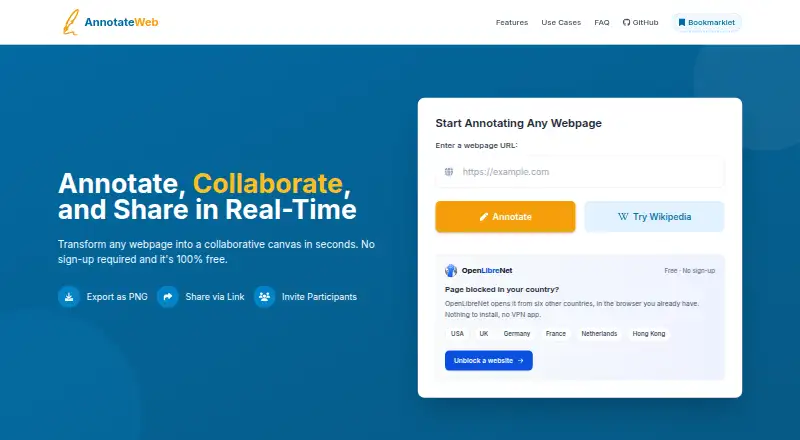
What AnnotateWeb is
AnnotateWeb is a browser-based tool for marking up public webpages and reviewing them live with other people. Its drawing options include a highlighter, lines, circles, squares, multiple colors, and text annotations. Users can invite participants with a link, and visitors can join a shared session without signing up. The service describes session URLs as permanent and usable on all devices. Annotations can be exported as PNG images, either for the visible area or the entire page. The site says sessions are accessible through their unique link and that it does not store personal data. Annotations are automatically removed after two minutes without activity. AnnotateWeb works on most public websites, though strict security policies or complex JavaScript frameworks can limit functionality. It runs on the web and requires no installation or account. The free plan costs nothing. The maker lists no third-party integrations.
Who it suits
It suits students, educators, researchers, teams, developers, designers, content creators, and marketers who want to discuss or mark up public webpages. It can also suit collaborators who need guest access without accounts.
What it does well
- Live sessions support link-invited participants
- Guests can join without signing up
- Exports annotations as PNG images
- No installation or account required
- Free plan at no cost
What to know first
- Annotations disappear after two minutes of inactivity
- Security policies or complex JavaScript can limit functionality
- No third-party integrations are listed
Limits
Annotations are automatically deleted after two minutes of inactivity. Strict security policies or complex JavaScript frameworks can limit functionality on some public websites.
Plans
| Plan | Billed and limits | Price |
|---|---|---|
| Free | Free to use · no sign-up required | Free |
As annotateweb.com lists them, read 5 Oct 2026. The maker's own page has the final word.
Getting started
- Open https://annotateweb.com/ in a web browser.
- Start annotating a public webpage; no installation or account is required.
- Use the drawing tools to add marks and text.
- Invite collaborators with the session link.
- Export the visible area or whole page as a PNG if needed.
Overview
AnnotateWeb is a browser-based tool for marking up public webpages and sharing a live session through a link. It is best suited to people who need a quick, account-free review with collaborators. Its broad drawing toolkit and PNG export are useful; the two-minute inactivity deletion and compatibility limits make it a poor fit for work that needs durable annotations.
Key features
Annotations can include highlights, lines, circles, squares, multiple colors, and text. That range covers common visual feedback without requiring a separate design tool, though sessions are limited to webpages rather than other document types.
Invite collaborators by sharing a session link; participants can view the session live without signing up. AnnotateWeb says URLs are permanent and work across devices, but annotations are automatically deleted after two minutes of inactivity. That short retention window matters: teams should not treat a session as an archive or assume they can return to unfinished feedback later.
Annotations can be exported as PNG images of either the visible area or the whole page, giving reviewers a static record to share. Sessions are accessible only through their unique link, and the site says it does not store personal data. Link access is convenient, but anyone with the session link can access it, so it is not a substitute for controlled access to sensitive review material.
The tool works on most public websites, although strict security policies or complex JavaScript frameworks can limit functionality. It has no third-party integrations, which keeps the workflow focused but may not suit teams that need annotation connected to other tools.
Pricing
Free — free. The plan is free to use and requires no sign-up. It includes both annotation modes, collaborative review, guest access, webpage support, browser capture, and PNG export. There is no paid tier or free trial described. The trade-off is not a seat or quota cap, but the short inactivity retention and possible site compatibility problems.
Platforms
AnnotateWeb runs on the web, with no installation or account required. Its browser-based access suits collaborators who need to join a shared review from different devices, though site-specific security or scripting can interfere with markup.
Who it's for
Students, educators, researchers, teams, developers, designers, content creators, and marketers can use AnnotateWeb for quick visual discussion of public webpages. It fits best when collaborators need to point out changes together and can complete their review promptly. Choose another approach if the work requires persistent comments, integrations, or reliable coverage of a site with restrictive security or complex scripts.
Pros and cons
- Pros: Link-based live collaboration with guest access removes account setup for reviewers.
- Pros: Highlights, shapes, lines, color, and text give reviewers several ways to make feedback visible.
- Pros: PNG export can capture either the visible area or the whole page for sharing outside the live session.
- Cons: Annotations are deleted after two minutes of inactivity, limiting the value of sessions for slower or asynchronous review.
- Cons: Strict security policies and complex JavaScript frameworks can reduce compatibility across public websites.
- Cons: No third-party integrations are available, so it is less suited to workflows that depend on connected tools.
Alternatives
Web Annotation Tools is a broader directory for comparing options in this category.
Choose Pastel if you need a freemium option with Android, iOS, web, and API platforms; its free plan is limited to one user and one canvas.
Weava Highlighter is a better fit for collecting highlights and notes, with syncing across unlimited devices and 100 MB of free storage, rather than live shared webpage review.
Consider Annot if you want a project-based review workflow with unlimited guests and a Slack integration on its Freelance plan, priced at $9 a month.
Annot8 may suit a small team that needs defined project, seat, reviewer, feedback-thread, history, and storage allowances on a free plan.
AnnotationBase is another web option, with a free Lite plan allowing five active projects and up to five collaborators.
Choose dotts if a free plan with up to three projects and unlimited reviewers better matches your review volume.
Huddlekit is an alternative for web-based work.
Hypothesis is worth considering for core annotation and private groups, including in education settings with per-student annual pricing.
Verdict
AnnotateWeb is a good choice for people who want a free, account-free way to mark up public webpages together and export the result. Its live collaboration and flexible markup are the main reasons to choose it. Look elsewhere when review must persist beyond two minutes of inactivity, when site compatibility is critical, or when integrations are part of the workflow.
Verdict
AnnotateWeb offers link-based collaboration and webpage markup without requiring an account or installation. Consider its two-minute inactivity deletion and possible site compatibility limits before using it for review.
Questions
How much does AnnotateWeb cost?
Its Free plan costs nothing.
Do collaborators need accounts?
No. Users can invite participants with a link, and guests can view the live shared session without signing up.
What platforms does AnnotateWeb support?
It runs in a web browser and requires no installation.
Can I export annotations?
Yes. Annotations can be exported as PNG images of the visible area or the whole page.
Does AnnotateWeb have third-party integrations?
The maker's comparison page says it has no third-party integrations.
How long are annotations kept?
They are automatically deleted after two minutes of inactivity.
Facts from AnnotateWeb's own pages
- Access
- The site describes AnnotateWeb as a browser-based tool that requires no installation or account. · annotateweb.com, 5 Oct 2026
- Audience
- The site describes use by students, educators, researchers, teams, developers, designers, content creators, and marketers. · annotateweb.com, 5 Oct 2026
- Collaboration
- Users can invite participants with a link and view a shared session live without signing up. · annotateweb.com, 5 Oct 2026
- Data retention
- Annotations are automatically deleted after 2 minutes of inactivity. · annotateweb.com, 5 Oct 2026
- Drawing tools
- The drawing tools include a highlighter, lines, circles, squares, multiple colors, and text annotations. · annotateweb.com, 5 Oct 2026
- Export
- Users can export annotations as PNG images, saving either the visible area or the whole page. · annotateweb.com, 5 Oct 2026
- Integrations
- The maker's comparison page says AnnotateWeb has no third-party integrations. · annotateweb.com, 5 Oct 2026
- Privacy
- The site says sessions are accessible only through their unique link and that it does not store personal data. · annotateweb.com, 5 Oct 2026
- Product
- AnnotateWeb lets users annotate public webpages in real time and share sessions with collaborators. · annotateweb.com, 5 Oct 2026
- Share links
- The site says session URLs are permanent and work on all devices. · annotateweb.com, 5 Oct 2026
- Site compatibility
- AnnotateWeb works on most public websites, but strict security policies or complex JavaScript frameworks can limit functionality. · annotateweb.com, 5 Oct 2026
- Support
- The site invites users to contact its support team for questions or help with site-specific issues. · annotateweb.com, 5 Oct 2026
Where AnnotateWeb stands on Freedom251
- Web Annotation Tools#5 of 31