Freedom251 › Web Annotation Tools

AnnotationBase
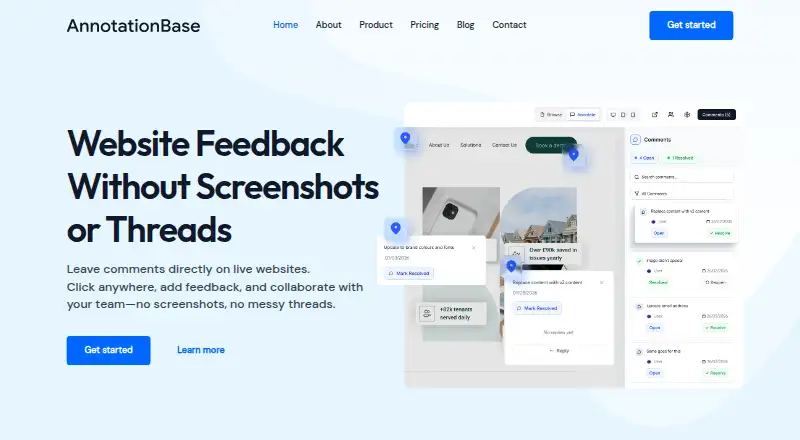
What AnnotationBase is
AnnotationBase is a web-based visual feedback tool for commenting directly on websites. Users can pin a comment to an exact page element, add context or a screenshot, and tag teammates. Replies, updates, and resolutions stay in a thread linked to that element. Clients and stakeholders can comment through a shared link without creating an account or downloading anything. The service works with live websites, staging environments, and localhost sites that open in a browser; listed platforms include Elementor, Framer, Shopify, Squarespace, Webflow, Wix, WordPress, and GoDaddy. Open feedback can be copied as a structured prompt for an AI editor, and users can export comments and project data at any time. The free Lite plan allows five active projects and up to five collaborators. Monthly Pro costs £9.99 per month, and Yearly Pro costs £99.00 per year; both include unlimited active projects and collaborators. API access is marked as coming soon. AnnotationBase says it does not sell personal data or share it with third parties for marketing purposes.
Who it suits
AnnotationBase suits project managers, freelancers, clients, designers, developers, and agencies reviewing websites together. Guest links let clients and stakeholders comment without setting up an account.
What it does well
- Comments stay attached to exact page elements.
- Guest commenters do not need an account.
- Works with live, staging, and browser-accessible localhost sites.
- Exports comments and project data at any time.
- Free plan allows five projects and five collaborators.
What to know first
- Free plan is limited to five active projects.
- API access is marked as coming soon.
- Monthly Pro costs £9.99 per month.
Limits
The free Lite plan allows five active projects and up to five collaborators. Monthly Pro and Yearly Pro include unlimited active projects and collaborators.
Plans
| Plan | Billed and limits | Price |
|---|---|---|
| Lite | Always free · 5 active projects · up to 5 collaborators · guest commenting · AI instructions export · comment threads & resolution | Free |
| Yearly Pro | yearly · Unlimited active projects · unlimited collaborators · guest commenting · AI instructions export · comment threads & resolution | £99 a year |
| Monthly Pro | monthly · Unlimited active projects · unlimited collaborators · guest commenting · AI instructions export · comment threads & resolution | £9.99 a month |
As annotationbase.com lists them, read 1 Oct 2026. The maker's own page has the final word.
Getting started
- Open the AnnotationBase website in a browser.
- Use a live website, staging environment, or browser-accessible localhost site.
- Start with the always-free Lite plan or choose Monthly Pro or Yearly Pro.
- Share a link with clients or stakeholders so they can comment as guests.
AnnotationBase is a browser-based workspace for marking up websites and managing feedback in context. It fits freelancers, agencies, and delivery teams that need clients to review pages without creating accounts. The free tier works for small workloads; growing teams will need Pro for unlimited projects and collaborators.
Overview
Reviewers click an element on a live page, staging site, or browser-accessible localhost site and attach a comment there. They can add explanatory context, screenshots, and teammate tags, while replies, changes, and resolution status remain in one element-specific thread. That structure is more actionable than a detached list of page-wide notes when a discussion depends on an exact button, image, or section.
Shared-link guest access lets clients and other stakeholders comment without an account or download. There is no browser extension, code installation, or onboarding call, so a project can move into review with little setup. AnnotationBase is focused on webpage comments rather than general document annotation. It supports sites built with Elementor, Framer, Shopify, Squarespace, Webflow, Wix, WordPress, and GoDaddy.
Key features
Threaded visual feedback
Element pins preserve the location under discussion, and threaded replies keep clarification and resolution together. This suits design and development handoffs where an issue must remain traceable from report to fix. Collaborative review is built in, but the annotation mode is comments and the document type is webpages, so it is not a broad markup system for arbitrary files.
Guest review and AI export
External reviewers can participate through a shared link, removing account friction for client approvals or occasional stakeholder input. Open feedback can be exported as a structured prompt for an AI editor, giving teams a way to turn unresolved notes into editing instructions. Users can also export all comments and project data at any time.
Privacy and operational assurances
AnnotationBase says it does not sell personal data or share it with third parties for marketing. The operator identifies itself as a controller under UK and EU GDPR; passwords are encrypted, Stripe handles PCI DSS-compliant payments, and hosting is described as UK or EU based. API access is coming soon, with planned Linear, Notion, Jira, and custom-system connections, so teams needing current integrations must wait.
Pricing
| Plan | Price | Includes |
|---|---|---|
| Lite | £0.00, always free | 5 active projects, up to 5 collaborators, guest commenting, AI instructions export, comment threads and resolution |
| Monthly Pro | £9.99 per month | Unlimited active projects and collaborators, plus guest commenting, AI instructions export, and comment threads and resolution |
| Yearly Pro | £99.00 per year | Unlimited active projects and collaborators, with the same Pro features |
Lite is enough for an individual or small client roster, but the five-project and five-collaborator ceilings will constrain an agency running several concurrent sites. Monthly Pro offers flexibility at £9.99 per month; Yearly Pro lowers the effective monthly cost for teams committed to continuous use. Both paid plans remove the two key capacity limits. Approved refund requests are handled by email, with a response target of five business days.
Platforms
AnnotationBase is a web service. It can review live, staging, and localhost websites opened in a browser, with no extension or installed code required.
Who it's for
Project managers, freelancers, designers, developers, agencies, and their clients will benefit when feedback must point to a precise webpage element. Guest links are especially useful for external approvals. Choose another category of tool if your workflow centers on non-web documents, or if immediate API connections to project systems are essential.
Pros and cons
- Pros: comments stay anchored to page elements; replies and resolution remain in context; guests need no account or download; works on staging and localhost sites; exports AI-ready instructions and project data; UK/EU hosting and stated GDPR responsibilities.
- Cons: the free plan allows only five active projects and five collaborators; webpage comments are the sole annotation format; API integrations are not yet available.
Alternatives
Browse Web Annotation Tools for a wider category comparison.
- Pastel suits teams wanting Android, iOS, web, and API availability, with a Free plan limited to one user and one canvas and a Pro plan at $29.00 per month.
- Weava Highlighter is the better fit for research-style highlighting across extension, iOS, and web, including unlimited highlights and notes on its Free plan.
- Annot fits freelancers seeking a £9.00-per-month plan with one active project, unlimited guests, file uploads, and Slack integration.
- Annot8 offers a free tier with two projects, three team seats, three guest reviewers, and 50 feedback threads per month.
- AnnotateWeb is a free web option with no sign-up required.
- dotts is worth considering for up to three projects and unlimited reviewers free, with a $15-per-month Pro plan.
- eMargin is a free web annotation option.
- Huddlekit is an alternative web and API service aimed at designer–developer handoff.
Verdict
Choose AnnotationBase when your priority is precise, client-friendly feedback on webpages and a clean thread from issue to resolution. Its no-login guest review and generous paid capacity are compelling for agencies and active project teams. Look elsewhere if you need document-wide annotation or integrations through an API today.
Verdict
AnnotationBase keeps website feedback attached to the page elements being discussed, with threaded resolution and guest commenting. Its free plan has project and collaborator limits; paid plans remove those limits, and API access is not yet available.
Questions
Is AnnotationBase free?
Yes. Its Lite plan is always free and includes five active projects and up to five collaborators.
What do the paid plans cost?
Monthly Pro costs £9.99 per month. Yearly Pro costs £99.00 per year.
Which platforms does it work with?
It works on the web and lists Elementor, Framer, Shopify, Squarespace, Webflow, Wix, WordPress, and GoDaddy. It also supports live, staging, and browser-accessible localhost websites.
Can clients comment without an account?
Yes. Clients and stakeholders can comment through a shared link without creating an account or downloading anything.
Can feedback be exported?
Open feedback can be copied as a structured prompt for an AI editor. Users can also export comments and project data.
Does AnnotationBase have an API?
API access is marked as coming soon, with planned connections to Linear, Notion, Jira, or custom systems.
Facts from AnnotationBase's own pages
- AI export
- Open feedback can be copied as a structured prompt for use in an AI editor. · annotationbase.com, 1 Oct 2026
- API status
- API access is marked coming soon, with planned connections to Linear, Notion, Jira, or custom systems. · annotationbase.com, 1 Oct 2026
- Compliance
- The operator identifies itself as a data controller under UK GDPR and EU GDPR. · annotationbase.com, 1 Oct 2026
- Data export
- Users can export all comments and project data at any time. · annotationbase.com, 1 Oct 2026
- Element comments
- Users can pin comments to exact page elements, add context, attach screenshots, and tag teammates. · annotationbase.com, 1 Oct 2026
- Feedback threads
- Comments remain tied to the exact element, with replies, updates, and resolutions kept in one thread. · annotationbase.com, 1 Oct 2026
- Guest access
- Clients and stakeholders can comment through a shared link without creating an account or downloading anything. · annotationbase.com, 1 Oct 2026
- Headquarters
- Bristol, United Kingdom · annotationbase.com, 28 Sept 2026
- Installation
- AnnotationBase requires no browser extension, code installation, or onboarding call. · annotationbase.com, 1 Oct 2026
- Privacy
- AnnotationBase says it does not sell personal data or share it with third parties for marketing purposes. · annotationbase.com, 1 Oct 2026
- Security services
- Passwords are stored in encrypted form, Stripe processes payments and is PCI DSS compliant, and hosting is described as being within the UK or EU. · annotationbase.com, 1 Oct 2026
- Supported platforms
- The homepage lists Elementor, Framer, Shopify, Squarespace, Webflow, Wix, WordPress, and GoDaddy as platforms it works with. · annotationbase.com, 1 Oct 2026
- Support refunds
- The refund policy says approved refund requests are handled via email and aims to respond within 5 business days. · annotationbase.com, 1 Oct 2026
- Target users
- The product page describes workflows for project managers, freelancers, clients, designers, developers, and agencies. · annotationbase.com, 1 Oct 2026
- Website compatibility
- The service works with live websites, staging environments, and localhost sites that can be opened in a browser. · annotationbase.com, 1 Oct 2026
- What it does
- AnnotationBase is a visual feedback tool that lets users click directly on live websites and leave comments where needed. · annotationbase.com, 1 Oct 2026
Where AnnotationBase stands on Freedom251
- Web Annotation Tools#6 of 31