Freedom251 › Mobile Scanning Apps
Doc Scanner Pro
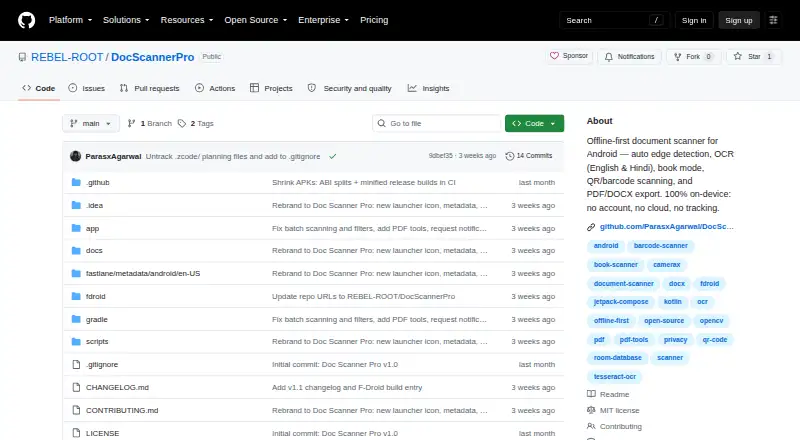
What Doc Scanner Pro is
Doc Scanner Pro is a free, open-source Android app for capturing, processing, organizing, and exporting physical documents while keeping its core work on the device. It supports automatic or manual scanning of single pages and multipage documents, with workflows for books, receipts, ID cards, business cards, and general documents. Book mode recognizes an open spread, corrects perspective, and separates both pages in one scan session. Editing tools provide cropping, rotation, grayscale and black-and-white conversion, contrast and brightness controls, document enhancement, and shadow reduction. Local OCR uses Tesseract 5 with English and Hindi data included. The app can create searchable PDFs, merge or split PDFs, and export OCR text, plain text, Markdown, DOCX, CSV, or JSON. Folders, favorites, tags, sorting, filtering, and local full-text search organize scans, while a private local vault adds protected storage. The project says no account, cloud service, backend, analytics or advertising SDK, or Internet permission is required. Files remain on the device unless you choose Android sharing, export, or printing. The MIT-licensed project includes F-Droid packaging files, although upstream F-Droid distribution requires review. Optional donations support development, but the app remains fully functional without them.
Who it suits
Doc Scanner Pro suits Android users who want local document capture, OCR, organization, and export without an account or subscription. It is also useful for people needing searchable PDFs, book scanning, and multiple structured export formats.
What it does well
- Automatic and manual single-page or multipage scanning
- Book mode corrects perspective and separates open pages
- Local Tesseract 5 OCR includes English and Hindi
- Exports searchable PDFs, DOCX, CSV, JSON, and more
- No account, cloud service, or Internet permission required
- MIT-licensed and fully functional without donations
What to know first
- Android-only app
- OCR language data listed for English and Hindi
- F-Droid upstream submission still requires review
Limits
The app is available on Android, and its bundled OCR data is for English and Hindi. Files stay local unless you explicitly share, export, or print them.
Plans
| Plan | Billed and limits | Price |
|---|---|---|
| Free and open-source | No account, subscription, or donation required | Free |
As github.com lists them, read 10 Oct 2026. The maker's own page has the final word.
Getting started
- Open the Doc Scanner Pro GitHub repository
- Install the Android app through an available distribution route
- Capture a document automatically or manually
- Choose a document, book, receipt, ID card, or business-card workflow
- Run local OCR and edit the scan
- Organize files with folders, tags, favorites, sorting, or filtering
- Export or share the resulting file when needed
Verdict
Pick Doc Scanner Pro if you need a free Android scanner that processes documents locally and exports them in varied formats. Its OCR, book mode, organization tools, and private vault cover substantial offline workflows. Look elsewhere if you require an iOS app or broader listed OCR language coverage.
Questions
Is Doc Scanner Pro free?
Yes. The free plan costs 0.00 USD, and no account, subscription, or donation is required for full functionality.
Does it work offline?
Yes. Capture, OCR, and storage run locally, and the project says no Internet permission is needed.
Can it create searchable PDFs?
Yes. It supports searchable PDFs, plus PDF merging and splitting.
Which export formats are available?
Exports include OCR text, text, Markdown, DOCX, CSV, JSON, and searchable PDFs.
Is the project open source?
Yes. Doc Scanner Pro is MIT-licensed and includes F-Droid packaging files.
Does it have an iOS version?
No. The listed mobile platform is Android.
Facts from Doc Scanner Pro's own pages
- Android app
- Yes · github.com, 22 Sept 2026
- Auto capture
- Yes · github.com, 22 Sept 2026
- Book mode
- Book mode detects an open spread, corrects perspective, and separates its two pages into one scan session. · github.com, 10 Oct 2026
- Capture
- It supports automatic and manual single-page and multipage scanning, plus workflows for documents, books, receipts, ID cards, and business cards. · github.com, 10 Oct 2026
- Distribution
- The repository includes F-Droid packaging files and says an upstream F-Droid submission still requires F-Droid review. · github.com, 10 Oct 2026
- Exports
- Export options include searchable PDFs, PDF merge and split, OCR text, text and Markdown, DOCX, CSV, and JSON. · github.com, 10 Oct 2026
- Free plan
- Yes · github.com, 22 Sept 2026
- Headquarters
- Meerut, Uttar Pradesh, India · github.com, 28 Sept 2026
- Image tools
- Image processing includes cropping, rotation, grayscale and black-and-white conversion, contrast and brightness adjustment, document enhancement, and shadow reduction. · github.com, 10 Oct 2026
- iOS app
- No · github.com, 22 Sept 2026
- License and support
- The project is MIT-licensed; optional donations support development, and the app remains fully functional without an account, subscription, or donation. · github.com, 10 Oct 2026
- Local security
- The private vault uses Android Keystore-backed security primitives, and documents are stored in app-managed storage with metadata in Room. · github.com, 10 Oct 2026
- Multipage PDF
- Yes · github.com, 22 Sept 2026
- OCR
- Local OCR uses Tesseract 5, with English and Hindi trained data bundled in the app. · github.com, 10 Oct 2026
- Organization
- Documents can be organized with folders, favorites, tags, sorting, filtering, local full-text search, and a private local vault. · github.com, 10 Oct 2026
- Privacy
- The app says it needs no account, cloud service, backend, analytics or advertising SDK, or Internet permission; capture, OCR, and storage run locally. · github.com, 10 Oct 2026
- Purpose
- Doc Scanner Pro is an offline-first Android app for capturing, processing, organizing, and exporting physical documents. · github.com, 10 Oct 2026
- Searchable PDF
- Yes · github.com, 22 Sept 2026
- Security reporting
- The security policy says not to post sensitive vulnerability details in public issues and directs reporters to GitHub Security Advisories once enabled or the published security contact. · github.com, 10 Oct 2026
- Sharing
- Scans, OCR results, notes, metadata, and exports stay on the device unless the user chooses an Android share, export, or print action. · github.com, 10 Oct 2026
Where Doc Scanner Pro stands on Freedom251
- Mobile Scanning Apps#30 of 76
- Scanner apps#31 of 76