Freedom251 › Route Optimization Software
DispatchTool
What DispatchTool is
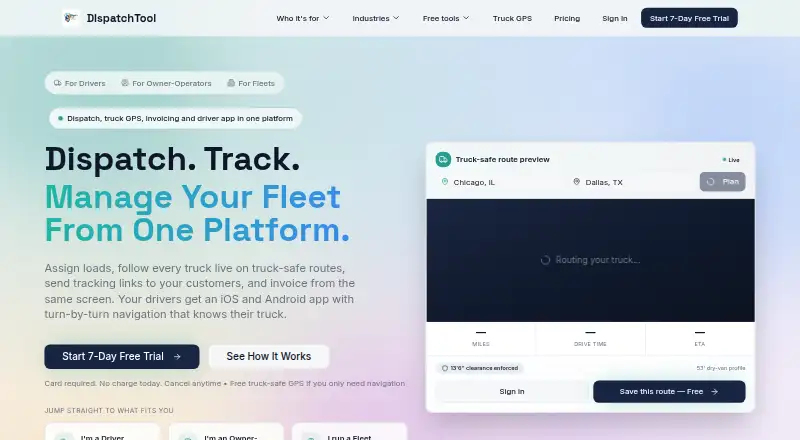
DispatchTool combines dispatching, truck tracking, customer tracking links, proof of delivery, invoicing, and reporting for freight and other mobile-workforce businesses. Its navigation uses truck height, weight, length, and HazMat settings to avoid low clearances, restricted tunnels, and prohibited roads. Native iOS and Android driver apps support job updates, navigation, photo and signature capture, proof-of-delivery uploads, and dispatch messages. Fleet tools include GPS tracking, scheduling, digital documents, IFTA reporting, settlements, expense tracking, load profitability, maintenance, and DVIR workflows. AI features cover rate-confirmation parsing, broker credit checks, route optimization, dispatch assistance, and status notifications. Integrations include Samsara and Motive ELDs and load boards. Free truck-safe navigation includes five truck-routed trips per month, with unlimited navigation while running a dispatched load. Monthly pricing ranges from Truck GPS Solo at 19.99 USD to Enterprise at 250.00 USD; a free plan and 7-day trial are listed. Routing alerts, restrictions, traffic, and ETAs are estimates that may be incomplete or out of date.
Who it suits
It suits trucking fleets and mobile-workforce teams that need dispatch, driver apps, and operational tracking. The listed industries include freight, HVAC, medical transport, delivery, construction, and fuel businesses.
What it does well
- Truck settings inform navigation routes
- Driver apps support proof-of-delivery capture
- Includes GPS tracking and driver scheduling
- Lists Samsara and Motive ELD integrations
What to know first
- Routing and traffic information may be incomplete or outdated
- Free truck-routed navigation is limited to five monthly trips
- Enterprise costs $250 a month
Limits
Free truck-safe navigation allows five truck-routed trips per month, with unlimited navigation while running a dispatched load. The lowest-priced listed plan, Truck GPS Solo, costs $19.99 a month and covers one truck.
Plans
| Plan | Billed and limits | Price |
|---|---|---|
| Fleet 15 | monthly · up to 15 drivers · unlimited loads | $149.99 a month |
| Truck GPS Solo | annually · 1 truck | $199 a year |
| Truck GPS Solo | monthly · 1 truck · free if part of a fleet on Starter, Pro, or Enterprise | $19.99 a month |
| Fleet 20 | monthly · up to 20 drivers · unlimited loads | $199.99 a month |
| Enterprise | monthly · up to 30 drivers · $7.99 per additional driver per month · unlimited loads | $250 a month |
| Multi-Truck | monthly · up to 5 drivers · unlimited loads | $49.99 a month |
| Multi-Truck | annually · up to 5 drivers | $499.99 a year |
| Fleet 10 | monthly · up to 10 drivers · unlimited loads | $99.99 a month |
As dispatchtool.app lists them, read 1 Oct 2026. The maker's own page has the final word.
Getting started
- Visit the DispatchTool website.
- Use CSV imports to add drivers, vehicles, and customers.
- Have team members join with six-character team codes.
- Use free truck-safe navigation without a card, or choose a listed monthly plan.
Overview
DispatchTool is a dispatch and fleet-management platform with truck-aware routing, driver apps, and tools for handling loads from assignment through delivery. It suits freight operators and other mobile-workforce teams that need dispatch and fleet administration together; its strongest distinction is truck-specific routing, though route alerts and ETAs should be treated as estimates.
Drivers can update job status, navigate, send messages, and capture photos and signatures for proof of delivery in native iOS and Android apps. The broader platform adds customer tracking links, invoicing, reporting, and fleet workflows, making it a more complete operational choice than a navigation-only tool.
Key features
- Truck-aware navigation: Routes use truck height, weight, length, and HazMat settings to avoid low clearances, restricted tunnels, and prohibited roads. That is useful for planning around vehicle-specific restrictions, but routing data, restriction alerts, traffic, and ETAs can be incomplete or out of date, so drivers should not treat them as guarantees.
- Dispatch and delivery: Dispatching, live truck tracking, customer tracking links, proof-of-delivery collection, invoicing, and reporting share one platform. This can reduce handoffs for teams managing loads and customer updates in the same workflow.
- Fleet administration: Digital documents, driver scheduling, chat, IFTA reporting, settlements, expense tracking, load profitability, maintenance, and DVIR workflows cover work beyond dispatch. The breadth is most relevant to operators consolidating routine fleet tasks, rather than teams looking only for a route planner.
- Automation and integrations: AI features cover rate-confirmation parsing, broker credit checks, route optimization, dispatch assistance, and automated status notifications. ELD integrations include Samsara and Motive, alongside load-board integrations.
- Getting started and data practices: CSV imports for drivers, vehicles, and customers and six-character team join codes are intended to get teams operational in about 15 minutes. Data is encrypted in transit with TLS 1.2+ and at rest, with row-level security and tenant isolation; the company says it does not sell user data or track people across other apps or websites for advertising.
Pricing
DispatchTool uses a freemium model, with a free plan and a 7-day trial. Free truck-safe GPS navigation requires no card and covers five truck-routed trips per month; navigation is unlimited while running a dispatched load. That makes it a practical way to try truck routing, but the five-trip cap limits standalone use.
- Truck GPS Solo: $19.99 a month, billed monthly, for one truck. It is free if included as part of a fleet on Starter, Pro, or Enterprise.
- Multi-Truck: $49.99 a month, billed monthly, for up to five drivers and unlimited loads. It fits a small team that needs load capacity without a higher driver ceiling.
- Fleet 10: $99.99 a month, billed monthly, for up to 10 drivers and unlimited loads.
- Fleet 15: $149.99 a month, billed monthly, for up to 15 drivers and unlimited loads.
- Fleet 20: $199.99 a month, billed monthly, for up to 20 drivers and unlimited loads.
- Enterprise: $250 a month, billed monthly, for up to 30 drivers and unlimited loads; each additional driver costs $7.99 per month. Enterprise includes priority phone and email support.
The fleet tiers scale by driver count while keeping loads unlimited, so the main stated capacity distinction is team size. Support is available at [email protected], with a typical response within 24 hours; Enterprise is the option with priority phone and email support. More than 17 free trucking calculators and lane-rate estimates add useful resources without requiring a paid plan.
Platforms
DispatchTool is available on the web, Android, and iOS. Native mobile apps are provided for drivers, and the platform supports a technician mobile app, recurring routes, time-window planning, and live technician tracking.
Who it's for
Freight and logistics businesses are the clearest fit, particularly those that need truck-specific routing alongside dispatch, tracking, delivery records, and fleet administration. DispatchTool also says it supports HVAC and plumbing, medical transport, courier and delivery, construction, fuel and propane, and other mobile-workforce businesses; recurring routes and time-window planning are relevant to teams coordinating scheduled field work.
It is less suitable as the sole authority for safety-critical routing decisions: restrictions, traffic, and ETAs are estimates that may be incomplete or outdated. Teams that need dispatch and fleet workflows in one system can weigh that limitation against the operational breadth; drivers must still account for current road conditions and restrictions.
Pros and cons
Pros
- Truck-specific routing: Height, weight, length, and HazMat settings address restrictions that general routing may not account for.
- Broad operating coverage: Dispatch, driver workflows, delivery proof, invoicing, and fleet administration sit alongside navigation.
- Low-friction navigation access: Five truck-routed trips monthly are free without a card, with unlimited navigation on dispatched loads.
- Team onboarding tools: CSV imports and join codes are designed to get teams running quickly.
Cons
- Routing is not definitive: Alerts and ETAs may be incomplete or out of date, which limits reliance on them for restriction-sensitive planning.
- Free standalone routing is capped: Five truck-routed trips per month is modest for regular independent navigation.
- Fleet subscriptions are driver-capped: Each named fleet tier has a set driver ceiling, and Enterprise charges $7.99 monthly for each driver beyond 30.
Alternatives
For a broader comparison of route-planning products, start with Route Optimization Software.
- Routific may suit teams planning around order volume: its free plan covers 100 orders a month with all features except SMS notifications.
- Geo2 is worth considering for a small operation that can work within its free plan's one-user, 15-orders-per-route, and 10-AI-requests-per-day limits.
- Route4Me may be a better fit for a simple stop-count workflow, with a free plan capped at 10 stops and routes saved for seven days.
- Routella is another option for teams that can operate within a free allowance of one driver, 50 orders monthly, and five rounds monthly.
- Shipday is an alternative with a 14-day full-platform trial without a credit card and a free Basic plan for up to 300 orders monthly and 10 driver accounts.
- Drivant is another freemium option, available on web, Windows, and macOS.
- Loop Route Planner is another freemium option, available on web, iOS, and Android.
- Otiggo may fit a very small routing workload: its free plan allows one route per day, 15 stops, and five AI scans monthly.
Verdict
Choose DispatchTool if your operation needs truck-aware routing inside a wider dispatch and fleet workflow, especially when driver coordination, proof of delivery, and fleet records matter as much as route planning. Look elsewhere if you need routing alerts and ETAs to serve as dependable guarantees, or if a small free trip allowance cannot support regular standalone navigation.
Verdict
DispatchTool combines driver workflows, fleet operations, and truck-aware routing in one platform. Treat its routing alerts and ETAs as estimates when planning around restrictions or traffic.
Questions
Is there a free plan or trial?
DispatchTool lists a free plan and a 7-day trial. Free truck-safe navigation is available without a card for five truck-routed trips per month, with unlimited navigation while running a dispatched load.
What does DispatchTool cost?
Truck GPS Solo is $19.99 a month, billed monthly. Other listed monthly plans are Multi-Truck at 49.99 USD, Fleet 10 at 99.99 USD, Fleet 15 at 149.99 USD, Fleet 20 at 199.99 USD, and Enterprise at 250.00 USD.
Which platforms does it support?
DispatchTool supports Android, iOS, and web.
What integrations are listed?
DispatchTool lists ELD integrations with Samsara and Motive, plus load-board integrations.
Which industries does DispatchTool support?
It lists freight and logistics, HVAC and plumbing, medical transport, courier and delivery, construction, fuel and propane, and other mobile-workforce businesses.
How can a team get started?
Drivers, vehicles, and customers can be added through CSV imports, and team members can join with six-character codes. DispatchTool says teams can be operational in about 15 minutes.
Facts from DispatchTool's own pages
- AI automation
- AI features include rate-confirmation parsing, broker credit checks, route optimization, dispatch assistance, and automated status notifications. · dispatchtool.app, 1 Oct 2026
- Dispatch platform
- DispatchTool combines dispatching, live truck tracking, customer tracking links, proof-of-delivery collection, invoicing, and reporting in one platform. · dispatchtool.app, 1 Oct 2026
- Driver app
- Drivers get native iOS and Android apps with job status updates, in-app navigation, photo and signature capture, proof-of-delivery uploads, and dispatch messaging. · dispatchtool.app, 1 Oct 2026
- Fleet features
- The platform includes real-time GPS tracking, digital documents, driver scheduling, chat, IFTA reporting, driver settlements, expense tracking, load profitability, maintenance, and DVIR workflows. · dispatchtool.app, 1 Oct 2026
- Free access
- Truck-safe GPS navigation is available without a card for 5 truck-routed trips per month, with unlimited navigation while running a dispatched load. · dispatchtool.app, 1 Oct 2026
- Free resources
- The site offers more than 17 free trucking calculators and lane-rate estimates. · dispatchtool.app, 1 Oct 2026
- Headquarters
- Philadelphia, Pennsylvania, United States · dispatchtool.app, 28 Sept 2026
- Industries
- DispatchTool says it supports freight and logistics, HVAC and plumbing, medical transport, courier and delivery, construction, fuel and propane, and other mobile-workforce businesses. · dispatchtool.app, 1 Oct 2026
- Integrations
- DispatchTool lists ELD integrations with Samsara and Motive, plus load-board integrations. · dispatchtool.app, 1 Oct 2026
- Navigation limitation
- The terms state that routing data, low-bridge alerts, weight restrictions, HazMat warnings, traffic, and ETAs are estimates that may be incomplete or out of date. · dispatchtool.app, 1 Oct 2026
- Privacy
- DispatchTool says it does not sell user data or track users across other apps or websites for advertising. · dispatchtool.app, 1 Oct 2026
- Security
- The privacy policy says data is encrypted in transit with TLS 1.2+ and at rest, with row-level security and tenant isolation. · dispatchtool.app, 1 Oct 2026
- Setup
- DispatchTool says teams can be operational in about 15 minutes, with CSV imports for drivers, vehicles, and customers and six-character team join codes. · dispatchtool.app, 1 Oct 2026
- Support
- The company lists [email protected] and says it typically responds within 24 hours; Enterprise plans include phone and email priority support. · dispatchtool.app, 1 Oct 2026
- Truck navigation
- Its navigation uses truck settings such as height, weight, length, and HazMat to avoid low clearances, restricted tunnels, and prohibited roads. · dispatchtool.app, 1 Oct 2026
Where DispatchTool stands on Freedom251
- Route Optimization Software#5 of 30