Freedom251 › Partition Recovery Software
DiskGenius
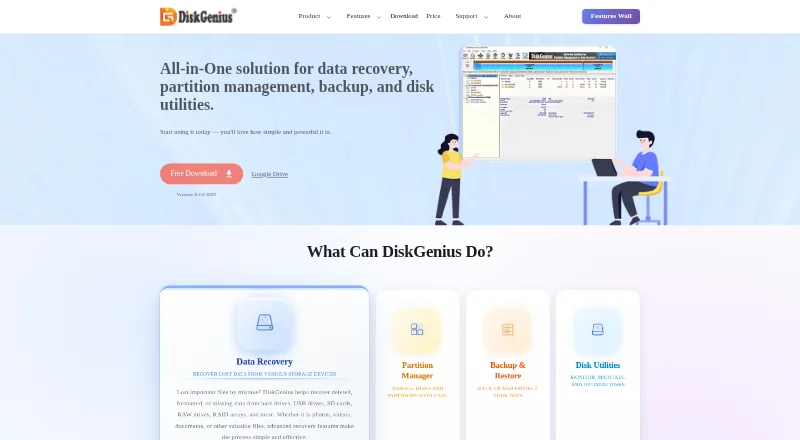
What DiskGenius is
DiskGenius is a Windows application for data recovery, partition management, backup and restore, and disk utilities. It advertises recovery of deleted, formatted, missing, RAW and lost-partition data, including data on RAID arrays. Users can preview recoverable files and save selected files to a different drive, or create a WinPE bootable USB for recovery when Windows will not start. Listed recovery sources include virtual disks created with VMware, VirtualBox, Parallels Desktop and Hyper-V. Partition tools cover resizing, creating, formatting, deleting, hiding, splitting and wiping partitions, plus conversion between GPT and MBR. The application can clone disks or partitions, migrate Windows to another drive, and create disk or partition image backups. Other utilities include bad-sector checking and repair, secure wiping, disk-health monitoring and UEFI boot-entry management. A free edition is available, with feature differences from paid editions. Paid Professional licenses include a one-month option at $69.90 a month, a one-year option at $99.90 a year, and a lifetime option at $129.90, paid once. The listed latest version is 6.2.0.1829; it does not support Windows XP, though an older compatible version is linked.
Who it suits
DiskGenius suits Windows users who need file recovery alongside partition, backup and disk-maintenance tools. It may also suit users who want bootable recovery media or support for listed virtual-disk sources.
What it does well
- Free edition is available.
- Can create WinPE bootable recovery media.
- Supports recovery from listed virtual-disk sources.
- Includes disk cloning and image backups.
- Lifetime Professional license includes free upgrades.
What to know first
- Available for Windows only.
- Latest version does not support Windows XP.
- Professional One-Month costs $69.90 a month.
Limits
The Free Edition has feature differences from paid editions. The Professional One-Month license is valid for one month on one PC; the One-Year license is valid for one year on one PC. Lifetime license PC allowances vary: Personal covers 1 PC, Family 5 PCs, and Technician 20 PCs.
Plans
| Plan | Billed and limits | Price |
|---|---|---|
| Free Edition | Basic partition management · disk cloning and OS migration · scan/preview lost files · limited recovery | Free |
| Professional Lifetime | One-time payment · Personal license 1 PC · family license 5 PCs · technician license 20 PCs · lifetime upgrades | $129.90, paid once |
| Professional One-Month | No renewal fees · One license code · 1 PC · valid one month after activation | $69.90 a month |
| Professional One-Year | No renewal fees · One license code · 1 PC · valid one year after activation | $99.90 a year |
As diskgenius.com lists them, read 19 Oct 2026. The maker's own page has the final word.
Getting started
- Visit the DiskGenius website.
- Choose the Free Edition or a Professional license.
- Download the Windows software.
- Create a WinPE bootable USB if you need recovery media.
DiskGenius is a Windows application for file recovery, partition work, backup and disk maintenance. It is best for Windows users who want those jobs under one roof, particularly when recovery may involve a lost partition, RAID array or a PC that will not boot. Its breadth is useful, but a single-purpose tool may be a better fit if you need only one of those capabilities.
Overview
Recovery covers deleted, formatted, missing and RAW data, including lost partitions on storage devices such as RAID arrays. DiskGenius also handles routine disk management, migration and image backups, so its value is not limited to emergency recovery. That combination suits users maintaining their own systems; it may be more than necessary for someone who only wants to recover a few files.
Key features
Users can preview recoverable files and selectively save them to a different drive. This supports a more deliberate recovery process than restoring everything at once. When Windows will not start, DiskGenius can create a WinPE bootable USB for file recovery. It also supports virtual disks created with VMware, VirtualBox, Parallels Desktop and Hyper-V, a useful inclusion for people working with those environments.
Partition tools cover resizing, creating, formatting, deleting, hiding, splitting and wiping partitions, along with conversion between GPT and MBR. Support for both partition-table types and FAT12, FAT16, FAT32, exFAT, NTFS, Ext2, Ext3 and Ext4 gives it reach across a varied set of volumes. Disk and partition cloning, Windows migration and image backups make it a broader maintenance package rather than a recovery-only utility.
Other tools include bad-sector checking and repair, secure wiping, disk-health monitoring, dynamic-to-basic conversion and UEFI boot-entry management. Version 6.2.0.1829, updated Jun. 08, 2026, adds Disk Speed Test and Windows Boot Repair and Conversion. The application’s wide scope is its main strength, though users who need only basic partition editing may prefer a narrower alternative.
Pricing
The Free Edition costs nothing. It is the sensible starting point for users who want to assess the application without paying, but its features differ from the paid editions. Check that it includes the functions you need before relying on it for a recovery or maintenance task.
Professional One-Month costs $69.90 a month, has no renewal fees, is valid for one month after activation and covers 1 PC. It fits a short-term need, but the one-month window is a poor match for ongoing use. Professional One-Year costs $99.90 a year, also with no renewal fees, and is valid for one year after activation on 1 PC. That gives a year of use without recurring renewal, at a higher total commitment than the monthly option.
Professional Lifetime costs $129.90, paid once, with a one-time payment and lifetime free upgrades. The Personal license covers 1 PC, Family covers 5 PCs and Technician covers 20 PCs, making it the clearest fit for longer-term use or multiple computers. DiskGenius offers a free trial edition with minimal functional differences from the registered edition, but no trial duration is stated. Its sales FAQ describes a conditional 30-day refund policy, so this is not an unconditional guarantee.
Platforms
DiskGenius runs on Windows and can create WinPE bootable USB media for recovery when the operating system will not start. The latest version does not support Windows XP; users of that operating system can obtain an older compatible version.
Who it's for
Choose DiskGenius if you use Windows and want file recovery alongside partition management, disk cloning, migration and backup. Its bootable recovery option and support for RAID and named virtual-disk formats are particularly relevant when recovery involves more than a working Windows desktop. It is less compelling if you need a simple partition editor, use Windows XP with the current release, or do not need the additional disk tools.
Pros and cons
- Pros: Recovery spans deleted, formatted, missing and RAW data, lost partitions and RAID arrays, with preview and selective saving to a different drive.
- Pros: WinPE boot media, virtual-disk support, partition operations, cloning, migration and image backups combine recovery with ongoing disk work.
- Pros: Lifetime licensing includes free upgrades, with license sizes for 1, 5 or 20 PCs.
- Cons: The current release does not support Windows XP, so XP users need an older version.
- Cons: The free edition has feature differences, and the month and year Professional licenses are limited to 1 PC and expire after their stated terms.
- Cons: The breadth of utilities may be unnecessary for users seeking only a focused recovery or partition tool.
Alternatives
GParted is a free partition editor that requires Linux for native installation, so consider it when you want a free partition-focused option and can use Linux. Active@ Partition Manager is a free Windows partition-management alternative for users who do not need DiskGenius’s broader recovery and backup scope.
AOMEI Partition Assistant offers a free Standard edition and a Professional yearly plan at $49.95 a year, making it worth comparing if partition management is the priority. iBeesoft Disk Partition Wizard has a free Basic plan for unlimited computers and paid annual plans, a possible fit for users comparing partition tools and computer coverage.
IM-Magic Partition Resizer is another freemium Windows option with a free trial, suited to readers comparing partition-resizing software. Macrorit Partition Expert offers a free edition for home users and a paid one-time Pro Standard edition, making it an alternative for home partition work.
MiniTool Partition Wizard has a free edition for basic disk and partition functions and a Pro annual subscription that automatically renews unless canceled; choose it if those terms and a basic-function free tier suit your needs. For broader category comparisons, browse Disk Partition Software, RAID Data Recovery Software, Partition Recovery Software, Photo Recovery Software and SD Card Recovery Software. Microsoft Quick Assist is a free alternative.
Verdict
DiskGenius is a strong fit for Windows users who want recovery, partition management and backup utilities in one application, especially when bootable recovery or RAID and virtual-disk sources matter. Its main trade-offs are the Windows XP limitation and the feature differences in the free edition; users who only need partition editing should compare more focused options before choosing it.
Verdict
DiskGenius combines recovery with partition, backup and disk utilities in one Windows application. Check the edition differences and Windows XP limitation, and compare the listed license terms for the features you need.
Questions
Is DiskGenius free?
Yes. The Free Edition costs nothing. Feature differences from paid editions are listed by the vendor.
How much do the Professional plans cost?
Professional One-Month costs $69.90 a month, Professional One-Year costs $99.90 a year, and Professional Lifetime costs $129.90, paid once.
Which operating system does DiskGenius support?
DiskGenius is for Windows. The latest version does not support Windows XP, and the download page links to an older compatible version.
Does DiskGenius offer a trial?
Yes. The vendor describes a trial edition with minimal functional differences from the registered edition; no duration is stated.
Can DiskGenius create bootable recovery media?
Yes. It can create a WinPE bootable USB for file recovery when Windows will not boot.
What filesystems and partition tables does it support?
Listed filesystems are FAT12, FAT16, FAT32, exFAT, NTFS, Ext2, Ext3, and Ext4. It supports both GPT and MBR.
Facts from DiskGenius's own pages
- Backup and migration
- It can clone disks or partitions, migrate Windows to another drive, and create disk or partition image backups. · diskgenius.com, 28 Sept 2026
- Backup and restore
- It can create disk or partition images, restore them, explore image files, and perform incremental backups. · diskgenius.com, 19 Oct 2026
- Boot media
- The user guide covers creating a WinPE bootable USB and rebooting into DiskGenius WinPE or DOS versions. · diskgenius.com, 19 Oct 2026
- Boot recovery
- It can create a WinPE bootable USB to recover files when Windows will not boot. · diskgenius.com, 28 Sept 2026
- Changelog highlights
- Version 6.2.0.1829 added Disk Speed Test, Windows Boot Repair and Conversion, the BMB21-2019 erase standard, and PMFX individual-partition restore. · diskgenius.com, 19 Oct 2026
- Company identity
- LinkedIn identifies the maker as EASSOS Technology Co., Ltd., a self-owned software company focused on recovery, disk utilities, and backup. · linkedin.com, 19 Oct 2026
- Company location
- The company page gives an address in Qinhuangdao Economic and Technological Development Zone, Hebei Province, China. · diskgenius.com, 28 Sept 2026
- Company milestone
- The company says it had released more than 300 updates by 2023. · diskgenius.com, 19 Oct 2026
- Company size and founding
- LinkedIn lists 11–50 employees and a 2010 founding year. · linkedin.com, 19 Oct 2026
- Current release
- The download page lists version 6.2.0.1829, updated June 8, 2026, with a 63.9 MB package. · diskgenius.com, 19 Oct 2026
- Data recovery
- The software recovers deleted, formatted, RAW, and lost-partition data from hard drives, USB drives, memory cards, virtual disks, and related storage. · diskgenius.com, 19 Oct 2026
- Disk cloning
- DiskGenius supports disk and partition cloning and Windows migration to another SSD or HDD. · diskgenius.com, 19 Oct 2026
- Disk diagnostics
- Disk utilities include S.M.A.R.T. inspection, bad-sector verification and repair, disk wiping, free-space wiping, 4K-alignment checks, and speed testing. · diskgenius.com, 19 Oct 2026
- Disk utilities
- Utilities include bad-sector checking and repair, secure wiping, disk-health monitoring, dynamic-to-basic conversion, and UEFI boot-entry management. · diskgenius.com, 28 Sept 2026
- Documentation
- The online manual contains categorized procedures for partitioning, recovery, virtual disks, sector editing, file operations, boot media, and registration. · diskgenius.com, 19 Oct 2026
- File systems
- The published guide lists FAT12, FAT16, FAT32, exFAT, NTFS, EXT2, EXT3, and EXT4 support. · diskgenius.com, 19 Oct 2026
- Headquarters
- The company profile gives Qinhuangdao Yizhishu Software Development Co., Ltd. in Qinhuangdao Economic and Technological Development Zone, Hebei, China as the location. · diskgenius.com, 19 Oct 2026
- Independent performance test
- PartitionManager.org reports a roughly 20-minute 500 GB NTFS scan on an SSD and free previewing across many file types. · partitionmanager.org, 19 Oct 2026
- Independent recovery test
- HandyRecovery reports good results on FAT32, exFAT, NTFS, and EXT4, while signature scanning was less consistent for some camera formats. · handyrecovery.com, 19 Oct 2026
- Installation options
- The download center provides a Windows installer plus 64-bit and 32-bit portable ZIP packages. · diskgenius.com, 19 Oct 2026
- LAN/WAN integration
- A disk can be shared between DiskGenius installations over LAN or WAN using device IDs, passcodes, and optional IPv4 or IPv6 settings. · diskgenius.com, 19 Oct 2026
- Latest version
- The home page lists version 6.2.0.1829, updated Jun. 08, 2026, with Disk Speed Test and Windows Boot Repair and Conversion among its additions. · diskgenius.com, 28 Sept 2026
- Licence model
- Registration uses a paid license code tied to a license name and email, with online, offline, and browser activation methods. · diskgenius.com, 19 Oct 2026
- Limit: beginner risk
- Ritridata says the manual-heavy, low-level workflow suits advanced users but increases the chance of mistakes for beginners. · ritridata.com, 19 Oct 2026
Where DiskGenius stands on Freedom251
- Partition Recovery Software#6 of 34
- Photo Recovery Software#8 of 44
- RAID Data Recovery Software#5 of 27
- SD Card Recovery Software#11 of 54
- Disk Partition Software#5 of 22
- Hard Drive Partitioning Software#4 of 17
- Partition recovery software#12 of 33
- SD card recovery software#21 of 52
- Photo recovery software#20 of 46