Freedom251 › Disk Benchmark Software
disk-mark-me
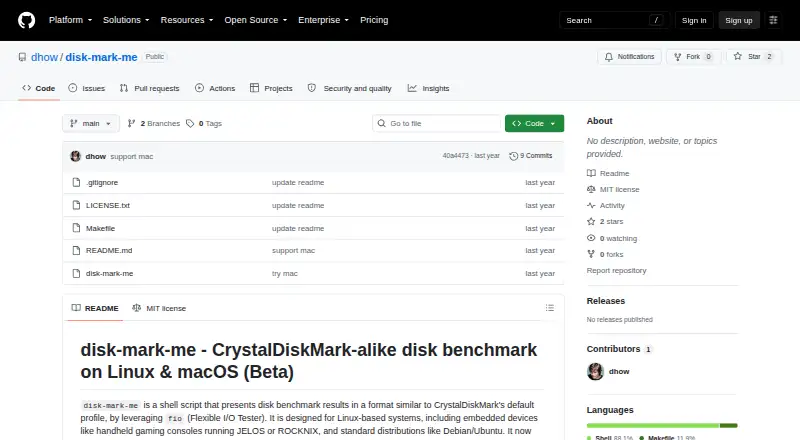
What disk-mark-me is
disk-mark-me is a command-line shell script for benchmarking disk performance on Linux and macOS. It uses fio to measure sequential and random read and write performance, then displays results in MB/s and IOPS. Its default profile runs sequential 1 MiB tests at queue depths 8 and 1, and random 4 KiB tests at queue depths 32 and 1, with one thread for each. Measurements are averaged across the configured rounds.
Options let you set the target directory and test file size, choose the number of rounds, run read tests, write tests or both, and enable verbose output. The script requires fio, numfmt and command-line utilities including grep with PCRE support, awk, bc, df, stat, id, touch and rm. It attempts to clear disk caches before read tests using operating-system-specific methods when permissions allow; sudo is optional and recommended. The maker recommends installation with the included Makefile, either to ~/.local/bin or a system-wide location. Linux support includes Debian and Ubuntu and handheld systems running JELOS or ROCKNIX. macOS support is beta and calls for fio and GNU coreutils installed through Homebrew. The project is released under the MIT License.
Who it suits
disk-mark-me suits command-line users who want to measure sequential and random disk performance on Linux or macOS. It is intended for users comfortable installing its command-line prerequisites and interpreting results within the same operating-system environment.
What it does well
- Measures sequential and random read and write performance.
- Reports throughput in MB/s and IOPS.
- Options cover target directory, file size, rounds and test type.
- Released under the MIT License.
- Supports Linux handheld systems running JELOS or ROCKNIX.
What to know first
- macOS support is marked beta.
- The script requires fio and several command-line utilities.
- Results should not be compared directly across operating systems.
- Intensive write benchmarks can contribute to SD card wear.
Limits
The free script requires fio and command-line utilities. macOS support is beta; the maker calls for GNU coreutils and, when needed, GNU grep to be available in PATH.
Getting started
- Install fio, numfmt and the required command-line utilities.
- On macOS, install fio and GNU coreutils through Homebrew.
- Install with the provided Makefile to ~/.local/bin or a system-wide location.
- Choose a target directory, test file size and number of rounds.
- Select read tests, write tests or both, then run the benchmark.
Verdict
Choose disk-mark-me if you want a free command-line disk benchmark with configurable tests and MB/s and IOPS results. Look elsewhere if you need stable macOS support or direct comparisons across operating systems.
Questions
Is disk-mark-me free?
Yes. It is listed as free and is released under the MIT License.
Which operating systems does it support?
The project describes support for Linux and beta support for macOS. Linux support includes Debian and Ubuntu and handheld systems running JELOS or ROCKNIX.
What does the benchmark measure?
It measures sequential and random read and write performance. Results are displayed in MB/s and IOPS.
What does it require?
It requires fio, numfmt and utilities including grep with PCRE support, awk, bc, df, stat, id, touch and rm.
Can I compare results from Linux and macOS directly?
The maker advises against direct cross-operating-system comparisons because storage stacks, hardware interfaces, fio engines and filesystems can affect results.
How do I install it?
The maker recommends using the provided Makefile to install it in ~/.local/bin or a system-wide location such as /usr/local/bin.
Facts from disk-mark-me's own pages
- Benchmark profile
- The default profile uses sequential 1 MiB tests at queue depths 8 and 1, and random 4 KiB tests at queue depths 32 and 1, each with one thread. · github.com, 5 Oct 2026
- Cache clearing
- It attempts to clear disk caches before read tests using operating-system-specific methods when permissions allow; sudo is optional and recommended for this. · github.com, 5 Oct 2026
- Comparability
- The maker advises using results to compare performance within the same operating-system environment because results across operating systems should not be directly compared. · github.com, 5 Oct 2026
- Compatibility limit
- The README advises against directly comparing results across operating systems because storage stacks, hardware interfaces, fio engines, and filesystems can affect results. · github.com, 5 Oct 2026
- Customization
- Options include the target directory, test file size, number of rounds, benchmark type (read, write, or both), and verbose output. · github.com, 5 Oct 2026
- Installation
- The maker recommends installing with the provided Makefile, either to ~/.local/bin or to a system-wide location such as /usr/local/bin. · github.com, 5 Oct 2026
- License
- The repository states that the script is released under the MIT License. · github.com, 5 Oct 2026
- Linux support
- The maker describes support for Linux distributions including Debian/Ubuntu and embedded handheld systems running JELOS or ROCKNIX. · github.com, 5 Oct 2026
- macOS limit
- The project labels macOS support beta and says GNU coreutils and, when needed, GNU grep should be installed and available in PATH. · github.com, 5 Oct 2026
- macOS support
- macOS support is marked beta, and the instructions call for fio and GNU coreutils installed through Homebrew. · github.com, 5 Oct 2026
- Prerequisites
- The script requires fio, numfmt, and standard command-line utilities including grep with PCRE/-P support, awk, bc, df, stat, id, touch, and rm. · github.com, 5 Oct 2026
- Purpose
- disk-mark-me is a shell script that benchmarks disk performance using fio and formats results similarly to CrystalDiskMark’s default profile. · github.com, 5 Oct 2026
- Read/write tests
- It tests sequential and random read and write performance. · github.com, 5 Oct 2026
- Requirements
- It requires fio, numfmt, and standard command-line utilities including grep with PCRE support, awk, bc, df, stat, id, touch, and rm. · github.com, 5 Oct 2026
- Results
- Results are displayed in MB/s and IOPS, and measurements are averaged across the configured rounds. · github.com, 5 Oct 2026
- Support and contributions
- The maker invites users to open an issue or submit a pull request for improvements or bug fixes. · github.com, 5 Oct 2026
- Supported systems
- The project describes support for Linux and beta support for macOS, including Linux handheld gaming consoles running JELOS or ROCKNIX. · github.com, 5 Oct 2026
- Tests
- It tests sequential and random read and write performance and reports results in MB/s and IOPS. · github.com, 5 Oct 2026
- Usage cautions
- The README says intensive write benchmarks can contribute to SD card wear and that other I/O-intensive processes can skew results. · github.com, 5 Oct 2026
- Usage considerations
- The maker notes that benchmarks may take significant time, frequent intensive writes can wear SD cards, and other I/O activity can skew results. · github.com, 5 Oct 2026
Where disk-mark-me stands on Freedom251
- Disk Benchmark Software#17 of 29