Freedom251 › Restaurant Recipe Costing Software

DishCost
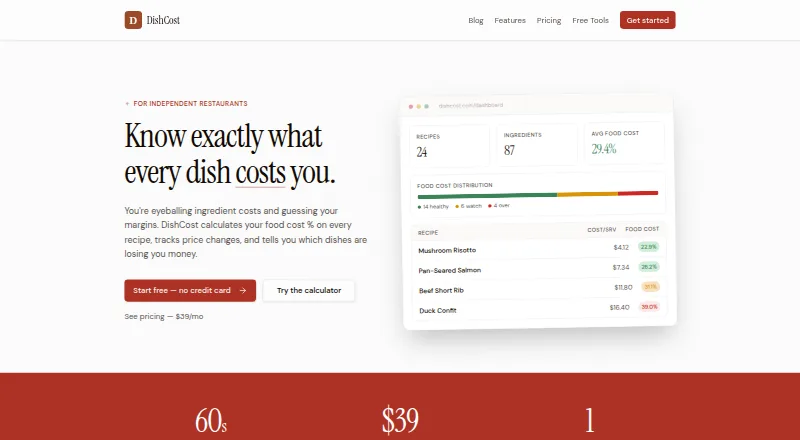
What DishCost is
DishCost helps independent restaurants calculate recipe costs, track ingredient price changes, and find dishes with weak margins. Each recipe can show ingredient line costs, total and per-serving cost, food cost percentage, a suggested price, and profit per serving. When an ingredient price changes, DishCost recalculates recipes and prep items that use it, including dishes that depend on those prep items. Users can add weekly order counts to sort dishes into Stars, Plowhorses, Puzzles, and Dogs. Bulk CSV imports cover ingredients and prices; Pro also imports distributor order guides from Sysco, US Foods, BEK, or other vendors, with column mapping and SKU-based price updates. Pro includes PDF and CSV exports and email support. DishCost is designed for one kitchen at a single location. It does not include multi-location dashboards, live POS sync, inventory counts, invoice OCR, or in-app per-recipe nutrition and allergen tagging. Free tools have no time limit. Pro costs $39 a month for one kitchen, with unlimited recipes and ingredients and no per-seat fees.
Who it suits
DishCost is intended for independent, single-location restaurants that need recipe costing and menu profitability tools for one kitchen.
What it does well
- Free tools have no time limit
- Ingredient price changes recalculate affected recipes
- Supports weekly menu engineering
- Bulk CSV ingredient imports
- Pro includes distributor imports and exports
What to know first
- Covers recipe costing for one kitchen
- No multi-location dashboards
- No live POS sync or inventory counts
- No invoice OCR
Limits
The Free account tier supports recipes, but most Pro features are read-only. Pro is limited to one kitchen, though it allows unlimited recipes and ingredients.
Plans
| Plan | Billed and limits | Price |
|---|---|---|
| Free tier | No time limit · free tools include recipe costing calculator and nutrition tools; account tier supports recipes, with most Pro features read-only | Free |
| Pro | Monthly through Stripe; charged on the same date each month · One kitchen · unlimited recipes and ingredients · no per-seat fees | $39 a month |
As dishcost.com lists them, read 28 Sept 2026. The maker's own page has the final word.
Getting started
- Visit https://dishcost.com/.
- Use the free calculator and other free tools without an account, or create an account for recipes.
- Import ingredients and prices using CSV and the downloadable template.
- Choose Pro for one kitchen at $39 per month if you need its additional features.
DishCost is a web app for costing restaurant recipes and judging menu margins from one kitchen. It is best for independent operators who need ingredient-price changes to flow through connected recipes. Choose it for focused cost control; look elsewhere for inventory, POS, or multi-location operations.
Overview
DishCost links ingredient prices, recipes, and prep items so cost figures stay connected. Change one ingredient price and the service recalculates every recipe and prep item that uses it, including dishes built from that prep. That is a meaningful advantage for menus with shared sauces, bases, or other sub-recipes, because a price increase can be traced across the menu without repeated manual edits.
The product is intentionally narrower than a restaurant management suite. It does not include inventory counts, live POS synchronization, invoice OCR, multi-location dashboards, or in-app nutrition and allergen tagging for each recipe. Its free tools can be used without an account, and the free tier has no time limit.
Key features
Recipe costing
Recipe views include ingredient line costs, total cost, per-serving cost, food-cost percentage, suggested price, and profit per serving. Yield and portion scaling help operators model changes in batch size or serving size rather than relying on a single fixed calculation. These fields support pricing decisions, but they do not replace the operational data that would come from inventory or POS systems.
Automatic price propagation
Ingredient updates recalculate dependent prep items and finished dishes. This is the core reason to use DishCost: kitchens with many shared components can see margin effects quickly and consistently. A small operation with few recipes will benefit less from the linked structure.
Menu engineering
Enter weekly order counts to classify dishes as Stars, Plowhorses, Puzzles, or Dogs. The categories combine demand with cost analysis to support menu decisions. Because counts are entered rather than pulled from a live POS, the feature is useful for periodic review but not continuous sales monitoring.
Imports, exports, and AI access
Bulk CSV import for ingredients and prices uses a downloadable template, reducing setup work. Pro can import CSV order guides from Sysco, US Foods, BEK, and other vendors through column mapping, then update prices by SKU. Pro also adds PDF and CSV exports and email support. The AI connector can read approved recipes, ingredients, costs, and price history, but it cannot create, edit, or delete records or handle billing, keeping changes under user control.
Pricing
Free tier
The Free tier costs nothing with no time limit. Free tools include the recipe-costing calculator and nutrition tools, and those tools work without an account. An account supports recipes, while most Pro features are read-only. This is a sensible way to calculate costs or evaluate the workflow, but operators who need vendor imports, exports, or full editing of Pro functions will outgrow it.
Pro
Pro costs $39 a month, billed monthly through Stripe on the same date each month. It covers one kitchen, unlimited recipes and ingredients, and has no per-seat fees. Distributor order-guide imports, PDF and CSV export, and email support are included. The single-kitchen scope and lack of seat charges suit a small independent restaurant; a growing group with several locations will need a different structure.
Platforms
DishCost runs on the web. No mobile or desktop platform is provided.
Who it's for
DishCost fits an independent, single-location restaurant that wants current recipe costs, margin visibility, yield and portion scaling, and basic menu engineering. It is particularly practical when recipes share ingredients or prep items and vendor prices arrive in CSV order guides.
It is not the right choice for operators requiring inventory tracking, invoice scanning, live POS data, multi-location reporting, or per-recipe nutrition and allergen tagging. Those requirements exceed its focused costing model.
Pros and cons
Pros
- Connected recalculation: one ingredient-price change flows through dependent prep items and dishes.
- Useful margin fields: per-serving cost, food-cost percentage, suggested price, and profit are shown together.
- Practical free access: the free tier has no expiry, and basic calculators work without an account.
- Pro import workflow: mapped distributor CSVs and SKU updates reduce recurring price-entry work.
- No Pro seat fees: one kitchen gets unlimited recipes and ingredients without per-user charges.
Cons
- Single-kitchen ceiling: there are no multi-location dashboards.
- No operational integrations: live POS sync, inventory counts, and invoice OCR are absent.
- Manual sales input: menu categories rely on entered weekly order counts.
- Limited recipe compliance data: in-app nutrition and allergen tags per recipe are not included.
- Free restrictions: most Pro capabilities are read-only on the account tier.
Alternatives
Chefy is a better fit when a first venue needs costing, recipes, bulk product import, wastage recording, real-time costing updates, and an included team on its free Core plan.
Cilurzo Foodcost suits readers seeking a modular free tier with a trial, though its Lite plan has volume limits and food costing is included with higher plans.
Cucinovo is aimed at household use, with a free plan for one household and one user plus unlimited recipes, ingredients, shopping lists, sub-recipes, and import/export.
Enplace is worth considering for a restaurant that can obtain approval for its selectively granted private-beta single-restaurant plan.
Freecost is the stronger option when unlimited recipes, menu items, ingredients, and multiple kitchens are required at no charge across Android and web.
Ratatool is an alternative for users who want a recipe-focused service with a small free trial and a paid production-planning tier.
RistoBrain is preferable when a €19-per-month Base plan with invoice upload and a basic AI adviser is more important than DishCost's single-kitchen focus.
Dishboard offers a free, no-subscription service with unlimited menu items, ingredients, supplies, prep recipes, and delivery partners.
For a broader comparison, see Restaurant Recipe Costing Software.
Verdict
DishCost is a strong choice for a single-location restaurant that wants dependable recipe costing and automatic propagation of ingredient-price changes without paying per seat. Its 39.00 USD monthly Pro plan adds the imports and exports that make ongoing cost maintenance practical. Look elsewhere if your operation depends on inventory, POS, invoice, nutrition, allergen, or multi-location features.
Verdict
DishCost focuses on recipe costing and menu margins for a single kitchen. Its free tools have no time limit, while Pro adds vendor imports, exports, and email support.
Questions
Does DishCost have a free plan?
Yes. Free tools have no time limit and include a recipe costing calculator and nutrition tools. The account tier supports recipes, with most Pro features read-only.
How much does Pro cost?
Pro costs $39 per month, billed monthly through Stripe on the same date each month. It covers one kitchen with unlimited recipes and ingredients and no per-seat fees.
Which platforms does DishCost support?
DishCost is available on the web.
Can I import distributor order guides?
Yes. Pro supports CSV order-guide imports from Sysco, US Foods, BEK or other vendors, with column mapping and price updates by SKU.
Does DishCost support multiple locations?
No. DishCost is built for one kitchen and does not include multi-location dashboards.
Who makes DishCost?
The contact page identifies Justin as founder and lists the business address in Wilmington, Delaware, United States.
Facts from DishCost's own pages
- AI connector
- The AI connector can read approved recipes, ingredients, costs, and price history, but cannot create, edit, or delete records or manage billing. · dishcost.com, 28 Sept 2026
- Automatic recalculation
- Changing an ingredient price recalculates every recipe and prep item that uses it, including dishes that use that prep item. · dishcost.com, 28 Sept 2026
- CSV import
- DishCost supports bulk CSV import of ingredients and prices, with a downloadable template. · dishcost.com, 28 Sept 2026
- Distributor imports
- Pro supports CSV order guide imports from Sysco, US Foods, BEK, or other vendors, with column mapping and price updates by SKU. · dishcost.com, 28 Sept 2026
- Exports and support
- Pro includes PDF and CSV export and email support. · dishcost.com, 28 Sept 2026
- Founded
- 2025 · dishcost.com, 28 Sept 2026
- Free access
- The free tier has no time limit, and the food cost calculator and other free tools can be used without an account. · dishcost.com, 28 Sept 2026
- Headquarters
- Wilmington, Delaware, United States · dishcost.com, 28 Sept 2026
- Intended customers
- DishCost is built for independent, single-location restaurants and covers recipe costing for one kitchen. · dishcost.com, 28 Sept 2026
- Maker and location
- The contact page identifies Justin as founder and gives DishCost's address as Wilmington, Delaware, United States. · dishcost.com, 28 Sept 2026
- Menu engineering
- Users can add weekly order counts to categorize dishes as Stars, Plowhorses, Puzzles, and Dogs. · dishcost.com, 28 Sept 2026
- Product limits
- DishCost does not include multi-location dashboards, live POS sync, inventory counts, invoice OCR, or in-app per-recipe nutrition and allergen tagging. · dishcost.com, 28 Sept 2026
- Purpose
- DishCost calculates food cost percentage for restaurant recipes, tracks ingredient price changes, and identifies dishes with weak margins. · dishcost.com, 28 Sept 2026
- Recipe costing
- Recipes show ingredient line costs, total and per-serving cost, food cost percentage, suggested price, and profit per serving. · dishcost.com, 28 Sept 2026
- Security and privacy
- DishCost says it uses access controls, encrypted network connections, scoped authorization, and account-bound queries, and does not sell personal or restaurant data. · dishcost.com, 28 Sept 2026
- Support
- The contact page lists [email protected] and says replies usually arrive within a few hours. · dishcost.com, 28 Sept 2026