Freedom251 › Restaurant Recipe Management Software
Enplace
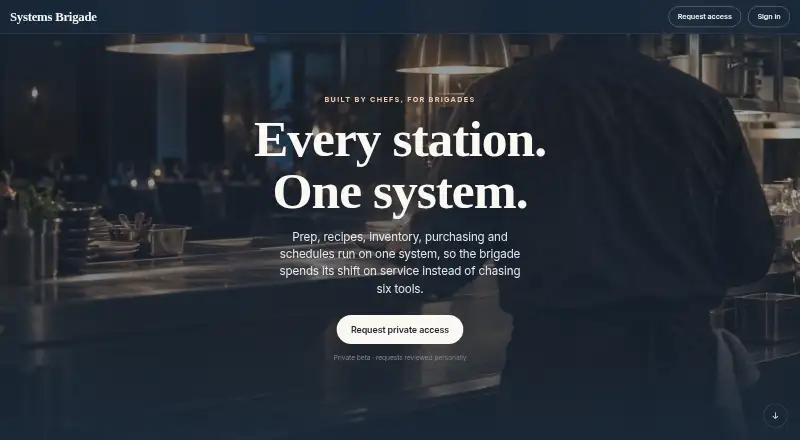
What Enplace is
Enplace is a web platform for restaurant recipes, food costing, prep planning, and kitchen workflows. It calculates plate costs from ingredient prices, conversions, yields, and sub-recipes, then updates costs when ingredient prices change. Recipes and par levels can produce daily prep and station task lists, with quantities adjusted to demand. Other listed capabilities include inventory counts, purchasing workflows, prep-label printing, digital logs, and temperature records. AI-assisted tools can analyze logs, identify patterns, and summarize issues. Schedules, recipes, prep lists, station notes, and team messages are described as automatically translated for each user. Listed integrations include Square and Toast for point of sale, QuickBooks Online and Xero for accounting, and Slack, Microsoft Teams, and OpenAI. The integrations page lists 112+ general-purpose tools available out of the box and 114+ hospitality systems available through custom integrations. Those hospitality integrations have a one-time setup fee; most take 1–3 weeks, and some may involve vendor certification fees. Enplace is in private beta, with access requests selectively approved. A single restaurant plan is free; multi-location groups are listed at $250 per location per month.
Who it suits
Enplace is presented for independent restaurants, multi-location groups, chefs, kitchen managers, catering and production kitchens, lodges, and pubs or casual dining. Its private beta access is selectively approved.
What it does well
- Calculates plate costs from ingredients, yields, and sub-recipes.
- Prep lists scale quantities to demand.
- Ingredient price changes update costs.
- Lists inventory, purchasing, logs, and temperature records.
- Automatically translates listed kitchen content per user.
What to know first
- Private beta access is selectively approved.
- Hospitality-specific integrations have a one-time setup fee.
- Custom integrations may take 1–3 weeks.
- Some custom integrations may have vendor certification fees.
Limits
The free plan is for one restaurant, and private beta access is selectively approved. The multi-location plan costs $250.00 per location per month. Hospitality-specific integrations have a one-time setup fee; most take 1–3 weeks, and some may include vendor certification fees.
Plans
| Plan | Billed and limits | Price |
|---|---|---|
| Single restaurant | Free for one restaurant · private beta access is selectively approved | Free |
| Multi-location groups | per location per month · For groups · private beta access is selectively approved | $250 a month |
As recipesenplace.com lists them, read 3 Oct 2026. The maker's own page has the final word.
Getting started
- Visit https://recipesenplace.com/.
- Request access to the private beta; requests are reviewed selectively.
- Choose the single-restaurant free plan or the multi-location plan at $250.00 per location per month.
- Connect any needed listed tools, such as Square, Toast, QuickBooks Online or Slack.
- For hospitality-specific systems, request a custom integration with its one-time setup fee.
Enplace is a web platform that connects restaurant recipe costing with prep planning and day-to-day kitchen operations. It is best suited to restaurant teams that want those workflows in one place, especially groups managing more than one location. Its scope is broad, but private beta access and custom hospitality integrations make it a less straightforward choice for a quick, self-directed rollout.
Overview
Enplace brings recipe and ingredient data into operational planning: costs update with ingredient prices, while prep lists draw on recipes and par levels and scale quantities to demand. Inventory counts, purchasing workflows, labels, digital logs and temperature records extend it beyond recipe management. That breadth could help teams connect decisions about menu economics with kitchen execution; it also means the strongest fit is an operation seeking a wider system, not just a calculator.
AI-assisted operations can analyze logs, identify patterns and summarize issues. The platform also automatically translates schedules, recipes, prep lists, station notes and team messages for each user, which is relevant for teams working across languages. Enplace is in private beta, with access requests selectively approved, so interested operators should not assume immediate availability.
Key features
Costing and prep planning
Recipe costing accounts for ingredient prices, conversions, yields and sub-recipes, then recalculates when prices change. That makes it useful for keeping plate costs current as purchasing costs shift. Prep lists are generated by day and station from recipes and par levels, with quantities adjusted to demand; this ties recipe specifications to production tasks rather than leaving teams to translate them manually.
Kitchen workflows and integrations
Inventory counts, purchasing workflows, prep label printing, digital logs and temperature records give Enplace a broader operational remit. The maker says 112+ general-purpose tools connect out of the box, including Square and Toast for POS, QuickBooks Online and Xero for accounting, Slack and Microsoft Teams for chat, and OpenAI for AI assistance. Identity and security options include Okta, Microsoft Entra, Google Workspace, Clerk, Auth0 and 1Password.
Hospitality-specific connections are custom builds, with a fixed-price one-time setup fee. Most take 1–3 weeks, and some may incur vendor certification fees. That is a meaningful planning cost: operators needing a specialized system connected should confirm the build, price and timing before making Enplace central to their workflow.
Pricing
The Single restaurant plan is free for one restaurant. The Multi-location groups plan is $250 a month, billed per location per month. Both plans require private beta access, which is selectively approved. The group plan's per-location billing means the subscription grows with the number of locations; custom hospitality integrations can add a separate one-time setup fee and, in some cases, vendor certification fees.
The free plan is aimed at a single restaurant, while the paid plan is designed for groups. The plan details do not establish a seat limit or a trial period, so teams should confirm access and fit before planning a rollout. The free price does not remove the private beta approval hurdle.
Platforms
Enplace is available on the web. No other platform is included in its stated availability, so teams choosing it should plan around browser-based access.
Who it's for
Enplace is presented for independent restaurants, multi-location groups, chefs and kitchen managers, catering and production kitchens, lodges, and pubs or casual dining. Its mix of costing, demand-scaled prep and operational records is most compelling where a team wants recipes to inform both financial tracking and daily kitchen work. A single restaurant can start with the free plan if approved for beta; groups should weigh the per-location monthly price and any integration setup costs. Operators looking only for recipe costing, or those that need immediate access and a standard connection to a hospitality system, may be better served elsewhere.
Pros and cons
- Pro: Ingredient price changes flow into recipe costs, helping teams keep menu economics current.
- Pro: Prep and station lists scale from recipes and par levels to demand, linking planning to production.
- Pro: Automatic translation covers several operational materials and team messages, useful for multilingual crews.
- Con: Private beta access is selectively approved, making availability uncertain for teams with a fixed launch schedule.
- Con: Hospitality integrations require paid custom builds, and some may also involve vendor certification fees.
- Con: The group plan is billed per location, so its monthly cost rises with the footprint.
Alternatives
For a focused comparison of specialist options, see our Restaurant Recipe Costing Software and Restaurant Recipe Management Software lists.
- Chefy is a web freemium option with a free first-venue plan that includes costing, recipes, bulk product import, wastage recording, real-time costing updates and team access. Choose it when those core costing and recipe tools are the priority, rather than Enplace's broader prep and kitchen operations scope.
- Cilurzo Foodcost offers a free, modular Lite plan with volume limits and a free trial. Choose it when a modular food-costing option is a better fit than Enplace's combined kitchen workflows.
- Cucinovo has a free household plan for one user, with unlimited recipes, ingredients and categories, shopping lists, sub-recipes, grocery lists and import/export. Choose it for household recipe organization rather than restaurant operations.
- DishCost provides free recipe costing and nutrition tools, while most Pro features are read-only on its account tier. Choose it when free costing tools are enough and demand-driven prep planning is not required.
- Freecost is free on Android and web, with unlimited recipes, menu items and ingredients, multiple kitchens on one account and no per-seat pricing. Choose it when those free costing capabilities and platform options matter more than Enplace's integrated prep workflows.
- Ratatool offers a trial with limits of four recipes and 15 ingredients, plus a Premium plan billed at 41 € per month annually. Choose it when its production-planning offering is a better match for your operation.
- RistoBrain starts at €19 a month for one location, with unlimited recipes and ingredients, food-cost analytics, invoice upload and a basic AI adviser. Choose it when food-cost analytics and invoice processing are the priority.
- Dishboard is free to use with no plan limits across menu items, ingredients, supplies, prep recipes and delivery partners. Choose it when unrestricted free access is more important than Enplace's stated demand-scaled prep planning.
Verdict
Enplace is worth considering for restaurant teams that want recipe costs, prep plans and kitchen records connected in one web platform, particularly multi-location groups able to budget per location. Its automatic price updates and demand-scaled station lists address practical operational needs. Look elsewhere if beta access is too uncertain for your schedule or if your required hospitality integration makes custom setup an unwelcome cost and delay.
Verdict
Enplace brings recipe costing and prep planning together with other kitchen operations tools. Consider its private beta access and custom integration process before planning a rollout.
Questions
Is Enplace free?
Yes. The single-restaurant plan is free.
How much does the multi-location plan cost?
It is $250.00 per location per month.
Can anyone join the beta?
Enplace is in private beta, and access requests are reviewed and selectively approved.
Which platforms does Enplace support?
The listed platform is web.
What integrations are available?
The site lists Square, Toast, QuickBooks Online, Xero, Slack, Microsoft Teams and OpenAI, among other tools. Hospitality-specific systems can be connected through paid custom integrations.
Who founded Enplace?
The homepage identifies Connor Macaulay as its founder.
Facts from Enplace's own pages
- AI features
- AI-assisted operations can analyze logs, detect patterns and summarize issues. · recipesenplace.com, 3 Oct 2026
- Availability
- Enplace is described as being in private beta, with access requests reviewed and selectively approved. · recipesenplace.com, 3 Oct 2026
- Custom integration limits
- Hospitality-specific integrations are custom builds with a fixed-price one-time setup fee; the site says most take 1–3 weeks and some may have vendor certification fees. · recipesenplace.com, 3 Oct 2026
- Integrations
- The integrations page claims 112+ general-purpose tools are available out of the box and 114+ hospitality systems can be connected through paid custom integrations. · recipesenplace.com, 3 Oct 2026
- Intended users
- The product is presented for independent restaurants, multi-location groups, chefs and kitchen managers, catering and production kitchens, lodges, and pubs or casual dining. · recipesenplace.com, 3 Oct 2026
- Kitchen operations
- The product lists inventory counts, purchasing workflows, prep label printing, digital logs and temperature records among its capabilities. · recipesenplace.com, 3 Oct 2026
- Maker
- The homepage identifies Connor Macaulay as Enplace's founder. · recipesenplace.com, 3 Oct 2026
- Named integrations
- Listed tools include Square and Toast for POS, QuickBooks Online and Xero for accounting, Slack and Microsoft Teams for chat, and OpenAI for AI assistance. · recipesenplace.com, 3 Oct 2026
- Prep planning
- It generates daily prep and station task lists from recipes and par levels, with quantities scaled to demand. · recipesenplace.com, 3 Oct 2026
- Product
- Enplace combines restaurant recipes, food costing, prep lists, batch scaling and kitchen workflows in one platform. · recipesenplace.com, 3 Oct 2026
- Recipe costing
- It calculates plate costs from ingredient prices, conversions, yields and sub-recipes, and updates costs when ingredient prices change. · recipesenplace.com, 3 Oct 2026
- Security
- The integrations page lists identity and security integrations including Okta, Microsoft Entra, Google Workspace, Clerk, Auth0 and 1Password. · recipesenplace.com, 3 Oct 2026
- Translation
- The site says schedules, recipes, prep lists, station notes and team messages are automatically translated per user. · recipesenplace.com, 3 Oct 2026