Freedom251 › Desktop Organization Software
DesktopShelves
What DesktopShelves is
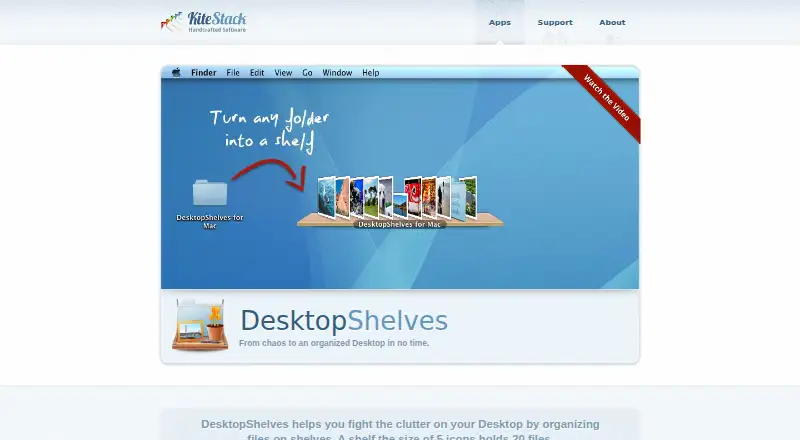
DesktopShelves is a paid macOS application for arranging files on shelves placed on the Mac desktop. A shelf occupying the space of five icons holds 20 files. Files can be dropped from the desktop or Finder onto shelves, then dragged from shelves into other applications. Finder’s context menu can open any folder as a shelf. Shelves remain available through a hotkey while other apps are running, and one click opens a Quick Look preview for a shelf file. The app includes shelf designs and a gallery with additional designs and user sharing. Right-clicking and dragging a file away from a shelf can paste its text contents into another app. Dropping selected text creates a .txt, .rtf, or .rtfd file according to its format. Automatic sorting is listed. Files moved onto a shelf must be on the same volume as the shelf folder. Support is available through built-in feedback and email.
Who it suits
DesktopShelves suits Mac users who organize desktop files visually and frequently move files or text between applications. It is also useful for browsing folders as shelves and accessing stored items with a hotkey.
What it does well
- Organizes files into desktop shelves
- Finder folders can open as shelves
- Quick Look previews with one click
- Creates files from selected text
- Includes designs and a sharing gallery
What to know first
- Available only on macOS
- Each shelf holds 20 files
- Dragged files must share the shelf folder’s volume
- No free plan
Verdict
DesktopShelves offers a shelf-based Mac workflow with Finder access, previews, text capture, and design options. Its macOS-only availability and same-volume file restriction define how it can be used.
Facts from DesktopShelves's own pages
- Capacity
- A shelf the size of five icons holds 20 files. · kitestack.com, 9 Oct 2026
- Company location
- Kitestack describes itself as a small company based in Luebeck, Germany. · kitestack.com, 9 Oct 2026
- Create files from text
- Dropping a text selection onto a shelf creates a new file. · kitestack.com, 9 Oct 2026
- Design gallery
- The gallery invites users to browse designs and share their own. · kitestack.com, 9 Oct 2026
- Documentation
- The maker provides DesktopShelves tutorials covering shelf basics, drag and drop, text snippets, folder browsing, Finder labels, designs, and sorting. · kitestack.com, 9 Oct 2026
- Drag and drop
- Files can be dropped from the desktop or Finder onto shelves and dragged from shelves into other apps. · kitestack.com, 9 Oct 2026
- File movement limit
- Files dragged onto a shelf must be on the same volume as the shelf folder. · kitestack.com, 9 Oct 2026
- Finder integration
- The Finder context menu can open any folder as a shelf on the desktop. · kitestack.com, 9 Oct 2026
- Founder
- Rico Gundermann founded Kitestack after working as a software engineer at HP. · kitestack.com, 9 Oct 2026
- Headquarters
- Luebeck, Germany · kitestack.com, 28 Sept 2026
- Hotkey access
- A hotkey provides access to shelves while other apps are running. · kitestack.com, 9 Oct 2026
- Maker location
- Kitestack describes itself as a small company based in Luebeck, Germany, making Mac applications. · kitestack.com, 9 Oct 2026
- Platform
- The maker describes Kitestack as building software for Mac, and DesktopShelves is presented as a Mac desktop app. · kitestack.com, 9 Oct 2026
- Purpose
- DesktopShelves organizes files on shelves on the Mac desktop. · kitestack.com, 9 Oct 2026
- Quick Look
- A single click on a shelf file opens a Quick Look preview. · kitestack.com, 9 Oct 2026
- Security
- The opened maker pages provide no security or compliance details for DesktopShelves. · kitestack.com, 9 Oct 2026
- Shelf access
- Shelves can be accessed with a hotkey while other apps are running. · kitestack.com, 9 Oct 2026
- Shelf designs
- The app includes shelf designs and offers more designs through its gallery. · kitestack.com, 9 Oct 2026
- Support
- DesktopShelves users can report problems through the app's built-in feedback mechanism or contact support by email. · kitestack.com, 9 Oct 2026
- Text capture
- Dropping a text selection onto a shelf creates a new file. · kitestack.com, 9 Oct 2026
- Text formats
- Dropping selected text creates a .txt, .rtf, or .rtfd file depending on the text format. · kitestack.com, 9 Oct 2026
- Text snippets
- Right-clicking and dragging a file away from a shelf pastes its text contents into another app. · kitestack.com, 9 Oct 2026
Where DesktopShelves stands on Freedom251
- Desktop Organization Software#42 of 47