Freedom251 › Desktop Organization Software
Turfs
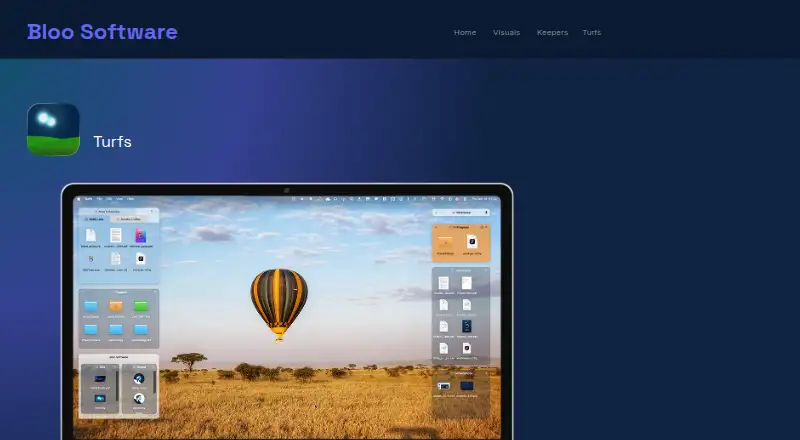
What Turfs is
Turfs is a macOS desktop organizer that places files into defined areas called turfs or keeps the desktop clear. Folder turfs are backed by real folders, so dragging a file into one moves it there. Tag turfs use Finder tags to display matching files from anywhere without relocating them. Collection turfs create virtual groups while files remain in their existing disk locations. The app supports Quick Look, Get Info, Trash, Finder context menus, and dragging files to apps. Appearance settings include background color, opacity, borders, corner radius, label visibility, hover-only mode, grid snapping, per-Space behavior, and tabbed turfs. A turf can roll into a thin strip showing its name and item count, then expand on click or hover. Turfs supports multiple monitors and requires macOS 14 Sonoma or later, with Apple Silicon recommended. Bloo Software sells it for $29, paid once, with no subscription or renewal, unlimited turfs, an offline license key, and free updates forever. A 10-day trial requires no credit card. The app is signed with a Developer ID certificate and notarized by Apple.
Who it suits
It suits Mac users who want desktop areas based on folders, Finder tags, or virtual collections. Multi-monitor users can also organize content across multiple displays.
What it does well
- Folder, tag, and collection turfs
- Works with familiar macOS actions
- Multiple-monitor support
- Unlimited turfs with one-time purchase
- 10-day trial without a credit card
What to know first
- Requires macOS 14 Sonoma or later
- Apple Silicon recommended
- macOS-only application
- No subscription renewal, but purchase is $29, paid once
Plans
| Plan | Billed and limits | Price |
|---|---|---|
| Turfs | One-time purchase; no subscription or renewal · Unlimited turfs · folder, tag, and collection types · full appearance customization · free updates forever · offline license key; no account needed | $29, paid once |
As bloosoftware.com lists them, read 11 Oct 2026. The maker's own page has the final word.
Verdict
Turfs offers several ways to organize desktop files while preserving normal Mac interactions. Its macOS requirement and one-time purchase make the platform and licensing model clear.
Facts from Turfs's own pages
- Appearance and layout
- Settings include background color, opacity, borders, corner radius, label visibility, hover-only mode, grid snapping, per-Space behavior, and tabbed turfs. · bloosoftware.com, 11 Oct 2026
- Collection turfs
- Collection turfs create virtual groupings while files stay in their existing disk locations. · bloosoftware.com, 11 Oct 2026
- Download and signing
- Turfs is available by direct download, is signed with a Developer ID certificate, and is notarized by Apple. · bloosoftware.com, 11 Oct 2026
- Folder turfs
- Folder turfs are backed by real folders, and dragging a file into one moves it into that folder. · bloosoftware.com, 11 Oct 2026
- Local storage and network
- Turfs says it collects nothing about users or files; its stated network activity is an update check and a one-time anonymous first-run count fetched from GitHub. · bloosoftware.com, 11 Oct 2026
- Mac integration
- Turfs supports macOS conventions including Quick Look, Get Info, Trash, dragging files to apps, and Finder context menus. · bloosoftware.com, 11 Oct 2026
- Organization
- The maker identifies itself as Bloo Software and its site footer says © 2026; the opened pages do not state its headquarters or founding year. · bloosoftware.com, 11 Oct 2026
- Purpose
- Turfs organizes Mac desktop content into defined areas or keeps the desktop clutter-free. · bloosoftware.com, 11 Oct 2026
- Recent version
- The Turfs page states its latest release is version 1.2.1, dated 7 September 2026. · bloosoftware.com, 11 Oct 2026
- Roll-up
- A turf can roll into a thin strip showing its name and item count, then expand on click or hover. · bloosoftware.com, 11 Oct 2026
- Support
- Bloo Software lists support at [email protected] and links to Turfs tips, shortcuts, and FAQ. · bloosoftware.com, 11 Oct 2026
- System requirements
- Turfs requires macOS 14 Sonoma or later, with Apple Silicon recommended. · bloosoftware.com, 11 Oct 2026
- Tag turfs
- Tag turfs use Finder tags to show matching files from anywhere on the Mac without moving them. · bloosoftware.com, 11 Oct 2026
- Trial
- The maker offers a 10-day free trial with no credit card required. · bloosoftware.com, 11 Oct 2026
Where Turfs stands on Freedom251
- Desktop Organization Software#39 of 47