Freedom251 › Desktop Wallpaper Software

DesktopHut
What DesktopHut is
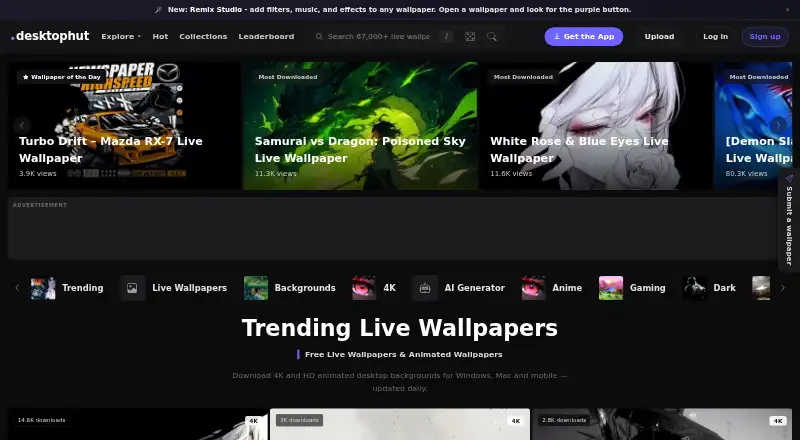
DesktopHut provides live wallpapers and software for displaying them on desktop and mobile devices. Its website lists more than 67,000 live and animated wallpapers, arranged by categories and tags. A built-in Motion Photo Editor turns photos into animated wallpapers with 65 motion presets and about 30 particle assets. It exports MP4, GIF, and WebP files, HTML live wallpapers, or native .dh packages. DesktopHut Studio supports distinct wallpapers on multiple displays, span mode, and restoration of per-monitor assignments. Performance options include hardware decoding, adjustable quality, FPS limits, Low Resource Mode, and automatic pausing during fullscreen apps, games, and screen lock. Studio can use MP4, WebM, MOV, MKV, animated GIF, and static image files. DesktopHut wallpapers in standard MP4 format are also compatible with Wallspace for macOS, Lively Wallpaper, and Wallpaper Engine. The Studio Free plan costs nothing, billed Forever, for Windows 10/11 64-bit, with no subscription or premium tier. The software license is limited to personal, non-commercial use.
Who it suits
DesktopHut suits wallpaper enthusiasts, gamers, and artists who want animated desktop or mobile backgrounds. Studio is a fit for Windows 10/11 64-bit users who want per-monitor controls and can use the software for personal, non-commercial purposes.
What it does well
- Website lists more than 67,000 wallpapers
- Motion editor includes 65 presets
- Supports multiple displays and span mode
- Free Studio plan has no subscription
What to know first
- Studio plan is for Windows 10/11 64-bit
- Software license excludes commercial use
- Studio has no premium tier
Limits
DesktopHut Studio Free is for Windows 10/11 64-bit and personal, non-commercial use. It has no subscription and no premium tier.
Plans
| Plan | Billed and limits | Price |
|---|---|---|
| DesktopHut Studio Free | Forever · Windows 10/11 64-bit · no subscription · no trial · no premium tier | Free |
| DesktopHut Studio | Free · Windows · no bloatware · built-in wallpaper store · 65-effect Motion Photo Editor · screensavers · time-of-day wallpapers · multi-monitor support · auto-pause during games | Free |
As desktophut.com lists them, read 1 Oct 2026. The maker's own page has the final word.
Getting started
- Visit the DesktopHut website.
- Browse wallpapers by category or tag.
- Choose the DesktopHut Studio Free plan for Windows 10/11 64-bit.
- Use the Motion Photo Editor to create a wallpaper from a photo, or select a wallpaper from the library.
DesktopHut is a live-wallpaper library and a set of tools for displaying and creating animated backgrounds. It is best suited to personal-use Windows users who want extensive monitor and playback controls. Its breadth and free Studio plan are compelling, but the Windows-only Studio app and non-commercial license narrow its appeal.
Overview
DesktopHut’s library contains more than 67,000 live and animated wallpapers arranged by category and tag. That scale gives wallpaper enthusiasts, gamers and artists plenty to browse, while the Motion Photo Editor offers a way to turn their own still images into moving backgrounds. The project dates to 2017.
The distinction between the broad set of platforms and Studio matters: DesktopHut’s platform coverage includes Android, a browser extension, macOS, web and Windows, but the Studio plan is specifically for Windows 10/11 64-bit. The personal, non-exclusive, non-transferable and revocable license also limits use to personal, non-commercial purposes, ruling it out for business installations.
Key features
Browse, create and reuse
The editor includes 65 motion presets and about 30 particle assets, letting users add movement and effects to photos without starting from video. It exports MP4, GIF and WebP, along with HTML live wallpapers and DesktopHut’s .dh format. Studio accepts MP4, WebM, MOV and MKV video, animated GIFs, and static PNG, JPG and WEBP images.
DesktopHut wallpapers in MP4 format also work with Wallspace for macOS, Lively Wallpaper and Wallpaper Engine. That compatibility makes the videos more reusable if a user changes display software, though it does not extend Studio’s monitor-management controls to those other apps.
Display and resource controls
Studio can set a different wallpaper on each display, span one image across monitors, and automatically restore individual monitor assignments. Hardware decoding, adjustable quality tiers, FPS limits and Low Resource Mode offer ways to trade visual quality for lower resource use. Automatic pausing during fullscreen apps, games and screen lock is a practical safeguard against needless playback.
Security and privacy
DesktopHut says its current software has no adware, spyware, toolbars or bundled software and has VirusTotal clean certification. The project funds itself with non-intrusive website display ads rather than popup ads or ad-supported installers. It says it is based in Lithuania and aims to handle data in line with the EU GDPR. The Chrome extension stores wallpaper preferences and bookmark data locally, without sending them to DesktopHut servers.
Pricing
DesktopHut Studio Free: free (billed Forever). The plan is for Windows 10/11 64-bit, has no subscription and no trial, and has no premium tier. Its free price makes the editing and desktop controls accessible without a recurring charge, but the personal, non-commercial license is a firm limit rather than a business-use option. Website display ads fund the project.
Platforms
DesktopHut covers Android, browser extension, macOS, web and Windows. Studio itself is Windows 10/11 64-bit, so users on other platforms should not assume they get its multi-monitor management and performance controls. Automatic rotation, video wallpapers, interactive wallpapers and multi-monitor support are supported capabilities.
Who it's for
DesktopHut is a strong fit for Windows users who want a large source of animated backgrounds, want to make wallpapers from photos, or need per-monitor assignments and playback controls without paying for Studio. It is also relevant to people who value MP4 wallpapers they can use with other compatible wallpaper applications. It is not the right choice for commercial use, or for someone who needs Studio’s controls on macOS or another non-Windows platform.
Pros and cons
- Pros: More than 67,000 categorized wallpapers offer substantial browsing choice.
- Pros: Photo animation, multiple export formats and broad file support suit both creators and people with existing wallpaper files.
- Pros: Per-monitor assignment, restoration and resource controls give Windows users useful control over how animated backgrounds behave.
- Cons: Studio is limited to Windows 10/11 64-bit, despite DesktopHut’s wider platform coverage.
- Cons: The license allows personal non-commercial use only, excluding workplace or other commercial deployment.
Alternatives
For a wider desktop wallpaper software shortlist, compare the options by platform and license. komorebi is worth considering for a freemium alternative available on macOS and Windows, though its single-platform Windows license is $10 a month. PUSH Video Wallpaper has a free Windows version with all features enabled but a visible watermark; its Home License is a one-time perpetual license for home use on up to five PCs. Vivid Walls is a macOS and Windows option with a free tier of eight bundled wallpapers and a 9.99 USD one-time in-app purchase for the full library.
Waypaper is a free, open-source GUI wallpaper setter for Linux and macOS, but it requires a compatible wallpaper backend. Backdrops is another freemium option for iOS, Android and macOS. Clockwork Orange is a free option for Windows, macOS and Linux. Dynamic Wallpaper Studio is a freemium macOS alternative, with premium subscriptions priced at $2.99 a month weekly or $29.99 a year.
LearnWell Languages is also an alternative in the directory, though it is a language-learning app rather than wallpaper software.
Verdict
Choose DesktopHut if you want a large live-wallpaper library, photo animation tools and detailed per-monitor controls on a personal Windows PC, all without a Studio subscription. Look elsewhere if you need commercial rights or want Studio’s display controls on another platform.
Verdict
DesktopHut combines a large wallpaper library with editing and display controls, including multi-monitor support. Its Studio plan is free, but is Windows-only and restricted to personal non-commercial use.
Questions
How much does DesktopHut Studio cost?
The DesktopHut Studio Free plan costs nothing, billed Forever.
Is there a free plan or trial?
Yes. Studio Free is available, and there is no free trial.
Which platforms does DesktopHut support?
The listed platforms are Android, extension, macOS, web, and Windows. The Studio Free plan is for Windows 10/11 64-bit.
What file types can Studio use?
Studio supports MP4, WebM, MOV, MKV, animated GIF, and static PNG, JPG, and WEBP files.
Can DesktopHut wallpapers work with other wallpaper apps?
DesktopHut wallpapers in standard MP4 format are compatible with Wallspace for macOS, Lively Wallpaper, and Wallpaper Engine.
Can I use the software commercially?
The license is limited to personal, non-commercial use.
Facts from DesktopHut's own pages
- Android features
- The Google Play app supports video and photo live wallpapers, crop and reposition, time-of-day scheduling, auto-rotate playlists, widgets and static-image extraction. · play.google.com, 14 Oct 2026
- Audience
- DesktopHut describes its community as enthusiasts, gamers, and artists. · desktophut.com, 1 Oct 2026
- Browser editor
- The browser-based Wallpaper Editor lets users layer clocks, weather, text, particles, music visualizers and effects over video. · desktophut.com, 14 Oct 2026
- Community submissions
- Anyone can submit wallpaper files for administrator review before publication. · desktophut.com, 14 Oct 2026
- Company community
- The company describes its community as enthusiasts, gamers and artists and links Discord, Reddit and YouTube channels. · desktophut.com, 14 Oct 2026
- Company history
- DesktopHut says it has provided wallpapers since 2017. · desktophut.com, 14 Oct 2026
- DesktopHut Studio
- The Windows Studio app plays video, HTML, .dh and online URL wallpapers and includes a Wallpaper Library. · desktophut.com, 14 Oct 2026
- Direct downloads
- Wallpaper pages provide direct downloads without requiring an account. · desktophut.com, 14 Oct 2026
- Documentation
- The official Handbook covers browsing, downloads, submissions, the Wallpaper Library, Motion Photo Editor and troubleshooting. · desktophut.com, 14 Oct 2026
- Editor integrations
- Editor exports can target Lively Wallpaper, Wallpaper Engine, DesktopHut Studio, plain web pages and modern browsers. · desktophut.com, 14 Oct 2026
- Export formats
- The editor exports MP4/GIF/WebP files, HTML live wallpapers, or native .dh packages. · desktophut.com, 1 Oct 2026
- Extension privacy
- The Chrome extension stores wallpaper preferences and bookmark data locally and does not send them to DesktopHut servers. · desktophut.com, 1 Oct 2026
- External risk score
- Scam Detector rates desktophut.com 19.5 out of 100 and labels it new, suspicious and dubious. · scam-detector.com, 14 Oct 2026
- External trust warning
- ScamAdviser assigns desktophut.com a trust score of 0 and flags hidden WHOIS ownership despite valid SSL and positive user reviews. · scamadviser.com, 14 Oct 2026
- Founded
- 2017 · desktophut.com, 23 Sept 2026
- Funding
- The project is funded by non-intrusive display ads on the website and does not use popup ads or ad-supported installers. · desktophut.com, 1 Oct 2026
- Google Play availability
- The Android listing shows 10K+ downloads, contains ads, and identifies Rimantas Stankus in Lithuania as developer. · play.google.com, 14 Oct 2026
- Google Play data safety
- The Android listing says device or other IDs may be collected and shared, data is encrypted in transit, and data cannot be deleted. · play.google.com, 14 Oct 2026
- Historical security issue
- DesktopHut acknowledges that older third-party installers offered optional bundled software that users could miss, and says that relationship ended. · desktophut.com, 14 Oct 2026
- Integrations
- DesktopHut wallpapers are standard MP4 files compatible with DesktopHut, Wallspace for macOS, Lively Wallpaper, and Wallpaper Engine. · desktophut.com, 1 Oct 2026
- Library size
- The homepage advertises more than 67,000 live wallpapers. · desktophut.com, 14 Oct 2026
- Licence
- The terms grant a revocable personal, non-exclusive, non-transferable license for personal non-commercial use and prohibit reverse engineering, resale and redistribution. · desktophut.com, 14 Oct 2026
- License limit
- The software license is personal, non-exclusive, non-transferable, revocable, and limited to personal non-commercial use. · desktophut.com, 1 Oct 2026
- Limit: advertising
- Trustpilot includes a one-star complaint about excessive pop-up ads, while a Reddit response says ads appear in the online gallery. · trustpilot.com, 14 Oct 2026
Where DesktopHut stands on Freedom251
- Desktop Wallpaper Software#5 of 34