Freedom251 › Desktop Wallpaper Software
PUSH Video Wallpaper
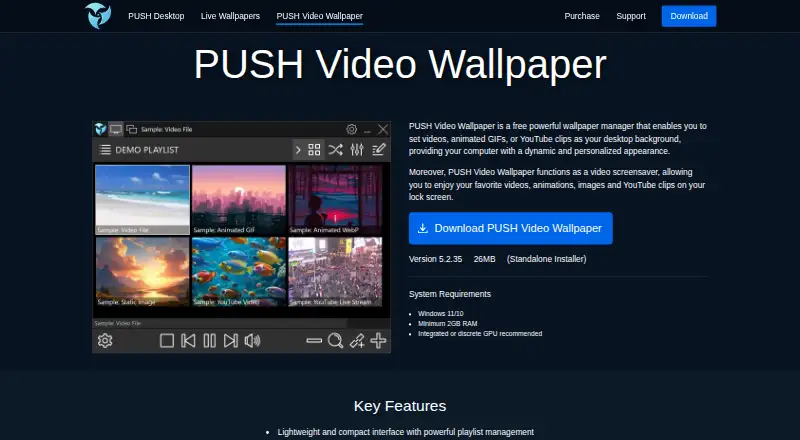
What PUSH Video Wallpaper is
PUSH Video Wallpaper turns videos, animated GIFs, YouTube clips, and images into desktop backgrounds or screensavers on Windows. Playlists can draw on local files, folders and subfolders, ZIP archives, YouTube links, and YouTube playlists. The listed formats and sources include MP4, GIF, WebP, images, YouTube, and direct video URLs. Playlist controls cover alignment, playback speed, looping, per-item duration, anti-aliasing, and default YouTube quality. On multi-monitor setups, you can duplicate or extend video, assign separate playlists, disable monitors independently, or span one playlist across screens. The app can pause during fullscreen games or video playback, reduce activity on battery, or stop rendering to free resources. It works offline after setup. The free version costs nothing and enables all features, but displays a watermark. Windows 10 or 11 and at least 2 GB RAM are listed as requirements; a GPU is recommended. Paid licenses are perpetual and non-commercial.
Who it suits
It suits Windows users who want video or image playlists for their desktop or screensaver, including people with multi-monitor setups. The free version may suit users who accept a visible watermark.
What it does well
- Supports videos, GIFs, images, and YouTube clips.
- Playlist sources include local files and YouTube.
- Offers several multi-monitor arrangements.
- Can pause or reduce activity to free resources.
- Works offline after setup.
What to know first
- The free version displays a watermark.
- Requires Windows 10 or 11.
- Paid licenses are for non-commercial use only.
Limits
The Free Version enables all features but displays a visible watermark. The listed Home License is for home use on up to five PCs, and the Personal License is for individual use on one PC; both are non-commercial perpetual licenses.
Plans
| Plan | Billed and limits | Price |
|---|---|---|
| Free Version | All features enabled · visible watermark | Free |
| Home License | One-time payment; perpetual license · Home use · up to 5 PCs · non-commercial use | On request |
| Personal License | One-time payment; perpetual license · Individual use · 1 PC · non-commercial use | On request |
As push-entertainment.com lists them, read 3 Oct 2026. The maker's own page has the final word.
Getting started
- Visit the PUSH Video Wallpaper product page.
- Use the Free Version, or choose a Home License or Personal License for non-commercial use.
- Install it on Windows 10 or 11 with at least 2 GB RAM.
- Add local media, folders, ZIP archives, YouTube links, or YouTube playlists.
- Choose background or screensaver content and adjust playback and monitor settings.
PUSH Video Wallpaper is a Windows app for turning supported media into moving desktop backgrounds and screensavers. It suits people who want to curate playlists and tailor them across multiple monitors. Its free version includes every feature, but the visible watermark makes it a poor fit for a spotless desktop.
Overview
The appeal is the level of control over both content and display: playlists can combine local media and online sources, while monitor-specific options go beyond mirroring one image everywhere. Performance settings can also pause or scale back activity when animated backgrounds are least useful. The trade-off is that PUSH is for Windows only and does not offer interactive wallpapers.
It requires Windows 10 or 11 and at least 2 GB of RAM; an integrated or discrete GPU is recommended. After setup, it can operate without an internet connection, which suits users who want a local rotation without ongoing connectivity.
Key features
Playlists with varied sources
PUSH can use videos, animated GIFs, or YouTube clips as backgrounds, and videos, animations, images, or YouTube clips as screensavers. Supported media includes MP4, GIF, WebP, images, YouTube, and direct video URLs. Playlists can draw from local media, folders and subfolders, ZIP archives, YouTube links, and YouTube playlists. This breadth is useful for users who want one rotation spanning saved files and online clips, rather than a single fixed background.
Settings for alignment, playback speed, looping, per-item duration, anti-aliasing, and default YouTube playback quality make it possible to tune how that rotation looks and behaves. Those controls reward a curated setup; they are unnecessary overhead for someone who only wants an occasional static wallpaper change.
Multi-monitor and resource controls
Users can duplicate or extend video, assign separate playlists to different monitors, enable or disable displays independently, or stretch one playlist across screens. That flexibility is a strong fit for multi-screen desktops where one layout does not suit every display. The app can also pause during fullscreen games or video playback, reduce activity on battery, or stop rendering to free resources—practical controls for limiting an animated background when it competes with other work.
Pricing
The Free Version costs free and enables all features, but adds a visible watermark. It is a way to access the full feature set without paying, though the mark is a significant compromise for a desktop background meant to stay unobtrusive.
The Home License is a one-time payment for a perpetual license covering home use on up to 5 PCs, with non-commercial use only. The Personal License is also a one-time payment and perpetual, for individual use on 1 PC, also non-commercial. Both paid licenses include free updates for future versions and support offline activation. Their prices are custom pricing. The Home option fits a household installing on several computers; the Personal option fits one individual PC. Neither is suitable for commercial use.
Refund requests can be submitted within 30 days of purchase, but digital-download requests are evaluated individually. The maker says payments are processed securely by authorized resellers FastSpring and PayPro Global.
Platforms
PUSH Video Wallpaper is available for Windows 10 and 11. Its modest minimum of 2 GB RAM broadens the range of systems it can run on, while the recommended GPU points to the value of graphics hardware for this kind of animated desktop. It is not an option for macOS or Linux users.
Who it's for
Choose PUSH if you use Windows, want a moving background or screensaver, and value varied playlist sources or fine control over multiple displays. It is especially compelling for multi-monitor users who want different content per screen or the choice to span a playlist across them. Skip it if you need interactive wallpapers, another operating system, or a clean free desktop without a watermark.
Pros and cons
- Pro: Broad media and playlist-source support makes it practical to mix local collections, archives, and YouTube content.
- Pro: Monitor-specific playback and independent display controls offer more than simple duplication for multi-screen setups.
- Pro: Pause, battery, and rendering controls help limit background activity when games, video, or power use take priority.
- Con: The free version's visible watermark undermines its usefulness for users who want an unobtrusive background.
- Con: Paid licenses are non-commercial, and the Personal License is limited to one PC.
- Con: Windows-only availability excludes users on macOS and Linux, while interactive wallpapers are unsupported.
Alternatives
Browse desktop wallpaper software for a broader set of options. Choose DesktopHut if a free, no-subscription Windows 10/11 app with no trial or premium tier is a better fit. Hydra is a free, GPL-3.0 option for Linux, web, API, or self-hosted use, though running it is currently supported only on NixOS.
John’s Background Switcher is another freemium choice for Windows and macOS. For a Mac-only option with up to 10 dynamic wallpapers free and an unlimited one-time in-app unlock, consider MuGen Wallpaper. Razer Axon offers free wallpaper browsing and application on Android and Windows, with AI generation using claimable or purchasable tokens.
Vivid Walls suits Mac or Windows users who want to try its free tier, which keeps eight bundled wallpapers free, or buy its full library for $9.99, paid once. Waypaper is a free, open-source wallpaper setter for Linux and macOS that requires a compatible wallpaper backend. Waywallen is a free, MIT-licensed wallpaper manager for Linux desktops.
Verdict
PUSH Video Wallpaper is a strong choice for Windows users who want a carefully managed animated desktop, particularly across multiple monitors. Its combination of broad playlist sources, display controls, and ways to curb background activity is the main reason to choose it. Look elsewhere if the free watermark is unacceptable, you need commercial rights or interactive wallpapers, or you use macOS or Linux.
Verdict
PUSH Video Wallpaper provides broad playlist and multi-monitor controls for Windows desktop backgrounds and screensavers. The free version enables all features but includes a visible watermark; paid licenses are non-commercial.
Questions
Is PUSH Video Wallpaper free?
Yes. The Free Version costs nothing and has all features enabled, with a visible watermark.
What does a paid license cost?
Prices are not included in the listed plan details. Home License and Personal License are one-time payments.
Which operating system does it support?
The listed platform is Windows. System requirements specify Windows 10 or 11 and at least 2 GB RAM; a GPU is recommended.
Can it work without internet?
The product page says no internet connection is required after setup.
Can I use it across multiple monitors?
Yes. It can duplicate or extend video, use separate playlists, enable or disable monitors independently, or stretch one playlist across screens.
Are paid licenses perpetual?
Yes. The listed Home and Personal licenses are perpetual, non-commercial licenses and include free updates for future versions.
Facts from PUSH Video Wallpaper's own pages
- License terms
- Paid licenses are perpetual, include free updates for future versions, support offline activation, and are for non-commercial use only. · push-entertainment.com, 3 Oct 2026
- Multi-monitor
- The multi-monitor engine can duplicate or extend video, show separate playlists, enable or disable monitors independently, and stretch one playlist across screens. · push-entertainment.com, 3 Oct 2026
- Offline use
- The product page says no internet connection is required after setup. · push-entertainment.com, 3 Oct 2026
- Payment security
- The maker says payments are securely processed by FastSpring, its authorized reseller, and also lists PayPro Global as an alternative authorized reseller. · push-entertainment.com, 3 Oct 2026
- Performance controls
- The app can pause during fullscreen games or video playback, reduce activity on battery, or stop rendering to free resources. · push-entertainment.com, 3 Oct 2026
- Playlist controls
- Playlist settings include alignment, playback speed, looping, per-item duration, anti-aliasing, and default YouTube playback quality. · push-entertainment.com, 3 Oct 2026
- Playlist sources
- Playlists can use local media, folders and subfolders, ZIP archives, YouTube links, and YouTube playlists. · push-entertainment.com, 3 Oct 2026
- Privacy
- The privacy policy says the maker does not sell personal information and does not store full payment card information on its servers. · push-entertainment.com, 3 Oct 2026
- Privacy safeguards
- The privacy policy says reasonable measures are taken to protect personal information, while noting that no transmission or storage method can be guaranteed completely secure. · push-entertainment.com, 3 Oct 2026
- Refunds
- Refund requests may be submitted within 30 days of purchase and are evaluated individually for digital downloads. · push-entertainment.com, 3 Oct 2026
- Support
- The support page invites users to contact the maker about product problems, enhancement ideas, questions, comments, or requests through a web form. · push-entertainment.com, 3 Oct 2026
- Supported media
- The product page lists support for MP4, GIF, WebP, YouTube, images, and direct video URLs. · push-entertainment.com, 3 Oct 2026
- System requirements
- The listed requirements are Windows 11 or 10 and at least 2 GB RAM; an integrated or discrete GPU is recommended. · push-entertainment.com, 3 Oct 2026
- Wallpaper and screensaver
- The app sets videos, animated GIFs, or YouTube clips as desktop backgrounds and can show videos, animations, images, and YouTube clips as a screensaver. · push-entertainment.com, 3 Oct 2026
Where PUSH Video Wallpaper stands on Freedom251
- Desktop Wallpaper Software#21 of 34