Dairoo
What Dairoo is
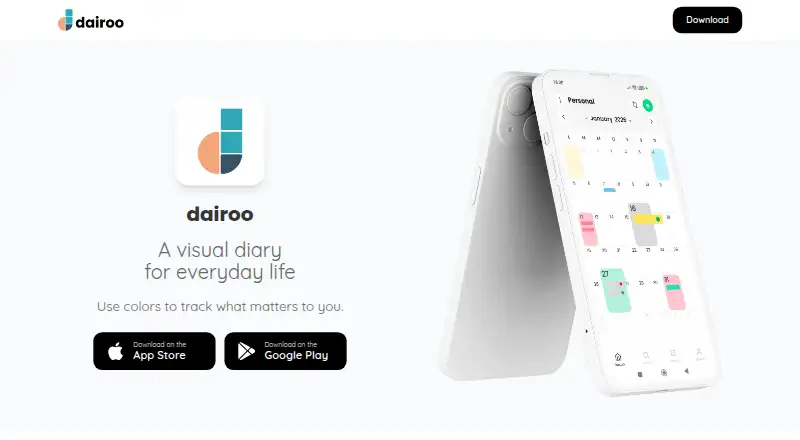
Dairoo is a personal calendar and visual diary for keeping daily notes on Android, iOS, and the web. Its calendar lets you color days and add status labels, making it easier to see activity across the calendar. Entries can hold text, images, video, audio recordings, and documents such as PDF, Word, and Excel files. You can use it to record moods and habits, keep track of daily activities and productivity, or maintain personal life logs.
Dairoo has a free version with basic features and usage limits, plus monthly and annual Pro plans that unlock premium features. The Pro prices are shown in the app and may vary by country. Creating an account uses Google Sign-in, without a separate Dairoo username or password. The privacy policy says content is stored in Firestore in Belgium and backed up automatically to your personal Google Drive. It lists TLS 1.3 for communications and AES-256 encryption for Firestore data at rest; Google Drive data is also encrypted at rest. Account settings let users export notes and metadata or permanently delete their data, with deletion within 48 hours. Optional analytics and error monitoring require consent and can be disabled in privacy settings.
Who it suits
Dairoo suits people who want a calendar-based place to record personal notes, moods, habits, activities, or productivity. It may also fit users who want to attach several kinds of media and documents to daily entries and use Google Sign-in.
What it does well
- Available on Android, iOS, and the web.
- Daily entries accept text, images, video, audio, and documents.
- Color days and apply status labels in the calendar.
- Export notes and metadata through account settings.
- Optional analytics and error monitoring can be disabled.
What to know first
- The free version has usage limits.
- Pro prices vary by country and are displayed in the app.
- Account creation uses Google Sign-in.
Limits
The free version includes basic features with usage limits; their amounts are described in the app. Pro plans unlock all premium features, with prices displayed in the app and varying by country.
Plans
| Plan | Billed and limits | Price |
|---|---|---|
| Free version | Basic features with usage limits | Free |
| Dairoo Pro annual | Billed annually; price is displayed in the app and may vary by country. · Unlocks all premium features | On request |
| Dairoo Pro monthly | Billed monthly; price is displayed in the app and may vary by country. · Unlocks all premium features | On request |
As dairoo.com lists them, read 11 Oct 2026. The maker's own page has the final word.
Getting started
- Open the Dairoo website or use the Android or iOS app.
- Create an account with Google Sign-in.
- Add daily notes and choose colors or status labels for days.
- Attach supported media or documents to entries as needed.
- Review the free or Pro plan details in the app.
Verdict
Choose Dairoo if you want a personal calendar and diary that can hold varied attachments and organize days with colors and labels. Its free version has usage limits, and access to all premium features requires a Pro plan whose price is displayed in the app.
Questions
Is Dairoo free?
Yes. It has a free version with basic features and usage limits.
How much do the Pro plans cost?
The monthly and annual prices are displayed in the app and may vary by country.
Which platforms does Dairoo support?
Dairoo is available on Android, iOS, and the web.
Can daily entries include attachments?
Yes. Entries can include images, videos, audio recordings, and documents such as PDF, Word, and Excel files.
How do users create an account?
Account creation uses Google Sign-in and does not require a Dairoo username or password.
Can users export or delete their content?
Account settings let users export notes and metadata or permanently delete their data. Deletion is completed within 48 hours.
Facts from Dairoo's own pages
- Color calendar
- Users can color each day, organize notes, and assign status labels to see activity at a glance. · dairoo.com, 11 Oct 2026
- Data export and deletion
- The privacy policy says users can export notes and metadata and permanently delete their data through account settings, with deletion within 48 hours. · dairoo.com, 11 Oct 2026
- Encryption
- The privacy policy lists TLS 1.3 for communications and AES-256 encryption at rest on Firestore; it also says Google Drive data is encrypted at rest. · dairoo.com, 11 Oct 2026
- Entry formats
- Daily entries can include text, images, videos, audio recordings, and documents such as PDF, Word, and Excel files. · dairoo.com, 11 Oct 2026
- Headquarters
- Modena, Italy · dairoo.com, 28 Sept 2026
- Optional telemetry
- App analytics and error monitoring require consent and can be disabled in privacy settings. · dairoo.com, 11 Oct 2026
- Platforms
- The terms list iOS, Android, and web browser access. · dairoo.com, 11 Oct 2026
- Product
- Dairoo is a personal calendar app and visual diary for organizing daily notes. · dairoo.com, 11 Oct 2026
- Refunds
- Refund requests are handled under Apple App Store or Google Play policies; Dairoo says it does not process refunds directly. · dairoo.com, 11 Oct 2026
- Sign-in
- The terms state that account creation uses Google Sign-in and does not require a Dairoo username or password. · dairoo.com, 11 Oct 2026
- Storage and backup
- The privacy policy says user content is stored in Firestore in Belgium and automatically backed up to the user's personal Google Drive. · dairoo.com, 11 Oct 2026
- Subscription limits
- The free version has usage limits, but the terms do not specify their amounts and say plan details are described in the app. · dairoo.com, 11 Oct 2026
- Support
- The maker lists [email protected] as its contact and support email. · dairoo.com, 11 Oct 2026
- Use cases
- The app can be used to track mood, habits, daily activities, productivity, and personal life logs. · play.google.com, 11 Oct 2026
Where Dairoo stands on Freedom251
- Journal Apps#6 of 35