RedNotebook
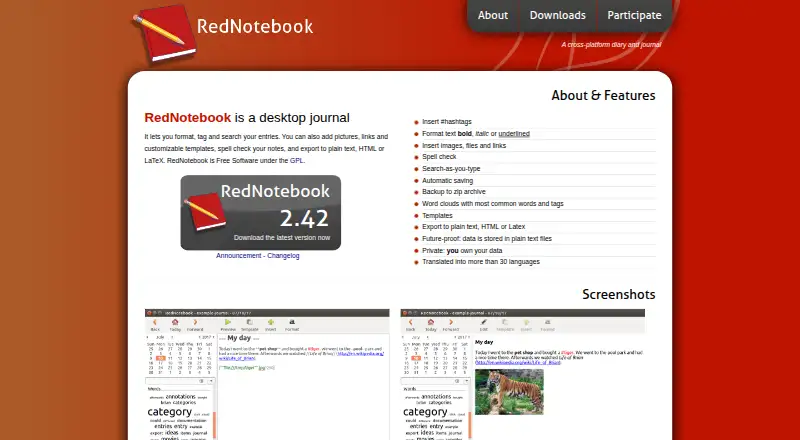
What RedNotebook is
RedNotebook is a free desktop diary and journal for Linux, Windows, and macOS, with offline access. It supports formatted, tagged entries with hashtags, images, files, links, spell checking, and customizable templates. Search-as-you-type helps locate entries, while word clouds show frequent words and tags. Entries save automatically at intervals and when the app closes. You can back up a journal as a zip file or export it to plain text, HTML, or LaTeX; direct PDF export is not supported. Journal data is stored in plain text files, and the maker says users own their data. The documentation describes placing the journal in an encrypted folder or encrypting the home partition that contains it. Sync options include Dropbox, Syncthing, remote servers, or external tools. Inserted images and files are linked rather than copied into the journal directory, so attachments stored elsewhere need separate backups. macOS is not officially supported, though installation instructions using Homebrew are provided. RedNotebook is Free Software under the GPL and is translated into more than 30 languages.
Who it suits
It suits people who want an offline journal with entry formatting, tags, search, and export options. Users choosing macOS should note that it is not officially supported.
What it does well
- Works offline on desktop
- Automatic saves and zip backups
- Exports to plain text, HTML, or LaTeX
- Translated into more than 30 languages
What to know first
- Cannot export directly to PDF
- Linked attachments stored elsewhere need separate backups
- macOS is not officially supported
- Package manager versions may be outdated
Plans
| Plan | Billed and limits | Price |
|---|---|---|
| RedNotebook | Free Software under the GPL | Free |
| Free | desktop journal · plain-text files · GPL software | Free |
As rednotebook.app lists them, read 9 Oct 2026. The maker's own page has the final word.
Getting started
- Visit https://rednotebook.app/.
- Choose the download route for your platform: Flatpak, Ubuntu PPA, or package manager on Linux; installer or portable version on Windows.
- On macOS, follow the maker's Homebrew installation instructions; macOS is not officially supported.
- Open the bundled or online help for guidance.
- Back up the journal and close RedNotebook before upgrading on Windows.
Verdict
RedNotebook offers journal writing, search, backups, and several export formats at no cost. Keep separate backups of linked attachments, and check platform support before installing.
Questions
How much does RedNotebook cost?
RedNotebook is free under the GPL.
Which platforms does it support?
It is available for Linux, Windows, and macOS, though macOS is not currently officially supported.
Can it be used offline?
Yes. RedNotebook supports offline access.
What export formats are available?
Journals can be exported to plain text, HTML, or LaTeX. Direct PDF export is not supported.
How can a journal be synced?
The documentation describes Dropbox, Syncthing, remote servers, or syncing the journal folder with a server using external tools.
How does RedNotebook handle journal data and privacy?
The maker says data is stored in plain text files and users own it. The documentation describes using an encrypted folder or encrypting the home partition containing the data.
Facts from RedNotebook's own pages
- Attachment limitation
- Inserted images and files are linked to but not copied into the journal directory, so they need separate backups if stored elsewhere. · rednotebook.app, 9 Oct 2026
- Attachments
- Entries can include images, files and links. · rednotebook.app, 14 Oct 2026
- Autosave
- The program saves entries automatically at regular intervals and on exit. · rednotebook.app, 14 Oct 2026
- Backups
- The Journal menu can create a ZIP backup of the journal directory. · rednotebook.app, 14 Oct 2026
- Capterra pricing status
- Capterra lists vendor-contact pricing, no free trial and no free version for RedNotebook. · capterra.com, 14 Oct 2026
- Command line
- The command-line interface accepts an optional journal directory plus --version and --date options. · rednotebook.app, 14 Oct 2026
- Data ownership
- The maker says journal data is stored in plain text files and that users own their data. · rednotebook.app, 9 Oct 2026
- Developer workflow
- The repository documents running from source, pre-commit hooks and tox tests. · github.com, 14 Oct 2026
- Encryption
- The documentation recommends encrypting the journal folder or home partition with an external tool such as TrueCrypt. · rednotebook.app, 14 Oct 2026
- Export
- Journals export to plain text, HTML and LaTeX; PDF requires printing HTML or converting LaTeX. · rednotebook.app, 14 Oct 2026
- Extensibility
- The project exposes source code, GitHub issue tracking, Weblate translations and a calendar.exe conversion script, but no public web API or SDK is documented. · rednotebook.app, 14 Oct 2026
- Free plan
- Yes · rednotebook.app, 20 Sept 2026
- Hashtags
- Entries can contain #hashtags for tagging. · rednotebook.app, 14 Oct 2026
- Independent installation report
- A Mac installation report praises RedNotebook's local raw-text, open-format storage and says Mac use requires manual source setup. · blog.jarrousse.org, 14 Oct 2026
- Independent review
- LinuxLinks describes RedNotebook as free open-source software with calendar navigation, live search, drag-and-drop, remote SSH/FTP/WebDAV storage and plain-text data. · linuxlinks.com, 14 Oct 2026
- Languages
- The project says it has translations in more than 30 languages. · rednotebook.app, 14 Oct 2026
- Languages and license
- RedNotebook is translated into more than 30 languages and is Free Software under the GPL. · rednotebook.app, 9 Oct 2026
- Licence
- The repository identifies RedNotebook as GPLv2+ and explains that bundled LGPLv3+ code makes the resulting work GPLv3+. · github.com, 14 Oct 2026
- Limit: crashes and file handling
- A G2 reviewer reports crashes and requests drag-and-drop handling for images and files. · g2.com, 14 Oct 2026
- Limit: Markdown
- A SourceForge reviewer says Markdown support is missing. · sourceforge.net, 14 Oct 2026
- Limit: mobile access
- G2 reviewers commonly identify the lack of a mobile version as a limitation. · g2.com, 14 Oct 2026
- Limit: simplicity and maintenance
- A G2 reviewer describes the application as overly simplified and says development appeared stalled. · g2.com, 14 Oct 2026
- Limit: unencrypted files
- A G2 reviewer notes that diary data is stored in unencrypted monthly text files. · g2.com, 14 Oct 2026
- Limit: Windows preview bug
- A SourceForge reviewer reports that editor and preview switching did not work correctly on Windows 7. · sourceforge.net, 14 Oct 2026
Where RedNotebook stands on Freedom251
- Note-taking apps#2 of 216
- Journal Apps#2 of 35