Freedom251 › AI Storyboard Generators
Cygnus
What Cygnus is
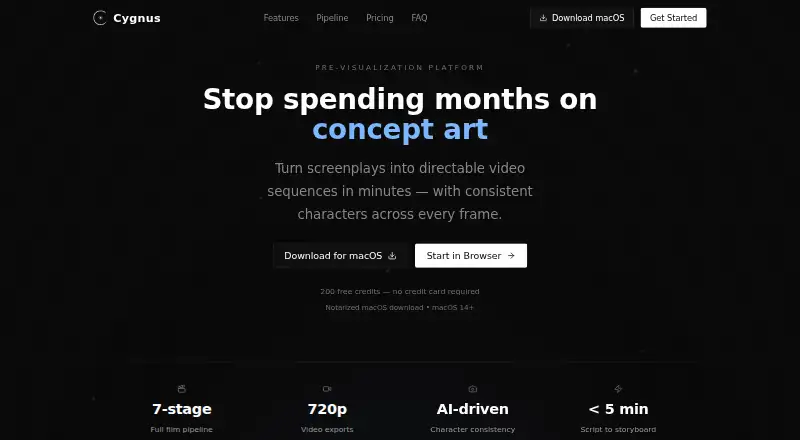
Cygnus turns screenplays into video sequences, helping filmmakers plan characters and scenes through a seven-stage process from concept to export. It accepts Final Draft, PDF, Fountain, plain-text scripts, treatments, and outlines. Reference images are used to keep character appearances consistent across storyboard frames and video clips. Teams can share review links for comments, annotations, and approvals, then export to Premiere Pro, After Effects, Frame.io, or PDF, with Premiere XML and EDL also listed. Video generation supports clips of 1–15 seconds at 720p; extensions add 2–10 seconds to a source video. Cygnus is optimized for projects of 1–5 minutes, 3–10 scenes, and 8–35 shots, and recommends dividing longer work into acts or sequences. It runs in a browser or as a notarized macOS app requiring macOS 14 or later. The free plan includes 200 credits per month, two projects, and watermarked exports. Paid plans start at $31 a year; commercial use is licensed on paid plans.
Who it suits
Cygnus suits indie filmmakers, agencies and brands, and studios or production teams developing short, shot-based projects. Browser access or a macOS 14-or-later app is available.
What it does well
- Accepts scripts, treatments, and outlines in several formats.
- Reference images help maintain character appearance across frames.
- Review links support comments, annotations, and approvals.
- Exports include Premiere Pro, After Effects, Frame.io, and PDF.
- Free plan includes all seven pipeline stages.
What to know first
- Free exports are watermarked.
- Free plan allows two projects and 200 credits monthly.
- Video clips are limited to 1–15 seconds at 720p.
- Mac app requires macOS 14 or later.
Limits
The Free plan provides 200 credits per month and two projects, with watermarked 720p exports. Creator raises the allowance to 2,000 credits per month and 10 projects; Pro provides 6,000 credits and unlimited projects, while Studio provides 20,000 credits. Paid plans remove watermarks, and all listed plans specify 720p exports.
Plans
| Plan | Billed and limits | Price |
|---|---|---|
| Free | 200 credits/mo · 2 projects · all 7 pipeline stages · 720p exports · watermarked output | Free |
| Studio (annual) | $2,676/year · 20,000 credits/mo · everything in Pro · 720p exports · 25 team seats · priority render queue · dedicated account manager | $2,676 a year |
| Studio (monthly) | $279/month · 20,000 credits/mo · everything in Pro · 720p exports · 25 team seats · priority render queue · dedicated account manager | $279 a month |
| Creator (annual) | $372/year · 2,000 credits/mo · 10 projects · all 7 pipeline stages · 720p exports · no watermarks | $372 a year |
| Creator (monthly) | $39/month · 2,000 credits/mo · 10 projects · all 7 pipeline stages · 720p exports · no watermarks | $39 a month |
| Pro (annual) | $852/year · 6,000 credits/mo · unlimited projects · all 7 pipeline stages · 720p exports · no watermarks · 5 team seats · priority support | $852 a year |
| Pro (monthly) | $89/month · 6,000 credits/mo · unlimited projects · all 7 pipeline stages · 720p exports · no watermarks · 5 team seats · priority support | $89 a month |
As cygnus.video lists them, read 4 Oct 2026. The maker's own page has the final word.
Getting started
- Open Cygnus in a browser or download the notarized macOS app for macOS 14 or later.
- Choose the Free plan or a paid Creator, Pro, or Studio plan.
- Import a script, treatment, or outline in a supported format.
- Develop the project through the seven workflow stages, using reference images for character consistency.
- Share review links with collaborators, then export the finished work.
Cygnus is a screenplay-to-video workspace for filmmakers and production teams developing short visual sequences. It is best for projects where script, character continuity, storyboards and review need to stay connected; its short-clip limits and recommended project scale make it a less natural fit for long productions handled as one project.
Overview
Cygnus takes work from concept and script through character and location planning, storyboard, video, timeline, review and export. It accepts Final Draft, PDF, Fountain, plain text, treatments and outlines, so teams can begin with either a screenplay or earlier-stage material. The value is a continuous path from written idea to reviewable sequence, rather than a collection of disconnected production steps.
Cygnus recommends projects of 1–5 minutes, 3–10 scenes and 8–35 shots, and suggests splitting longer work into acts or sequences. That guidance makes the tool most compelling for compact projects and previews, not sprawling productions managed in one workspace.
Key features
Script, characters and generated video
Script import, shot sequencing and frame generation support turning a screenplay into directable video sequences. Reference images anchor character appearances across storyboard frames and clips, which is useful when continuity matters. Generated clips run 1–15 seconds at 720p, and extensions add 2–10 seconds to an existing source video. Those limits suit short visual beats, but are restrictive for longer scenes or work that needs output above 720p.
Review and handoff
Shareable review links let collaborators comment on, annotate and approve frames. Exports include Premiere Pro, After Effects, Frame.io and PDF, with Premiere XML and EDL exports also mentioned. This gives teams several paths into review and editing workflows; it does not remove the need to account for Cygnus’s clip length and resolution limits.
Ownership and commercial use
Cygnus says scripts are encrypted at rest and in transit, content is not used for AI training, and users retain ownership of uploaded and generated content. Content generated on paid plans is licensed for commercial use in film, television, advertising and corporate video production. AI services are included in plan credits, so users do not need to supply their own API keys.
Pricing
Cygnus has a free plan and paid Creator, Pro and Studio tiers, each offered monthly or annually. The monthly credit allowance renews by plan; the free tier is capped at 200 credits per month and two projects, with watermarked output. All plans include all seven pipeline stages and 720p exports.
| Plan | Price | What it includes |
|---|---|---|
| Free | free | 200 credits/mo, 2 projects, watermarked output |
| Creator (annual) | $31 a year (billed $372/year) | 2,000 credits/mo, 10 projects, no watermarks |
| Creator (monthly) | $39 a month (billed $39/month) | 2,000 credits/mo, 10 projects, no watermarks |
| Pro (annual) | $71 a year (billed $852/year) | 6,000 credits/mo, unlimited projects, no watermarks, 5 team seats, priority support |
| Pro (monthly) | $89 a month (billed $89/month) | 6,000 credits/mo, unlimited projects, no watermarks, 5 team seats, priority support |
| Studio (annual) | $223 a year (billed $2,676/year) | 20,000 credits/mo, everything in Pro, 25 team seats, priority render queue, dedicated account manager |
| Studio (monthly) | $279 a month (billed $279/month) | 20,000 credits/mo, everything in Pro, 25 team seats, priority render queue, dedicated account manager |
Creator is the paid entry point for an individual or small project that needs watermark-free output, but it has a 10-project cap and no published team-seat allowance. Pro is the practical step up for ongoing or collaborative work: it removes the project cap and includes five seats, with priority support. Studio is aimed at larger teams that need 25 seats, a priority render queue and a dedicated account manager. Annual billing lowers the monthly equivalent compared with paying month to month, but commits the full listed annual charge.
Platforms
Cygnus runs in a browser and offers a notarized macOS download for macOS 14 or later. That covers browser-based access and supported Mac desktops, but not other desktop platforms.
Who it's for
Indie filmmakers can use Cygnus to shape a short script into a storyboarded, reviewable video sequence. Agencies and brands may find the connected review and export path useful for compact advertising or corporate projects, while studios and production teams have higher-seat plans for collaboration. Its best fit is still work that falls near the recommended project size; longer productions are better divided into acts or sequences.
Pros and cons
- Pros: A seven-stage workflow links imported scripts, character references, frames, clips, review and export, reducing the need to move among separate stages.
- Pros: Reference-image character continuity and shareable frame review support visual consistency and collaborator feedback.
- Pros: Paid-plan commercial-use licensing and included AI services suit production use without requiring personal API keys.
- Cons: Generated video is limited to 1–15 seconds per clip at 720p, so it is not suited to longer continuous scenes or higher-resolution delivery.
- Cons: The free plan limits users to two projects and 200 monthly credits, and watermarks exports.
- Cons: Creator is capped at 10 projects; teams needing seats, unlimited projects or priority support must move to Pro or Studio.
Alternatives
For a broader set of storyboard tools, browse AI Storyboard Generators.
- Krock.io is worth considering if a free trial, multiple desktop and browser platforms, or a free plan with one user, two projects, 2 GB of storage and unlimited reviewers matters more than Cygnus’s screenplay-to-video workflow.
- Boords is a web option for someone prioritizing a free single-user plan with 250 AI images each month and unlimited storyboards and scripts.
- CinemaScape AI may suit a user who wants a free two-project plan with a one-time allowance of 10 storyboard generations, a screenplay editor, story canvas, blocking and PDF export.
- Drawstory is another freemium storyboard option; its free plan includes 10 image genera
- GOGUL may suit a user who prefers a one-time 100-credit free balance, though it does not replenish and its free plan limits storyboards to eight frames and one character and omits ZIP, HD ZIP and PDF export.
- LTX Studio is an alternative for users seeking web or API access and a free plan with 800 credits granted once.
- Shai may fit a user who wants to begin with the first nine storyboard scenes and 200 credits for image creation and editing, with AI video reserved for premium use.
- ShortPlay Studio is worth a look for a free two-credit trial of its core storyboard workflow or a one-time $30 pack with 70 generation credits for storyboard, image and video work.
Verdict
Choose Cygnus if you want to carry a short screenplay through character planning, storyboards, generated clips and collaborative review in one workflow, with paid-plan commercial use and team options. Look elsewhere if your project needs longer or higher-resolution clips, or if its recommended compact project scale does not match the production you need to manage.
Verdict
Cygnus brings screenplay planning, storyboard generation, video, review, and export into one workflow. Check its project-size guidance and clip limits against the work you plan to produce.
Questions
Is Cygnus free?
Yes. Its Free plan costs nothing and includes 200 credits per month, two projects, and watermarked 720p exports.
What do paid plans cost?
Creator costs $31 a year on annual billing, billed $372/year, or $39 a month, billed $39/month. Pro costs $71 a year, billed $852/year, or $89 a month, billed $89/month. Studio costs $223 a year, billed $2,676/year, or $279 a month, billed $279/month.
Which platforms does Cygnus support?
Cygnus offers browser access and a notarized macOS app. The app requires macOS 14 or later.
Can collaborators review projects?
Yes. Shareable review links let collaborators comment, annotate, and approve frames. Pro includes five team seats, and Studio includes 25.
Can Cygnus content be used commercially?
Cygnus says content generated on paid plans is licensed for commercial use in film, television, advertising, and corporate video production.
Does Cygnus require my own AI API keys?
No. Cygnus says its plans include AI services in the plan credits and do not require users to provide their own API keys.
Facts from Cygnus's own pages
- AI services
- Cygnus says its plans include AI services in the plan credits and do not require users to provide their own API keys. · cygnus.video, 4 Oct 2026
- Character consistency
- Cygnus locks character appearances from reference images and aims to maintain them across storyboard frames and video clips. · cygnus.video, 4 Oct 2026
- Commercial use
- Cygnus says content generated on paid plans is licensed for commercial use in film, television, advertising, and corporate video production. · cygnus.video, 4 Oct 2026
- Desktop platform
- The site offers a notarized macOS download and specifies macOS 14 or later; it also offers browser access. · cygnus.video, 4 Oct 2026
- Exports and integrations
- The site lists exports for Premiere Pro, After Effects, Frame.io, and PDF, and mentions Premiere XML and EDL exports. · cygnus.video, 4 Oct 2026
- Intended users
- The site presents Cygnus for indie filmmakers, agencies and brands, and studios and production teams. · cygnus.video, 4 Oct 2026
- Pipeline
- Its seven-stage workflow covers concept, script, character and location bible, storyboard, video, timeline, review, and export. · cygnus.video, 4 Oct 2026
- Purpose
- Cygnus turns screenplays into directable video sequences with consistent characters across frames. · cygnus.video, 4 Oct 2026
- Recommended project size
- Cygnus says it is optimized for scripts targeting 1–5 minutes, 3–10 scenes, and 8–35 shots, and recommends splitting longer projects into acts or sequences. · cygnus.video, 4 Oct 2026
- Review
- Collaborators can use shareable review links to comment, annotate, and approve frames. · cygnus.video, 4 Oct 2026
- Script formats
- Cygnus accepts Final Draft, PDF, Fountain, plain text, treatments, and outlines. · cygnus.video, 4 Oct 2026
- Security and data
- Cygnus says scripts are encrypted at rest and in transit, content is not used for AI training, and users retain ownership of uploaded and generated content. · cygnus.video, 4 Oct 2026
- Support
- The site lists [email protected] for support and says Pro includes priority support. · cygnus.video, 4 Oct 2026
- Video limits
- Video generation supports 1–15 second clips at 720p, with extensions adding 2–10 seconds to an existing source video. · cygnus.video, 4 Oct 2026
Where Cygnus stands on Freedom251
- AI Storyboard Generators#6 of 26