Freedom251 › AI Storyboard Generators

Alchemys
What Alchemys is
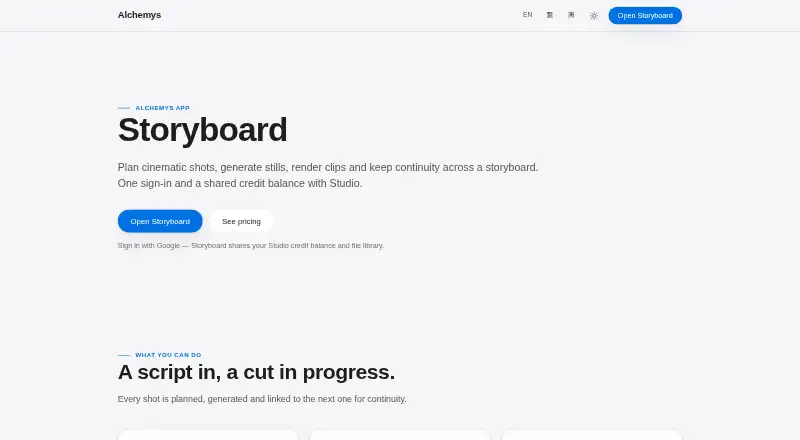
Alchemys Storyboard is a web workspace for planning cinematic shots, generating stills and video clips, and managing continuity across a sequence. It can turn a project brief into a numbered shot list to add to a board or use instead of its current list. Prompts can specify camera movement, lighting, and action, with a cinematic prompting guide for refinement. A shot’s final frame can carry into the next shot as its opening frame, one connection at a time or throughout the board. Arrange work in a list or a node-based Canvas, and use uploaded images, Studio files, or connected Google Drive images as first, last, or reference frames. Finished clips can be combined into one film or downloaded separately. Settings include 16:9, 9:16, 1:1, 4:3, and 3:4 ratios, resolutions of 480p, 720p, or 1080p, and adjustable shot length, set to five seconds by default. Sign-in is required; the workspace shares credits, model catalogue, and file library with Studio. New accounts receive 1,000 free credits, and AI use draws credits based on model and workload.
Who it suits
Storyboard suits people planning cinematic sequences who want shot lists, frame continuity, and still or video generation in one web workspace. It may also fit users who want to bring in reference images or arrange shots visually on a node-based Canvas.
What it does well
- Generates numbered shot lists from project briefs
- Carries final frames forward for continuity
- Accepts reference images from Google Drive
- Exports clips individually or as one film
- New accounts receive 1,000 free credits
What to know first
- Requires sign-in
- AI use consumes credits based on model and workload
- Available on web
Limits
New accounts start with 1,000 free credits. AI usage consumes credits based on the model and workload.
Plans
| Plan | Billed and limits | Price |
|---|---|---|
| Free starter credits | 1,000 credits for new users at first sign-in; AI usage consumes credits based on model and workload | Free |
As alchemys.ai lists them, read 7 Oct 2026. The maker's own page has the final word.
Getting started
- Open the Storyboard website.
- Sign in to access Storyboard and its shared Studio credits, models, and files.
- Use the 1,000 free credits provided to new accounts.
- Create a project brief and generate or enter a shot list.
- Set the aspect ratio, resolution, and shot length, then add prompts and reference frames.
Alchemys Storyboard suits creators who want to plan a sequence and carry it through to generated clips in one web workspace. Its main appeal is the connection between shot planning, frame continuity and film assembly; the trade-off is credit-based generation.
Overview
Storyboard brings planning, image and clip generation, and export into a single workflow. AI can turn a project brief into a numbered shot list, which users can add to an existing board or use in its place. That is a useful starting point for a new sequence, while users who already have a shot plan can work directly with prompts describing camera movement, lighting and action.
The workspace requires sign-in and shares its credits, model catalogue and file library with Alchemys Studio. New accounts receive 1,000 free credits at first sign-in, but AI use draws on that balance according to the model and workload. The free allowance is therefore a way to begin, not a predictable amount of production capacity.
Key features
Planning and continuity
Storyboard supports script import, shot sequencing and annotations. A shot’s last frame can serve as the next shot’s first frame, either for individual links or across the board. This is useful when a sequence depends on visual carry-through; for collections of unrelated shots, the continuity controls matter less.
References and canvas
Users can upload reference images, choose them from Studio files or use images from connected Google Drive. A reference can serve as a first frame, last frame or general reference. The list view keeps a sequence legible as a shot list, while the node-based Canvas lets users drag frame links to shape connections visually.
Generation and export
A cinematic prompting guide helps refine descriptions of movement, lighting and action. Project settings allow 16:9, 9:16, 1:1, 4:3 and 3:4 aspect ratios, with 480p, 720p or 1080p resolution; shot length is adjustable and defaults to five seconds. These options cover common formats and resolutions, though generation consumes credits. Once clips are ready, users can assemble them into one film or download them individually.
Pricing
Free starter credits: free. New users receive 1,000 credits at first sign-in, and AI usage consumes credits based on the selected model and workload. This is best for exploring the workflow or making a limited start; users planning sustained generation should expect the free balance to run down. No other plan price is available to recommend, so users who need more capacity should check Alchemys for custom pricing.
Platforms
Storyboard runs on the web. Google Drive can provide reference images when connected, and the broader Alchemys workspace also offers OAuth connections for Gmail, Notion, Outlook and GitHub. Those wider connections should not be confused with additional Storyboard platforms.
Who it's for
Storyboard is a strong fit for creators who want to move from a brief or script to sequenced shots, preserve continuity between frames and assemble generated clips. Its adjustable output settings and reference-frame choices help when a project has a defined format or visual reference. It is less compelling for users who only need a simple storyboard or who need a reliable production quota: the free credits are workload-dependent, and sign-in is required.
Pros and cons
- Pros: Brief-to-shot-list planning, script import and annotations support work from an initial idea through shot sequencing.
- Pros: Passing last frames forward, reference-frame options and a node-based Canvas give creators specific controls over continuity.
- Pros: Film assembly and individual clip downloads make the workspace useful beyond planning.
- Cons: The 1,000-credit starter balance has no fixed workload value because consumption depends on model and use.
- Cons: Sign-in is required, and the web platform may not suit users seeking a desktop workflow.
Alternatives
For a broader set of options, browse AI Storyboard Generators. Consider Cygnus if you want a macOS option alongside web access and a free plan with 200 monthly credits, two projects and watermarked 720p exports. Krock.io is another choice, with a free plan that allows one user, two projects, 2 GB of storage and 50 AI tokens, plus desktop and extension platforms. For a web-based free option, Boords offers a single-user plan with 250 AI images per month and unlimited storyboards and scripts.
CinemaScape AI may suit users looking for a free web plan with two projects and ten one-time storyboard generations. Drawstory is another web alternative. GOGUL has a free one-time 100-credit balance, capped at eight frames per storyboard, one character and one video model, without ZIP, HD ZIP or PDF export. LTX Studio is worth considering for its free web plan with 800 one-time credits. Shai offers free access to the first nine storyboard scenes and 200 credits for image creation and editing, while AI video is premium-only.
Verdict
Choose Alchemys Storyboard if you want shot planning, frame continuity and clip assembly in a single web workflow. Its strongest case is the way it connects those stages, from brief to export. Look elsewhere if you need a known ongoing generation allowance or a non-web platform: the free credits are variable in practical reach, and the product is web-based.
Verdict
Alchemys Storyboard brings shot planning, image and clip generation, reference frames, and continuity tools into a single workspace. Its free starter credits are limited by usage, so the amount of work they cover depends on the model and workload.
Questions
Is Alchemys Storyboard free?
New accounts receive 1,000 free credits at first sign-in. AI usage consumes credits according to the model and workload.
What platforms does Storyboard support?
Storyboard is available on the web.
Does Storyboard work with Google Drive?
Connected Google Drive images can be used as first, last, or reference frames.
What output settings are available?
Projects support 16:9, 9:16, 1:1, 4:3, and 3:4 aspect ratios, with 480p, 720p, or 1080p resolution. Shot length is adjustable and defaults to five seconds.
Can finished clips be exported?
Clips can be assembled into one film or downloaded individually.
Who makes Alchemys?
Alchemys describes the workspace as Hong Kong-built and lists Alchemys App in Hong Kong SAR.
Facts from Alchemys's own pages
- Canvas
- Storyboard offers a list view and a node-based Canvas for dragging frame links. · alchemys.ai, 7 Oct 2026
- Company location
- Alchemys describes the workspace as Hong Kong-built and lists Alchemys App in Hong Kong SAR. · alchemys.ai, 7 Oct 2026
- Continuity
- A shot’s last frame can be carried into the next shot as its first frame, individually or across the board. · alchemys.ai, 7 Oct 2026
- Credits and sign-in
- Storyboard requires sign-in and shares its credit balance, model catalogue and file library with Studio; new accounts start with free credits. · alchemys.ai, 7 Oct 2026
- Export
- Finished clips can be assembled into one film or downloaded individually. · alchemys.ai, 7 Oct 2026
- Headquarters
- Hong Kong SAR · alchemys.ai, 28 Sept 2026
- Integrations
- Storyboard can use reference images from connected Google Drive, while the broader Alchemys workspace lists OAuth connections including Drive, Gmail, Notion, Outlook and GitHub. · alchemys.ai, 7 Oct 2026
- Output limits
- Project settings support 16:9, 9:16, 1:1, 4:3 or 3:4 aspect ratios and 480p, 720p or 1080p resolution; shot length is adjustable and defaults to 5 seconds. · alchemys.ai, 7 Oct 2026
- Pricing model
- Alchemys states that AI usage is billed in credits per model, with media models charged per request or per second; the pricing page does not show numerical rates in its opened content. · alchemys.ai, 7 Oct 2026
- Privacy
- Alchemys says it does not sell private data or use private content to train its models. · alchemys.ai, 7 Oct 2026
- Product
- Storyboard is a workspace for planning cinematic shots, generating stills and video clips, and maintaining continuity across a storyboard. · alchemys.ai, 7 Oct 2026
- Prompting
- Users can write prompts describing camera movement, lighting and action, then refine them with a cinematic prompting guide. · alchemys.ai, 7 Oct 2026
- References
- Reference images can be uploaded or selected from Studio files or connected Google Drive, and used as first, last or reference frames. · alchemys.ai, 7 Oct 2026
- Security
- Alchemys says history, files and generated media are stored in encrypted Google cloud storage scoped to the user account. · alchemys.ai, 7 Oct 2026
- Shot planning
- AI can turn a project brief into a numbered shot list that users can append to the board or use to replace it. · alchemys.ai, 7 Oct 2026
- Support
- The security policy says the service is run by a solo founder and targets acknowledging vulnerability reports within 72 hours and initial triage within 7 days. · alchemys.ai, 7 Oct 2026
Where Alchemys stands on Freedom251
- AI Storyboard Generators#5 of 26