Freedom251 › Customer Health Score Software

Customer Health Compass
What Customer Health Compass is
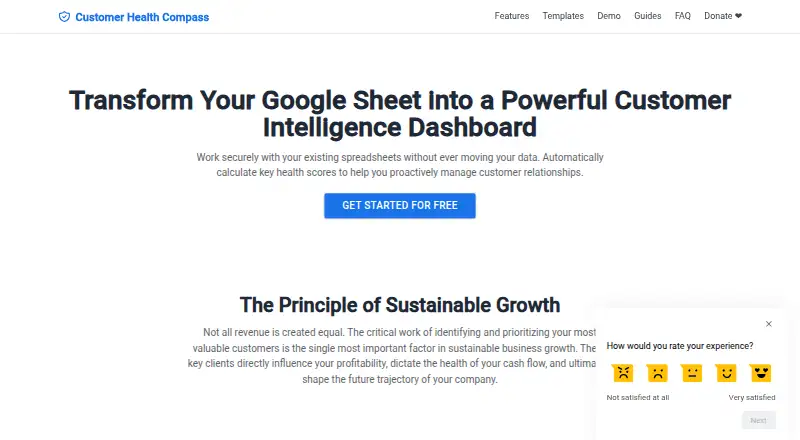
Customer Health Compass turns a Google Sheet into a customer intelligence dashboard that calculates and presents health scores. Users can set metric weights and scoring criteria around their business priorities, update scores manually or automatically each day, and fill scores across a chosen historical date range. Its reports include customer overviews, metric trends, radar charts, and a strategic customer matrix. A traditional software template is available for project- or license-based businesses; the SaaS template is marked “Coming Soon.” To get started, users make a private copy of the Google Sheets template and follow the video and manual for a one-time setup, with no coding required. The privacy policy says spreadsheet data remains in the user's sheet rather than being collected, stored, accessed, or transmitted to the maker's servers or third-party services. License verification accesses the user's Google Account email and sends the email and license key to Lemon Squeezy for validation. The free user program lists full feature access and priority support. The separate cloud-based SaaS product is described as upcoming.
Who it suits
It suits people who want to track customer health scores in Google Sheets, especially project- or license-based software businesses using the available template. Users seeking a cloud-based SaaS product should note that it is still upcoming.
What it does well
- Adjustable metric weights and scoring criteria
- Scores can update automatically each day
- Can backfill scores across a historical date range
- Reports include trends, radar charts, and a customer matrix
What to know first
- SaaS template is marked “Coming Soon”
- Setup requires copying a Google Sheets template
Limits
The current traditional software template is for project- or license-based businesses. The SaaS template and cloud-based product are upcoming.
Plans
| Plan | Billed and limits | Price |
|---|---|---|
| Free User Program | Full access to all features · priority support · feature feedback influences roadmap · apply through form | Free |
As customerhealth.co lists them, read 4 Oct 2026. The maker's own page has the final word.
Getting started
- Open the Customer Health Compass website.
- Create a private copy of the Google Sheets template in Google Drive.
- Follow the setup video and manual to complete the one-time setup.
- Use the free user program application form to access the program.
Customer Health Compass is a Google Sheets-based customer health scoring tool for teams that want to shape metrics around their own priorities. Its strongest fit is project- or license-based businesses comfortable working from a spreadsheet; the SaaS template is not ready yet. The price and full-feature access are compelling, but the product depends on a one-time Sheets setup rather than a hosted platform.
Overview
The tool turns a private Google Sheets copy into a customer intelligence dashboard, keeping the working file in the user’s Google Drive. That makes it a practical option for teams already comfortable with Sheets and who prefer their spreadsheet data to stay there. It is less suited to buyers who want a cloud application ready to use without setting up a template.
Key features
Teams can adjust metric weights and scoring criteria to reflect their business priorities rather than adopting a fixed scoring model. Scores can be updated manually or automatically each day, and historical scores can be backfilled across a selected date range. Together, those options support regular monitoring as well as review of customer health over time.
Reports include customer overviews, metric trends, radar charts and a strategic customer matrix. The available traditional software template is aimed at project- or license-based businesses. SaaS companies should wait for the SaaS template, which is marked “Coming Soon,” rather than assume it is ready for their workflow.
Setup involves creating a private copy of the template and following the video and manual; coding is not required. The privacy policy says spreadsheet data stays in the user’s Sheet and is not collected, stored, accessed or transmitted to the maker’s servers or third-party services. Calculations run within Google Workspace, whose security infrastructure includes encryption in transit and at rest. License verification does involve access to the Google Account email, and activation sends the email and license key to Lemon Squeezy for validation.
Pricing
The Free User Program costs nothing and includes full access to all features, priority support and a way to influence the roadmap through feature feedback. It requires an application through a form. For a no-cost option with custom scoring, daily automated updates and reporting, that is a substantial set of capabilities; the trade-off is the Google Sheets setup and workflow rather than a hosted SaaS experience.
The terms grant a limited, non-exclusive, non-transferable, perpetual license for use within Google Sheets. The free program offers direct access to the development team for priority support. The published contact for help is [email protected].
Platforms
Customer Health Compass runs on the web through Google Sheets, with the copied template stored in Google Drive. The SaaS product is described as an upcoming cloud-based platform, and its help guides are still forthcoming. Buyers who need a standalone cloud service now should look elsewhere.
Who it's for
This is a good fit for project- and license-based businesses that want to define their own health model, review customer trends and keep their data in Google Sheets. It is also attractive to teams willing to apply to a free program in exchange for a spreadsheet-based workflow. It is not the right choice for SaaS teams seeking a ready-made SaaS template or organizations that require a hosted customer health platform today.
Pros and cons
- Pros: Full feature access in the free program makes custom scoring, automated daily updates and reporting available without a paid plan.
- Pros: Historical backfills and varied report views give teams ways to examine both score changes and customer status.
- Pros: Spreadsheet data remains in the user’s Google Sheet according to the privacy policy, while calculations use Google Workspace security infrastructure.
- Cons: Users must create and configure a private template copy, which is a less direct route than opening a hosted application.
- Cons: The available template targets project- or license-based businesses; the SaaS-specific template is still forthcoming.
- Cons: License activation sends the user’s email and license key to Lemon Squeezy for validation.
Alternatives
Customer Health Score Software is the broader category directory for comparing products in this space.
Choose Exeechain if API and web access better suit your workflow; its free plan has full feature access on sample data but cannot contact customers, while Shield costs $299 a month.
FirstDistro is another freemium API and web option, with a Pro plan at $49 a month that includes unlimited customer accounts, health scores, quiet-account alerts and AI preparation notes and email drafts.
GainTrace may suit teams needing API and web access with a free tier capped at 25 companies, 100 contacts, 5,000 events per month, three live connectors, 100 automations per month, 12-hour sync and three months of history.
UserMotion offers an API and web-based free plan for up to 1,000 accounts, with ICP and intent scoring, real-time signals, and email and chat support.
SaaSy is a paid alternative with a free trial and support for Android, iOS, MacOS, Windows, API and web.
ZapScale is a paid web-based alternative.
UserIQ is a paid web-based alternative.
ChurnZero is a paid web-based alternative.
Verdict
Customer Health Compass is an appealing choice for project- or license-based teams that want configurable scoring and reporting inside Google Sheets without paying for access. Its strongest reason to choose it is the combination of full-feature free access and control over scoring; its strongest reason to look elsewhere is the spreadsheet-first setup, especially if a ready-to-use cloud platform or a SaaS-specific template is essential.
Verdict
Customer Health Compass offers configurable scoring and customer reports within Google Sheets. Its traditional software template is available now, while the SaaS product is described as upcoming.
Questions
How much does Customer Health Compass cost?
The Free User Program costs nothing.
What does the free program include?
It includes full access to all features and priority support. Users can apply through a form.
Which platform does it support?
It runs within Google Sheets, with the copied template stored in the user's Google Drive.
Is there a SaaS template?
A SaaS template is marked as coming soon, and the separate cloud-based platform is described as upcoming.
How does the product handle spreadsheet data?
Its privacy policy says spreadsheet data stays in the user's sheet and is not collected, stored, accessed, or transmitted to the maker's servers or third-party services.
How does license verification work?
The library accesses the user's Google Account email. On activation, the email and license key are sent to Lemon Squeezy for validation.
Facts from Customer Health Compass's own pages
- Custom scoring
- Users can adjust metric weights and scoring criteria to fit their business priorities. · customerhealth.co, 4 Oct 2026
- Daily updates
- Health scores can be updated manually or automatically each day. · customerhealth.co, 4 Oct 2026
- Data handling
- The privacy policy says spreadsheet data stays in the user's Google Sheet and is not collected, stored, accessed, or transmitted to the maker's servers or third-party services. · customerhealth.co, 4 Oct 2026
- Historical scores
- The tool can backfill customer health scores across a selected historical date range. · customerhealth.co, 4 Oct 2026
- Integrations
- The product operates within Google Sheets, and a copied template is stored in the user's Google Drive. · customerhealth.co, 4 Oct 2026
- License data
- For license verification, the library accesses the user's Google Account email; on activation, it sends the email and license key to Lemon Squeezy for validation. · customerhealth.co, 4 Oct 2026
- Limit
- The SaaS product is described as an upcoming cloud-based platform, with help guides still forthcoming. · customerhealth.co, 4 Oct 2026
- Purpose
- Customer Health Compass turns a Google Sheet into a customer intelligence dashboard that calculates health scores. · customerhealth.co, 4 Oct 2026
- Reporting
- Reports include customer overviews, metric trends, radar charts, and a strategic customer matrix. · customerhealth.co, 4 Oct 2026
- Security
- The privacy policy says calculations run within Google Workspace and data is protected by Google's security infrastructure, including encryption in transit and at rest. · customerhealth.co, 4 Oct 2026
- Setup
- Users create a private copy of the Google Sheets template and follow the video and manual for a one-time setup; coding is not required. · customerhealth.co, 4 Oct 2026
- Support
- The free user program offers priority support with direct access to the development team; the help page lists [email protected]. · customerhealth.co, 4 Oct 2026
- Templates
- The traditional software template is available for project- or license-based businesses; the SaaS template is marked “Coming Soon.” · customerhealth.co, 4 Oct 2026
- Terms
- The terms describe a limited, non-exclusive, non-transferable, perpetual license for use within Google Sheets. · customerhealth.co, 4 Oct 2026
Where Customer Health Compass stands on Freedom251
- Customer Health Score Software#4 of 26