Freedom251 › Teleprompter Software

CueFlow
What CueFlow is
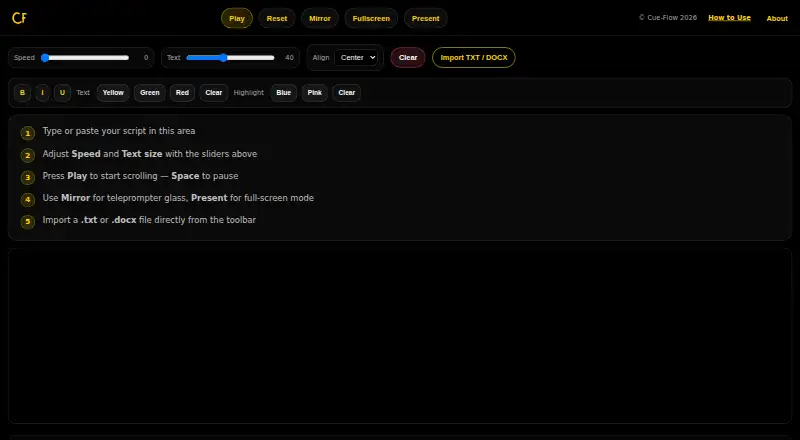
CueFlow is a free browser-based teleprompter for reading a script while speaking or presenting. You can type or paste text, or import a TXT or DOCX file from your device. A speed control adjusts scrolling, while a separate text control changes the font size. Playback starts or pauses using the Play button or Space, and the tool remembers where you stopped. Mirror mode flips the text horizontally for use with teleprompter glass or a beam splitter. Present mode opens a full-screen overlay with larger text and dedicated controls. CueFlow says scripts stay on the device and are not saved, sent, or tracked; refreshing clears the content. It works offline after it has loaded. The guide lists iPhone, iPad, Android phones and tablets, Mac, and Windows PCs with a modern browser. CueFlow has a free plan, requires no sign-up, and lists no premium tiers. Its supported platform is web, with a single-screen display mode.
Who it suits
CueFlow suits video creators, podcasters, public speakers, teachers, and business presenters who want to read scripts in a browser. It may also fit social media creators using supported phones, tablets, or computers.
What it does well
- Free plan with no sign-up
- Imports TXT and DOCX files
- Playback remembers the stopping point
- Mirror mode flips text horizontally
- Works offline after loading
What to know first
- Refreshing clears the script content
- Web-based, single-screen display mode
Limits
The free plan is listed as free, with no sign-up and no premium tiers. Refreshing clears the script content.
Plans
| Plan | Billed and limits | Price |
|---|---|---|
| Free | No sign-up · no premium tiers | Free |
As cue-flow.app lists them, read 11 Oct 2026. The maker's own page has the final word.
Getting started
- Open the CueFlow website in a modern browser.
- Type or paste a script, or import a TXT or DOCX file from your device.
- Adjust scrolling speed and font size with the sliders.
- Start or pause scrolling with Play or Space; CueFlow remembers where you stopped.
- Use Mirror mode for teleprompter glass or a beam splitter, or open Present mode for a full-screen overlay.
CueFlow is a browser teleprompter for creators, speakers, teachers, and presenters who need a quick way to read a script from one screen. It is a strong fit for occasional, privacy-conscious use, but the lack of saved scripts and multi-screen operation limits it for more elaborate production workflows.
Overview
You can type or paste copy directly, or import a TXT or DOCX file from your device. A speed slider controls the scroll rate and a separate text slider changes font size, so the reading pace and legibility can be tuned independently. Playback starts or pauses from the Play button or the Space key, and CueFlow remembers the stopping point during the session.
That simplicity has a clear consequence: refreshing the page clears the script. CueFlow therefore works best for a one-off recording, rehearsal, or presentation rather than as a repository for recurring scripts. The page works offline after it has loaded, which is useful on an unreliable connection, but offline operation does not preserve content after a refresh.
Key features
Reading and presentation controls
Mirror mode flips the text horizontally for teleprompter glass or a beam splitter, covering the basic setup requirement for reflected reading. Present mode opens a full-screen overlay with larger text and dedicated controls, making words easier to read at a distance. The display remains single-screen, so an operator cannot run controls on one monitor while a speaker reads from another.
Privacy and session handling
CueFlow says scripts remain on the device and are not saved, sent, or tracked. That is well suited to confidential drafts or users who prefer not to upload material. The same design means there is no retained library to return to, and a refresh removes the current script.
Pricing
CueFlow has one Free plan at no cost. It requires no sign-up and has no premium tiers, so there is no recurring charge or upgrade decision. The trade-off is that the free offering is also the entire product: users accept single-screen display and cleared-on-refresh content rather than paying for persistence or expanded presentation workflows. There is no free trial because the product itself is free.
Platforms
CueFlow is delivered as a web app and supports modern browsers on iPhone, iPad, Android phones and tablets, Mac, and Windows PCs. The broad device coverage is useful when a presenter needs to switch hardware, while the browser requirement means the experience depends on having a compatible browser loaded before offline use begins.
Who it's for
Video creators and social-media creators can use the adjustable scroll and text size for direct-to-camera scripts. Podcasters and public speakers get keyboard-friendly pause and resume behavior, while teachers and business presenters can use Present mode for a larger reading view. It is a poor match for teams that need shared script storage, repeated access to an archive, or a dedicated control screen.
Pros and cons
- Pros: Free forever with no account, imports TXT and DOCX files, adjustable speed and text size, mirror mode for optical setups, full-screen Present mode, and offline use after loading.
- Pros: On-device handling and no saving, sending, or tracking suit sensitive scripts.
- Cons: Refreshing clears the script, so recurring work must be re-entered or re-imported.
- Cons: Single-screen operation rules out separate presenter and operator displays.
Alternatives
For a wider comparison, see Teleprompter Software. Choose FluidPrompter instead if you need a freemium tool with a 600-word free-script limit and paid creator tiers. Speakflow is the better choice when limited script history or video recording and storage matter. Pick Teleprompter.com for cloud script storage, remote control, and recording, including a free tier with watermarked recordings.
Teleprompterly suits readers wanting unlimited script length, no account, no watermark, and downloadable video and audio recording at no cost. VoicePrompter is worth considering for voice scrolling and an offline web app. CueCast Prompter is another broadcast-oriented option. CuePrompter adds browser recording and local conversion on its free plan, while EasyPrompter is aimed at users comfortable with two saved scripts and a 500-word-per-script free cap.
Verdict
Choose CueFlow if you want a genuinely free, no-sign-up teleprompter with practical scrolling, mirror, presentation, and offline controls on almost any modern device. Look elsewhere if scripts must survive a refresh, be organized for repeated use, or support a separate operator display.
Verdict
CueFlow covers common script-reading needs with adjustable scrolling, text size, and presentation modes. Its browser-based, single-screen format and cleared-on-refresh content are worth considering before use.
Questions
How much does CueFlow cost?
CueFlow's Free plan costs nothing. It has no premium tiers.
Do I need to sign up or start a trial?
No sign-up is required, and there is no free trial because the product has a free plan.
Which devices can I use?
The guide lists iPhone, iPad, Android phones and tablets, Mac, and Windows PCs with a modern browser. The listed platform is web.
What script formats can I import?
You can import TXT or DOCX files from your device, or type or paste a script.
Does CueFlow save or send scripts?
CueFlow says scripts stay on the device and are not saved, sent, or tracked. Refreshing clears the content.
Can I use CueFlow offline?
The page says CueFlow works offline after it has loaded.
Facts from CueFlow's own pages
- Intended users
- The guide names video creators, podcasters, public speakers, social media creators, teachers, and business presenters as users. · cue-flow.app, 11 Oct 2026
- Mirror mode
- Mirror mode flips text horizontally for use with teleprompter glass or a beam splitter. · cue-flow.app, 11 Oct 2026
- Offline use
- The page says CueFlow works offline after it has loaded. · cue-flow.app, 11 Oct 2026
- Playback
- Users can start or pause scrolling with the Play button or Space, and CueFlow remembers where they stopped. · cue-flow.app, 11 Oct 2026
- Present mode
- Present mode opens a full-screen overlay with larger text and dedicated controls. · cue-flow.app, 11 Oct 2026
- Privacy
- CueFlow says scripts stay on the device and are not saved, sent, or tracked; refreshing clears the content. · cue-flow.app, 11 Oct 2026
- Product
- CueFlow is a free teleprompter that runs in a browser. · cue-flow.app, 11 Oct 2026
- Reading controls
- A speed slider controls scrolling and a text slider adjusts font size. · cue-flow.app, 11 Oct 2026
- Script input
- Users can type or paste a script, or import a TXT or DOCX file from their device. · cue-flow.app, 11 Oct 2026
- Supported devices
- The guide lists iPhone, iPad, Android phones and tablets, Mac, and Windows PCs with a modern browser. · cue-flow.app, 11 Oct 2026
Where CueFlow stands on Freedom251
- Teleprompter Software#2 of 32