Freedom251 › Data Preparation Software
CSV Engine
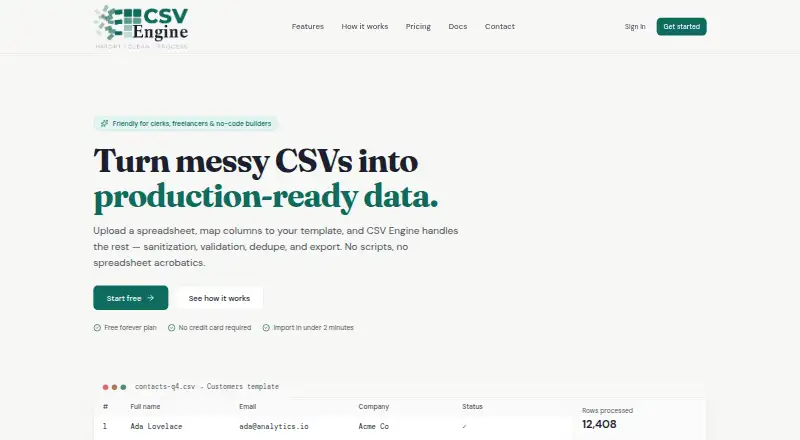
What CSV Engine is
CSV Engine is a web tool for converting uploaded CSV spreadsheets into structured data through column mapping, cleanup, validation, deduplication, and export. Uploads support drag and drop, with automatic detection of delimiters, encodings, and headers. Users can map columns to reusable templates using aliases and fuzzy matching, then save mappings for later imports. Listed cleanup steps include trimming whitespace, standardizing case, checking email addresses, parsing phone numbers, and correcting dates. Duplicate checks can use one or more fields and merge strategies, with conflicts reviewed before commitment. The row preview flags failures, and exports can be limited to records that pass selected rules. Templates preserve schemas, field types, and validation rules. One credit processes up to 1,000 rows, including validation, deduplication, and export. The free plan provides five credits per month and three active templates; paid subscriptions start at $15 a month billed annually. One-off credit packs start at $8, paid once, and those credits do not expire. A 14-day trial is listed. The site says the Pro plan’s developer API for programmatic imports, webhooks, and dataset access is coming soon.
Who it suits
CSV Engine suits clerks, freelancers, no-code builders, and product, operations, or data teams that need repeatable CSV cleanup and validation. Its templates and saved mappings are useful for recurring imports.
What it does well
- Automatically detects delimiters, encodings, and headers
- Reusable templates retain schemas and validation rules
- Previews row failures and can export passing records only
- One-off credit packs do not expire
What to know first
- Free plan has five credits per month and three active templates
- Free plan limits fields to text and email
- Developer API is listed as coming soon
- Paid subscriptions start at $15 a month billed annually
Limits
The Free plan has five credits per month and three active templates, with text and email fields and email and text sanitization. One credit processes up to 1,000 rows, including validation, deduplication, and export.
Plans
| Plan | Billed and limits | Price |
|---|---|---|
| Free | Forever · 5 credits/month · 3 active templates · text and email fields only · email and text sanitization · duplicate detection | Free |
| Agency Pack | One-off · 2,000 credits · never expire | $100, paid once |
| Starter | Billed annually · $180/yr · 200 credits/month · 5 active templates · all 5 field types · all sanitization rules · in-import duplicate detection · top-ups at $6/100 credits · rollover up to 3 months | $15 a month |
| Growth Pack | One-off · 500 credits · never expire | $35, paid once |
| Pro | Billed annually · $468/yr · 1,000 credits/month · unlimited templates · all 5 field types · all sanitization rules · cross-dataset deduplication · top-ups at $4/100 credits · email support with 24hr response · indefinite rollover | $39 a month |
| Business Pack | One-off · 1,000 credits · never expire | $60, paid once |
| Basic Pack | One-off · 100 credits · never expire | $8, paid once |
As csvengine.com lists them, read 7 Oct 2026. The maker's own page has the final word.
Getting started
- Open the CSV Engine website.
- Choose the Free plan, a paid subscription, or a standalone credit pack.
- Upload a CSV file by dragging and dropping it.
- Map source columns to a template and set the applicable rules.
- Preview the rows, review flagged failures or duplicate conflicts, and export passing records.
CSV Engine is a cloud service for turning CSV uploads into structured, checked datasets. It is aimed at clerks, freelancers, no-code builders, and product, operations, or data teams handling recurring imports. Choose it when reusable rules and duplicate review matter more than a large-file desktop workflow; the 5,000-row limit and annual subscription terms narrow its fit.
Overview
Drag-and-drop uploads detect delimiters, encodings, and headers automatically. The service describes support for files reaching millions of rows, but its stated row limit is 5,000, so larger datasets are outside the practical workflow. CSV Engine runs in the cloud and includes visual workflows rather than a local desktop application.
Templates store a schema, field types, and validation rules for reuse. Saved mappings make recurring imports less repetitive, particularly when suppliers or colleagues use different column names. A row-by-row preview flags failures before export, and exports can be restricted to records that pass the chosen rules.
Key features
Mapping and cleanup
Aliases and fuzzy matching connect source columns to template fields, while mappings saved per template preserve that setup for later files. Sanitization can trim whitespace, normalize case, validate email addresses, parse phone numbers, and correct dates. This is a practical set of common import repairs, though the Free plan limits users to text and email fields and their related text and email sanitization.
Validation and duplicate control
Rules are applied with a full preview, failed rows are flagged, and only passing records can be exported. Duplicate matching works across one or more fields, with merge strategies and conflict review before committing changes. Starter provides duplicate detection within an import; Pro adds cross-dataset deduplication, which is the more suitable choice for teams consolidating separate files.
Credits, templates, and API
One credit processes up to 1,000 rows, including validation, deduplication, and export. That makes credit consumption easy to estimate, but a 5,000-row import can use as many as five credits before any extra processing considerations. The developer API for programmatic imports, webhooks, and dataset access is described as coming soon on Pro, so it should not drive a purchase decision today. Documentation is still being expanded, with guidance currently covering getting started, templates and mappings, and sanitization rules.
Pricing
| Plan | Price and allowance | What it includes |
|---|---|---|
| Free | free, billed Forever; 5 credits/month | 3 active templates, text and email fields, text and email sanitization, duplicate detection |
| Basic Pack | 8.00 USD once; 100 credits | One-off credits that never expire |
| Starter | $15 a month, billed annually ($180/yr); 200 credits/month | 5 active templates, all 5 field types and sanitization rules, in-import duplicate detection, $6/100-credit top-ups, rollover up to 3 months |
| Growth Pack | 35.00 USD once; 500 credits | Non-expiring credits |
| Pro | $39 a month, billed annually ($468/yr); 1,000 credits/month | Unlimited templates, all field types and rules, cross-dataset deduplication, $4/100-credit top-ups, indefinite rollover, email support with a 24hr response |
| Business Pack | 60.00 USD once; 1,000 credits | Non-expiring credits |
| Agency Pack | 100.00 USD once; 2,000 credits | Non-expiring credits |
The 14-day trial is useful for evaluating a recurring workflow before committing. Free is suited to light files and simple text or email schemas, but five monthly credits and three templates are restrictive for regular operations. Starter unlocks the full rule set at the lowest subscription price, yet requires annual billing and limits rollover. Pro costs more but removes template limits, adds stronger deduplication and support, and lets unused credits roll indefinitely. Packs are the sensible route for occasional imports because credits do not expire and require no subscription renewal.
Platforms
CSV Engine is delivered through the web as a cloud deployment. Its 5,000-row limit makes it better for controlled operational imports than very large data migrations.
Who it's for
Clerks and freelancers repeating client or administrative imports can benefit from saved templates and automatic cleanup. No-code builders and small product, operations, or data teams get a rules-based preparation step without building a pipeline. It is a poor match for users needing local desktop processing, unrestricted row counts, or a mature API immediately.
Pros and cons
- Pros: Reusable templates preserve schemas and rules for recurring files.
- Pros: Fuzzy column matching, sanitization, validation previews, and conflict-aware deduplication cover the main import-preparation stages.
- Pros: One-off packs never expire, avoiding subscription commitment for occasional work.
- Cons: Imports are capped at 5,000 rows despite the larger upload description.
- Cons: The Free plan allows only five credits monthly, three templates, and text/email fields.
- Cons: Paid subscriptions are billed annually, and the API is not yet available.
Alternatives
For a broader starting point, browse Data Preparation Software. Pick qsv if you want a free option spanning Linux, macOS, web, and Windows, with spreadsheet imports up to 1MB on its free plan. csvkit is the straightforward choice for free, MIT-licensed command-line tooling on Linux, macOS, or Windows. Choose DataCleaner for an open-source LGPL desktop alternative. EasyMorph suits users wanting desktop, web, API, or self-hosted deployment, although its free desktop tier restricts projects to 20 actions and 20 loop iterations. OpenRefine is a free, open-source desktop application, while Frictionless Framework offers MIT-licensed tooling installable with pip. Open Data Editor is another free, open-source desktop option. Microsoft Project is a project-planning alternative rather than a CSV preparation specialist.
Verdict
CSV Engine is a strong choice for teams that repeatedly convert modest-sized CSV files into validated, deduplicated output and want reusable templates instead of manual cleanup. Its main reason to choose it is the unified mapping-to-export workflow; its main reason to look elsewhere is the 5,000-row ceiling combined with annual subscription billing and a still-unfinished API.
Verdict
CSV Engine brings mapping, cleanup, validation, and duplicate review into a reusable import workflow. Compare the free plan’s credit and template allowances with the annual subscription and one-off pack options.
Questions
Is there a free plan?
Yes. The Free plan costs nothing, billed forever, and includes five credits per month and three active templates.
What do paid plans cost?
Starter is $15 a month billed annually ($180 per year), and Pro is $39 a month billed annually ($468 per year). One-off packs start at $8, paid once for 100 credits.
Which platforms does CSV Engine support?
CSV Engine is available on the web and is deployed in the cloud.
How are credits used?
One credit processes up to 1,000 rows, including validation, deduplication, and export. Pack credits never expire.
What does Pro include?
Pro includes 1,000 credits per month, unlimited templates, cross-dataset deduplication, email support with a 24-hour response, and indefinite credit rollover.
Is a developer API available?
The documentation lists a developer API for programmatic imports, webhooks, and dataset access on Pro as coming soon.
Facts from CSV Engine's own pages
- Audience
- The site describes CSV Engine as friendly for clerks, freelancers, and no-code builders, and says it serves product, ops, and data teams. · csvengine.com, 7 Oct 2026
- Column mapping
- Users can map source columns to templates with aliases and fuzzy matching, with mappings saved per template. · csvengine.com, 7 Oct 2026
- Credit allowance
- The pricing page says one credit processes up to 1,000 rows, including validation, dedupe, and export. · csvengine.com, 7 Oct 2026
- CSV upload
- It supports drag-and-drop CSV uploads up to millions of rows and auto-detects delimiters, encodings, and headers. · csvengine.com, 7 Oct 2026
- Deduplication
- Users can match duplicates on one or more fields, choose merge strategies, and review conflicts before commit. · csvengine.com, 7 Oct 2026
- Developer API
- The documentation lists a developer API for programmatic imports, webhooks, and dataset access on the Pro plan as coming soon. · csvengine.com, 7 Oct 2026
- Documentation status
- The site says full documentation is in active development and currently provides getting started, template and mapping, and sanitization rule guidance. · csvengine.com, 7 Oct 2026
- Purpose
- CSV Engine turns uploaded spreadsheets into production-ready data through column mapping, sanitization, validation, deduplication, and export. · csvengine.com, 7 Oct 2026
- Sanitization
- Listed transformations include trimming whitespace, normalizing casing, validating emails, parsing phone numbers, and fixing dates. · csvengine.com, 7 Oct 2026
- Standalone packs
- Credit packs can be purchased without a subscription, and their credits never expire. · csvengine.com, 7 Oct 2026
- Support
- The Pro plan includes email support with a 24hr response. · csvengine.com, 7 Oct 2026
- Templates
- Reusable templates let teams define a schema, field types, and validation rules once and reuse them across imports. · csvengine.com, 7 Oct 2026
- Validation and preview
- The product previews every row, flags failures, and can export only records that pass the user's rules. · csvengine.com, 7 Oct 2026
Where CSV Engine stands on Freedom251
- Data Preparation Software#8 of 28