Freedom251 › Healthcare Staff Scheduling Software

CronShift
What CronShift is
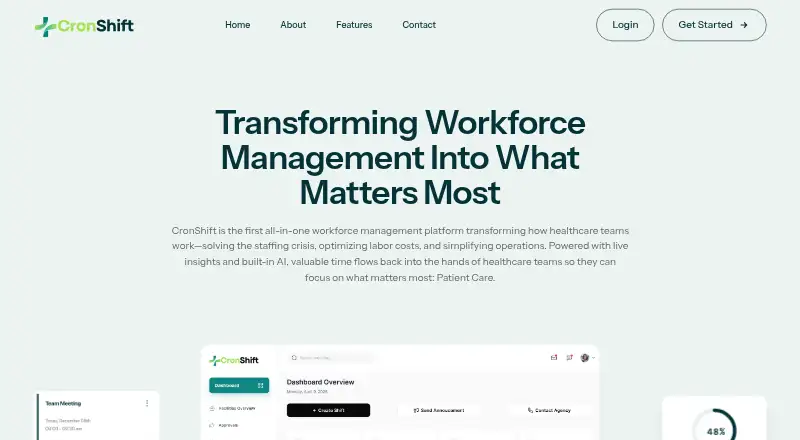
CronShift is a workforce management platform for healthcare teams, from small clinics to large hospital networks. Its mobile app handles shift schedules, swaps, requests for open shifts, and time off. Scheduling tools use PPD/PRD-based forecasting to help manage staffing levels, overtime, and agency spending. The platform creates Daily Nurse Staffing Sheets and PBJ reports, including agency staff, while an executive dashboard offers live staffing and attendance insights, cost tracking, and coverage visibility. Facilities can share staff to fill shifts under configurable rules; partner agencies may be notified when internal and cross-facility options are insufficient. Owners can manage multiple locations, assign schedulers, and use separate dashboards with centralized reporting. CronShift says it integrates with popular HR, payroll, and communication systems, but does not name them. It offers a free plan and paid plans from $8/mo. The maker says support is available 24/7 from a team familiar with healthcare.
Who it suits
CronShift suits healthcare teams coordinating shifts and staffing, including organizations managing multiple facilities. Its tools cover both small clinics and large hospital networks.
What it does well
- Mobile app supports scheduling, swaps, and time off.
- Forecasting targets overstaffing, overtime, and agency spending.
- Generates Daily Nurse Staffing Sheets and PBJ reports.
- Multi-facility support includes centralized reporting.
- 24/7 support from a healthcare-familiar team.
What to know first
- Named integrations are not provided.
- Paid plan details are unclear.
- Agency and Premium pages show different dollar figures.
Plans
| Plan | Billed and limits | Price |
|---|---|---|
| Starter | Per year or Per Month · Status updates | Free |
| Premium | Per Month · Status updates | $12 a month |
| Agency | Per year · Status updates | $12 a year |
| Premium | Per year · Status updates | $24 a year |
| Agency | Per Month · Status updates | $8 a month |
As cronshift.com lists them, read 15 Oct 2026. The maker's own page has the final word.
Getting started
- Visit https://www.cronshift.com/.
- Choose the free Starter plan or review the Agency and Premium plans.
- Use the web platform or Android or iOS app.
- Start the free trial if you want to try the product before choosing a plan.
CronShift is a healthcare workforce management platform for teams coordinating schedules and staffing across one or more facilities. It suits organizations that need tools for coverage, forecasting and reporting alongside day-to-day scheduling. Its breadth is useful, but the published plan descriptions make it hard to match a subscription to those needs.
Overview
CronShift spans routine schedule changes and organization-wide staffing oversight. Facility owners can manage multiple locations, assign schedulers to each, and use independent dashboards with centralized reporting. That structure is more compelling for multi-site operators than for teams seeking only a basic single-site rota.
Its scheduling tools use PPD/PRD-based forecasting to help prevent overstaffing, overtime and agency spending. The executive dashboard adds live staffing and attendance insights, cost tracking and coverage visibility. These functions target operational decisions, though their value will depend on how well the forecasts and views serve each organization’s needs.
Key features
Scheduling and availability
Staff can manage shifts, swaps, open-shift requests and time off through the mobile app. CronShift also supports self-scheduling, availability management and shift templates. Together, these cover common schedule adjustments and give staff a role in finding coverage, rather than leaving every change to schedulers.
Coverage, reporting and integrations
Facilities can share staff to fill open shifts, with configurable rules for how shifts are offered. If internal and cross-facility options fall short, partner agencies can be notified. This layered approach may help organizations coordinate existing staff before turning to agency workers.
CronShift generates Daily Nurse Staffing Sheets and PBJ reports, including agency staff. It can integrate with many popular HR, payroll and communication systems. The maker also says it uses industry-standard encryption and healthcare-compliant security measures. These are relevant capabilities for healthcare operations, but the maker does not name integrations or security certifications.
Pricing
CronShift uses a freemium model, with a free plan and a free trial. The Starter plan costs nothing and is billed Per Month or Per year. Its Pricing page lists “Status updates,” but the plan’s feature details are unclear, so teams should not assume it includes the platform’s scheduling, forecasting or reporting tools.
Agency is priced at $8 a month, billed Per Month; its page also shows 15$. Premium is $12 a month, billed Per Month, and its page also shows 28$. The Pricing page lists “Status updates” for both paid plans, while their feature details are unclear. The conflicting figures make the paid tiers difficult to compare or budget for. No seat or quota limits are given for these plans.
Platforms
CronShift is available on Android, iOS and the web. Mobile access supports staff-facing schedule tasks, while the web platform serves teams managing staffing across locations.
Who it's for
CronShift is built for healthcare teams from small clinics to large hospital networks. Multi-facility organizations have the clearest case: they can assign schedulers by location, share staff across facilities and consolidate reporting. A smaller team may value the scheduling and mobile tools, but should weigh them against the unclear plan inclusions. Support is available 24/7 from a team familiar with healthcare, and the company aims to respond to inquiries within 24 hours.
Pros and cons
- Pros: Cross-facility staffing and configurable shift-offering rules give multi-site teams a way to coordinate coverage across locations.
- Pros: Forecasting, cost visibility and reports including agency staff address staffing oversight beyond the rota itself.
- Cons: The Agency and Premium pages show conflicting dollar figures, complicating price comparisons.
- Cons: Unclear plan features make it difficult to know which tier includes the tools that distinguish CronShift.
- Cons: The maker does not name its integrations or specify security certifications, which may matter to organizations assessing fit.
Alternatives
For a broader comparison, browse Healthcare Staff Scheduling Software.
- RosterLab is worth considering if a free plan with manual scheduling, simple rule checks, dynamic statistics, shift colour coding and an employee mobile app better fits your needs; its AI Optimised Rostering plan is 20.
- SimpleStaff is a clearer option for a small team if its free plan’s 15 team members, one team, scheduling, shift swaps, time-off requests and open-shift pickup are sufficient.
- Infor Workforce Management is another paid option for organizations evaluating workforce management software.
- Amion is an alternative for teams comparing schedule-focused plans, including a Pro plan for up to 10 schedules and an Enterprise plan with unlimited schedules.
- symplr Directory is an alternative for enterprise healthcare provider data management.
- HealthRota is another paid healthcare scheduling option.
- Lightning Bolt is worth comparing if per-seat clinical team scheduling licenses suit your organization.
- ShiftMed Flex is another paid option.
Verdict
Choose CronShift if your healthcare organization needs to coordinate staffing across facilities and values forecasting, agency-inclusive reporting and coverage visibility in one platform. Its main advantage is the breadth of its staffing workflow; its main drawback is that unclear plan inclusions and conflicting dollar figures leave buyers without a reliable way to judge which tier fits. Teams that need a straightforward, verifiable plan comparison should look elsewhere.
Verdict
CronShift combines scheduling, forecasting, reporting, and cross-facility staffing for healthcare organizations. Its plan feature details are unclear, and the Agency and Premium pages show conflicting dollar figures.
Questions
Does CronShift have a free plan?
Yes. Starter is listed as free.
How much do the paid plans cost?
Agency is listed at $8 a month and Premium at $12 a month. The plan pages also show 15$ and 28$, respectively.
Is there a free trial?
Yes, CronShift lists a free trial.
Which platforms does CronShift support?
Android, iOS and web.
Can CronShift connect to other systems?
It says it can integrate with popular HR, payroll and communication systems.
Who is CronShift for?
CronShift describes the platform as built for healthcare teams, including small clinics and large hospital networks.
Facts from CronShift's own pages
- Account access limit
- The Android listing says accounts are created by organization administrators and new users cannot sign up inside the app. · play.google.com, 15 Oct 2026
- Agency integration
- Partner agencies can be notified when internal and cross-facility staffing cannot fill a last-minute shift. · cronshift.com, 15 Oct 2026
- Agency staffing
- CronShift says partner agencies can be notified when internal and cross-facility staffing options are insufficient. · cronshift.com, 30 Sept 2026
- Analytics
- Built-in analytics track staffing patterns, workloads and gaps. · cronshift.com, 15 Oct 2026
- Android app
- The Android Cronshift app is intended for authorized healthcare-platform users and was updated December 4, 2025. · play.google.com, 15 Oct 2026
- API integration
- The pricing comparison includes an API-integration capability, but no public API reference or SDK documentation is provided on the site pages reviewed. · cronshift.com, 15 Oct 2026
- Apple privacy statement
- Apple’s listing records the developer declaration that the app does not collect data, noting that Apple has not verified the claim. · apps.apple.com, 15 Oct 2026
- Built-in timekeeping
- The maker says built-in timekeeping supplies data for precise, survey-ready reports. · cronshift.com, 15 Oct 2026
- CMS reports
- CronShift generates Daily Nurse Staffing Sheets and PBJ reports, including agency staff. · cronshift.com, 15 Oct 2026
- Company founding year
- The maker’s public pages reviewed do not state a company founding year. · cronshift.com, 15 Oct 2026
- Company leadership
- CronShift’s about page names Ismael Carabante as President, Brett Rickord as President of Sales and Azaz Ahmed as Chief Technology Officer. · cronshift.com, 15 Oct 2026
- Company legal entity
- The app-store developer information identifies Heart Healthcare LLC, with an address at 800 Nebraska St Ste 200, Sioux City, Iowa 51101-1129, United States. · play.google.com, 15 Oct 2026
- Contact response
- The contact page says the company aims to respond to inquiries within 24 hours. · cronshift.com, 30 Sept 2026
- Cross-facility pooling
- Nearby facilities can share staff to cover open shifts under configurable rules. · cronshift.com, 15 Oct 2026
- Cross-facility staffing
- Facilities can share staff to fill open shifts, with configurable rules for how shifts are offered. · cronshift.com, 30 Sept 2026
- Customization
- Teams can tailor shift rules, roles and workflows to their operating needs. · cronshift.com, 15 Oct 2026
- Dashboards
- Its executive dashboard provides live staffing and attendance insights, cost tracking, and coverage visibility. · cronshift.com, 30 Sept 2026
- Documentation limit
- The public site reviewed exposes marketing, pricing, contact, blog and about pages but no linked developer documentation or help-center content. · cronshift.com, 15 Oct 2026
- Executive dashboard
- The executive dashboard shows live staffing and attendance information, costs and coverage visibility for CMS and state compliance work. · cronshift.com, 15 Oct 2026
- Forecasting
- PPD/PRD-based forecasting is intended to reduce overstaffing, overtime and unnecessary agency spending. · cronshift.com, 15 Oct 2026
- Google Play data statement
- Google Play reports no third-party data sharing and no data collection for the Cronshift listing. · play.google.com, 15 Oct 2026
- Headquarters
- Sioux City, Iowa, United States · cronshift.com, 28 Sept 2026
- Independent implementation record
- Developer Adnan Ali describes CronShift as a 2024 healthcare workforce project with AI scheduling, cross-facility pooling, CMS reporting and a mobile app. · adnanali.tech, 15 Oct 2026
- Integrations
- CronShift says it can integrate with many popular HR, payroll, and communication systems, but does not name them on the page. · cronshift.com, 30 Sept 2026