Freedom251 › Writing Style Checkers
Content Checker
What Content Checker is
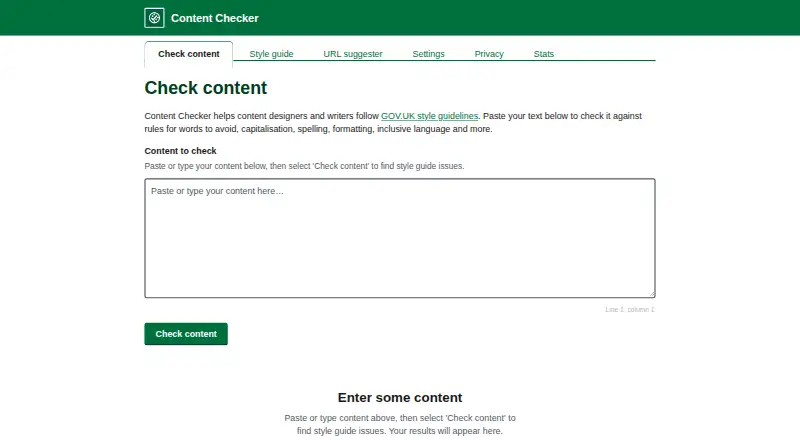
Content Checker helps writers apply Government Digital Service style and content design guidance to their text. It checks for words to avoid, capitalisation, spelling, formatting, and inclusive language using more than 140 rules. A searchable GOV.UK A-to-Z style guide is included, and a setting adds HMRC-specific rules and entries. The website can suggest URL slugs from page titles using GOV.UK URL standards and show the changes made by each rule. Content Checker is available on the web, Android, iOS, and macOS; editor support is listed for web, iOS, and macOS. The free app works offline. The maker says app checks happen on the device without sending content to a server. For website checks, text is sent to a server for processing and immediately discarded; the maker says it is not stored, logged, or saved. The maker also says the products do not collect, store, or transmit personal data or use cookies or client-side tracking scripts. Content Checker is independent and not affiliated with or endorsed by GDS, GOV.UK, or HM Government.
Who it suits
Content Checker suits content designers, publishers, and anyone writing for the UK government. It may also help writers who want GOV.UK style checks or HMRC-specific rules.
What it does well
- Checks text against more than 140 rules.
- Includes a searchable GOV.UK A-to-Z style guide.
- Can suggest URL slugs using GOV.UK standards.
- Free app works offline.
- Website checks discard submitted text after processing, according to the maker.
What to know first
- Website checks send submitted text to a server for processing.
- Editor support is listed for web, iOS, and macOS.
Plans
| Plan | Billed and limits | Price |
|---|---|---|
| Free | Free app; works offline | Free |
As contentchecker.uk lists them, read 4 Oct 2026. The maker's own page has the final word.
Getting started
- Visit https://contentchecker.uk/.
- Choose the web version or use the app on Android, iOS or macOS.
- Use the free plan; the app works offline.
- For editor support, use web, iOS or macOS.
Overview
Content Checker is a government-style checker for web and app, aimed at writers who need to follow GOV.UK conventions. It is strongest for UK public-sector content; writers seeking general-purpose editing tools should look elsewhere.
Its focus is unusually specific: style checks sit alongside a searchable guide and URL suggestions, with HMRC-specific rules as an option. That makes it a practical fit for government publishing workflows, but not a broad writing assistant.
Key features
The website checks words to avoid, capitalisation, spelling, formatting and inclusive language. The app applies over 140 rules and includes a searchable GOV.UK A-to-Z style guide. Together, these features help writers catch common style departures and look up guidance without relying on a separate reference.
For web publishing, the URL suggester turns page titles into slugs using GOV.UK URL standards and shows the changes made by each rule. That transparency is useful when a suggested slug needs review. A setting adds HMRC-specific rules and style guide entries, which gives HMRC teams a more relevant set of checks than the general government guidance.
The app checks text on the device and works offline, so it suits work where connectivity is limited or text should not leave the device. Website text is sent to a server for processing and immediately discarded, according to the maker. The maker also says the website and app do not collect, store or transmit personal data, and do not use cookies or client-side tracking scripts. The distinction matters for sensitive drafts: use the app for on-device checking rather than submitting text through the website.
Content Checker is independent and is not affiliated with or endorsed by GDS, GOV.UK or HM Government. Questions, suggestions and feedback can be sent to [email protected].
Pricing
The Free plan costs nothing and includes the free app, which works offline. There is no free trial because the product is free. This is an easy starting point for individual writers and teams who need government style checks without a subscription, though no paid tier or seat-based offering is given to compare against.
Platforms
Content Checker supports Android, iOS, macOS and web. The editor is supported on web, iOS and macOS; Android is an app platform rather than a listed editor platform. The offline promise applies to the free app, while website checks involve server processing.
Who it's for
Content designers, publishers and anyone writing for the UK government are the clearest audience. It is especially apt for people who regularly need GOV.UK style guidance, URL conventions or HMRC-specific entries. Writers outside that context may find the narrow government focus more limiting than helpful.
Pros and cons
- Pros: More than 140 app rules and a searchable GOV.UK guide combine checking with reference material, so writers can investigate flagged choices as they edit.
- Pros: HMRC-specific rules and URL suggestions address needs that are directly relevant to government publishing.
- Pros: A free offline app and on-device checks avoid sending app text to a server, according to the maker.
- Cons: Website checks do send submitted text to a server, even though the maker says it is immediately discarded; this may rule out that workflow for sensitive copy.
- Cons: The government-style focus is not a substitute for broader editing support for writers working across genres or house styles.
Alternatives
Writing Style Checkers is a useful place to compare tools if Content Checker’s government-specific focus does not fit.
- DeepL Write is worth considering for writers who want a freemium writing assistant across Android, iOS, macOS, Windows and browser extensions; its Write Pro add-on is €6.99 a month, billed billed annually, VAT included.
- Trinka is another freemium option with web, desktop, extension, API and self-hosted platforms.
- Vale suits readers looking for a freemium, MIT-licensed open-source option across Linux, macOS, Windows, web and self-hosted environments.
- Sapling may suit those seeking a freemium tool with browser extension, API, self-hosted and web options; its free plan includes 2,000 AI detector characters per check, five files per batch and 20 snippets.
- textlint is a free alternative for readers comfortable with software that requires Node.js 20+ and rule configuration.
- ProWritingAid offers a freemium option for writers using browser extensions, with its free plan capped at 500 words per report run, two report runs per day and 10 Rephrases per day.
- Revise is a freemium web, API and self-hosted alternative.
- StyleMCP is a freemium API, web and self-hosted option; its free plan includes 5,000 requests per month and basic rule-based rewrites.
Verdict
Choose Content Checker if you write for UK government audiences and want a free tool that brings GOV.UK rules, a searchable guide and URL guidance together, with offline app checking. Look elsewhere if you need a general-purpose assistant or cannot send draft text to a server for website checks.
Verdict
Content Checker combines style checks, a searchable guide, and URL suggestions, with a setting for HMRC-specific rules. The free app works offline; website checks use server processing, while the maker says submitted text is immediately discarded.
Questions
How much does Content Checker cost?
The Free plan costs nothing. The pricing model is free.
Is there a free plan or trial?
Yes, there is a free plan. There is no free trial.
Which platforms does it support?
Content Checker is available on Android, iOS, macOS and the web. Editor support is listed for web, iOS and macOS.
Does it work offline?
The free app works offline.
How does it handle text and personal data?
The maker says app checks run on the device and do not send content to a server. Website submissions are sent for processing and immediately discarded; the maker says the website and app do not collect, store or transmit personal data.
Is Content Checker affiliated with GOV.UK or GDS?
The maker describes Content Checker as independent and says it is not affiliated with or endorsed by GDS, GOV.UK or HM Government.
Facts from Content Checker's own pages
- App content handling
- The maker says checking in the app happens on the device and content is not sent to a server. · contentchecker.uk, 4 Oct 2026
- Checks
- The website checks text for words to avoid, capitalisation, spelling, formatting and inclusive language. · contentchecker.uk, 4 Oct 2026
- Department rules
- The website has a setting to include HMRC-specific rules and style guide entries. · contentchecker.uk, 4 Oct 2026
- Independence
- The maker says Content Checker is independent and is not affiliated with or endorsed by GDS, GOV.UK or HM Government. · contentchecker.uk, 4 Oct 2026
- Intended users
- The app is described as helping content designers, publishers and anyone writing for the UK government. · apps.apple.com, 4 Oct 2026
- Privacy
- The maker says the website and app do not collect, store or transmit personal data, and do not use cookies or client-side tracking scripts. · contentchecker.uk, 4 Oct 2026
- Purpose
- Content Checker helps writers follow the Government Digital Service style guide and content design guidelines. · contentchecker.uk, 4 Oct 2026
- Rule count
- The app checks text against over 140 rules. · apps.apple.com, 4 Oct 2026
- Style guide search
- The app includes a searchable GOV.UK A-to-Z style guide. · apps.apple.com, 4 Oct 2026
- Support
- The maker lists [email protected] for questions, suggestions and feedback. · contentchecker.uk, 4 Oct 2026
- URL suggester
- The website suggests URL slugs from page titles using GOV.UK URL standards and shows the changes made by each rule. · contentchecker.uk, 4 Oct 2026
- Web content handling
- Text submitted on the website is sent to the server for processing and immediately discarded; the maker says it is not stored, logged or saved. · contentchecker.uk, 4 Oct 2026
Where Content Checker stands on Freedom251
- Writing Style Checkers#3 of 29