
ProWritingAid
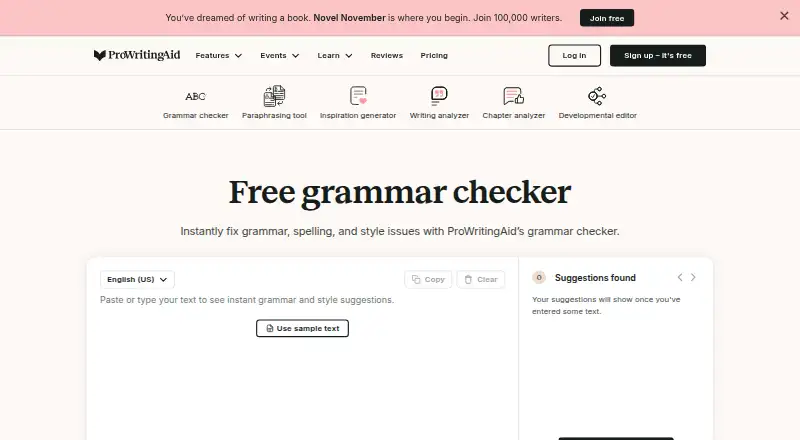
What ProWritingAid is
ProWritingAid is a writing tool for checking grammar and style, available through browser extensions and a desktop editor. It works with Word, Google Docs, Scrivener, Chrome, Firefox, and Edge. Its free plan provides suggestions for 500 words at a time, with two line-editing runs, 10 rephrases, three Sparks, and three Creative Nudges per day. Premium and Premium Pro support documents of any length; Premium adds document sharing, real-time comments, and more than 25 writing analysis reports. A plagiarism checker compares writing with webpages, published works, and academic papers. The service supports English only, including general, British, US, Australian, and Canadian English. ProWritingAid says text entered into its editor is not stored on processing servers, is encrypted during processing, and is not used to train algorithms. The free plan costs nothing; the listed starting price for paid service is $10/mo (annual). Yearly and lifetime plans may be refunded within three days; monthly plans are not refundable.
Who it suits
It suits writers who want grammar and style suggestions across supported writing apps and browsers. Its free plan has a 500-word-at-a-time limit, while paid plans support documents of any length.
What it does well
- Works with Word, Google Docs, and Scrivener
- Free plan includes daily editing and rephrasing tools
- Paid plans support documents of any length
- Premium includes sharing and real-time comments
- Text is not stored on processing servers
What to know first
- Supports English only
- Free suggestions cover 500 words at a time
- Monthly plans are not refundable
Limits
The free plan covers 500 words per report run and has daily limits of two line-editing runs, 10 rephrases, three Sparks, and three Creative Nudges. Premium and Premium Pro support documents of any length.
Plans
| Plan | Billed and limits | Price |
|---|---|---|
| Free | 500 words per report run · 2 report runs per day · 10 Rephrases per day · 3 Sparks per day · 3 Creative Nudges per day | Free |
| Premium | billed monthly · 1 Chapter Critique per day · 5 Sparks per day · 9 Creative Nudges per day | $30 a month |
| Premium Pro | billed monthly · 30 Chapter Critiques per day · 50 Sparks per day · 15 Creative Nudges per day | $36 a month |
| Premium | page shows $10 per month, billed yearly $120 · 1 Chapter Critique per day · 5 Sparks per day · 9 Creative Nudges per day | $120 a year |
| Premium Pro | page shows $12 per month, billed yearly $144 · 30 Chapter Critiques per day · 50 Sparks per day · 15 Creative Nudges per day | $144 a year |
| Premium | One-time payment · 1 Chapter Critique per day · 5 Sparks per day · 9 Creative Nudges per day | $399, paid once |
| Premium Pro | One-time payment · 30 Chapter Critiques per day · 50 Sparks per day · 15 Creative Nudges per day | $699, paid once |
| Premium Monthly | billed monthly | On request |
The first 8 of 13 plans, as prowritingaid.com lists them, read 28 Sept 2026. The maker's own page has the final word. Every plan
Getting started
- Visit the ProWritingAid grammar checker website.
- Choose the free plan or a paid plan.
- Use a browser extension for Chrome, Firefox, or Edge, or use the desktop editor.
- Open it in a supported platform such as Word, Google Docs, or Scrivener.
ProWritingAid is an English-language editing service that combines line-editing suggestions with writing reports and creative tools. It is best for writers who want detailed feedback within familiar writing apps; the free tier works for short passages, while longer documents require a paid plan.
Overview
ProWritingAid brings style suggestions, rephrasing and writing analysis together, with tools aimed at both everyday editing and creative work. The paid tiers support documents of any length, avoiding the free plan’s 500-word-per-run ceiling. That makes it a more practical fit for long chapters and manuscripts than the free option, though daily feature quotas still vary by plan.
Language coverage is a firm constraint: the service works only in English, including general, British, US, Australian and Canadian English. For writers working in other languages, it is not the right choice.
For sensitive drafts, ProWritingAid says text entered into the editor is not stored on processing servers, data is encrypted in transit, and uploaded documents are accessible only to the account owner. It also says user text is never used to train algorithms.
Key features
Editing and analysis
Style suggestions and rephrasing give writers ways to work beyond basic corrections. Premium includes more than 25 writing analysis reports, useful for people who want multiple kinds of feedback on a draft rather than a single editing pass. The free plan’s 500-word limit per run makes it better for excerpts than full chapters.
Creative tools and collaboration
Sparks and Creative Nudges offer additional prompts for developing writing, with daily allowances that differ by plan. Chapter Critiques are also quota-based: Premium allows one per day, while Premium Pro allows 30. Premium adds document sharing and real-time comments, so it is the more suitable tier when a writer wants collaborators to comment alongside the editing tools.
Plagiarism checking and integrations
The plagiarism checker compares work against more than one billion webpages, published works and academic papers. ProWritingAid works with Word, Google Docs, Scrivener, Chrome, Firefox and Edge, and also offers a desktop editor. Browser extensions are available for Chrome, Firefox and Edge. This broadens where writers can use it, but there is no mobile app.
Pricing
The free plan costs nothing. It allows 500 words per report run, two report runs per day, 10 rephrases per day, three Sparks per day and three Creative Nudges per day. Those caps make it a reasonable way to edit short selections, but a poor fit for frequent, whole-document work.
Premium costs $30 a month, billed monthly. It supports documents of any length and includes one Chapter Critique, five Sparks and nine Creative Nudges per day. Premium Pro costs $36 a month, billed monthly; it raises those allowances to 30 Chapter Critiques, 50 Sparks and 15 Creative Nudges per day. The Pro tier makes most sense for writers who will use those higher daily quotas; occasional editors may not need the extra capacity.
Yearly plans are shown at ₹550.00 per month, billed yearly, for Premium and ₹660.00 per month, billed yearly, for Premium Pro. Both come with a three-day money-back guarantee. Premium Lifetime and Premium Pro Lifetime use one-time payment, but cost custom pricing. Premium Pro Monthly also has custom pricing. The pricing note gives a paid starting point of $10/mo (annual), while the plan prices above describe monthly billing and the listed yearly rates.
Yearly and lifetime plans may be refunded within three days; monthly plans are not refundable. Subscriptions can be canceled at any time and remain active until the renewal date. K-12 educational organizations can receive premium features for free.
Platforms
ProWritingAid supports browser extensions, a desktop app, Word, Google Docs and Scrivener. Its integrations suit writers who already work in those environments, but the lack of a mobile app rules it out for people who need to edit on a phone or tablet.
Who it's for
Choose ProWritingAid if you write in English, want style feedback and analysis reports, and need editing to fit into supported desktop or browser workflows. It is particularly compelling for longer drafts on a paid plan and for writers who want sharing and real-time comments. Look elsewhere if you need another language, mobile editing or generous free access for full-length documents.
Pros and cons
- Pros: Paid plans handle documents of any length, which is useful for chapters and manuscripts.
- Pros: Premium bundles 25+ analysis reports with sharing and real-time comments, serving writers who need both review and collaboration.
- Pros: Text is not stored on processing servers, is encrypted in transit, and is not used to train algorithms, a relevant safeguard for private drafts.
- Cons: Free runs stop at 500 words and daily editing and creative-tool quotas are limited, restricting regular full-document use.
- Cons: English is the only supported language, despite coverage of several English varieties.
- Cons: There is no mobile app, and monthly plans have no refund.
Alternatives
For a dedicated readability workflow, Readability Formulas offers free calculators and a Readability Scoring System, with extension, macOS, web and Windows platforms. TextGears is another freemium option if you want web or API access: its PRO plan starts from $2.48 per month and includes unlimited checks, translations and paraphrases of long texts, custom dictionary rules, and an option not to store texts.
If you want a free, focused readability checker instead, AnchorKite Readability Checker runs in a browser without signup and works offline after loading. Check Readability is free for personal and commercial use, with no account or usage fees. Data·yze Readability Analyzer is a free, ad-supported web app with no usage limit stated on its page.
Delimiter Readability Checker is a free web option with no account or paywall. Flesch-Kincaid Readability & Grade Level Analyzer offers a free, instant check without signup. ReadabilityTool is worth considering if you want free web analysis with no text limit and all six formulas.
For broader category comparisons, browse Readability Checkers, AI writing assistants, Grammar checkers, Writing Style Checkers and AI Grammar Checkers.
Verdict
ProWritingAid is a strong choice for English-language writers who want style analysis, integrations and support for long documents, especially if collaboration or high creative-tool quotas matter. Its main drawback is the gap between a tightly capped free tier and paid access, compounded by English-only support and no mobile app. Choose it for in-depth desktop editing; look elsewhere for mobile-first work, other languages or uncomplicated free readability checks.
Verdict
ProWritingAid combines writing suggestions with reports, integrations, and plagiarism checking. Check the free limits and refund terms against your writing needs before choosing a plan.
Questions
Is there a free plan?
Yes. The Free plan costs nothing and includes 500 words per report run, two report runs per day, 10 rephrases, three Sparks, and three Creative Nudges per day.
How much does ProWritingAid cost?
The pricing note lists paid plans from $10/mo with annual billing. The plan details also list Premium at $30 a month and Premium Pro at $36 a month.
Which platforms does it support?
It has browser extensions for Chrome, Firefox, and Edge, plus a desktop editor. It works in Word, Google Docs, Scrivener, Chrome, Firefox, and Edge; there is no mobile app.
Does it support languages other than English?
No. It supports English only, including general, British, US, Australian, and Canadian English.
What does Premium include?
Premium includes document sharing, real-time comments, and more than 25 writing analysis reports. Premium and Premium Pro support documents of any length.
Can a subscription be canceled or refunded?
Subscriptions can be canceled anytime and stay active until the renewal date. Yearly and lifetime plans may be refunded within three days; monthly plans are not refundable.
Facts from ProWritingAid's own pages
- Browser extension
- Yes · prowritingaid.com, 20 Sept 2026
- Browser extensions
- Browser extensions are available for Chrome, Firefox, and Edge. · prowritingaid.com, 28 Sept 2026
- Company name
- The company listed in the page footer is Orpheus Technology. · prowritingaid.com, 28 Sept 2026
- Data encryption
- Data is encrypted when sent to servers for processing. · prowritingaid.com, 28 Sept 2026
- Data retention
- Text entered into the editor is not kept or stored on processing servers. · prowritingaid.com, 28 Sept 2026
- Desktop app
- Yes · prowritingaid.com, 20 Sept 2026
- Document access
- Only the account owner has access to uploaded documents. · prowritingaid.com, 28 Sept 2026
- Education offer
- K-12 educational organizations can receive premium features for free. · prowritingaid.com, 28 Sept 2026
- Founded
- 2013 · prowritingaid.com, 28 Sept 2026
- Free daily limits
- Free includes 2 line-editing runs, 10 rephrases, 3 Sparks, and 3 Creative Nudges per day. · prowritingaid.com, 28 Sept 2026
- Free plan
- Yes · prowritingaid.com, 20 Sept 2026
- Free word limit
- Free accounts receive suggestions for 500 words at a time. · prowritingaid.com, 28 Sept 2026
- App integrations
- Listed integrations include Google Docs and Microsoft Office, plus a desktop editor. · prowritingaid.com, 28 Sept 2026
- Languages supported
- 1 · prowritingaid.com, 20 Sept 2026
- Mobile app
- No · prowritingaid.com, 20 Sept 2026
- Paid word limit
- Premium and Premium Pro support documents of any length. · prowritingaid.com, 28 Sept 2026
- Plagiarism checker
- The plagiarism checker compares work against over one billion webpages, published works, and academic papers. · prowritingaid.com, 28 Sept 2026
- Refund policy
- Yearly and lifetime plans may be refunded within three days; monthly plans are not refundable. · prowritingaid.com, 28 Sept 2026
- Security practices
- The service uses bank-level security and never uses user text to train algorithms. · prowritingaid.com, 28 Sept 2026
- Sharing and comments
- Premium includes document sharing and real-time comments. · prowritingaid.com, 28 Sept 2026
- Style suggestions
- Yes · prowritingaid.com, 20 Sept 2026
- Cancellation policy
- Subscriptions can be canceled anytime and remain active until the renewal date. · prowritingaid.com, 28 Sept 2026
- Support channel
- Support is provided through the Help Center. · prowritingaid.com, 28 Sept 2026
- Supported English
- The product is available only in English, including general, British, US, Australian, and Canadian English. · prowritingaid.com, 28 Sept 2026
Where ProWritingAid stands on Freedom251
- Grammar checkers#32 of 88
- Writing Style Checkers#15 of 29
- AI writing assistants#13 of 25
- Edge Extensions#14 of 23
- Readability Checkers#17 of 25
- Writing Assistants Software#18 of 26
- Proofreading Software#23 of 30
- AI Grammar Checkers#22 of 26